
I recently started working at Zscaler and one of the things that interested me most about Zscaler was their cloud security offering. Offering a Security as a Service (SaaS) platform that includes URL filtering, Cloud Sandboxing, Data Loss Prevention (DLP), Next Generation Firewall (NGFW) and more, is impressive by its own right.
There was one thing that puzzled me, however, and it is probably something that has puzzled prospects as well. How is it possible to have all that functionality, located in a public cloud, and still outperform on premise appliances? I mean, how can latency be lower for doing the same stuff, but off premises.
Luckily, now that I work for Zscaler, I get to look into the kitchen and everything has become clear. There is a lot of optimizing going on. I am not talking about installing a Linux distribution on a box, tweaking the kernel and slapping your service daemon on it. Zscaler does much more than that, and in this post, I will talk about one of those optimizations:
Single Scan Multi-Action (SSMA)
Before actually talking about SSMA, let us see how traditional vendors implements multiple services.

Data packets run through all the inspection engines using service chaining. A packet will first match against a database for URL filtering, then it is sent to the anti-virus engine, then it will go through the anti-spam engine, and so on. Finally, it can be sent out to the internet, after it has been inspected by every service. All of these services can exist in a single box, or multiple boxes/virtual machines, but in each case, the packet has to be inspected separately by each service before going to the next. This adds latency for every inspection. And as everyone knows, high latency makes for a bad internet experience.
So how does Zscaler’s SSMA solve this?
With Zscaler, packets are placed in shared memory in highly optimized custom servers. Even more important, though, is that all of the CPUs on a Zscaler Node can access those packets at the same time. By having dedicated CPUs for each function, all of the engines can inspect the same packets at the same time (hence the name, Single Scan, Multi-Action). This ensures there is no added latency from service chaining, allowing the Zscaler node to make policy decisions extremely quickly and forward the packets back out to the internet.
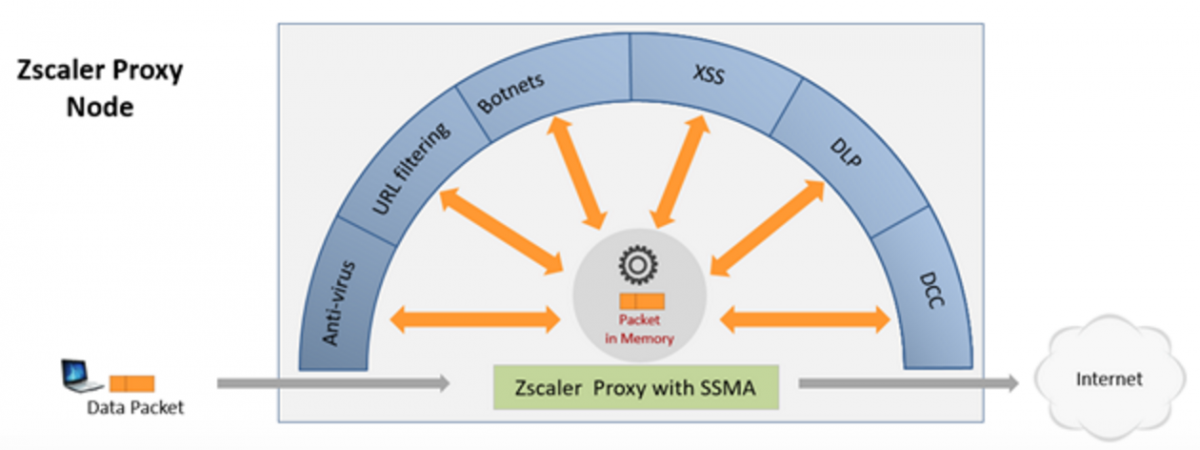
And since everything runs in parallel, there is no reason to selectively use specific engines. For all customers we always run everything, no matter the subscription level. So with Zscaler not only do you get the best internet security, you also aren’t penalized on performance for enabling all that security!
To learn more about Zscaler’s software and services, click here.
Written by:
Kell Van Daal - Senior Technical Marketing Engineer, Zscaler Inc.
As a Senior Technical Marketing Engineer, Kell Van Daal is responsible for enabling sales engineers at Zscaler. Besides his everlasting love for purple, he is very passionate about security and technology in general. Kell has been in the networking/security industry for 15+ years, working with technologies ranging from switching, routing and wireless to NAC, firewalls and now cloud security at Zscaler. Before joining Zscaler, Kell held technical marketing positions at Aerohive and HP in the US. Before that, Kell was a sales engineer for HP in the Netherlands.