Zscaler 블로그
Zscaler 블로그의 최신 업데이트를 이메일로 받아보세요
Ask Partner Network Compromise: Operational Lessons on Software Supply Chain Risk

This article was originally published by Red Canary, which is now part of Zscaler.
On 5 November, Red Canary detected suspicious activity associated with Windows applications distributed by the Ask Partner Network (a.k.a. APN, Ask.com, or simply Ask). Upon further inspection, we discovered that Ask’s software was being co-opted by a malicious actor to execute malicious software on victims’ endpoints.
Ask is self-described as providing “solutions to help software developers acquire and monetize users.” This class of software is commonly referred to as “adware,” a “potentially unwanted program” (PUP) or “unwanted software.” While unwanted software is legitimately installed and can be easily removed via Add/Remove Programs on Windows systems, it is classified as such because it almost always accompanies a sought-after program and is not installed intentionally. Ask is best known for its search toolbar, which was bundled with Oracle Java installers and updates for many years, making it one of the most pervasive unwanted software suites in the wild.
This attack was discovered by Red Canary and immediately reported to Ask. Red Canary would like to extend our thanks to the team at Ask, who worked around-the-clock to investigate and publish a software update to mitigate this threat.
Read Network World’s coverage on Red Canary’s identification of the Ask Partner Network compromise: Attacks to make Ask.com Toolbar a conduit for malware are nipped in the bud
Technical Details
On 5 November, Red Canary detected a number of Windows processes associated with Portable Executable (PE, or “binary”) files having abnormal extensions. This is actually very common. Many Windows applications provide binaries that have specific extensions other than .exe. When we see legitimate applications doing this we can easily attribute and suppress those binaries based on a number of criteria. Included in these criteria are:
- Was the binary written and/or executed by a digitally signed parent or installer? Digital signatures do not equate to explicit trust, but they provide some measure of attribution.
- Have we already adjudicated the binary or its parent in another customer environment?
- With what frequency does the binary occur in this customer environment? How about across all Red Canary customers?
The majority of the time we can quickly disposition the binary and its behavior based on this type of context. And in this case, most of the questions had passable answers:
- Attribution: The parent process was a signed Ask.com component apnmcp.exe.
- Adjudication: The parent process was first observed by us several months prior, albeit exhibiting its intended behavior(s).
- Frequency: The program is present on many systems in many of our customers’ environments.
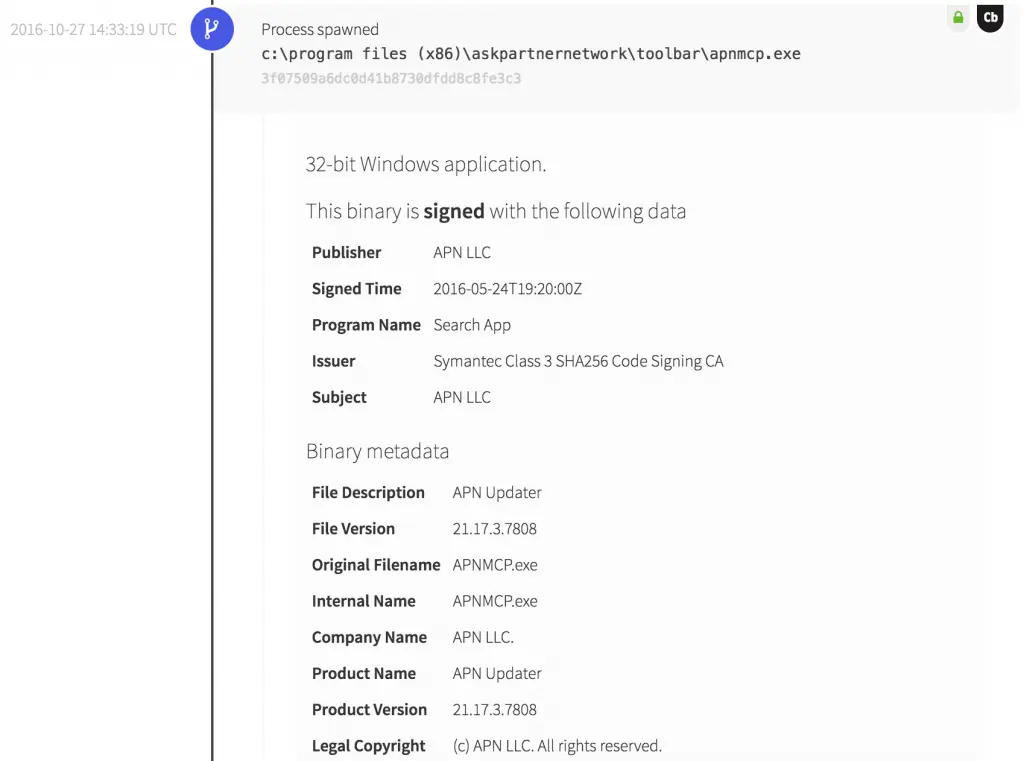
Despite the answers being “correct” in all cases, we immediately recognized this behavior as anomalous in the context of this application.
For starters, we are not talking about .bin file or another common file extension. The binary and process in question were associated with a file named logo.png. Image files should be opened by other programs, but obviously should not execute on their own. The logo.png file appears to be signed as well, though we investigate any binary that is signed a little too recently for our liking.
Learn more about what Red Canary detects and why to learn our rationale for unwanted software detection.
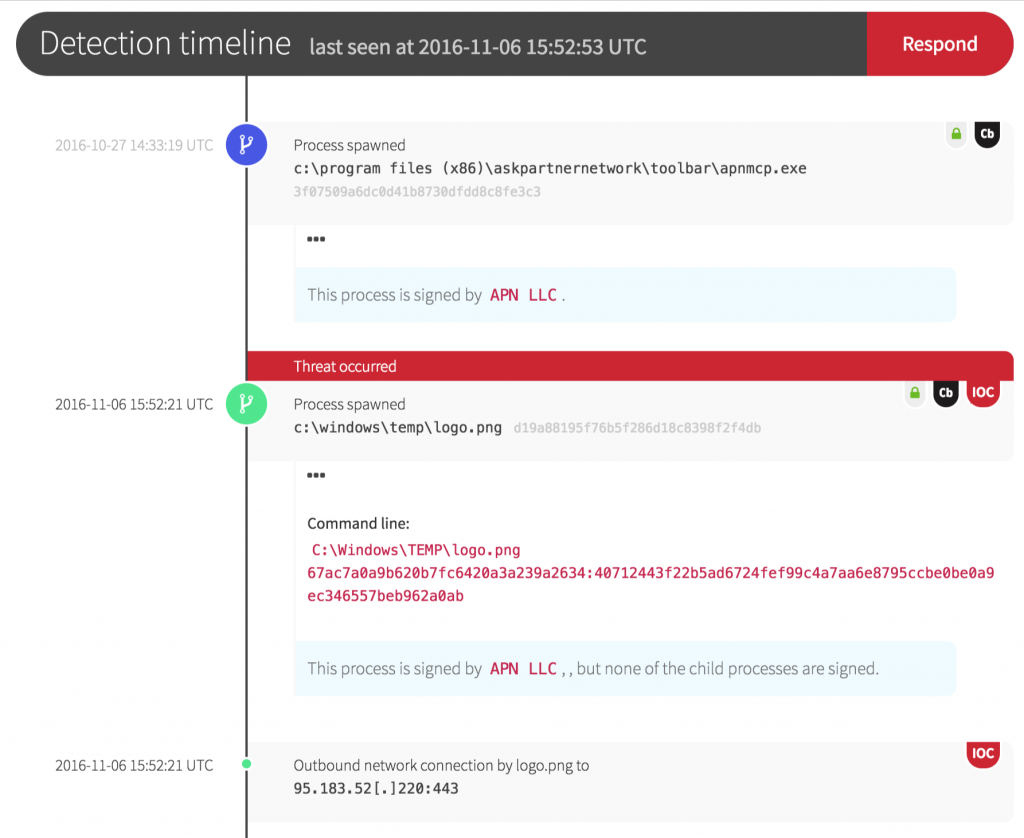
This behavior alone was enough to justify alerting the customer. And upon further inspection it became immediately clear that we had a case of co-opted software update mechanism. Note the network connection initiated by logo.png, which was used to pull down 2-3 unique, later-stage binary files that were then executed by logo.png before logo.png itself was deleted from the disk.
Of the dozen victims that we observed, all of the first stage (logo.png) binaries were unique, but the later-stage payloads were the same across all victims. Our suspicion is that we caught this during the early stages of deployment or testing, as these processes took very few actions on the victim endpoints. This may have been intentional, or it may have been due to bad payloads or configurations.
View a table of all binary hashes (MD5), including both the affected Ask.com updater versions as well as corresponding malware payloads, at the end of this article.
Want to hear more from Joe on detection and response? View our on-demand webinar on IR program best practices.
Parting Thoughts and Operational Lessons
Keith McCammon, Red Canary CSO, commented: “The impact of this event was minimized by the combination of Red Canary’s ability to identify behaviors not easily detected by software alone, our customers’ ability to respond, and the software vendor’s diligence with respect to mitigation. But we cannot allow the impact of one event to mask the substantial risk that this class of attack exposes. A software supply chain attack targeting a vendor with this type of reach could easily infect thousands or perhaps millions of endpoints worldwide.”
The operational lessons that we can take from this are critically important:
- In the same way that administrators should harden system services by removing or disabling services that aren’t required, the same must be done with software. “It’s not harming me today” is not a winning strategy. Third-party software that isn’t required to meet a business need should be removed, without exception.
- None of these payloads were detected by anti-virus engines at the time of execution, and most have little or no coverage a week later. Do not rely on anti-virus to detect or mitigate any new or novel attack.
- Examination of binary files alone is not sufficient to detect any new or novel attack. Start looking at behaviors, and ideally start looking at behaviors relative to specific files or applications. If you can’t do this, find a partner or service provider who can help.
Binary hashes (MD5)
| apnmcp.exe (Ask Updater, Signed) | logo.png (Signed) | 2nd Stage | 3rd Stage | 4th Stage |
| 0b639391b2710a610100490d0cac3650 | d2c77120acd8bdc4cd25bbb510b9cb51 | 0dd84d3da8732c219441ddfbf8a0f09f | 4ea667498568e024376a4b84c27c51e0 | fd4c357c74800e5fea077a658bdad892 |
| 3f07509a6dc0d41b8730dfdd8c8fe3c3 | 31cee09cd77a3606187b523613ec972e | 4ea667498568e024376a4b84c27c51e0 | NA | NA |
| 8492bbbcbe8fbbaee6e0a3f177055c83 | e4774925aab6688d723715b2acc5efdf | 4ea667498568e024376a4b84c27c51e0 | fd4c357c74800e5fea077a658bdad892 | |
| 873aaf48decff8641dfaa5b6f05038d3 | 7ca05b0df34685a07e6ce1746939a1b9 | 4ea667498568e024376a4b84c27c51e0 | fd4c357c74800e5fea077a658bdad892 | |
| 884c7cf5946086f7c12cc6158d2d9e0d | NA | NA | NA | |
| a241ce0e9793a7857ed62984344faaa6 | 2229f90cf7b3a3870badeb20cf4ab8ce | 4ea667498568e024376a4b84c27c51e0 | fd4c357c74800e5fea077a658bdad892 | |
| b3deb5aee193f0425b837d9011757f3c | 892ed5ad9eba571a75f78d2e0bd69b70 | 4ea667498568e024376a4b84c27c51e0 | fd4c357c74800e5fea077a658bdad892 | |
| d19a88195f76b5f286d18c8398f2f4db | a6a65c4e0f534a1fd0cdd22702cf071a | 4ea667498568e024376a4b84c27c51e0 | fd4c357c74800e5fea077a658bdad892 | |
| f6058f9884c71f0b479fac9059af2616 | e995f602ff82de8ee285ffed365a18b7 | 4ea667498568e024376a4b84c27c51e0 | NA | |
| NA | NA | NA | NA | |
| 4ff15bd29e94197affb09e6dd68dfe84 | b256d50903a3124229ca3f634b8ddb8d | 2a9cbc5355e60580554d90b6ad71306d | 4ea667498568e024376a4b84c27c51e0 | fd4c357c74800e5fea077a658bdad892 |
| NA | aa38d06772d5ddf9de319533cfcbb1db | 1dc3986d7d7b82c98bcc99f8895cebc4 | 4ea667498568e024376a4b84c27c51e0 | fd4c357c74800e5fea077a658bdad892 |

이 게시물이 도움이 되었나요?


면책 조항: 이 블로그 게시물은 정보 제공만을 목적으로 Zscaler에서 작성하였으며, 정확성, 완전성 또는 신뢰성에 대한 어떠한 보증도 없이 "있는 그대로" 제공됩니다. Zscaler는 제공된 정보를 기반으로 수행된 조치나 오류 또는 누락에 대해 어떠한 책임도 지지 않습니다. 이 블로그 게시물에 링크된 제3자 웹사이트나 리소스는 편의를 위해서만 제공되며, Zscaler는 해당 웹사이트의 콘텐츠나 관행에 대해 책임을 지지 않습니다. 모든 콘텐츠는 예고 없이 변경될 수 있습니다. 이 블로그에 접속함으로써 귀하는 본 약관에 동의하며 귀하의 필요에 따라 정보를 확인하고 사용할 전적인 책임이 귀하에게 있음을 인정합니다.

