Zscaler 블로그
Zscaler 블로그의 최신 업데이트를 이메일로 받아보세요
Forward thinking: How adversaries abuse Office 365 email rules

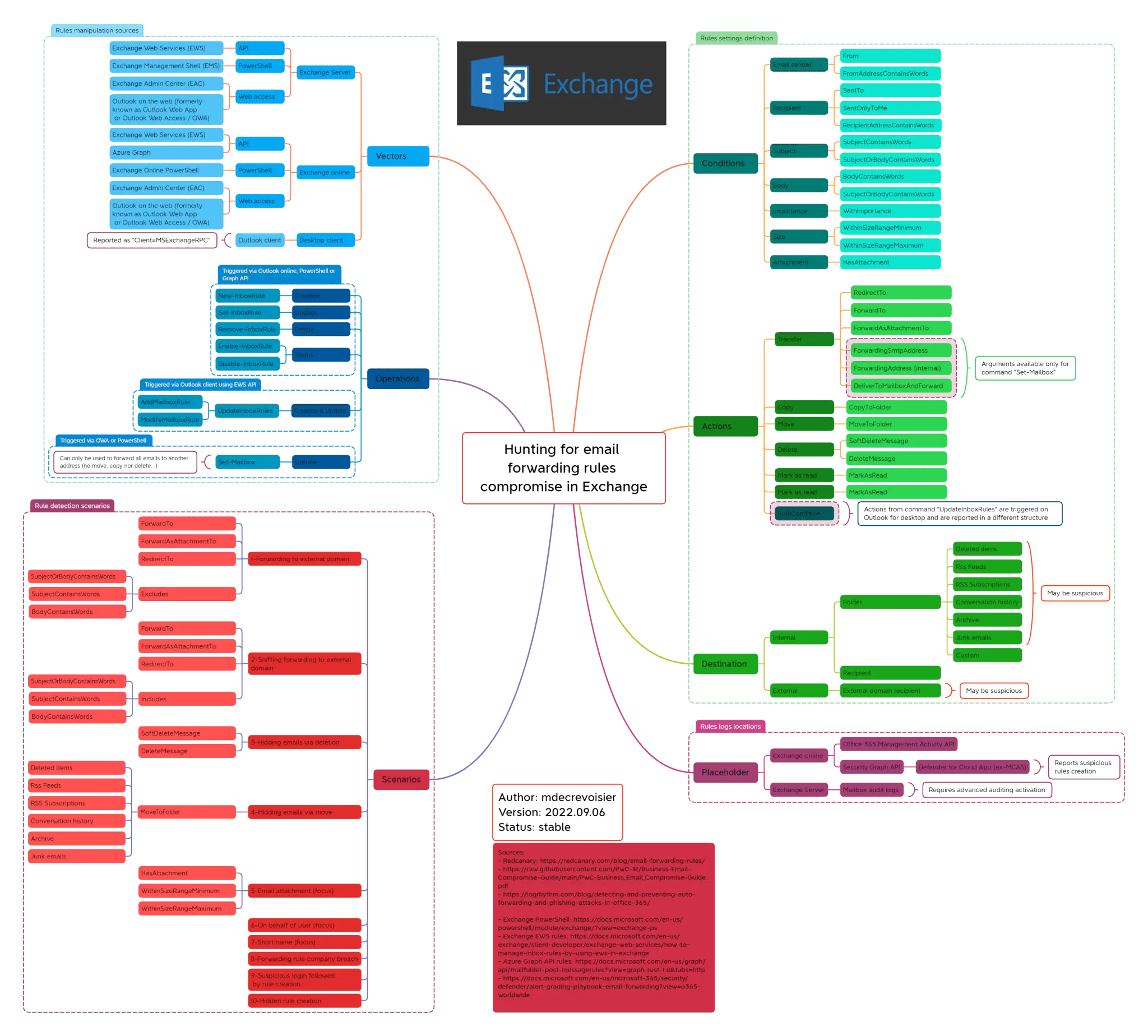
This mind map demonstrates how adversaries exploit email conditional rules in Office 365 to execute business email compromise (BEC) and other schemes
This article was originally published by Red Canary, which is now part of Zscaler.
One of the most frequent techniques adversaries leverage in business email compromise (BEC) schemes is to create email forwarding rules (T1114.003) to establish persistence or to collect targeted information. This is particularly a problem in Microsoft Exchange and Exchange Online. Expanding upon Brian Donohue and Justin Schoenfeld’s previous article about detecting suspicious email forwarding rules on Office 365, I’d like to share three different modus operandi that adversaries can leverage when abusing email rules in Exchange.
Many users create email rules to achieve their daily business tasks and manage the tremendous amount of email they receive. Therefore, detecting a malicious rule can quickly become a challenge as the number of events reported by Exchange telemetry can be very high. To help narrow things down, I created a mind map of the different attack scenarios that defenders or blue teamers should monitor.
Mapping malicious behavior
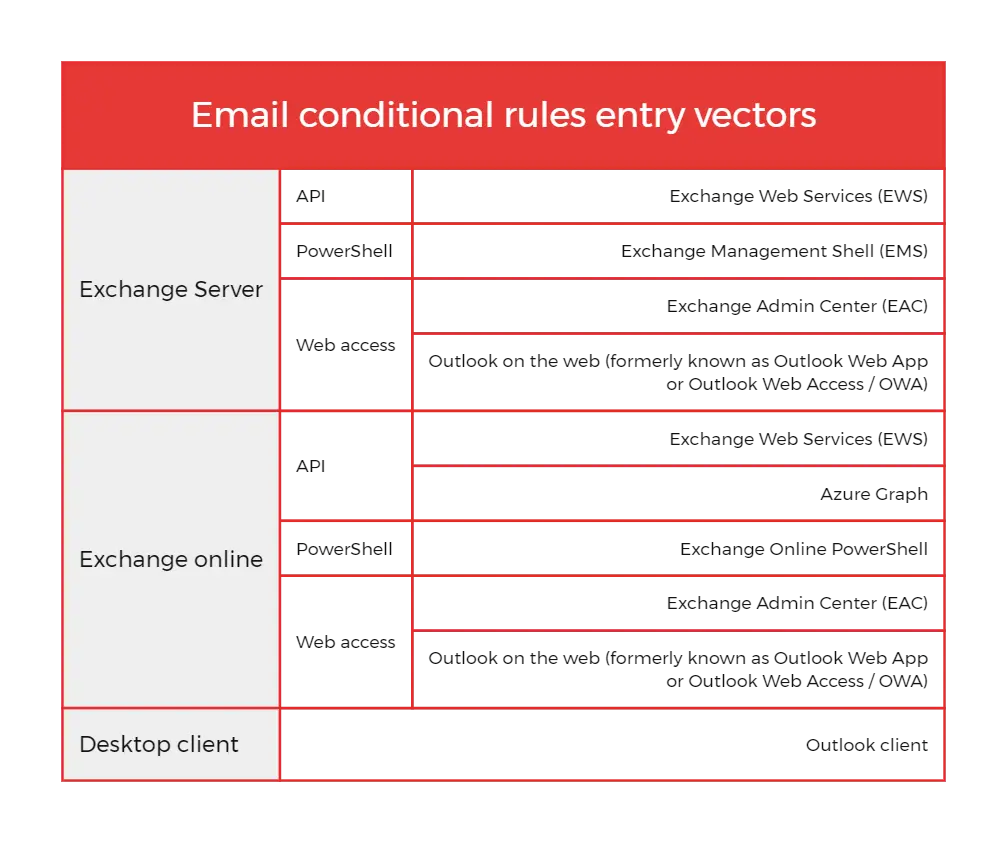
My first step was to identify the different entry vectors usually exposed to the internet or in a local network that adversaries could use in order to create or modify a rule. More precisely, Exchange rule modification can usually be done via API, PowerShell, online web access or via a desktop client, as shown in the table below:
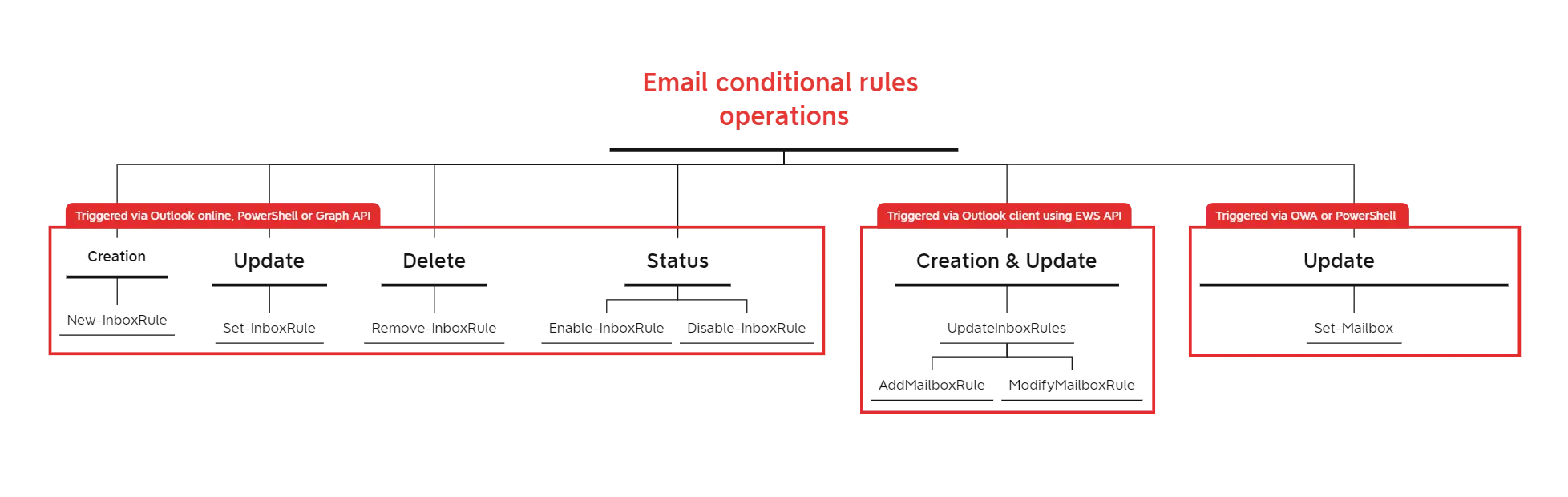
My next task was to identify the available Operations depending on the different entry vectors previously mentioned, with help from Brian Donohue and Justin Schoenfeld’s research. For example, most of the operations performed via Outlook online are reported with New-InboxRule or Set-InboxRules commands, whereas actions performed using the Outlook desktop client are reported with UpdateInboxRules. The schema below resumes these commands:
The last step was to define the different settings that structure a rule. In my research, I defined three:
- Condition: a logic element that triggers the rule based on defined criteria
- Action: the action to perform following a match on a condition
- Destination (optional): the placeholder where the email should be sent. In malicious cases, this will usually be either an external email or an uncommon mailbox folder
Attack scenarios
1. Forwarding to an external domain
This method is probably the most common, as it provides the adversary with a long-term footprint on the user’s mailbox. However, and due to the fact that email users frequently forward emails to another address for legitimate purposes, it can be difficult for defenders to handle the huge number of alerts generated. A best practice advised by Microsoft is to analyze the forwarding rule’s recipient and block any email addresses from external domains. In some cases, adversaries may also apply a forwarding condition based on attachment presence or specific keywords (e.g.: “invoice”, “credit card”, “IBAN”…).
2. Deleting or moving emails
Another adversarial tactic is to delete or move emails to a specific location, so they never reach the user. For example, an adversary could create a rule deleting or forwarding emails containing financial information and replace them with a phishing email that contains financial information for their own account. Instead of outright deleting emails, adversaries can also move emails to uncommon folders (e.g.: RSS feeds, Archive, Deleted items, …) to hide them.
3. Massive rule via breached admin account
This method can be harder to detect as it requires another perspective on the logs. If an adversary gains access to an Exchange administrator account, they may be able to create rules on behalf of one or several users. Therefore it is very important to monitor any rules created via admin accounts. For example, in the middle of launching an attack, an adversary with admin email access could create a rule for all or most mailboxes that deletes any email with keywords warning of the active incident.
Detection opportunities
The following SIGMA rules can help you detect malicious behavior related to Office 365 email rules:
The final product
The mind map presents email rule manipulation vectors, operations, settings and actions in a single view. While it doesn’t cover all the possible attack scenarios, it does demonstrate the different arsenal capacities of the adversaries leveraging email rules in BEC attacks. You can find an expandable version here.
About our guest contributor
Michel de Crevoisier is Senior Security Analyst working as a Detection Lead at a MSSP provider. Formerly he worked as a Network and System Engineer as well as a Security Analyst. He is the author of EVTX-to-MITRE-Attack and SIGMA-detection-rules, a dataset with more than 250 SIGMA rules. He recently presented on a native technology to collect Windows event logs at a Bsides conference in Tirana.

이 게시물이 도움이 되었나요?


면책 조항: 이 블로그 게시물은 정보 제공만을 목적으로 Zscaler에서 작성하였으며, 정확성, 완전성 또는 신뢰성에 대한 어떠한 보증도 없이 "있는 그대로" 제공됩니다. Zscaler는 제공된 정보를 기반으로 수행된 조치나 오류 또는 누락에 대해 어떠한 책임도 지지 않습니다. 이 블로그 게시물에 링크된 제3자 웹사이트나 리소스는 편의를 위해서만 제공되며, Zscaler는 해당 웹사이트의 콘텐츠나 관행에 대해 책임을 지지 않습니다. 모든 콘텐츠는 예고 없이 변경될 수 있습니다. 이 블로그에 접속함으로써 귀하는 본 약관에 동의하며 귀하의 필요에 따라 정보를 확인하고 사용할 전적인 책임이 귀하에게 있음을 인정합니다.

