Zscaler 블로그
Zscaler 블로그의 최신 업데이트를 이메일로 받아보세요
What is normal? Profiling System32 binaries to detect DLL Search Order Hijacking
We created an extensive library of System32 binary metadata to help threat hunters recognize malicious DLL behavior, masquerading, and more.
This article was originally published by Red Canary, which is now part of Zscaler.
Creating coverage for hypothetical adversary behaviors may not seem like the best use of time when there are so many known evils for which we could improve detection, but occasionally those hypothetical detection ideas pay off.
My buddy Mike Haag (who is now at Splunk) is arguably the best threat hunter out there. When Mike was finding evil on a daily basis here at Red Canary, he’d frequently find adversaries using techniques that our existing analytics did not detect, and he’d write up a coverage gap issue to be addressed. One of the recurring issues he’d write up was related to DLL Search Order Hijacking (T1574.001). One manifestation of that technique involves moving legit system binaries into unusual directories along with malicious dynamic link libraries (DLL), effectively gaming the natural DLL search order (more on this in a moment). Adversaries would frequently switch up the binaries they were abusing, subverting detection logic built around our expectations about those binaries, and resulting in a cat-and-mouse game.
DLL and search order refresher
From a very high level, a dynamic link library (DLL) is essentially a resource that can be used by multiple binaries, reducing the need for duplicative or unnecessary code. If a binary needs to use a function within one of these DLLs, it can load the DLL into memory and inherit the ability to execute that function. In practice, DLLs usually contain an export table that includes a list of functions that are available for import by executables.
When a binary loads a DLL, it has to know where the DLL exists on disk, but it can reference the DLL in a number of ways. One of the most common ways is to reference the DLL’s name within the executing binary, causing the operating system to enumerate through a number of locations in a predefined order to locate and load any DLL by that name. As you might have guessed, this DLL search order process is ripe for abuse. More details on the exact DLL search order are available directly from Microsoft.
DLL Search Order Hijacking
With enough development knowledge, an adversary can craft a malicious DLL that shares its name and exported functions with a legitimate one, but which actually contains a custom payload. The adversary can then place this malicious DLL in an appropriate directory and cause the executing binary to load the custom DLL payload. For example, an adversary can move a legitimate system binary to an unusual directory and place a malicious DLL that shares its name with a legitimate one in that same directory. When the relocated binary goes looking for the legitimate DLL, it will find and run the malicious one that’s in the same directory first.
Typically, we don’t see adversaries overwrite existing DLLs on disk, for a number of reasons. One of the main reasons is that it may cause the endpoint to become unstable, resulting in the malicious DLL being identified, the host being re-imaged, and the adversary losing their foothold. Instead of conspicuously overwriting the legit DLL with a malicious one, adversaries write these system binaries somewhere else on disk along with a malicious DLL in the same directory as the system binary, allowing the malicious DLL to be loaded into memory when the relocated binary executes.
Depending on your level of visibility into your environment, you may only see the process executing from an obscure directory. From our perspective, DLL Search Order Hijacking seems to be gaining popularity, in part because it can be difficult to detect but also because blocking suspect binaries outright can cause serious issues on a host. Trying to actively identify all of the DLLs being written to disk is also extremely difficult at scale, and attempting to identify every binary that loads a DLL from the same directory requires a large amount of processing for very little reward.
DLL Search Order Hijacking seems to be gaining popularity, in part because it can be difficult to detect but also because blocking suspect binaries outright can cause serious issues on a host.
We’ve tried a few different approaches to detecting DLL Search Order Hijacking, but the one that’s been most successful for us involves monitoring for relocated instances of system binaries. In the example below, we’re examining a native Windows binary called the Share Creation Wizard (shrpubw.exe), and the detection logic for alerting on process path deviations is essentially as follows:
process_is_likely?('shrpubw') && process_path_is_unexpected?('shrpubw.exe')
The above pseudocode represents an analytic that’s designed to look for the execution of shrpubw.exe from a path that we do not typically expect it to execute from. Our understanding of expected paths (i.e., the normal file path for a given executable) is based on a library that we’ve been developing over a period of many years.
This library is basically a list of processes and some of their respective metadata. Both process_is_likely? and process_path_is_unexpected? are what we call “helper detectors,” and they rely on this library to make determinations about the true identity of a given executable. We expand the list to incorporate new processes as needed.
The following is a partial example of the metadata we store for the Share Creation Wizard:
'shrpubw' => { 'expected_process_names' => [ 'shrpubw.exe' ], 'expected_internal_names' => [ 'shrwiz' ], 'expected_process_paths' => [ 'windows\system32\shrpubw.exe', 'windows\winsxs' ], 'expected_process_publishers' => [ 'Microsoft Corporation' ], 'expected_file_description' => [ 'share creation wizard' ],... We can leverage this library as a source of truth to identify when adversaries rename legitimate binaries—or even when adversaries attempt to masquerade suspect binaries as legitimate ones. In addition to masquerading, this library of known process metadata has also given us the ability to capture Search Order Hijacking, and by chance, techniques like AppDomainManager injection, along with instances where adversaries are otherwise dropping system binaries onto disk for further exploitation.
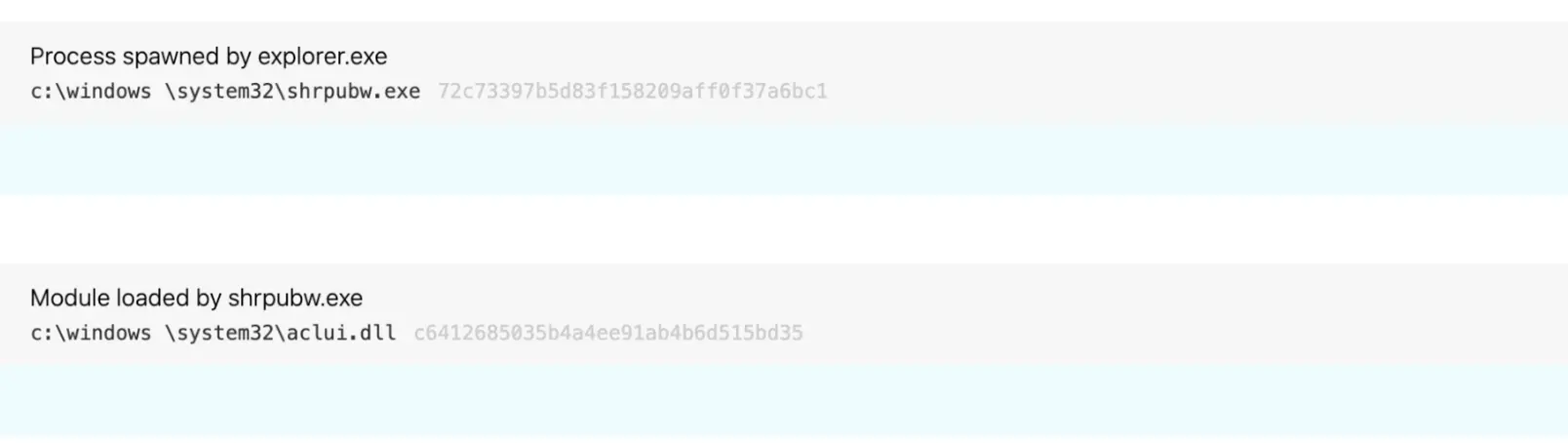
This kind of detection logic has helped us identify malicious activity like the following (notice the space in windows \):
Implementing the detection logic
Back to the cat-and-mouse game… after multiple hunts that led to the identification of subversive binaries performing malicious actions for which we didn’t have coverage, Mike finally decided that he’d had enough, and, instead of waiting to ad hoc threat hunt his way into the next bad binary, he began baselining binaries within System32 and Syswow64 to explore the possibility of creating bulk coverage.
Initially, he compared LOLBAS with our known process information helper to confirm coverage parity. Then, we asked the question “why not just add binary metadata for all binaries in system32?” Mike wrote a simple PowerShell script to list all the binaries from Windows 10 and Server 2016 to perform a comparison of Syswow64 and System32.
$system32 = Get-ChildItem -Path C:\windows\System32\ -Include '*.exe' -Recurse -ErrorAction SilentlyContinue | % { [PSCustomObject] @{ exe_name = $_.FullName InternalName = $_.VersionInfo.InternalName fileDescription = $_.VersionInfo.FileDescription Product = $_.VersionInfo.Product } } $system32 | Export-Csv -Path C:\users\research\Desktop\data.csv After we ran the PowerShell script and gathered the binary metadata, we leveraged each binary’s hash to query our existing binary metadata library and added any metadata that our PowerShell script turned up that hadn’t been in the store previously. From there, we updated our detection logic around expected file paths and binary internal names to include that metadata for every binary in System32.
Of course, we don’t just send these detectors into production immediately. We typically subject them to a tuning process that ensures the detection logic we are putting into production is effective. In general, we want to avoid putting an analytic into production that might light up our analysis queue. However, due to the large number of detectors we created during this process, manually checking each one of these wasn’t really an option.
Part of our usual process for getting a detection analytic into production involves simulating the activity we’re trying to detect in an instrumented test environment. In this case, we copied every System32 binary and moved them into a different System32 directory on a virtual machine and launched them via an elevated PowerShell session. This provided our telemetry to validate the activity, and, from there, we made some tweaks to the logic as needed. Through a number of iterations, we set a maximum number of tuning exclusions per detector and events per piece of detection logic and rolled them out in an automated fashion once they met a set criteria.
Happy hunting
Not all of the System32 binaries met our criteria and made it into production, but as of today we were able to implement detection logic for 483 binaries. The logic is nearly identical to the Share Creation Wizard logic we described earlier in this blog, although some binaries include slight tweaks, such as parent process exclusions and the occasional process path exclusion. Since implementing this bulk detection coverage, we have identified adversaries abusing 114 unique binaries (listed below) to perform DLL Search Order Hijacking or other malicious activity.
Appendix
The following is a list of 114 System32 binaries we have identified being abused with this technique:
alg.exe applicationframehost.exe applysettingstemplatecatalog.exe bde.exe bdechangepin.exe bdeuisrv.exe bdeunlock.exe bitlockerwizard.exe changepk.exe cloudnotifications.exe compmgmtlauncher.exe computerdefaults.exe conhost.exe consent.exe credwiz.exe cscunpintool.exe ctfmon.exe cttune.exe dccw.exe ddodiag.exe devicepairingwizard.exe dfsvc.exe dialer.exe diskpart.exe dism.exe dmnotificationbroker.exe dpapimig.exe dpnsvr.exe dvdplay.exe dxgiadaptercache.exe dxpserver.exe easeofaccessdialog.exe ehstorauthn.exe eudcedit.exe eventvwr.exe filehistory.exe fontdrvhost.exe fvenotify.exe fveprompt.exe gamepanel.exe genvalobj.exe gfxdownloadwrapper.exe hvax64.exe hvix64.exe ie4ushowie.exe isoburn.exe licensingui.exe logoff.exe lpksetup.exe mdeserver.exe mdmagent.exe mdmappinstaller.exe mfpmp.exe mousocoreworker.exe msdt.exe msra.exe musnotificationux.exe netplwiz.exe netsupport.exe nltest.exe node-renamed.exe odbcad32.exe omadmclient.exe optionalfeatures.exe passwordonwakesettingflyout.exe perfmon.exe presentationsettings.exe printfilterpipelinesvc.exe proximityuxhost.exe quickassist.exe rasphone.exe rdpclip.exe rdpinput.exe rdpsa.exe rdpsauachelper.exe rdvghelper.exe recdisc.exe recoverydrive.exe regedt32.exe rrinstaller.exe rstrui.exe rurat.exe sdiagnhost.exe securityhealthsystray.exe sessionmsg.exe shrpubw.exe sihost.exe sppextcomobj.exe sppsvc.exe susp-dir.exe sysreseterr.exe systempropertiesadvanced.exe systempropertiescomputername.exe systempropertiesdataexecutionprevention.exe systempropertieshardware.exe systempropertiesperformance.exe systempropertiesprotection.exe systempropertiesremote.exe systemreset.exe systemsettingsremovedevice.exe tabcal.exe tpminit.exe ttdinject.exe tttracer.exe upfc.exe upgraderesultsui.exe usocoreworker.exe vmcompute.exe wfs.exe windowsactiondialog.exe wlrmdr.exe wmpdmc.exe wpcmon.exe wsatconfig.exe
이 게시물이 도움이 되었나요?


면책 조항: 이 블로그 게시물은 정보 제공만을 목적으로 Zscaler에서 작성하였으며, 정확성, 완전성 또는 신뢰성에 대한 어떠한 보증도 없이 "있는 그대로" 제공됩니다. Zscaler는 제공된 정보를 기반으로 수행된 조치나 오류 또는 누락에 대해 어떠한 책임도 지지 않습니다. 이 블로그 게시물에 링크된 제3자 웹사이트나 리소스는 편의를 위해서만 제공되며, Zscaler는 해당 웹사이트의 콘텐츠나 관행에 대해 책임을 지지 않습니다. 모든 콘텐츠는 예고 없이 변경될 수 있습니다. 이 블로그에 접속함으로써 귀하는 본 약관에 동의하며 귀하의 필요에 따라 정보를 확인하고 사용할 전적인 책임이 귀하에게 있음을 인정합니다.