Zscaler 블로그
Zscaler 블로그의 최신 업데이트를 이메일로 받아보세요
Disable XFF Header insertion

Zscaler, working as an inline proxy, inserts the XFF header in the HTTP/ HTTPS packets that egress from the service. This is true for all traffic that is SSL decrypted and encrypted through the Zscaler proxy, except for a few scenarios in which the XFF header is not inserted by Zscaler. These scenarios include:
- The destination site categorized as Miscellaneous or serving Adult content
- The ZIA Private Service Edges in use
- The traffic has been configured to bypass SSL inspection in Zscaler Internet Access
The XFF header is used by certain destination websites to determine the true IP address of the client. Proxies populate this field with the client’s true IP address when forwarding traffic to the destination. Destination servers use the IP address in the XFF header to detect abuse and restrict access accordingly. If the XFF header were not available, the only IP address visible to the destination servers would be that of the proxy itself. This would make every proxy an anonymizing proxy, abstracting the true IP address-based identity of the client making the request to the server.
Increasingly, we have seen customers requesting the use of source IP addresses dedicated to their use. Destination servers use the source IP address of the traffic they receive to restrict access to content. SaaS and third-party applications commonly employ this technique. Zscaler’s solution to this problem has been either the Customer Managed Dedicated IP (also known as Source IP Anchoring) or Zscaler Managed Dedicated IP. Both of these methods have been popular with our customers.
The Dedicated IP service today spans both the Zscaler Internet Access (ZIA) and Zscaler Private Access (ZPA) platforms within the Zero Trust Exchange. Security policies are applied within the ZIA service before being forwarded to the ZPA App Connector, which performs Source Network Address Translation on the traffic before it reaches the destination. The traffic egresses the App Connector with a source IP address of the App Connector, thereby presenting an unique IP address to the destination server. Certain SaaS applications look at the IP address in the XFF header to determine access restrictions.
Consider a situation where, as an network admin operator, you have informed a third-party SaaS application of the unique IP address assigned to your organization. The third-party application continues to allow-list the IP address for access. However, the same application also looks for the contents of the XFF header, if present, in the requests that it receives. If the IP address in the XFF header is always the same (from the office location), then even those IPs can be allow-listed.
However, as is often the case nowadays, users access destinations from anywhere in the world, and their IP addresses vary widely. Therefore, it is not feasible for the third-party application to allow-list all these IP addresses in advance.
Ideally, for traffic that egresses with IP addresses that are dedicated to the organization, there is no need for a XFF header to be inserted. This is why Zscaler offers an option (via a support ticket) to not insert XFF headers in traffic that egresses the ZIA Private Service Edges. The IP addresses assigned to the Private Service Edges are owned by the customer, and since these Service Edges are dedicated to a customer, the IP addresses are also dedicated to them. This eliminates the need to share the client IP separately with the destination website.
Another use case that spans both these services within the Zero Trust Exchange involves the inspection of traffic destined to private applications. In this scenario, the traffic is forwarded from the client to ZPA before it is redirected to the ZIA service for inspection, security policies, etc. Here too, once the traffic is SSL inspected, the XFF header is inserted with the “real” client IP address. Destination applications may look at the content of the XFF header to take appropriate actions on the request that they receive.
With a recent update, it is now possible to disable the insertion of XFF headers in the traffic destined to ZPA from ZIA. This addresses both the scenarios described above. Once this setting is enabled in ZIA, SSL inspected traffic that is being forwarded to a ZPA Gateway will no longer have a separate XFF header field populated with the IP address of the client.
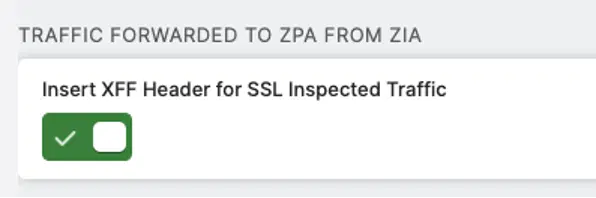
Admins will no longer need to list any client IP addresses in the list that they provide to third-party applications for allow-listing. Similarly, third-party or privately owned applications will not need to be modified to avoid parsing the XFF header field for information on the client IP to take appropriate action.
If you are using Source IP Anchoring (Customer Managed or Zscaler Managed) or the inspection of private application traffic features, go ahead and try out the toggle switch to disable the insertion of XFF header for ZIA traffic destined to ZPA. Your third-party and SaaS application providers may well thank you for reducing their processing time and power spent in parsing XFF header when they are already parsing the source IP addresses!

이 게시물이 도움이 되었나요?


면책 조항: 이 블로그 게시물은 정보 제공만을 목적으로 Zscaler에서 작성하였으며, 정확성, 완전성 또는 신뢰성에 대한 어떠한 보증도 없이 "있는 그대로" 제공됩니다. Zscaler는 제공된 정보를 기반으로 수행된 조치나 오류 또는 누락에 대해 어떠한 책임도 지지 않습니다. 이 블로그 게시물에 링크된 제3자 웹사이트나 리소스는 편의를 위해서만 제공되며, Zscaler는 해당 웹사이트의 콘텐츠나 관행에 대해 책임을 지지 않습니다. 모든 콘텐츠는 예고 없이 변경될 수 있습니다. 이 블로그에 접속함으로써 귀하는 본 약관에 동의하며 귀하의 필요에 따라 정보를 확인하고 사용할 전적인 책임이 귀하에게 있음을 인정합니다.


