Zscaler is dedicated to providing an improved end user experience. After many companies started adapting work-from-anywhere and hybrid work environments, and because users have different network environments at home, it became essential to implement an intelligence method into Zscaler Client Connector to allow choosing the best service edge with the lowest latency. This enhancement can substantially improve the end user experience and reduce the administrator’s workload by minimizing the number of support tickets.
Client Connector connects users to the service edge that is configured in the PAC file. Administrators can manually add the ZIA public service edge to the PAC file, or use $ {GATEWAY} and $ {SECONDARY_GATEWAY} Zscaler specific variables to connect users based on geo-proximity. Prior to Zscaler Client Connector 4.2, it would fail over to the secondary service edge if, and only if, the primary service edge becomes unreachable. In other words, if the tunnel to the primary is up and the user experiences a latency issue with that DC, the Client Connector won’t fail over to the secondary DC that can offer a better performance.
To overcome this limitation, a new feature was added into Client Connector 4.2 in which a constant HTTP-based probing to the primary and the secondary service edges is conducted. Zscaler Client Connector utilizes time to first byte (TTFB) to compare the latency between both service edges and then, based on the following parameters: Probe Interval Threshold and Probe Sample Size, the failover may occur. Zscaler supports this feature with all traffic forwarding methods; tunnel with local proxy, tunnel 1.0, and tunnel 2.0. In tunnel 1.0, Client Connector utilizes HTTP CONNECT to the public service edge for 407 (Proxy Authentication) response to calculate the latency. In Tunnel 2.0, Client Connector utilizes HTTP GET to http://gateway.[cloud].net /generate_204 response to calculate the latency (Figure 1).
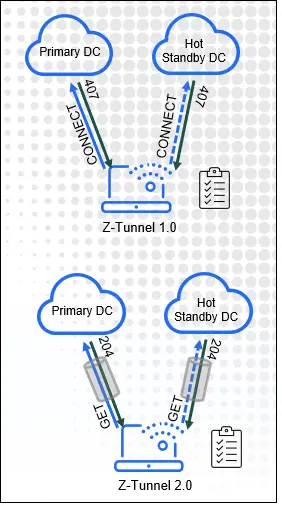
Figure 1
The switchover criteria are fully controlled by administrators. They can enable the feature in Client Connector portal and configure the three main parameters: Probe Interval, Probe Sample Size, and Threshold Limit (Figure 2). Probe Interval dictates how often the probe is made to the primary and secondary service edge (The minimum value is 0.5, and the maximum value is 10 min). Probe Sample Size dictates the confidence level required to fail from the primary to the secondary service edge or vice versa. To fail over, it requires all consecutive n tries (i.e., the value set by the administrators) to meet the Threshold value. Finally, the Threshold Limit, which represents the minimum percentage delta in latency between the primary and the secondary that is required to trigger the failover.
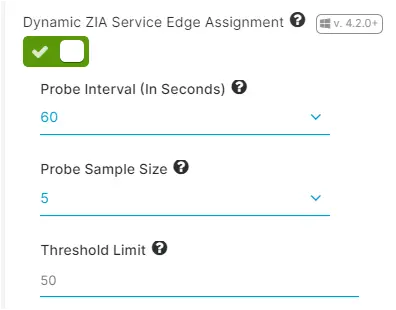
Figure 2
To illustrate how this feature works, Figure 2 shows Probe Interval = 60 seconds, Probe Sample Size = 5, and Threshold Limit = 50. According to this configuration profile, Zscaler Client Connector will perform HTTP-based probing to the primary and the secondary service edge every minute. Then it will calculate the latency based on TTFB for every probe. If the secondary service edge demonstrates more than a 50% (Threshold limit) better latency than the primary for 5 conductive times (Probe Sample Size), then Client Connector will fail over to the secondary service edge. After switching over to the secondary, Client Connector will keep performing the same test every minute and once the primary establishes a better performance, the Client Connector will switch back to the primary. Finally, once the failover criteria are met, the end user will be notified that the connection was moved to another data center to provide a better performance.
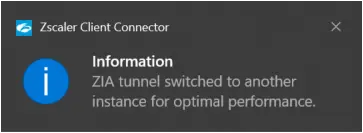
Figure 3
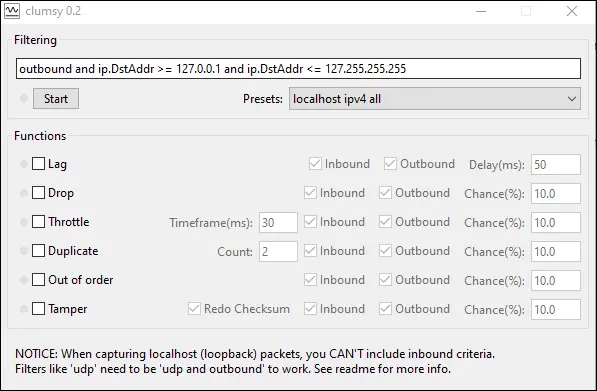
To test and validate this feature, we recommend using third party tools that can simulate high latency and packet loss such as Clumsy (Figure 4). Using these tools, you can add a delay overhead, a packet loss, and throttle the bandwidth for a specific destination. For example, you can add 200ms and/or drop 20% of the connection that is destined to the primary data center in beta cloud to simulate the failover to the secondary.