Zscaler 블로그
Zscaler 블로그의 최신 업데이트를 이메일로 받아보세요
Introducing Zscaler Workload Communications Virtual Machine Scale Sets with Microsoft Azure

Workload Communications, our product under the Zscaler Zero Trust Networking portfolio helps securely connect workloads in the public cloud. They are purpose built gateways deployed into Cloud Service Providers (CSP), such as Amazon Web Services, Google Cloud Platform and Microsoft Azure. Workload Communications securely forwards traffic to the Zscaler Zero Trust Exchange, for both Zscaler Internet Access (ZIA) and Zscaler Private Access (ZPA). Enabling customers to secure cloud workload traffic and enable zero trust connectivity. To learn more about Zscaler ZeroTrust Networking for Cloud, see here
A recent addition to the Zscaler Zero Trust Networking capabilities is Cloud Connector Virtual Machine Scale Sets(VMSS) with Microsoft Azure. Designed to meet the needs of customers' dynamic environments in Microsoft Azure.
In this blog, we’ll describe the benefits of this new capability, as well as describing the topology, components and how it works.
This capability introduces a number of benefits, including;
- Auto Scaling
- Automatically scale up or down the number of Cloud Connectors, based on data plane CPU thresholds
- Ensuring your environment always has the right number of Cloud Connectors to meet throughput requirements, while avoiding over-provisioning.
- Simplified Operations
- Operations teams need not be concerned with deploying additional Cloud Connectors during high traffic periods.
- Cost Optimization
- Scale sets are configured to deallocate idle Cloud Connectors, meaning cloud computing costs can be reduced during periods of low demand.
- High Availability & Resiliency
- If a Cloud Connector fails, health monitoring automates replacement of unhealthy Cloud Connectors, ensuring continuous availability with no manual action required.
Cloud Connectors are typically deployed as part of a security stack on a regional zone basis. Workload route tables are then updated to forward traffic that will be sent to ZIA and/or ZPA to the stack for that region. The security stack, by default is deployed into a single Resource Group, to facilitate ease of resource management.
The security stack if made up of;
- Azure Internal Load Balancer
- Workloads route traffic to the Load Balancer, and traffic is then forwarded to healthy Cloud Connectors in the backend pool.
- Cloud Connectors
- The component that securely forwards traffic to the Zscaler Zero Trust Exchange.
- NAT Gateway
- Deployed in each zone, used for outbound traffic from the Cloud Connectors.
This new capability also adds the following components;
- VM Scale Sets
- This defines the desired minimum and maximum number of Cloud Connectors per zone. Rules are triggered to scale out and/or in based on performance metrics.
- Azure Function App
- Health Monitoring Function
- Responsible for monitoring the health of the running Cloud Connectors across the deployment. Terminating and then replacing instances that have gone unhealthy.
- Resource Sync Function
- Ensures that Cloud Connectors in the Zscaler portal match what is running as part of the scale set. If a Cloud Connector is found in the portal, but not in the scale set, this function will perform a cleanup and ensure they are in sync.
- Health Monitoring Function
Refer to figure1 below.
Figure1: Azure VM Scale Sets with Zscaler Cloud Connector Topology
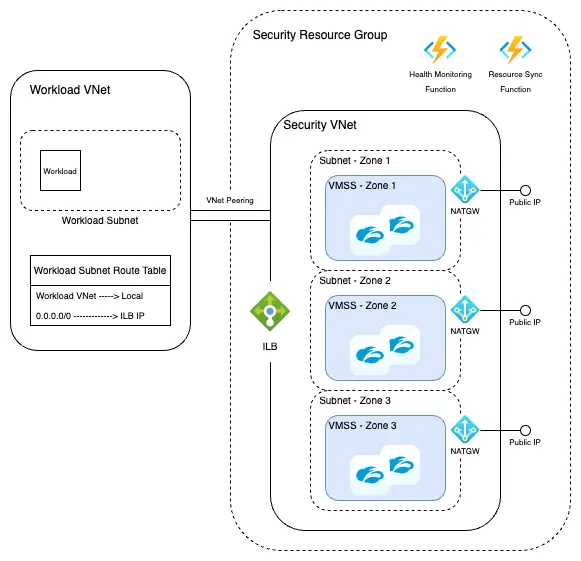
The entire security stack, including the configuration, depicted in figure 1, is designed to be deployed programmatically via terraform.
Both brownfield and greenfield environments are supported. These terraform modules can be found here, https://github.com/zscaler/terraform-azurerm-cloud-connector-modules/
Let's describe how this new capability works in more detail.
Customers specify(via terraform variables);
- Minimum number of Cloud Connectors per VMSS(default = 2)
- Default number of Cloud Connectors per VMSS (default =2). This value is used if no metrics are published. It’s recommended to set this value to be the same as the minimum amount of Cloud Connectors.
- Maximum number of Cloud Connectors per VMSS(default =5).
So if using the defaults, the minimum number of Cloud Connectors per VMSS will be 2, and can scale out to a maximum of 5. These numbers can be tailored, based on the requirements of the customer's environment.
Customers then specify thresholds(again via terraform variables) for scale out and scale in events. This is based on CPU utilization percentage of the Cloud Connectors.
- Scale In threshold(default = 50%)
- Scale out threshold(default = 70%)
With the default settings, if a Cloud Connectors CPU utilization is greater than 70% for 5 minutes, the scale set will automatically deploy an additional Cloud Connector, up to the maximum amount specified (default=5). Cooldown time is 15 minutes by default.
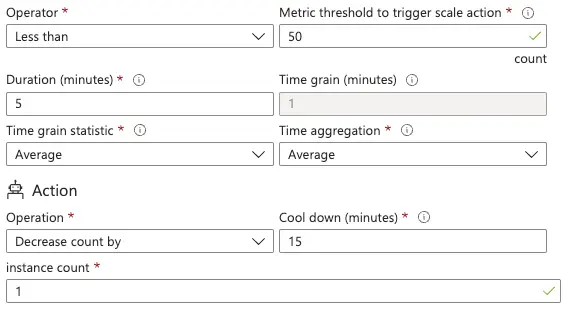
Then for Scale In, when a Cloud Connectors CPU utilization is less than 50% for 5 minutes, Cloud Connector count will be decreased by one, all the way down to the minimum amount(default =2) if required. Cooldown time is 15 minutes by default
See figure 2 for an example of scale out rule, and figure 3 for an example of a scale in rule.
Figure 2: Example Scale Out Rule
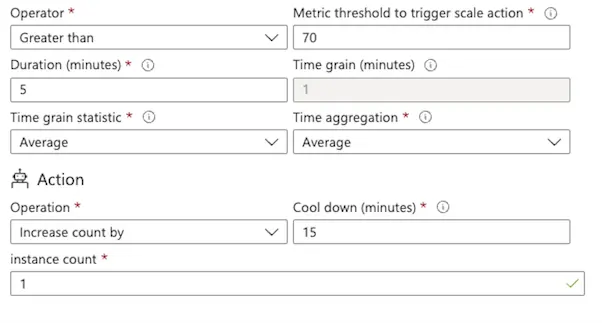
Figure3: Example Scale In Rule
There is also an option to configure scheduled VMSS scaling. Which enables customers to define the minimum number of Cloud Connectors for a specified time period.
For example, if high traffic times are Monday to Friday, 9AM to 5PM, customers can specify the number of additional Cloud Connectors to be available during this time. Then return to normal running state , outside of the defined time range.
This article provided an overview of the new capability, Zscaler Cloud Connector VMSS with Microsoft Azure. Describing the benefits, as well as the topology ,components and how it works.
Existing customers of Zscaler Workload Communications can enable this feature by creating a support ticket, and requesting that Azure VMSS be added to their tenant.
To learn more about this new capability, or Zscaler’s Zero Trust Networking portfolio in general, contact your Zscaler account team, or click here to request a demo.

이 게시물이 도움이 되었나요?


면책 조항: 이 블로그 게시물은 정보 제공만을 목적으로 Zscaler에서 작성하였으며, 정확성, 완전성 또는 신뢰성에 대한 어떠한 보증도 없이 "있는 그대로" 제공됩니다. Zscaler는 제공된 정보를 기반으로 수행된 조치나 오류 또는 누락에 대해 어떠한 책임도 지지 않습니다. 이 블로그 게시물에 링크된 제3자 웹사이트나 리소스는 편의를 위해서만 제공되며, Zscaler는 해당 웹사이트의 콘텐츠나 관행에 대해 책임을 지지 않습니다. 모든 콘텐츠는 예고 없이 변경될 수 있습니다. 이 블로그에 접속함으로써 귀하는 본 약관에 동의하며 귀하의 필요에 따라 정보를 확인하고 사용할 전적인 책임이 귀하에게 있음을 인정합니다.