Zscaler 블로그
Zscaler 블로그의 최신 업데이트를 이메일로 받아보세요
Prevent Compromise of Private Applications with ZPA Threat Inspection
As part of a comprehensive zero trust solution, it is crucial not to blindly trust any users or systems. All interactions must be not only authenticated and authorized, but also inspected for inappropriate content. This ensures even approved users are not acting maliciously and that applications are not used to compromise internal enterprise users.
Zscaler Private Access™ (ZPA), the industry’s first AI-powered ZTNA, delivers zero trust access for all users with direct connectivity to private applications while minimizing the attack surface by hiding apps behind the Zscaler Zero Trust Exchange™ platform, eliminating lateral movement using AI-powered user-to-app segmentation and protecting against sophisticated attacks with integrated traffic inspection, application, and data protection.
Internal users are often unwisely given a higher level of trust that can be abused by attackers, who are getting more sophisticated and determined. A recent example showed that some sophisticated groups of state-sponsored attackers gained access as internal users. The Verizon 2024 Data Breach Investigations Report notes a sharp uptick in recent breaches involving internal actors (see below).

And whether they are intentional breaches by malicious insiders or unintentional breaches by careless employees, the picture is clear that internal actors are often involved, and enterprises need to protect themselves from that risk. According to the report, “Nobody wants to believe their employees will do them dirty, but if it happens, do you know how your organization would detect it? If you don’t, you’re not alone, and it may have already happened.”
What is ZPA Threat Inspection?
ZPA Threat Inspection enables enterprises to inspect private application interactions to ensure users, applications, and data are all secured. This includes applying our AAA-rated Zscaler cyberthreat protections, such as firewall controls, malware protection, sandboxing, IPS, browser isolation, URL filtering, and data protection for all application access, whether private applications or on the public internet. It takes just a few steps to set up this protection and ensure your enterprise users are secure, no matter which applications they are accessing.
Key benefits:
- Provide protection to private applications against insider threats
- Provide protection to users against compromised or malicious private applications
- Leverage a unified security and data protection posture for securing Internet/SaaS traffic and private application traffic
ZPA Threat Inspection in action
One of the many cyber protection capabilities that ZPA Threat Inspection offers is Malware Protection. As part of Internet Access protection, Malware Protection can inspect file uploads and downloads for malware in a variety of protocols and take action per violation.

Optionally, administrators can enable TLS Inspection as well to monitor for threats in encrypted traffic. TLS Inspection can be applied broadly or granularly based on specific criteria (e.g., specific applications, specific users), so the administrator can retain full control over when and where protections are enforced.
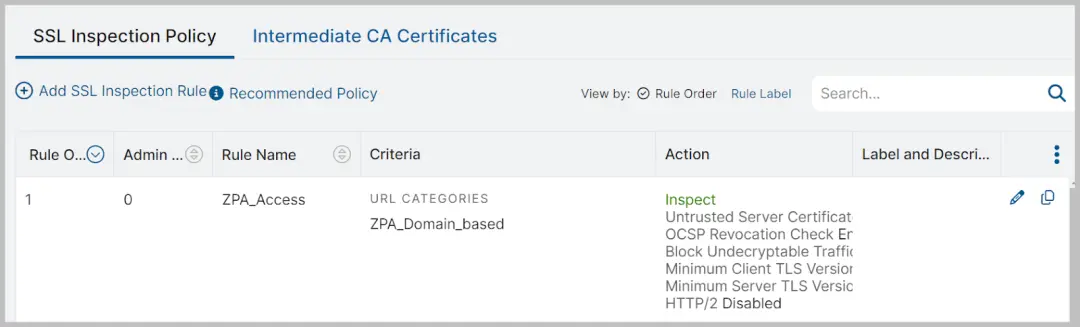
With just the Internet Access protection in place, this policy will apply only to public internet applications. But we can apply that same strong set of protections to private applications with just one more step. Enabling the “Inspect Traffic with ZIA” setting will ensure all traffic on a given application segment is inspected for malware signatures in both the upload and download directions, keeping users safe as they download files, and protecting private apps from uploads of malicious content. Administrators can enable this inspection per application segment that needs protection against malware, as shown below.

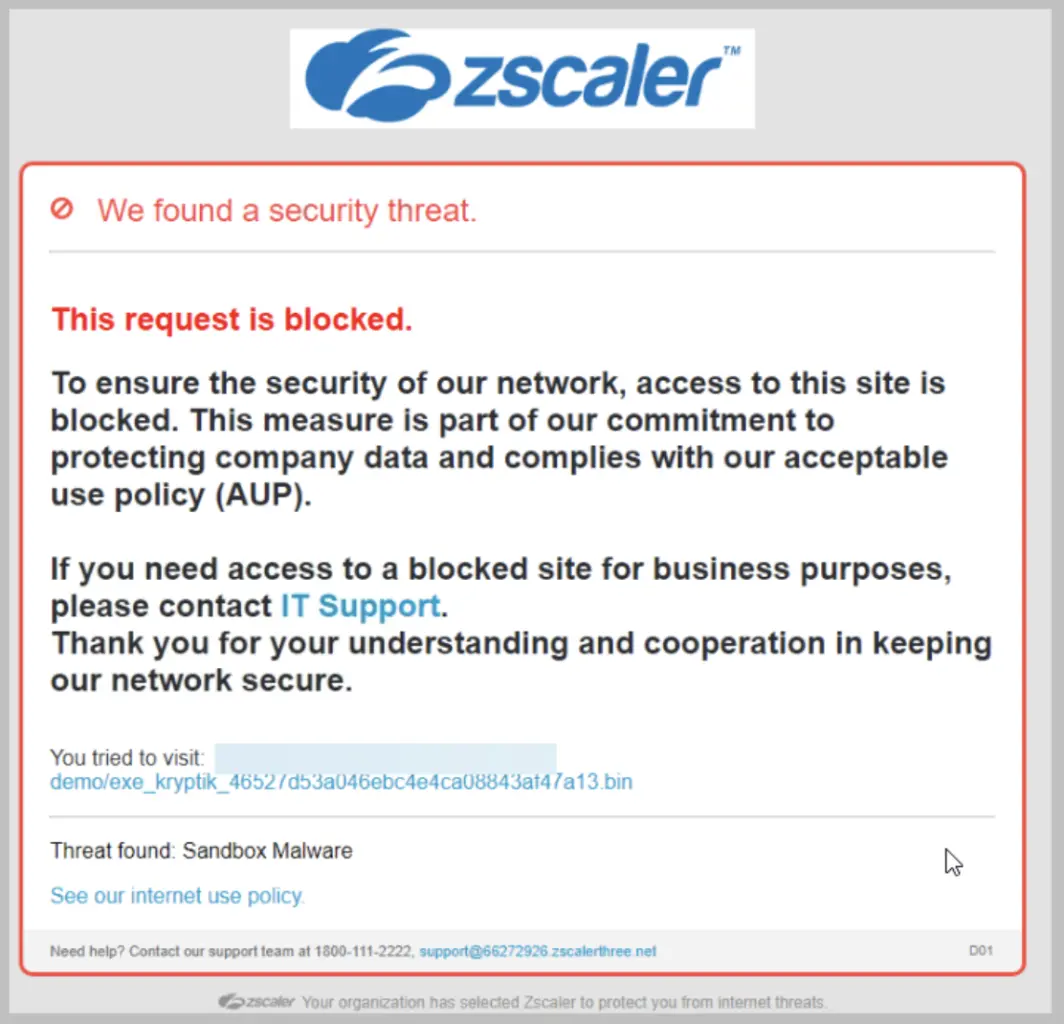
If a malicious actor manages to get malware onto a private application, users will see a customizable warning message if they try to download the malicious content, and the download will be prevented. An example of a customized message is shown below.
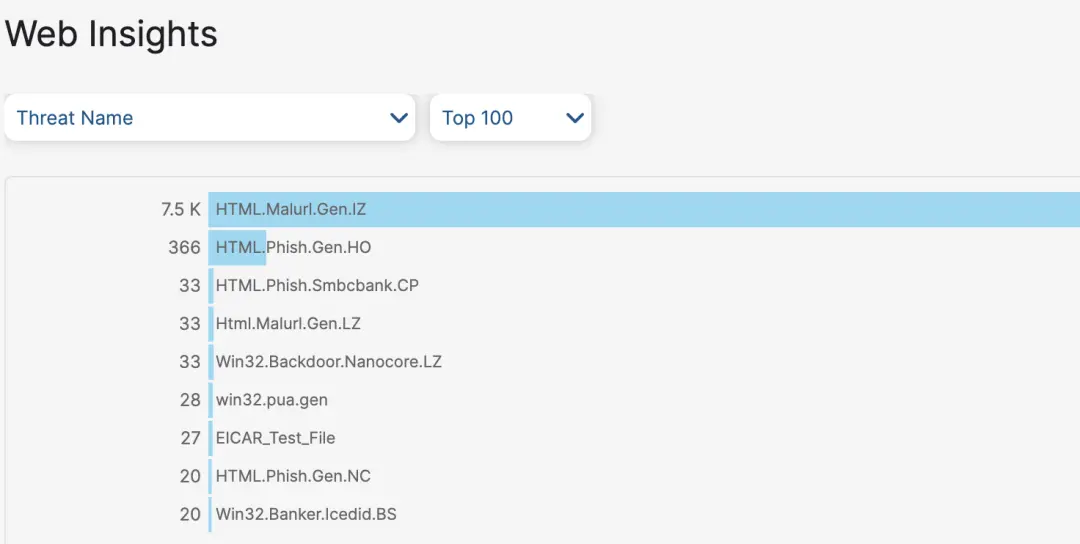
In addition to a streamlined configuration that applies the same protections to public and private application access, security event reporting is also integrated. With integrated reporting on public and private application threats, administrators can gather critical insights into their enterprise across all user interactions. Whether looking for all recent application interactions for malicious or possibly infected users, or simply the names of identified malware, the data is available to analyze the security events and take action.
To see a detailed view of all the protections ZPA Threat Inspection has to offer, check out our Threat Library. Zscaler ThreatLabz, our global threat intelligence and security research team, is continually monitoring for threats and updating our protections, so check back often for updates.
Getting private application cyber protection
Keeping up with threat actors and protecting your enterprise is a constantly moving target. ZPA Threat Inspection, available as part of the Zscaler Private Access platform and backed by Zscaler ThreatLabz, helps you get and stay protected.
Check out our help pages for how to configure ZPA Threat Inspection along with all of our cyber protections. Reach out to your Zscaler account team to learn more and activate this capability.
For more information on Zscaler Private Access (ZPA)
Zscaler ThreatLabz 2024 VPN Risk Report with Cybersecurity Insiders
Get a better understanding on Zscaler Cyberthreat Protection

이 게시물이 도움이 되었나요?


면책 조항: 이 블로그 게시물은 정보 제공만을 목적으로 Zscaler에서 작성하였으며, 정확성, 완전성 또는 신뢰성에 대한 어떠한 보증도 없이 "있는 그대로" 제공됩니다. Zscaler는 제공된 정보를 기반으로 수행된 조치나 오류 또는 누락에 대해 어떠한 책임도 지지 않습니다. 이 블로그 게시물에 링크된 제3자 웹사이트나 리소스는 편의를 위해서만 제공되며, Zscaler는 해당 웹사이트의 콘텐츠나 관행에 대해 책임을 지지 않습니다. 모든 콘텐츠는 예고 없이 변경될 수 있습니다. 이 블로그에 접속함으로써 귀하는 본 약관에 동의하며 귀하의 필요에 따라 정보를 확인하고 사용할 전적인 책임이 귀하에게 있음을 인정합니다.


