Zscaler 블로그
Zscaler 블로그의 최신 업데이트를 이메일로 받아보세요
Intelligence Insight: Tax-themed phishing emails delivering GuLoader

Adversaries are taking advantage of tax season in their phishing campaigns, using GuLoader to drop payloads such as Remcos.
This article was originally published by Red Canary, which is now part of Zscaler.
Each month, the Intel team provides Red Canary customers with an analysis of trending, emerging, or otherwise important threats that we’ve encountered in confirmed threat detections, intelligence reporting, and elsewhere over the preceding month. We call this report our “Intelligence Insights” and share a public version of it with the broader infosec community. We also occasionally share breaking and time-sensitive findings throughout the month, such as the insight below.
Financially themed phishing campaigns are seen year-round, with the frequency of tax and accounting themes increasing before and during tax season every year. This is the case for enterprises across all industries, not just the financial sector. At Red Canary, we’ve recently observed adversaries taking advantage of tax season to lure victims into interacting with malicious phishing emails, notably those distributing GuLoader.
Groups distributing GuLoader have used financially themed phishing schemes for some time, but those themes are more likely to be effective this time of year. The malicious attachments we’ve observed include references to new orders for accounting services, IRS documentation, or client tax files.
What is GuLoader, and what does it do?
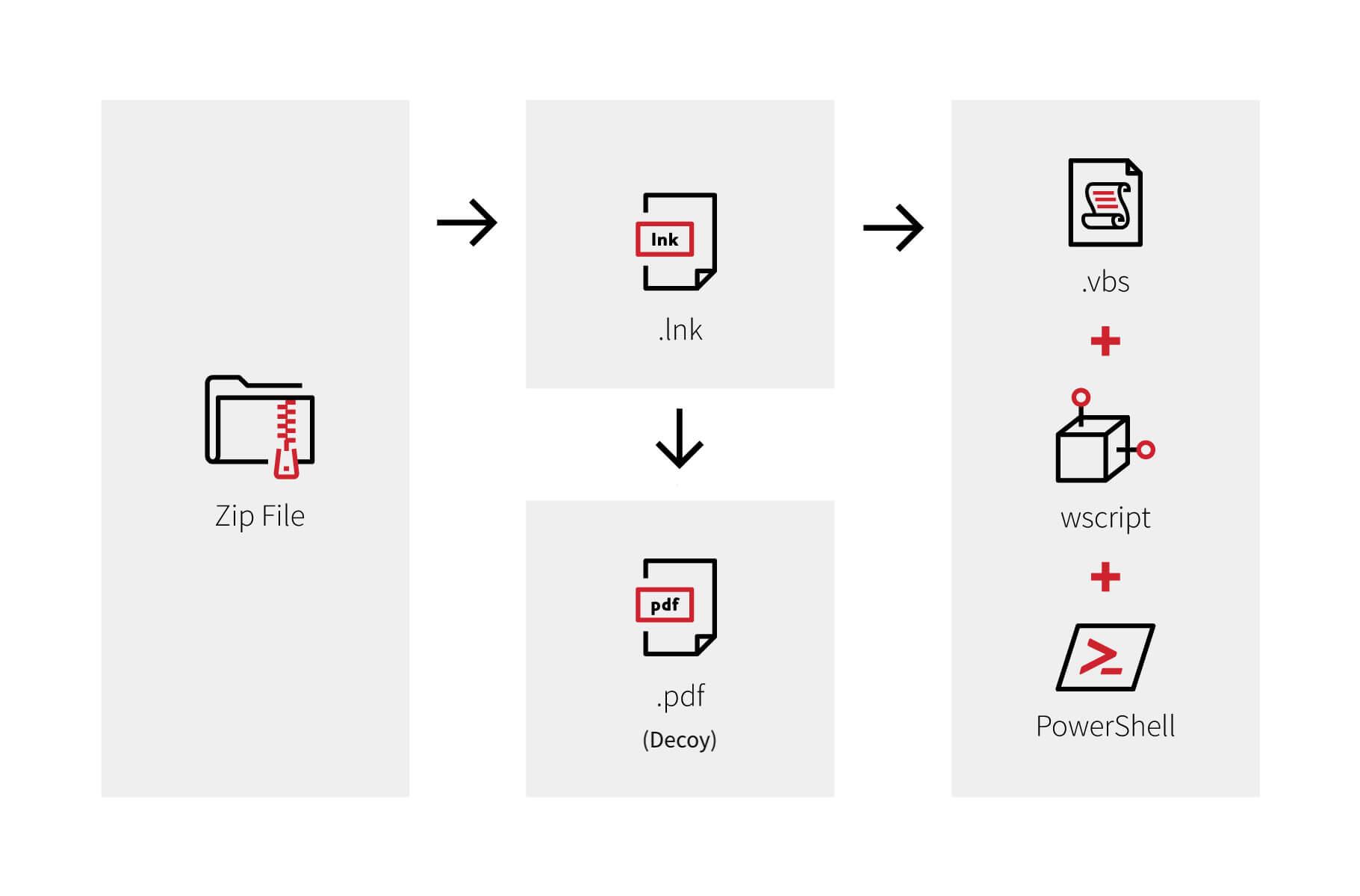
GuLoader is a malicious downloader that adversaries use to distribute shellcode and deliver follow-on payloads like Remcos. Recent GuLoader infections have started with a phishing email containing a malicious attachment, often a .zip file that is sometimes password-protected. Inside the attachment are additional files, including a .lnk file that leverages wscript.exe to execute a Visual Basic (VBS) script that eventually loads and executes malicious PowerShell commands to download staged payloads. The .lnk file also includes an innocuous .pdf file that launches in parallel with the malicious activity, presumably to make the user think they simply downloaded a benign PDF from an errant email.
Red Canary saw Remcos delivered as the payload in some recent GuLoader infections. Remcos is a remote access tool that adversaries use to gain persistent remote access to a victim’s endpoint. After Remcos is successfully installed, adversaries can choose from a number of options, including surveilling the victim system, downloading additional malware, and sending host data back to a command and control (C2) server. Key indicators of successful Remcos installation include suspicious registry changes for persistence and malicious processes making outbound network connections to C2 IP addresses.
What’s the risk and how should we respond?
The best way to respond to the recent financially themed phishing messages is the same as the response to any other phishing campaign. While user awareness should always be part of a security program, in particular, organizations may find it useful to make users aware of the specific risk of malware delivery via fake tax and financial documents. Users should be wary of unexpected tax-related emails with attachments, especially those purporting to be from the IRS. The IRS does not initiate contact with individuals or enterprises regarding tax issues via email, text message, or social media.
If a user opens the phishing attachment, one way to mitigate malicious scripts is to create a Group Policy Object (GPO) to change the default behavior of commonly misused script extensions, making them behave like benign text files that open in Notepad and do not automatically execute. We’ve seen GuLoader use .vbs in particular.
This strategy works to mitigate many threats beyond just GuLoader. Many malware families use scripts as part of their intrusions. Additional script types to include in your GPO could be .vba, .js, .hta, .bat, as well as any others you choose based on your environment, user activity, and threats to your enterprise.
Below are the steps to change the behavior of .vbs in the Group Policy Management Console to mitigate GuLoader script execution:
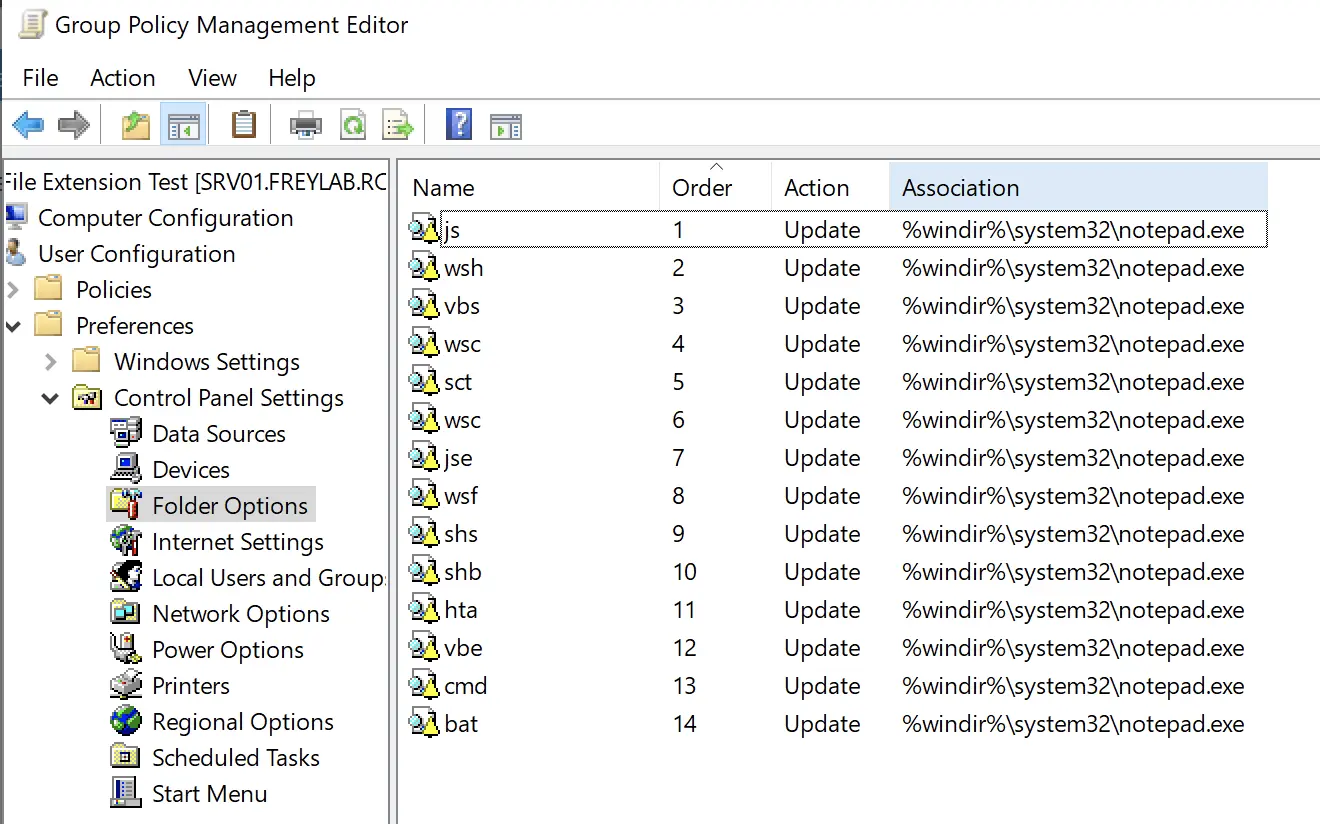
- Switch to the GPO editing mode. In the GPO editor, go to the section: User Configuration -> Preferences -> Control Panel Settings -> Folder Options
- Create a new parameter: New -> Open With
- Fill out the fields as follows:
- Action: Update
- File Extension:
.vbsor your file type of choice - Associated Program:
%windir%\system32\notepad.exeor whichever text application is appropriate - Set as default: check the option
- The finished product should look similar to the image below. Note that the image includes many script extensions that would each need their own GPO parameter creation as outlined in the steps here.
It is essential to test and roll out these GPO changes slowly so as to not impact production.
Detection opportunity
The following detection analytic should will identify a script—wscript.exe in this case—launching PowerShell to download and executing a payload.
parent_process == “wscript.exe”
&&
process == “powershell.exe”
&&
command_includes (“invoke-webrequest” || “iwr”)
References:
- https://cybersecurity.att.com/blogs/security-essentials/guloader-a-highly-effective-and-versatile-malware-that-can-evade-detection
- https://www.crowdstrike.com/blog/guloader-dissection-reveals-new-anti-analysis-techniques-and-code-injection-redundancy/
- https://www.fortinet.com/blog/threat-research/latest-remcos-rat-phishing
- https://www.cisa.gov/tips/st15-001
- https://twitter.com/redcanary/status/1408485279669882880?s=20

이 게시물이 도움이 되었나요?


면책 조항: 이 블로그 게시물은 정보 제공만을 목적으로 Zscaler에서 작성하였으며, 정확성, 완전성 또는 신뢰성에 대한 어떠한 보증도 없이 "있는 그대로" 제공됩니다. Zscaler는 제공된 정보를 기반으로 수행된 조치나 오류 또는 누락에 대해 어떠한 책임도 지지 않습니다. 이 블로그 게시물에 링크된 제3자 웹사이트나 리소스는 편의를 위해서만 제공되며, Zscaler는 해당 웹사이트의 콘텐츠나 관행에 대해 책임을 지지 않습니다. 모든 콘텐츠는 예고 없이 변경될 수 있습니다. 이 블로그에 접속함으로써 귀하는 본 약관에 동의하며 귀하의 필요에 따라 정보를 확인하고 사용할 전적인 책임이 귀하에게 있음을 인정합니다.

