
Over the last few years, many organizations moved a huge number of IT assets to the public cloud. However, while the cloud provides many benefits, it also comes with a set of security challenges. Traditional tools such as firewalls and cloud security posture management (CSPM) have been used to address these challenges but have also revealed some gaps and limitations.
While these tools provide basic protection, they often fail to identify cloud-specific attack vectors, including those that leverage cloud identity (e.g. AWS IAM role, Azure Managed Identity, GCP Service Account, etc.). These cloud identity blind spots have been exploited multiple times in the past, leading to the emergence of a new cloud security tool to manage entitlements in the cloud, Cloud Infrastructure Entitlement Management (CIEM). CIEM solutions are available from both third-party vendors, like Zscaler, or you can use cloud platform native solutions, which may be free of charge. Today, we’ll focus on AWS IAM Policy Simulator. With Policy Simulator, you can check who can perform what actions on your resources and if needed, you can use the Policy Simulator to confirm that a user or a group of users do not have access to your data (e.g. AWS S3 buckets).
Let us consider an example. Anna Klein is employed by our example company as a Linux System Administrator. Many of our workloads are Linux virtual machines, running in AWS as EC2 instances.
To make system administration tasks easier, we provide Anna with access to our EC2 instances, including the ability to establish an SSH connection to an instance, directly from the AWS console, using EC2 Instance Connect. Here is a snippet of Anna’s IAM policy below:
While we want to support Anna’s system administration tasks, we would like to make sure that we are not exposing sensitive data, stored in our AWS S3 buckets.
To do that, we are running the Policy Simulator to see whether we might have accidentally granted her access to an S3 bucket:
As outlined above, she cannot perform any action (read or write) on our S3 buckets, so we assume that our data is protected.
Unfortunately, despite verifying Anna’s lack of access to the S3 buckets with IAM Policy Simulator, our analysis is fundamentally flawed. Let’s review the diagram below, and describe how Anna can bypass IAM security controls, and access S3 buckets.
As outlined above, we have an EC2 instance, which can access an S3 bucket. This is achieved by using an IAM role to grant permissions to applications running on Amazon EC2 instances:
“Applications that run on an Amazon EC2 instance must include AWS credentials in the AWS API requests. You could have your developers store AWS credentials directly within the Amazon EC2 instance and allow applications in that instance to use those credentials. But developers would then have to manage the credentials and ensure that they securely pass the credentials to each instance and update each Amazon EC2 instance when it's time to rotate the credentials. That's a lot of additional work.
Instead, you can and should use an IAM role to manage temporary credentials for applications that run on an Amazon EC2 instance.”
While this is a security best practice, in our case it creates a possible insider threat.
Anna can open an SSH connection to this EC2 instance (something that she is doing as part of her job duties as Linux admin), and ask for API credentials that would allow her to list all S3 buckets and download files from them, as demonstrated in the video below:

Videos
As we can see in the video, although the AWS Policy Simulator assured us that Anna could not access these buckets, she can do that, indirectly. A modern cloud security solution like Cloud Native Application Protection Platform (CNAPP) should be able to identify and alert about these kinds of risks.
In the next section, we’ll outline how Zscaler Posture Control, our CNAPP solution, identifies these attack vectors.
Posture Control introduces a concept called ‘Power Categories’, which flags identities (human or non-human) with ‘strong’ permissions to specific services, for instance, storage, as illustrated below:

Clicking on ‘Storage Admin’ shows the following:
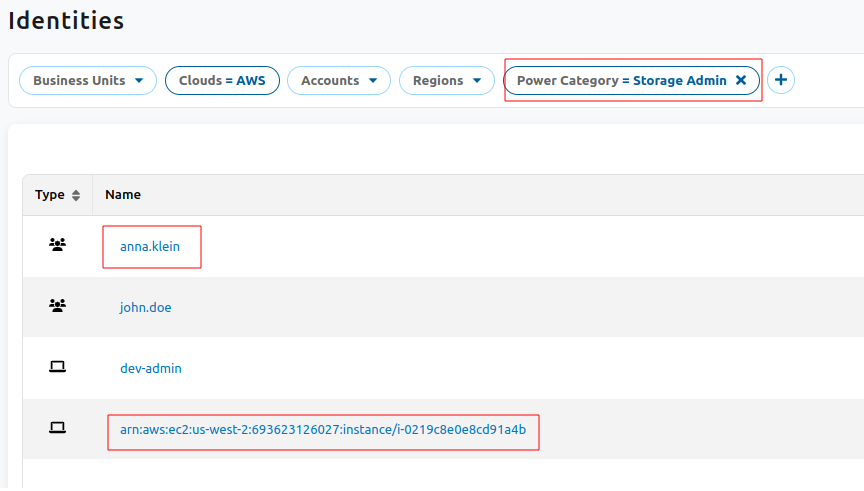
Fig: Posture Control UI highlighting “Power categories” with strong permission
As you can see above, both Anna Klein and an EC2 instance are flagged as identities having ‘strong’ storage permissions. Let’s review the EC2 instance:
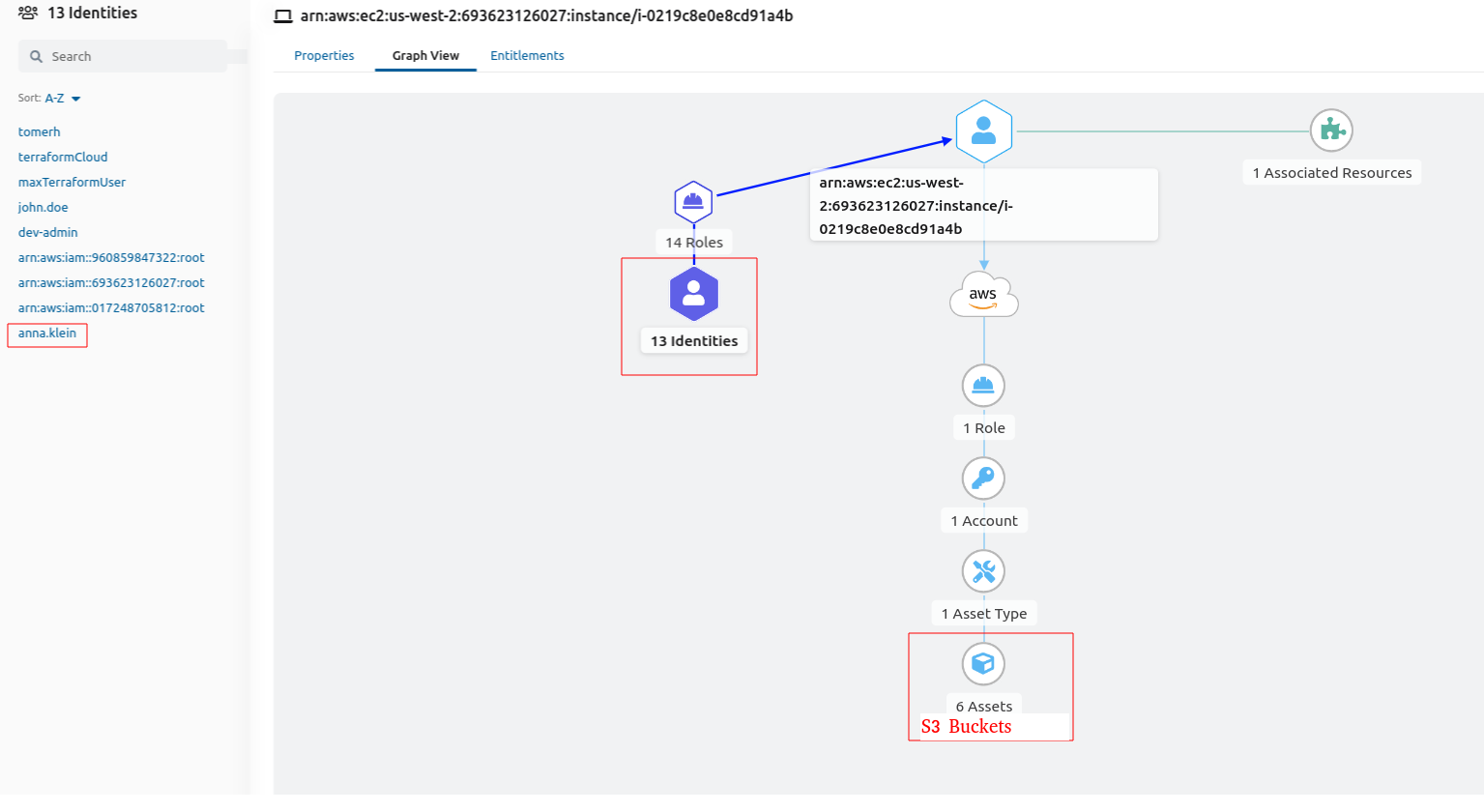
Fig: EC2 instance review highlighting access to S3 storage
In the diagram, we can see that Anna Klein can access the EC2 instance, therefore she can access S3 buckets, indirectly via the instance, bypassing security controls.
Based on the above, the security administrator can decide whether to take action (e.g. revoke Anna’s access to this specific instance) or accept and document the risk.
For more information about Posture Control, and to schedule a demo, please visit our website.