AWS recently announced a new revolutionary Identity and Access Management (IAM) feature - IAM Roles Anywhere. This feature allows workloads (or any certificate holding entity, for that matter) outside the AWS account (on-prem or in other clouds), to assume a role (obtain temporary credentials for a role) in your AWS account and access AWS resources. While this feature presents a significant improvement in management of external access to AWS resources, it also presents security challenges; and unless done correctly; could potentially reduce the governance and manageability of your workload's identities.
How does it work?
Prior to this feature, an on-premises server could access an S3 bucket in an AWS account, for example, by creating an IAM user in the AWS account, creating access keys for that IAM user, and placing the keys on the on-premises server. It is considered bad practice to use access keys to identify workloads for a variety of reasons, including:
- Access keys can be forgotten and leaked
- There is no visibility into who is the entity using these keys
- They require regular rotation
In comes Roles Anywhere
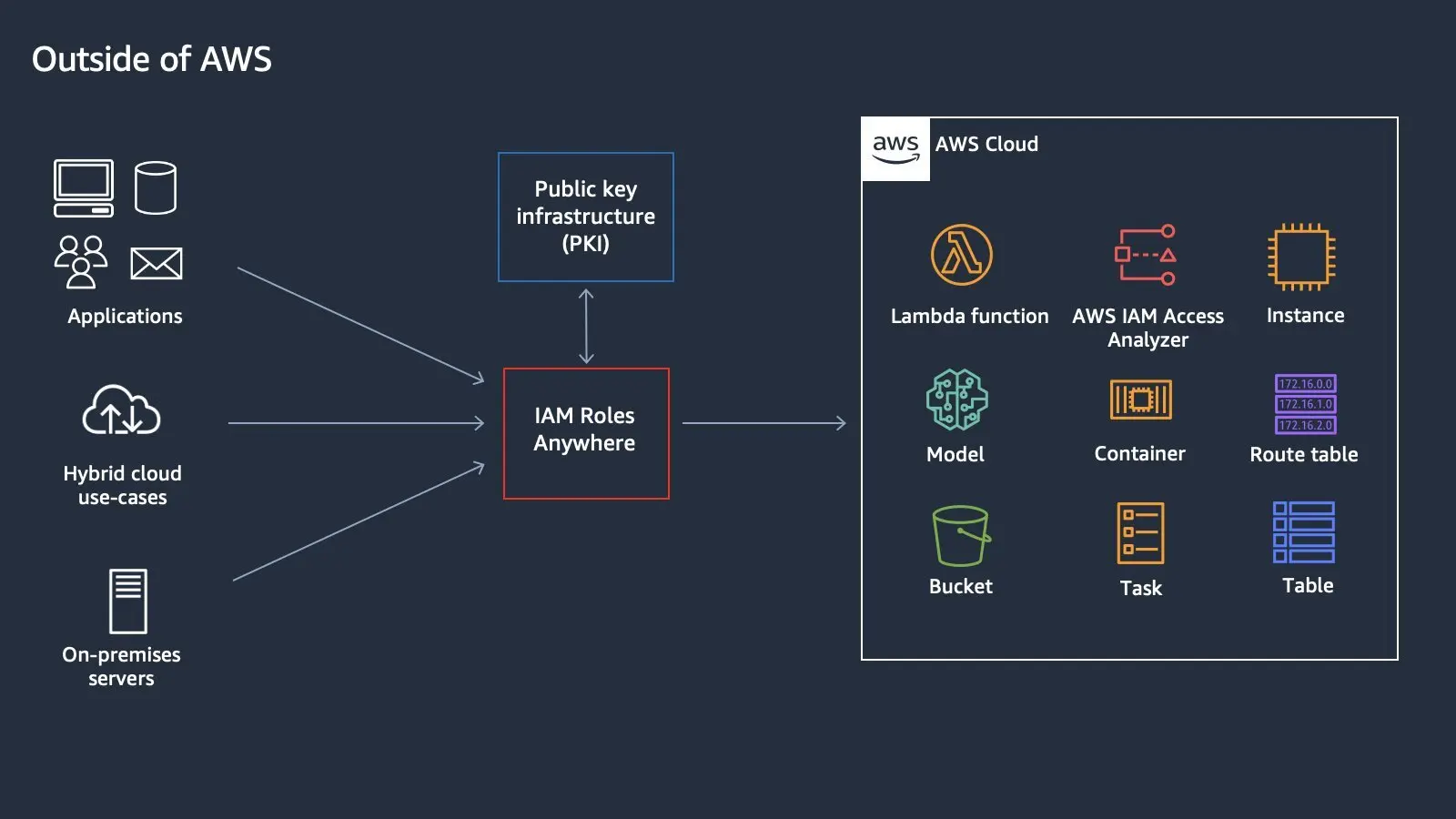
To simplify; this feature relies on a CA (Certificate Authority) that issues certificates to your workloads confirming they are recognized by the CA. Inside AWS, you create a Trust Anchor, which is basically telling AWS “this is my CA, which I trust to authenticate my workloads.” Additionally, you create “profiles” that are collections of roles that can be assumed, once you are trusted by this trust anchor.
When a workload wants to access an AWS resource, let's say, the S3 bucket above, it presents AWS with its certificate signed by the CA and signs the request with its private key. If the certificate is valid, AWS will return the temporary credentials for that role to the calling workload.
IAM Roles Anywhere (Courtesy AWS Identity):
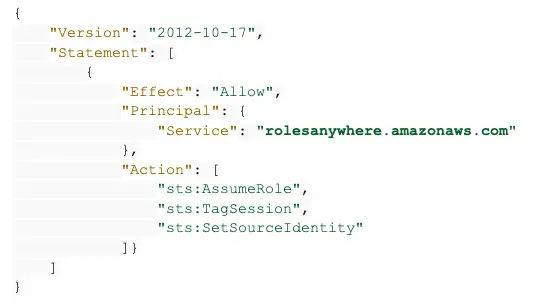
Modification to a role’s trust policy
Any role that would be assumed by workloads using Roles Anywhere should trust the “rolesanywhere” service by adding the rolesanywhere service to its trust policy. The following trust policy example presents the minimum requirement in a role’s trust policy, for the role to partake in Roles Anywhere:
How to distinguish between workloads
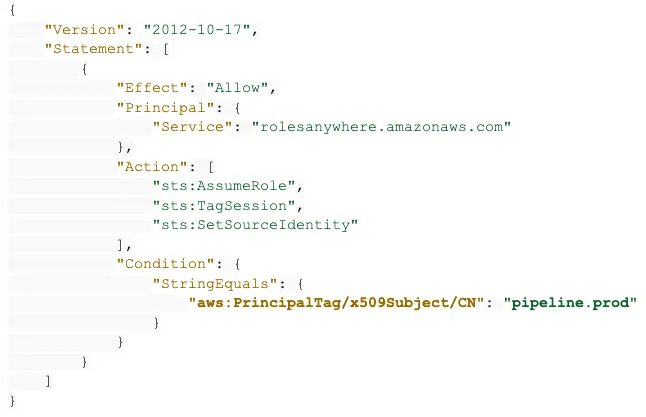
Workloads can be distinguished by the Organizational Unit (OU) and Subject Common Name (CN) in the certificate. Both, the CN and OU are available in the aws:principalTag key to be used as a condition in the role's trust policy.
In the example above, if this role should only be assumed by a workload named “pipeline.prod” - the CA would issue the workload a certificate with CN = “pipeline.prod” and the role’s trust policy should include the following condition:
Security implications
One of the biggest challenges in managing IAM in the cloud is answering the question - who can access my cloud? Put differently: Where are my identities?
In any cloud environment, the identities are a mix of IAM users, workloads, externally assumed roles, and federated identities. While the need to eliminate usage of IAM users and access keys is clear, the goal should be to reduce complexity, rather than increasing it.
The combination of CA and condition keys in rolesanywhere renders them as a cloud identity store, where your identities hide in the CN as defined by the CA and enforced by your condition keys. Imagine a cloud security admin trying to figure out, “who can assume this role from the internet?” going through multiple complex JSON objects of trust policies and chasing the CA config to map the workload assuming the role and accessing the data.
To put it in another way, condition keys are hardly where you want to manage your identities that can access your account from the internet.
In terms of blast radius management, once rolesanywhere is used in the environment, a compromised CA means a compromised AWS environment, which is non-trivial.
In addition, some non-trivial configuration gaps one should be aware of, when deploying this service:
- While the CN is available as a condition key in the role's trust policy, its usage is not enforced. One could add the rolesanywhere service to the trust policy without any conditions, meaning any entity that presents a valid certificate from the trusted CA could assume the role.
- Multiple CN strings can be added to the condition of a trust policy, violating the separation of duties and least-privileged approach.
- The same role can trust rolesanywhere as well as other identities; hence be assumed by the rolesanywhere service and other entities in parallel, creating yet another complexity layer.
- Source IP of the workload cannot be used in the condition keys of neither the trust policy nor the attached permission policies (While they are available when using access keys and an IAM User). This is because the IP in the request context is set as the caller service (rolesanywhere). If the workload’s IP could be passed in the request context, that could add a significant layer of control.
Best practices and recommendations
The following best practices are built in and supported by Zscaler’s Posture Control, CNAPP platform:
- Designate dedicated roles to be assumed via rolesanywhere; do not reuse existing roles that are assumed outside rolesanywhere
- Designate a single role per workload
- Group similar workloads into rolesanywhere profiles for better manageability
- Use session policies in the profile to control the blast radius of a compromise. For example, use the session policies to
- Deny deletion of S3 Buckets and database instances
- Deny any IAM action
- Limit the actions to the relevant services
- Use CN and OU in a format that aligns with org naming conventions and enables accountability
To learn more about Posture Control, schedule a demo or contact us.