We at ThreatLabZ are keeping an eye on a fairly active downloader called Chanitor. This malware is being delivered via phishing emails purporting to be "important" documents, for example, voicemails, invoices, and faxes; all are actually screensaver executables with the extension ‘.scr’. Another unique feature of this downloader Trojan family is the usage of tor2web.org and tor2web.ru over SSL for its Command & Control (C2) communication.
Upon execution, Chanitor copies itself to ‘%APPDATA%\Roaming\Windows\winlogin.exe’ by running the following command:
cmd /D /R type "C:\
\winlogin.exe" > ___ && move /Y ___ "C:\Users\\AppData\Roaming\Windows\winlogin.exe"
It then waits for a few seconds before deleting the original file, and executes the copy via the following command:
cmd /D /R ping -n 10 localhost && del "C:\
" && start /B "" "C:\Users\\AppData\Roaming\Windows\winlogin.exe" && exitOnce the command executes, it creates a registry entry for persistence:
Chanitor encrypts some key components like C2 server locations that is decrypted only when used on run time. For example, "tor2web.org" is decrypted using a xor loop:
The next step is enumeration of functions for making outbound SSL connections and making connections to the command and control server. These connections are shown in the screenshot below.
The first connection (#1 above) is to retrieve the public IP of the infected host. The success or failure of this request isn’t checked though, so the next request happens regardless. This request (#2) is a beacon to the command and control server on TOR via tor2web.org. Chanitor uses SSL for all communication and beacons via POST requests to /gate.php. If the request is successful, the C2 server will provide further instructions which during our analysis was to download additional binary payload. The download is shown in session #3 above. Once the download finishes, there is a subsequent beacon which presumably means success (#4). Strangely enough, there is a failed request to tor2web.ru (#5). This domain does not exist, so the purpose of this request is unknown.
The screenshot below shows detail of the initial beacon (#2) and server response to download a stage 2 binary:
Each beacon takes the following form:
{
}<4 SPACE PADDING>}<58 SPACE PADDING>}
If the request to api.ipify.org is unsuccessful, the IP address will be the machine's RFC1918 address instead of a public IP. The C2 server replies with an instruction to download a file (highlighted in red above) and the download is initiated immediately. The beacon information, with the exception of the IP address, is also stored in the registry:
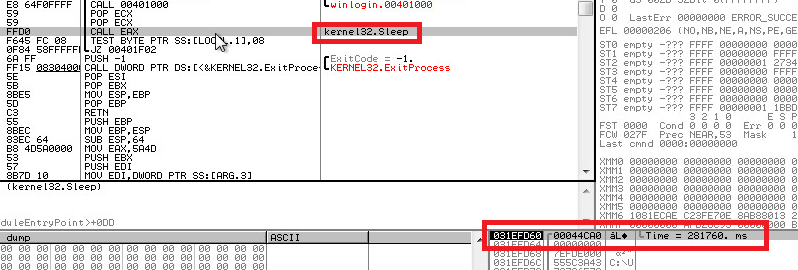
After downloading and reporting success, the original binary will then sleep for approximately 5 minutes (there's some variation for slightly longer and slightly shorter) before beaconing again:
Downloaded Binary
The downloaded binary is a dropper Trojan and is saved as C:\Users\\AppData\Local\Temp\__<4 alphanumeric characters>.exe. Chanitor will run the downloaded payload via the following command:
cmd /D /R start /B "" "C:\Users\\AppData\Local\Temp\___16AE.exe" && exit
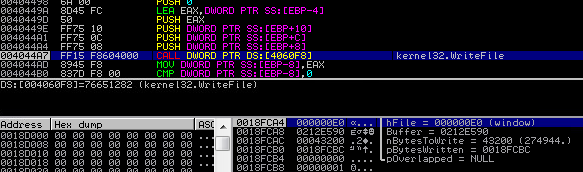
Upon execution, the binary checks for the presence of a debugger. If no debugger is found, the binary then unpacks an embedded DLL and writes it to disk. This DLL is a new variant of the Vawtrak Trojan.

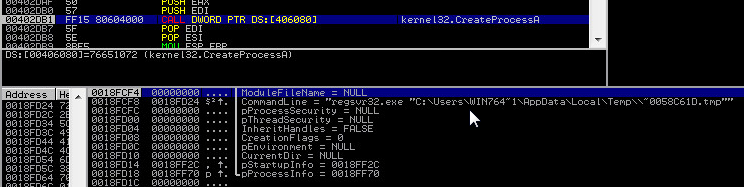
The DLL is registered with regsvr32.exe via the following command to ensure persistence:
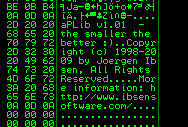
The Vawtrak dropper Trojan then deletes itself from the target system. The Vawtrak dropper binary and the DLL are compressed using aPLib v1.01 library as seen below:

Vawtrak, also known as NeverQuest and Snifula, is a powerful information stealing backdoor Trojan that has been gaining momentum over past few months. It primarily targets user's bank account via online banking websites.
Indicators of Compromise
C2 Domains
https://svcz25e3m4mwlauz.tor2web[.]org/gate.php
https://ho7rcj6wucosa5bu.tor2web[.]org/gate.php
https://o3qz25zwu4or5mak.tor2web[.]org/gate.php
https://lctoszyqpr356kw4.tor2web[.]org/gate.php
File Locations
C:\Users\\AppData\Roaming\Windows\winlogin.exe
C:\ProgramData\TigaPjopw\VofcOhhel.zvv -- these names appear random
C:\Users\\AppData\Local\Temp\~004BFD62.tmp -- this name appears random
C:\Users\\AppData\Local\Temp\___16AE.exe -- this name appears random
Conclusions
The samples collected date back to the beginning of October 2014 and have changed in measurable ways over the past few months. The first samples would not run on Windows 7 unless in compatibility mode, required administrative privileges, and did not have icons that matched the purported filetype or theme, but the recent samples have evolved to run without errors and appear to be more refined. We attempted to contact tor2web at
[email protected] and at
[email protected] and received bouncebacks followed a few days later by a delivery failure notification. Since the C2 servers are hosted on TOR, tracking the individuals behind this campaign may prove difficult, but blocking access to tor2web would be effective for the time being.