
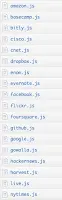
Firesheep, a Firefox plugin to do session hijacking ("sidejacking") by snooping on a LAN/WLAN and identifying session cookies passed in the clear over HTTP, was released last week at Toorcon. To my surprise, this tool received a large amount of media attention. As the authors point out in their presentation, session hijacking is nothing new ... they actually describe it as the known "elephant in the room." In fact, a few years ago (2008), sidejacking was presented at DefCon, and a tool was written to take advantage of Gmail cookies being passed over HTTP to hijack Gmail sessions (see preso here). This presentation and tool also received a fair bit of media attention. Unfortunately, not a whole lot was done about this problem. Google did eventually provided persistent SSL/TLS sessions for Gmail users, however as the Google Handler in Firesheep shows, users' Google session cookies can be captured when navigating from Gmail (HTTPS) to the Google search page (HTTP) or other HTTP Google pages that continue to track your Google profile (session). As the list of Firesheep handlers shows, the problem of passing session cookies in the clear is persistent across most all mainstream web services:

So, how do you, the user, deal with this problem of websites passing session cookies in the clear for all to snoop off the Starbucks or Panera Wi-Fi you're using? The proper way of dealing with this problem is to browse to these sites through a trusted network connection. If not available, an encrypted tunnel (VPN, SSH, SSL, etc.) may be established through a trusted host to secure your web transactions. In addition to these known good security practices, I also took a look at detecting if someone is running Firesheep on the LAN/WLAN that you are connected to. The first thing that Firesheep does after it detects the session cookies for a site of interest is to automatically attempt to connect and scrape the user's account name and avatar to then display in the Firesheep/Firefox side panel. Because Firesheep is running on the same LAN/WLAN you are able to see Firesheep's network transactions the same way it saw yours :)
I just used Scapy (a Python packet manipulation program) and generated one packet with the Facebook details that Firesheep is looking for. Here is the Facebook Firesheep handler:

Firesheep is looking for 3 cookies (xs, c_user, and sid) being passed to Facebook. So that's what I generate, with a few modifications - I make my packet IP address destination just for the gateway IP (versus sending garbage to Facebook) and send bogus "66666" values for the three cookies. In the Scapy interactive session, this was done in these three lines (for readability):
>>> get = "GET /home.php HTTP/1.1\r\nHost: www.facebook.com\r\nUser-Agent: Mozilla/5.0\r\nAccept: text/html,application/xhtml+xml,application/xml;q=0.9,* /*;q=0.8\r\nAccept-Language: en-us,en;q=0.5\r\nAccept-Encoding: gzip,deflate\r\nAccept- Charset: ISO-8859-1,utf-8;q=0.7,*;q=0.7\r\nKeep-Alive: 115\r\nConnection: keep-alive\r \nCookie: c_user=66666; sid=66; xs=6666666\r\n\r\n" >>> pkt = IP(dst="192.168.1.1")/TCP(flags="SPA",sport=12345,dport=80)/get >>> send(pkt)
Here is the output of the packet that was generated:

Immediately after putting this packet onto the wire (actually, it was Wi-Fi), I was able to see in Wireshark an attempted network session to Facebook with the fake session cookies that I populated.

The first packet highlighted in blue is the generated/fake Facebook session cookie packet to 192.168.1.1. Immediately following this packet being sent, we see packets being generated from my open Firefox running a Firesheep capture on the network. Firesheep immediately attempts to access www.facebook.com/home.php with the captured (fake) session cookies, only to be 302 redirected to the login.php page since the session is invalid. Any users running Firesheep on this LAN/WLAN would have also attempted this invalid session information and we would have seen it in our packet capture. From the Firesheep user's perspective, an error is displayed for the fake session information that I provided. Whereas, valid sessions display the account name and avatar that was scraped from accessing Facebook with the captured session cookies:

This technique could be put in a loop to generate and flood random fake session packets to provide an annoyance to the Firesheep user. Though they would just have to scroll through and ignore all of the error profiles. Also the flood of fake session packets and corresponding flood of traffic from Firesheep attempting to connect with the session cookies would likely result in a fairly unusable Wi-Fi network - and possible denylisting from Facebook or other sites being repeatedly accessed by Firesheep with false session cookies.
The above described technique provides a 1 packet means of detecting Firesheep. Regardless of detection, users should (1) be wary of authenticating to sites on public/untrusted networks, (2) be disappointed with and encourage security changes among the web services they use, and (3) utilize encrypted tunnels (VPN, SSH, SSL proxy, etc.) to protect their session information when on public networks.
Who knows, maybe this round of attention on sidejacking will result in some real change?