In our ongoing hunt for malicious apps on Google Play Store, we have come across more than a dozen apps that we have confirmed to be aggressive adware strains, with the ability to add themselves as device administrator on a victim's mobile device.
After a primary analysis of these apps, we confirmed that they do not have any features that require critical device administration privileges. A common theme among all these apps is that they do not display any suspicious activity for the first six hours after installation. This may be an attempt to evade Googles Bouncer. (Bouncer is Google's antivirus system, which executes an app for few minutes and analyzes its behavior before publishing the app on Play Store.)
Four out of the 12 apps that were reported for this suspicious activity have been downloaded between 10,000 and 50,000 times:
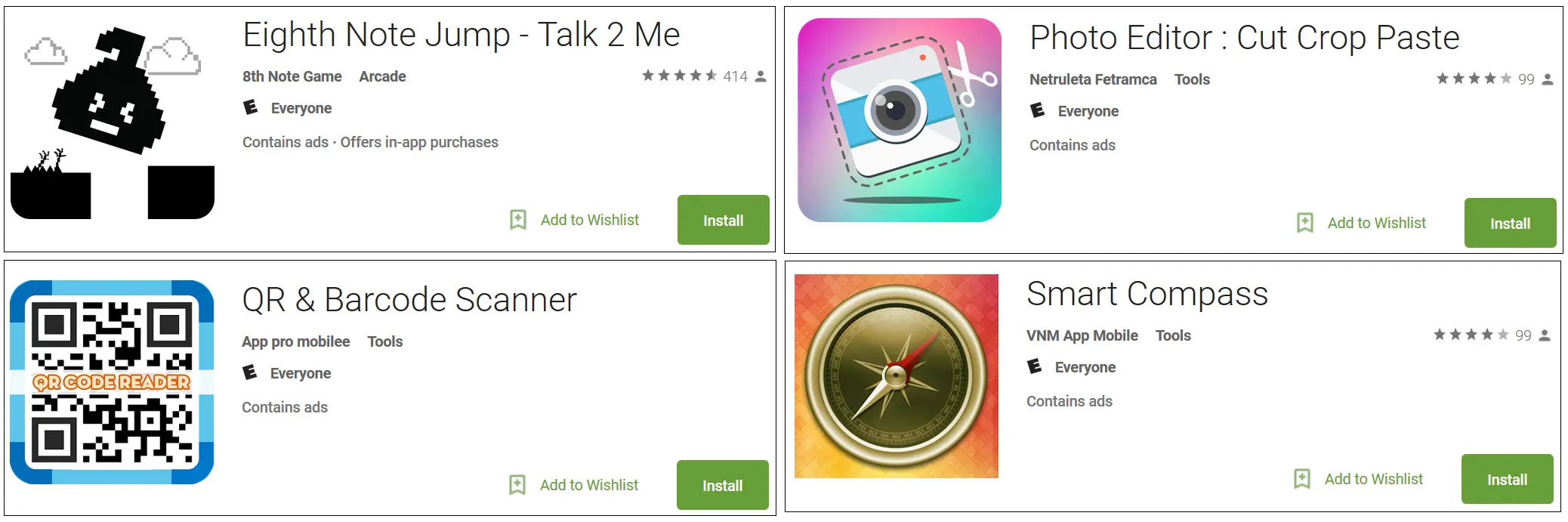 |
| Figure 1: Apps with 10,000 to 50,000 downloads |
Device admin privileges
Upon successful installation, these apps will communicate with a preconfigured Command & Control (C&C) server and act in accordance with C&C directions.
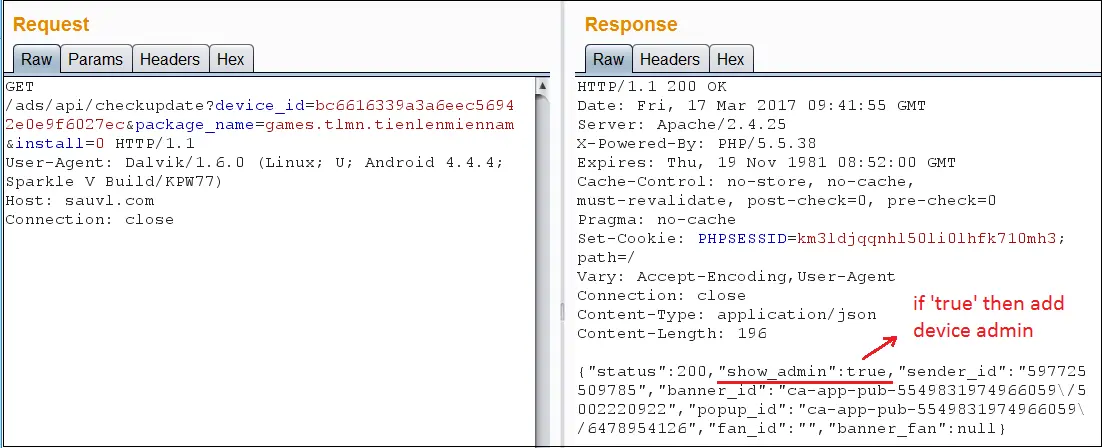 |
| Figure 2: C&C server communication |
If the response contains the "show_admin" parameter to be "true," the following code is executed, which asks the user for admin privileges.
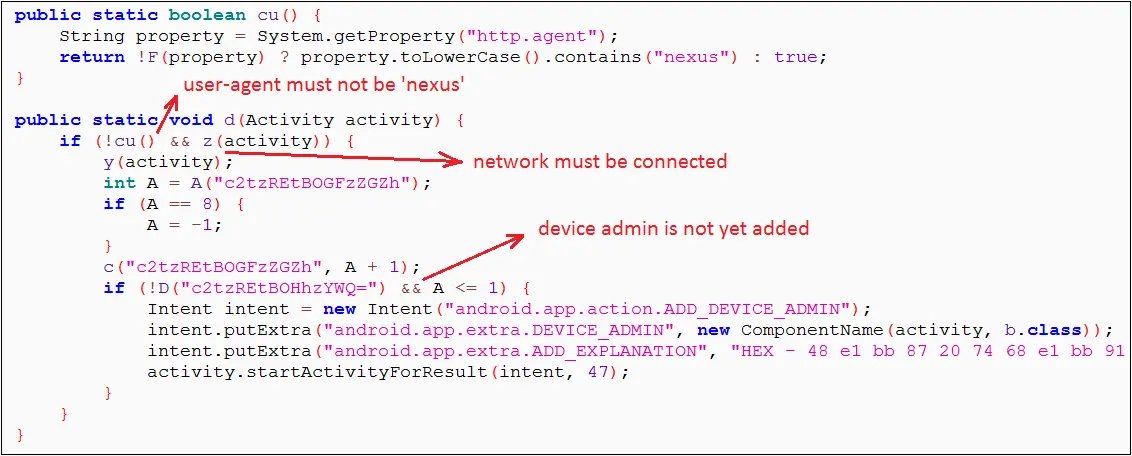 |
| Figure 3: Code to add device administrator |
Observation
We continued our analysis on apps that were removed as well as those that were still live on Play Store, sharing the same piece of code, and observed that the majority of the live apps were receiving "show_admin" as "false," whereas the removed apps were receiving a value of "true." Although it's just a matter of time when the C&C server may respond with "true," causing all these apps to prompt for device admin privileges.
Here's what the device admin prompt looks like:
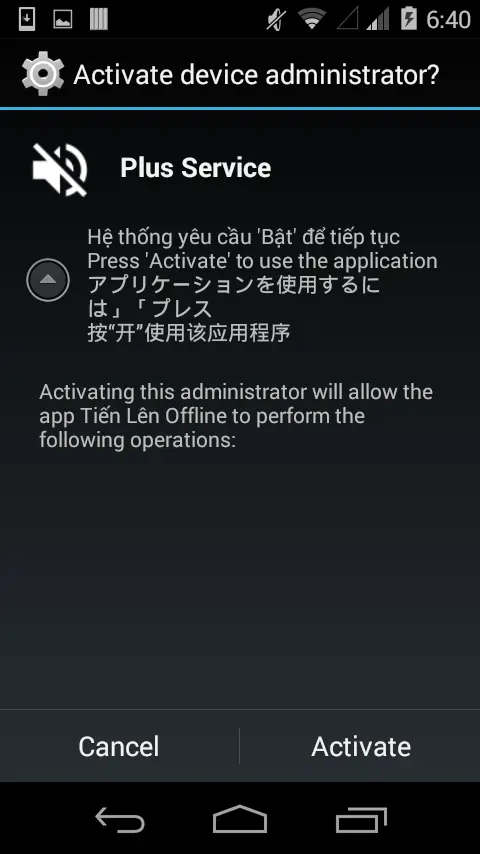 |
| Figure 4: Device admin prompt |
As seen in Figure 4, the activation message is displayed to the user in four languages: Vietnamese, English, Japanese, and Chinese. Once the user grants device admin privileges to the app, the app cannot be uninstalled until the user withdraws admin privileges for this app.
Advertisement activities
The C&C server will send commands instructing the app to perform different advertisement activities on the device. The type of activity we have seen from these apps during our analysis include:
- Full screen ads
- Open a link in mobile browser
- Launch a YouTube video
- Launch an already installed app on the phone
- Create a new shortcut on the home screen for a given URL
Code piracy
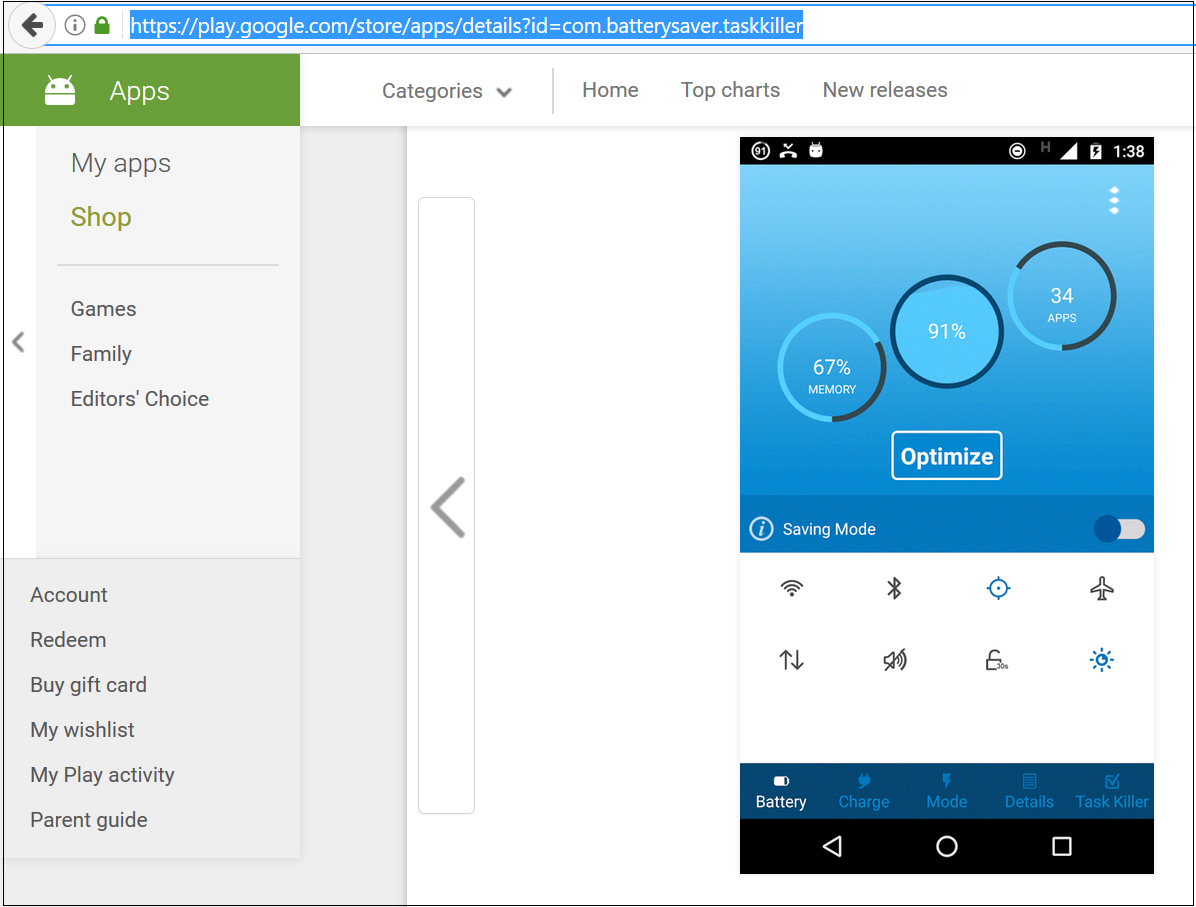
Most of the apps in this report are examples of source code piracy. The app with the package name com.ndk.taskkiller, for example, is a pirated version of com.batterysaver.taskkiller. (Note that com.batterysaver.taskkiller was not found to be malicious.)
 |
|
Figure 5: Original app |
The package called com.ndk.taskkiller shown below not only uses the same code as the original app, from which it was pirated, but also has the same appearance.
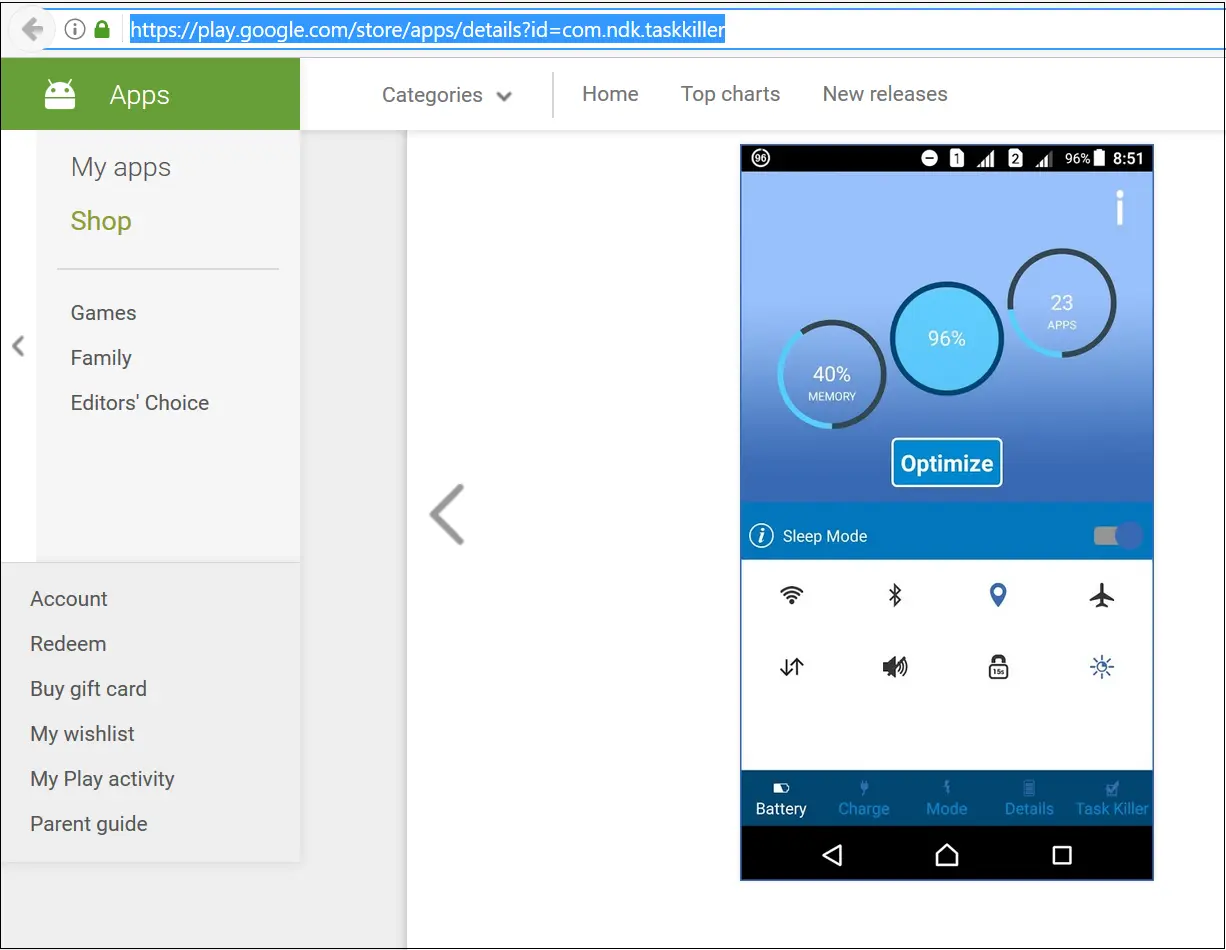 |
| Figure 6: Pirated app |
Injected code
The pirated app has injected a new package named "logs" into the copied source code.
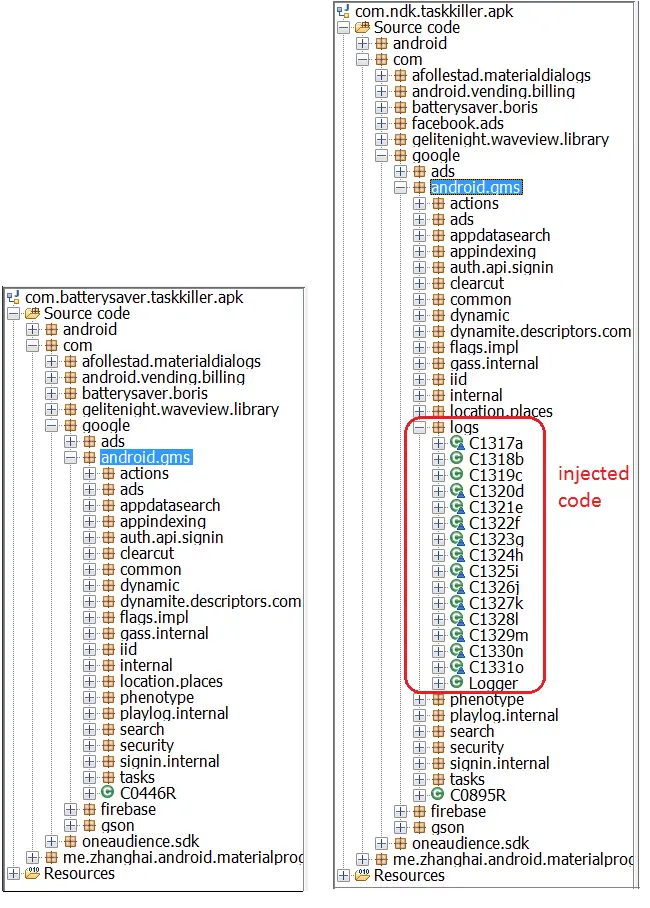 | |
| Figure 7: Difference in packages between original and pirated app | |
Analysis of injected code
The location of injected code is interesting. The com.google.android.gms package is Android's genuine package for Google Mobile Services (GMS). A complete list of Google GMS packages can be found here. In this case, a package named "logs" is injected inside the GMS packages to evade detection.
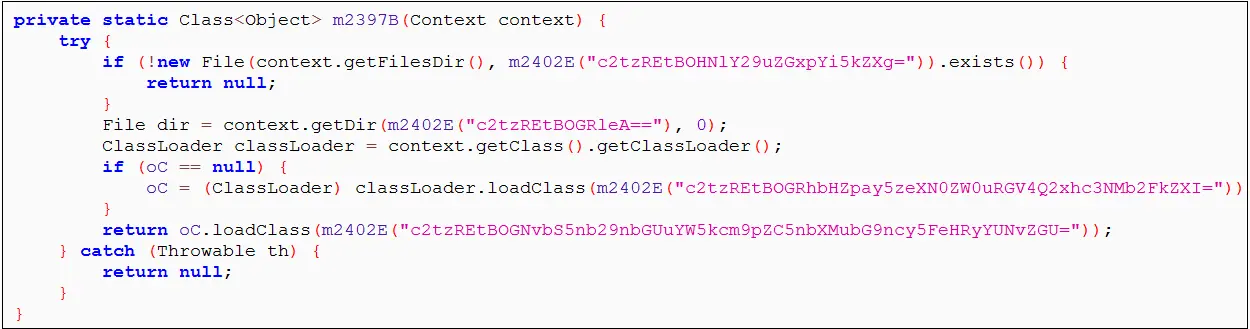
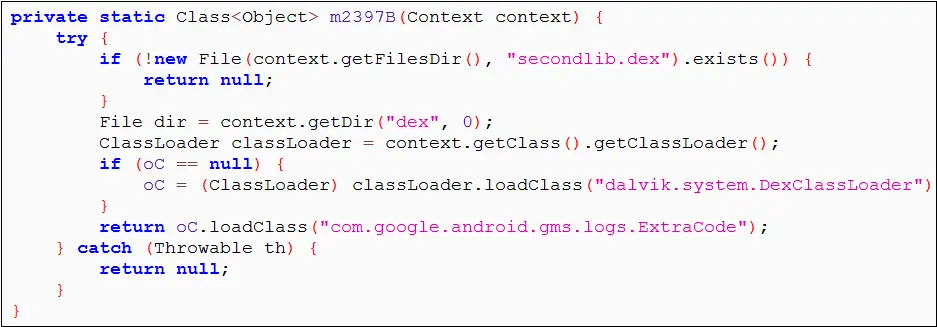
All the strings in the code were obfuscated, which makes them difficult to understand. The encryption technique leveraged here is trivial but served its purpose. After decrypting all the strings, the de-obfuscated code revealed the secrets hidden within, as shown in Figure 9.
 |
|
Figure 8: Obfuscated code |
 |
|
Figure 9: De-obfuscated code |
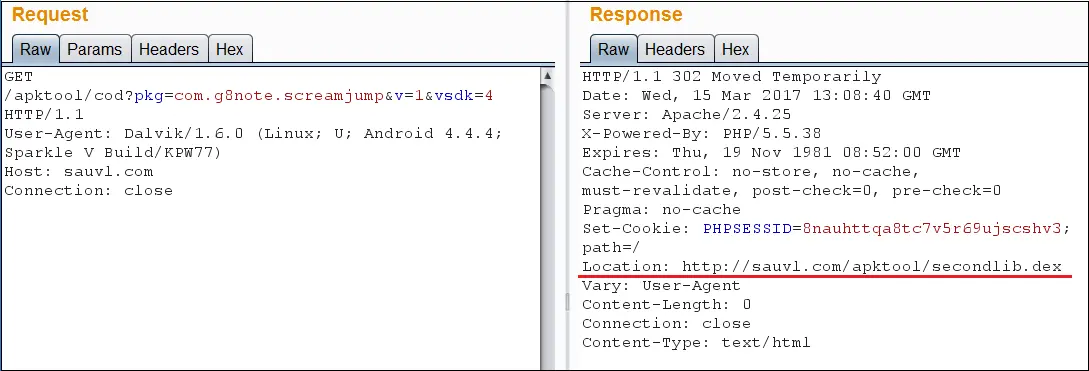
It is clear from the de-obfuscated code that the app is trying to load another dex (secondlib.dex) file dynamically. But where does this secondary dex come from? As we analyzed the app's network traffic, we confirmed that this dex file was being downloaded at runtime.
 |
|
Figure 10: Downloading secondlib.dex |
The secondlib.dex file has code that, when executed, plays a particular YouTube video. This function would generate revenue for the video uploader by increasing its number of views. It's notable that this dex file is not embedded in the original app, but is downloaded at runtime. This means that the app developer can change the code of secondlib.dex at any time and it will be executed on the user's device without requiring the user to update the app.
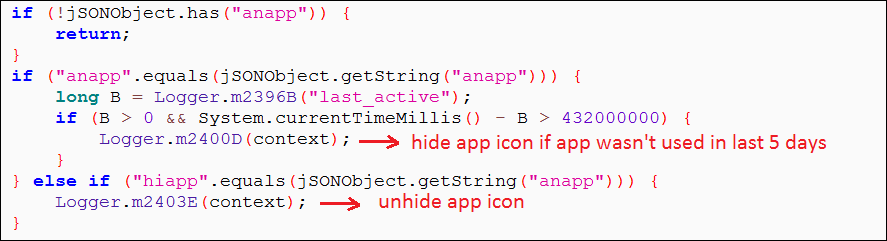
One of this app's more interesting features is its ability to hide and unhide its icon based on the C&C server instructions. To avoid user suspicion, the app does not hide its icon as soon as the user opens the app for the first time — a common behavior in most malware families. The app's icon is only hidden if the app is not used for five days. In most cases, if an average user does not open an app for five days, after which the app icon is concealed, the user will probably have no idea where those annoying ads are coming from and is unlikely to suspect the now-hidden app.
 |
|
Figure 11: Code to hide app icon |
Spreading
Although we haven't observed any phishing or spam attempts to deliver these apps, we found an interesting way by which one of the apps is advertising itself outside the Google Play Store through a YouTube gameplay video for the "Eighth Note Jump" game. The uploader has added a download link in the description of the video that points to the app "Eighth Note Jump – Talk 2 Me" on Play Store, which is one of the 12 malicious apps that we found.
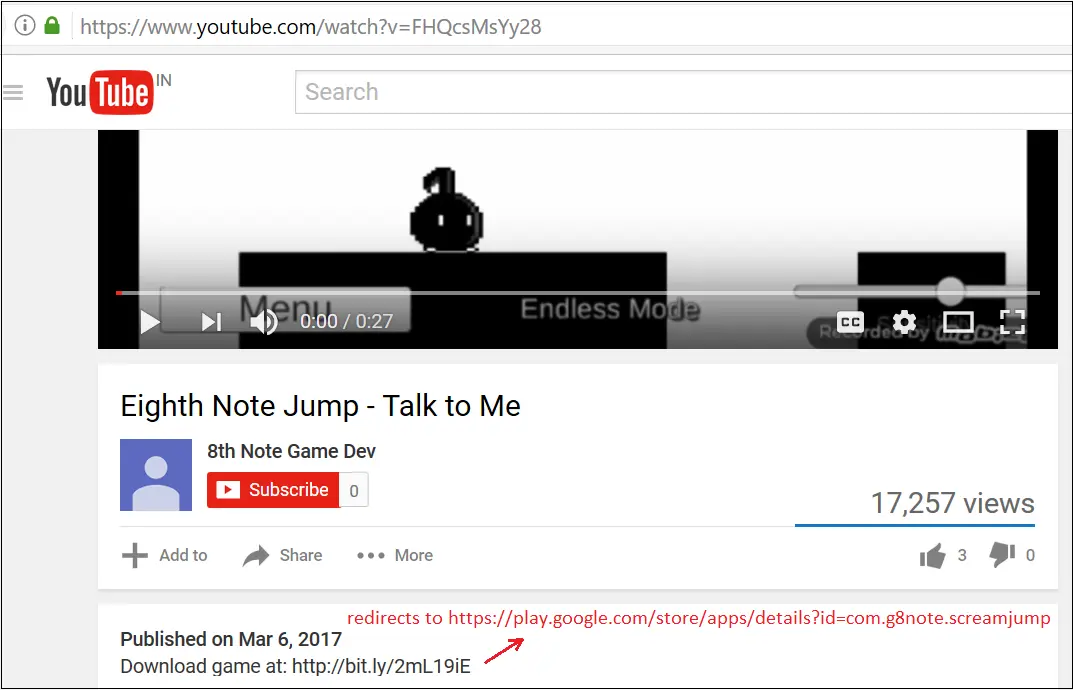 |
| Figure 12: YouTube video promoting an app with the adware |
Full list of malicious package names found on Google Play Store
| com.barcodescannertvc.vnm com.fastchargertie.vnm com.g8note.screamjump com.lichviet.lichvannien.lichamduong com.photoeditor.cutphoto.pastephotos com.qrbarcodescanneranh.vn com.qrbarcodescanneroeh.vnm com.qrbarcodescannertva.vnm com.qrcodereader.htr.hcm com.smartcompassproto.vnm com.smartcompasstvc.vnm game.danhbaidoithe.winday |
Conclusion:
Despite the precautionary measures taken by Google, malware developers are finding new ways to upload their apps on Google Play Store. More and more malware strains – and now adware – are becoming sophisticated and more adept at staying under the radar.
Zscaler ThreatlabZ reported these apps to Google's Android security team on Mar 20, 2017, and the apps have been taken down from Play Store as of Mar 22, 2017.
ThreatLabZ continuously monitors and blocks threats, such as those that use hidden code to communicate to C&C servers, to protect Zscaler customers.