
Facebook widgets, including the "Like" buttons, are often used to spread spam and propagate scams. Typically, the scammer creates a page with a fake video player. Users are tricked into clicking on Facebook Like buttons hidden behind a fake Play button. This is called Likejacking, and it's a specific form of clickjacking. I have posted a Youtube video showing in June that explains how these Facebook widgets are disguised.
I previously posted a bookmarket - a piece of JavaScript that can be executed on any page to display hidden Facebook widgets on the page. I wanted to go a step further and offer good protection against Likejacking, or any type of clickjacking with Facebook widgets (Facebook comments, Facebook login, etc.).
You can install the free Zscaler Likejacking Prevention tool for Firefox, Google Chrome and Safari. The extension offer 2 primary features:
Page information
On Firefox and Chrome, an icon is displayed in the URL bar when a page contains at least one Facebook widget. If the page is suspicious, meaning hidden widgets were detected, the icon has a red background. You can use https://www.zscaler.com/research/plugins/likejacking/example.htm as an example of a suspicious page.
If the page is safe, meaning the widgets are not hidden, the icon background is green. This allows users to have a quick understanding of the safety of the page.
Safari has the same functionality, but uses a toolbar instead of an icon.
You can obtain more information on the page -- either by clicking on the icon, or "More options" in Safari -- including:
The popup (Chrome), or toolbar (Safari and Firefox) also let users take some action on the page: they can allowlist the current domain (see more below), manage their preferences, or display the hidden Facebook widgets on the page.
You can also report back to Zscaler, any page that was classified improperly by clicking on "Report an error". This will open a new tab in your browser and send you to a form on the zscaler.com website. We will use this information to improve the add-on.
Display hidden widgets
As you can see in the Youtube video, it is possible to expose the hidden widgets. The extension can modify the source of the page (opacity, height, weight, z-index, overflow, etc.). You can try this feature on https://www.zscaler.com/research/plugins/likejacking/example.htm.
Explicit confirmation
You can choose your level of protection in the preferences:
You can also allowlist domains so that no protections are applied on a given site. The popup, or toolbar, can show you what action was taken on a page -- for example confirm, remove, or ignore (no protection applied).
Some notes
The extension does not affect the ability to use the main Facebook site; it protects users only on other sites that use widgets from Facebook.
Some Facebook widgets are hidden by design. This is normal, and the the extension will not list them as suspicious and will not apply any protection on those.
I will post another blog on the process of creating the plugin for different browsers to explain the challenges I faced on each platform.
-- Julien
I previously posted a bookmarket - a piece of JavaScript that can be executed on any page to display hidden Facebook widgets on the page. I wanted to go a step further and offer good protection against Likejacking, or any type of clickjacking with Facebook widgets (Facebook comments, Facebook login, etc.).
You can install the free Zscaler Likejacking Prevention tool for Firefox, Google Chrome and Safari. The extension offer 2 primary features:
- Information about the page: does it contain Facebook widgets? Are these widgets hidden?
- Protection against hidden widgets: the application requires explicit confirmation from the user when clicking on a Facebook widgets on a suspicious page
Page information
On Firefox and Chrome, an icon is displayed in the URL bar when a page contains at least one Facebook widget. If the page is suspicious, meaning hidden widgets were detected, the icon has a red background. You can use https://www.zscaler.com/research/plugins/likejacking/example.htm as an example of a suspicious page.
 |
| Suspicious page found in Firefox |
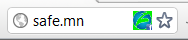 |
| Safe page found in Chrome |
 |
| Suspicious page found in Safari |
You can obtain more information on the page -- either by clicking on the icon, or "More options" in Safari -- including:
- how many widgets were found on the page
- whether the page is suspicious or not
- what protection was applied on the Facebook widgets
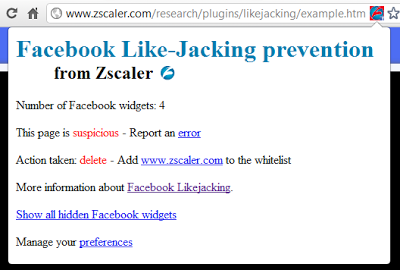 |
| Information, and actions, for a page with Facebook widgets (Chrome) |
You can also report back to Zscaler, any page that was classified improperly by clicking on "Report an error". This will open a new tab in your browser and send you to a form on the zscaler.com website. We will use this information to improve the add-on.
Display hidden widgets
As you can see in the Youtube video, it is possible to expose the hidden widgets. The extension can modify the source of the page (opacity, height, weight, z-index, overflow, etc.). You can try this feature on https://www.zscaler.com/research/plugins/likejacking/example.htm.
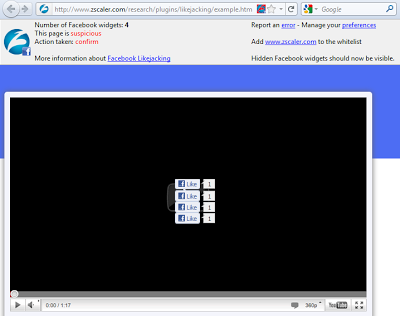 |
| Hidden Like buttons exposed in Firefox |
You can choose your level of protection in the preferences:
- Delete all Facebook widgets - Choose this option if you never use "Like" buttons on external sites. You can always allowlist a domain to keep the widgets on a particular site.
- Always ask for explicit confirmation - A popup will warn you that you clicked on an element that is trying to post to your public profile. You can decide to stop the action, or to let the page post to your profile. This is a good option if your rarely click on "Like" buttons.
- Ask for explicit confirmation only on suspicious pages with hidden widgets - This is a good balance between security and productivity. It is the recommended setting.
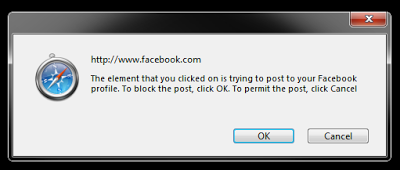 |
| Explicit confirmation in Safari |
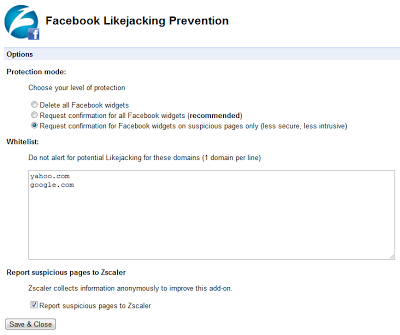 |
| Extension preferences in Chrome |
Some notes
The extension does not affect the ability to use the main Facebook site; it protects users only on other sites that use widgets from Facebook.
Some Facebook widgets are hidden by design. This is normal, and the the extension will not list them as suspicious and will not apply any protection on those.
I will post another blog on the process of creating the plugin for different browsers to explain the challenges I faced on each platform.
-- Julien