
With the session-sidejacking issue highlighted once more by Firesheep, a many people have asked me why more websites, or at least the major players (Google, Facebook, Amazon, etc.) have not enabled SSL by default for all communication. Indeed, encryption is the only way to ensure that user sessions cannot be easily sniffed on a open wireless network.
This sounds easy - just add an s after http in the URL! It's not actually that easy. Here are some of the challenges.
Server overhead
The obvious issue is that encrypting all HTTP sessions requires additional resources on the sever-side. I've seen numbers showing 10% to 20% CPU overhead for SSL. Having to add 10% more servers is a big deal when you're dealing with thousands of them like Facebook and Google. However, the overhead can actually be much higher on specialized severs, which efficiently serve static content (such as images) directly from memory (think memcached). In this case, the processing power required is easily multiplied by a factor of 10. Of course the SSL encryption can be offloaded to a proxy or other external hardware, but you have to add the cost of managing a more complex topology as well as buying the new hardware.
Increased latency
SSL also has a perceived performance issue for the client (i.e. the browser). For each new session, SSL encryption must be set up between the client and server. This means a few more packets must be sent back and force before the actual HTTP data is received. This happens for each page load, and also for each domain.
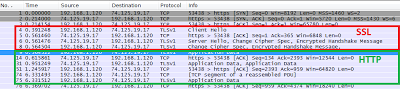 |
| 1 HTTPS transaction: 4 SSL handshake packets, 6 data apckets |
A typical Facebook page (like the News Feed) contains HTML elements (images, CSS, JavaScript) from more than 10 domains. This means the full SSL handshake is done over 10 times on each page. This in turn makes pages load more slowly. The problem is amplified if the user's connection has high latency, as it would on a cell phone.
 |
| 4 of the 10+ domains used on a Facebook page |
Challenge for CDNs
All the major websites use a Content Delivery Network (CDN) to deliver static content quickly to their users. Some have their own (Facebook, Google), but others use third parties such as Akamai.
The same website can be served from hundreds of CDN servers based on their geographical location, and each CDN server can handle several hundred websites. Most website owners don't want users to see content being downloaded from akamai.com, so they use an alias. For example, static.amd.com could point to a248.e.akamai.net.
Each CDN therefore serves different content based on the Host header received (static.amd.com for example). This creates a problem. The SSL handshake is done first, then the HTTP data is sent. That means the SSL server must send an SSL certificate to each client without first seeing the host. In brief, the SSL server sends a certificate based on the destination IP address, not based on the HTTP hostname.
The second fact to keep in mind is that an SSL certificate is valid for one domain only. If a user goes to www.example.com, the certificate has to be signed for www.example.com, not example.com or example.net.
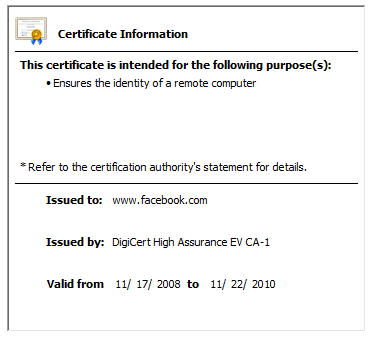 |
| SSL certificate for www.facebook.com |
For example, http://www.amd.com/ is served entirely through Akamai. So what happens when you use https://www.amd.com/ ? You get a warning, because the Akamai CDN server sends a certificate valid for itself (a248.e.akamai.net), not for www.amd.com.
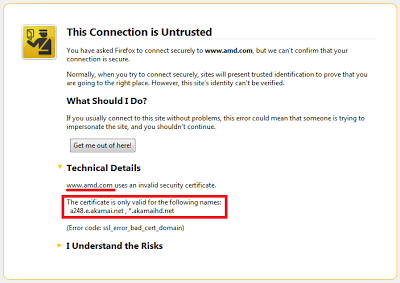 |
| Wrong SSL certificate issued for akamai.net instead of amd.com |
Wildcard certificates are not enough
You don't need to use a CDN to have troubles serving the right certificate for a given hostname. Most sites can be reached with and without www: http://amazon.com/ and http://www.amazon.com/ brings you to the same site. When a site wants to handle several sub-domains (www.site.com, mail.site.com, static.site.com, etc.) easily, it can buy a wildcard certificate. This certificate is valid not just for one domain, but for all sub-domains: *.site.com. Unfortunately, this wildcard certificate is not valid for site.com (no sub-domain). For that, a separate certificate is required. This is again a challenge if the same IP address servers both site.com and www.site.com.
Dropbox has this exact issue. Access to https://dropbox.com/ delivers a warning to he user:
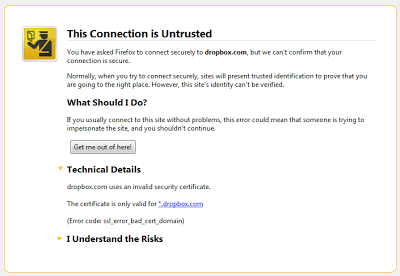 |
| Dropbox's wildcard SSL certificate is not valid for dropbox.com |
Mixed HTTP/HTTPS: the chicken & the egg problem
Yet another issue - HTTPS pages must contain external object from HTTPS URLs only. You cannot match HTTP and HTTPS on a secure page, otherwise users receive a warning message. Websites however rely on a significant amount of content from external sites: Googole/Comscore Analytics, Google/Twitter/Facebook connect, ads, etc.
Google Adsense, for example, cannot be used on a secure site. All sites which rely on this advertising network to make some money need to forget about HTTPS and about protecting their users!
Each website needs to make sure that all their partners, sometimes much bigger than they are, fully support HTTPS before they switch to it.
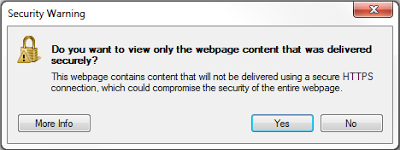 |
| Warning about external HTTP objects on a secure page |
Warning are scary!
It is not easy for a site to switch to SSL for all content. One mistake, and users will receive a warning. And they're scary! Internet Explorer 8 explicitly suggests that the user not to enter a site with an SSL certificate error.
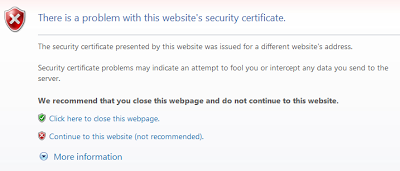 |
| Scary warning on Internet Explorer |
Websites really don't want to scare away potential visitors!
But it is possible
Moving from HTTP to HTTPS is easier said than done. This must be carefully planned. All cases have to be thought through to avoid warning messages. Despite that fact, all of the challenges discussed in this post do have technical sotuions.
This can be done. Google has already moved Gmail to HTTPS by default, but they have not done the same for their other services.