Zscaler 블로그
Zscaler 블로그의 최신 업데이트를 이메일로 받아보세요
Windows Registry attacks: Knowledge is the best defense

A Red Canary security analyst walks through common Windows Registry malware attacks and offers practical steps for defense.
This article was originally published by Red Canary, which is now part of Zscaler.
Let’s talk about the Windows Registry… yes, that mysterious and oh-so-dangerous piece of the Windows operating system that we were warned against messing with from the moment we booted up our first PC. Turns out, the Windows registry is not as scary as everyone makes it out to be. Granted, if you do not know what you are doing, there is ample opportunity for you to severely mess up installed software and the operating system itself. But not only is it simple to fix (backups, backups, backups!), you would also have to be fairly careless in what changes you were making.
Once I let go of the stigma surrounding the Windows Registry, I realized how powerful it can be. Of course, attackers are aware of its power as well. Like so many other administrative tools and processes out there, the Windows Registry can be used as intended or for nefarious purposes. Since it is so ingrained into the operating system, it’s a prime target for attacks and getting around standard security controls. With that in mind, I’ll walk you through a few common attack vectors and tactics using the Windows Registry.
Tactic 1: Using Registry keys for malware attacks
As we have already mentioned, the registry is a core part of Windows and contains a plethora of raw data. This data could very quickly be used against you by a malicious actor or by data-mining software. An example would be remotely querying the registry to see if any remote access tools (RAT) are installed, such as TeamViewer, VNC, or simply Terminal Services. With that information, a malicious actor could leverage these tools and spread further throughout an environment or find a route to more valuable and interesting systems.
A tactic that has been growing increasingly common is the use of registry keys to store and hide next-step code for malware after it has been dropped on a system. What is a registry key? A registry key is an organizational unit within the Windows Registry, similar to a folder.
Furthermore, the malware uses native Windows tools to perform its commands so it is undetectable by signature-based security software such as antivirus.
Here’s an example of this behavior…
First, the end user received a fake Adobe Flash update pop up while browsing via Firefox from this domain:

Shortly afterward, a JavaScript attempting to disguise itself as a patch for Firefox was downloaded:

It then executed via a spawned instance of the native Windows Script shell wscript.exe:

Upon execution, this JavaScript presented a command prompt window to the end user, showing them that an “update” was taking place and then completed. While this was going on, it made an external network connection with the malicious domain and received further instructions to write commands to a registry key on the system.

Now that the next steps have been written to this registry key, an instance of Windows native tool mshta.exe is launched to pass the code in the registry key into a Windows Script shell. This writes a command into an obscure environment variable on the infected host.
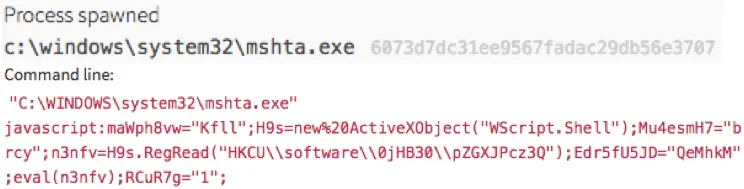
A cmd.exe child process then launches PowerShell, which references the Invoke-Expression cmdlet—a common event we’ve seen and explored in previous threat detections.
One or more child processes of either regsvr32.exe or rundll32.exe are then spawned. What is often seen after this are hundreds to thousands of external network connections made to advertisement domains for the sake of acquiring ad click revenue.
Last, but not least, a persistence mechanism is put in place:

This leads us to our next tactic…
Tactic 2: Using run keys and the Windows startup folder to establish persistence
Once an actor or piece of malware is on an endpoint, it will usually make sure it can continue to utilize the resources through persistence mechanisms. Most of us in the field are well aware of the run keys and use of the Windows startup folder in order to create persistence on a victim endpoint, but this tactic has not gone away so it is certainly worth talking about and keeping in mind during investigations.
The more simple of the two tactics is using the Windows startup folder located at: C:\Users\< user name >\AppData\Roaming\Microsoft\Windows\Start Menu\Programs\Startup. Shortcut links (.lnk extension) placed in this folder will cause Windows to launch the application each time < user name > logs into Windows. This is used by various forms of malware, but also easily identified and remediated by simply deleting the shortcut.
The registry run keys perform the same action, but can be located in four different locations:
- HKEY_LOCAL_MACHINE\Software\Microsoft\Windows\CurrentVersion\Run
- HKEY_CURRENT_USER\Software\Microsoft\Windows\CurrentVersion\Run
- HKEY_LOCAL_MACHINE\Software\Microsoft\Windows\CurrentVersion\RunOnce
- HKEY_CURRENT_USER\Software\Microsoft\Windows\CurrentVersion\RunOnce
The difference between HKEY_LOCAL_MACHINE and HKEY_CURRENT_USER is whether the referenced executable launches at startup for any user logging in or a specific user (current_user is copied to a stored “user hive” and loaded whenever that user ID logs in). Then there is Run and RunOnce; the only difference is that RunOnce will automatically delete the entry upon successful execution.

If this method of persistence is successful, malware will continue executing its code to either make sure advertisement sites are hit (in cases of click fraud malware), command and control servers are beaconed (in cases such as botnets where further commands need to be sent to victim machines), or to constantly try to have the end user click on popup window links for any number of purposes.
Tactic 3: Exploiting weaknesses in Service Registry permissions to establish persistence
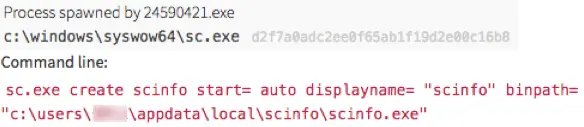
Another means of establishing persistence while also allowing for privilege escalation is by way of modifying the parameters of services that start each time Windows is launched. If permissions aren’t configured correctly (remember the principle of least privilege) and allow the registry keys for a service to be modified, the ImagePath or binPath key can be modified to instead point to a malicious binary or a newly created one. Not only does this allow for the malware to launch at Windows startup, but it can then be run under a local system account with elevated privileges. Keep in mind that this behavior is common for many software installers and, if monitored for changes, can be a source of false positive hits. That said, it remains a great spot for malicious software to dig its heels into your endpoints. Any unknown software should be scrutinized if it is making changes to this part of the registry.
What you can do to protect yourself
So now that you know what these types of Windows Registry attacks look like, what can you do to defend against them? Consider practical steps to build your defenses. One of the best defense mechanisms against Windows Registry attacks is whitelisting software or maintaining local group policy restrictions. That way you can be sure that you are controlling the applications and permissions levels. Just keep in mind that whitelisting isn’t a silver bullet and can always be circumvented, as we explored in our post on bypassing application whitelisting. If this is not feasible due to your organization’s culture, the next best thing is to have an active monitoring agent to identify changes to these registry keys or the startup folder.
Above all else, remember that knowledge is power. Don’t be afraid of the Windows Registry; learn what it does and know that it’s not a super-secret “Holy Grail” type of vessel that no one can touch. Attackers are already using it against you, so you should understand it and be aware of what is normal and what is not. The better you know your operating system, the better equipped you’ll be to understand and defend against attackers.

이 게시물이 도움이 되었나요?


면책 조항: 이 블로그 게시물은 정보 제공만을 목적으로 Zscaler에서 작성하였으며, 정확성, 완전성 또는 신뢰성에 대한 어떠한 보증도 없이 "있는 그대로" 제공됩니다. Zscaler는 제공된 정보를 기반으로 수행된 조치나 오류 또는 누락에 대해 어떠한 책임도 지지 않습니다. 이 블로그 게시물에 링크된 제3자 웹사이트나 리소스는 편의를 위해서만 제공되며, Zscaler는 해당 웹사이트의 콘텐츠나 관행에 대해 책임을 지지 않습니다. 모든 콘텐츠는 예고 없이 변경될 수 있습니다. 이 블로그에 접속함으로써 귀하는 본 약관에 동의하며 귀하의 필요에 따라 정보를 확인하고 사용할 전적인 책임이 귀하에게 있음을 인정합니다.