Zscaler 블로그
Zscaler 블로그의 최신 업데이트를 이메일로 받아보세요
Respond and remediate faster with Red Canary’s new Splunk Phantom integration

Introducing Red Canary’s native app within the Splunk Phantom Security Orchestration, Automation, and Response (SOAR) platform.
This article was originally published by Red Canary, which is now part of Zscaler.
The need for fast and comprehensive incident response is common knowledge in the security industry, reinforced by requirements to lower and report on metrics such as mean time to detect (MTTD) or mean time to respond (MTTR). However— just like how eating well and regular exercise leads to improved mental and physical health—sometimes these truths are easier said than done. For many organizations, working with limited resources and myriad disparate tools proves problematic when implementing processes to meet aggressive detection and response goals.
Red Canary understands these challenges and invests heavily in our security operations platform to maximize efficiency by eliminating false positives, providing high-quality detections, and creating robust automated responses. Today we are excited to announce another investment in our effort to drive security operation efficiency: a native integration with the Splunk Phantom SOAR platform.
Automated response? There’s an app for that
Red Canary customers who use the Phantom platform now have a bird’s eye view of all their threat detections and automated playbooks in one place. The Red Canary integration is delivered through an app within Phantom, enabling customers to automatically synchronize Red Canary detections into their broader security automation and orchestration processes. Data for the integration is provided through Red Canary’s robust REST API, which is available to all customers. The app can be configured in as little as three minutes, initially synchronizing all previous detections then monitoring for any new detections going forward.
Where can I download the app?
The Red Canary app is found and configured in the Apps section of your Splunk Phantom instance:
- To install the app, select the New Apps box
- Search for “Red Canary” and click Install.
- Once the installation is complete, select Configure New Asset within the app and follow the setup and configuration instructions.

What other automations does Red Canary offer?
Red Canary has built-in investigative and remedial automations for responses that can be completed solely within our Portal. Our Automate framework combines triggers (e.g., a detection is published) with playbooks (e.g., Isolate an endpoint and kill a process) for flexible and robust automations conducted within your Red Canary and endpoint detection and response (EDR) technologies. Red Canary consistently adds new triggers and playbooks to deliver better security outcomes for our customers. As an example, earlier this month we added support to automatically block IPs and domains with Microsoft Defender for Endpoint.
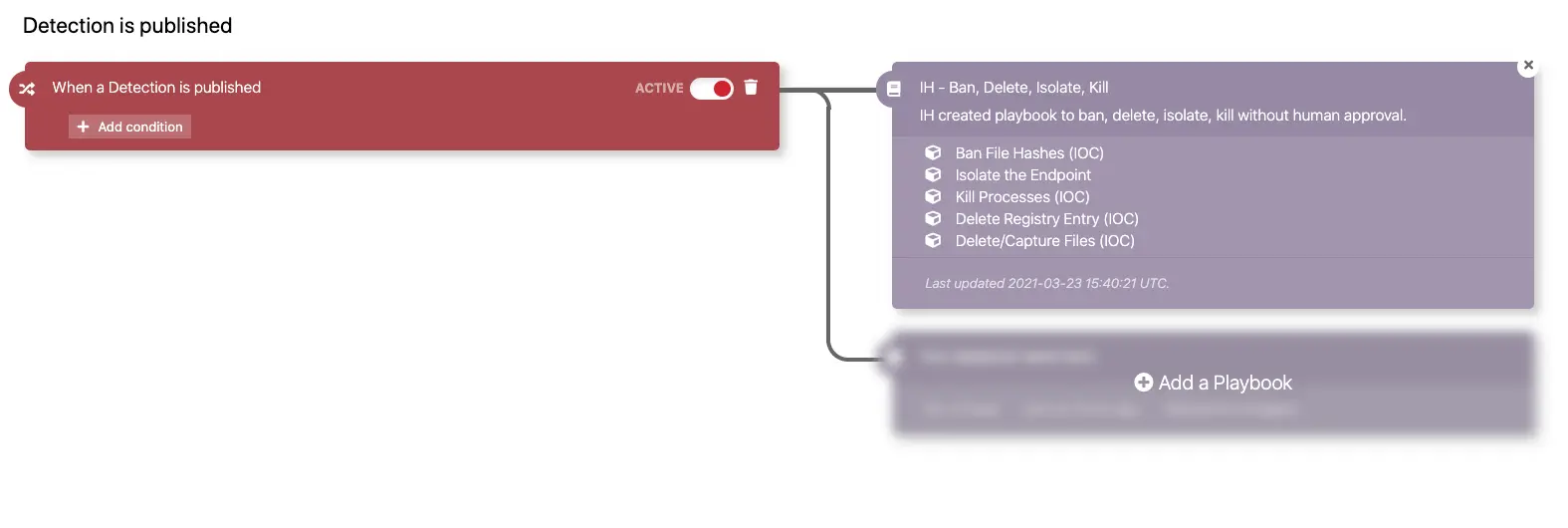
Customers with questions or feedback can reach out to their Red Canary Customer Success Manager (CSM) or Incident Handler (IH) via the Portal.
Stay tuned
The Splunk Phantom platform is in active development with new features—such as detection and remediation acknowledgement—set to be released later this year. With the added context of Red Canary’s detections, defenders will be better informed and quicker on the draw.
Schedule a demo

이 게시물이 도움이 되었나요?


면책 조항: 이 블로그 게시물은 정보 제공만을 목적으로 Zscaler에서 작성하였으며, 정확성, 완전성 또는 신뢰성에 대한 어떠한 보증도 없이 "있는 그대로" 제공됩니다. Zscaler는 제공된 정보를 기반으로 수행된 조치나 오류 또는 누락에 대해 어떠한 책임도 지지 않습니다. 이 블로그 게시물에 링크된 제3자 웹사이트나 리소스는 편의를 위해서만 제공되며, Zscaler는 해당 웹사이트의 콘텐츠나 관행에 대해 책임을 지지 않습니다. 모든 콘텐츠는 예고 없이 변경될 수 있습니다. 이 블로그에 접속함으로써 귀하는 본 약관에 동의하며 귀하의 필요에 따라 정보를 확인하고 사용할 전적인 책임이 귀하에게 있음을 인정합니다.
더 많은 Zscaler 블로그 살펴보기

New: Use response actions to update Zscaler policies and block threats
The key of AI: How Agentic Tuning can make your detection strategy sing
Accelerate investigation and response with Red Canary and Zscaler Internet Access
Clear skies ahead with Wiz visibility and Red Canary MDR
