Zscaler 部落格
訂閱 Zscaler 部落格,第一時間獲取最新資訊!
Respond and remediate faster with Red Canary’s new Splunk Phantom integration

Introducing Red Canary’s native app within the Splunk Phantom Security Orchestration, Automation, and Response (SOAR) platform.
This article was originally published by Red Canary, which is now part of Zscaler.
The need for fast and comprehensive incident response is common knowledge in the security industry, reinforced by requirements to lower and report on metrics such as mean time to detect (MTTD) or mean time to respond (MTTR). However— just like how eating well and regular exercise leads to improved mental and physical health—sometimes these truths are easier said than done. For many organizations, working with limited resources and myriad disparate tools proves problematic when implementing processes to meet aggressive detection and response goals.
Red Canary understands these challenges and invests heavily in our security operations platform to maximize efficiency by eliminating false positives, providing high-quality detections, and creating robust automated responses. Today we are excited to announce another investment in our effort to drive security operation efficiency: a native integration with the Splunk Phantom SOAR platform.
Automated response? There’s an app for that
Red Canary customers who use the Phantom platform now have a bird’s eye view of all their threat detections and automated playbooks in one place. The Red Canary integration is delivered through an app within Phantom, enabling customers to automatically synchronize Red Canary detections into their broader security automation and orchestration processes. Data for the integration is provided through Red Canary’s robust REST API, which is available to all customers. The app can be configured in as little as three minutes, initially synchronizing all previous detections then monitoring for any new detections going forward.
Where can I download the app?
The Red Canary app is found and configured in the Apps section of your Splunk Phantom instance:
- To install the app, select the New Apps box
- Search for “Red Canary” and click Install.
- Once the installation is complete, select Configure New Asset within the app and follow the setup and configuration instructions.

What other automations does Red Canary offer?
Red Canary has built-in investigative and remedial automations for responses that can be completed solely within our Portal. Our Automate framework combines triggers (e.g., a detection is published) with playbooks (e.g., Isolate an endpoint and kill a process) for flexible and robust automations conducted within your Red Canary and endpoint detection and response (EDR) technologies. Red Canary consistently adds new triggers and playbooks to deliver better security outcomes for our customers. As an example, earlier this month we added support to automatically block IPs and domains with Microsoft Defender for Endpoint.
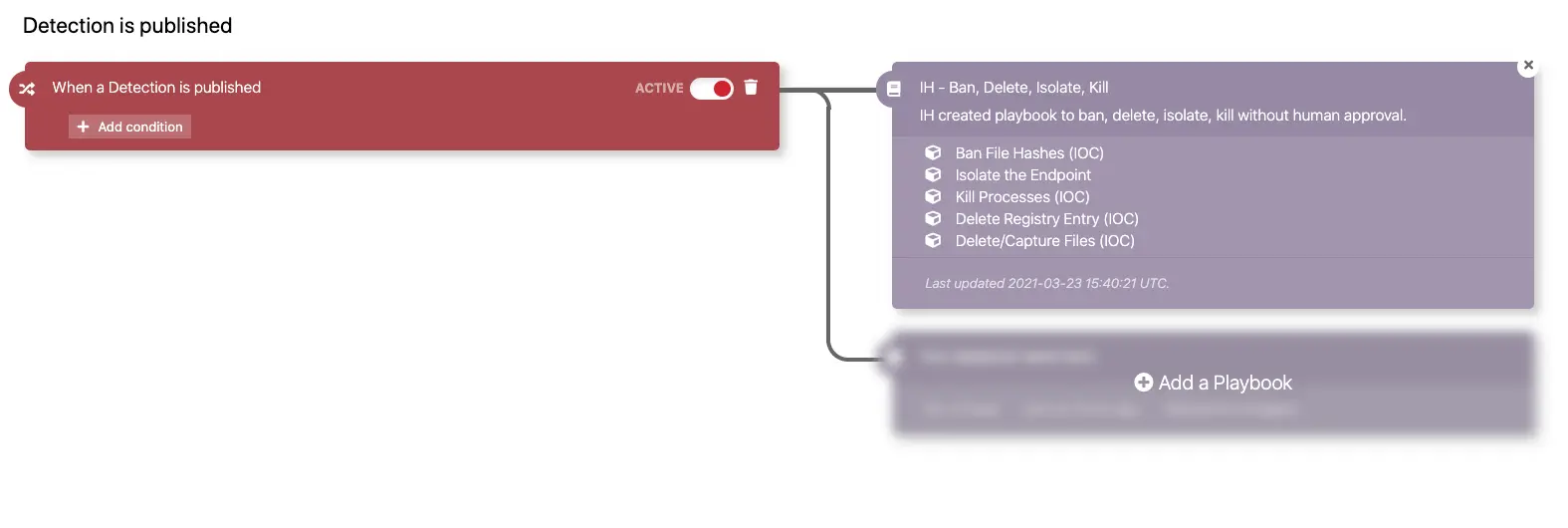
Customers with questions or feedback can reach out to their Red Canary Customer Success Manager (CSM) or Incident Handler (IH) via the Portal.
Stay tuned
The Splunk Phantom platform is in active development with new features—such as detection and remediation acknowledgement—set to be released later this year. With the added context of Red Canary’s detections, defenders will be better informed and quicker on the draw.
Schedule a demo


免責聲明:本部落格文章由 Zscaler 製作,僅供資訊參考,並以「現狀」提供,不保證其準確性、完整性或可靠性。Zscaler 對任何錯誤或遺漏,或基於所提供的資訊而採取的任何行動不承擔任何責任。本部落格文章中連結的任何第三方網站或資源僅為方便起見而提供,Zscaler 對其內容或做法概不負責。所有內容如有變更,恕不另行通知。存取此部落格,即表示您同意這些條款,並承認您有責任自行驗證並根據您的需求適當使用資訊。