As the coronavirus has been declared a pandemic, threat actors will take advantage of the uncertainty around it to attack a large number of online users.
Zscaler ThreatLabz recently came across hxxp://coronavirusapp[.]site/mobile.html, which portrays itself as a download site for an Android app that tracks coronavirus spread across the globe. In reality, the app is Android ransomware that locks out the victim and asks for ransom to unlock the device.
Figure 1 shows our Cloud Behavioral Analysis report, where the sample APK is flagged as malicious.
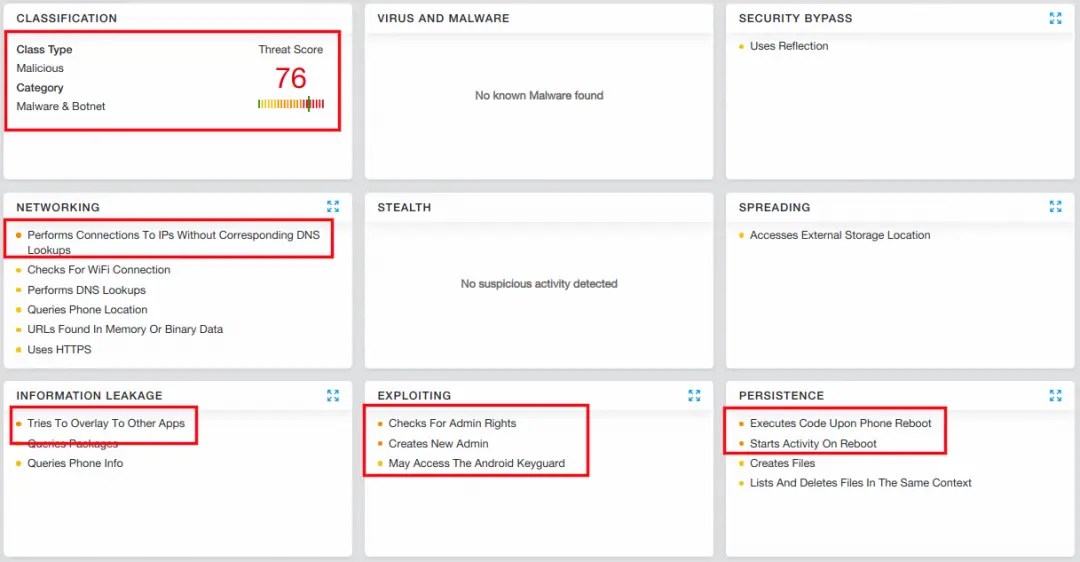 |
| Figure 1: Analysis report for CovidLock ransomware |
We found an article where security researchers from DomainTools came across the same ransomware. Its basic details are covered in the article, so we won't get into that here. Instead, we'll do a technical walkthrough of the app. We'll also how you can unlock you device if you're a victim of CovidLock ransomware.
Brief Description
App name: Coronavirus Tracker
Package name: com.device.security
Hash: D1D417235616E4A05096319BB4875F57
VirusTotal: Not found during analysis
Technical Details
The app poses as a Coronavirus Tracker. As soon as it starts running, it asks the user to allow it to ignore battery optimization. The allows the ransomware to keep running in the background, without the Android closing the app to optimize battery performance.
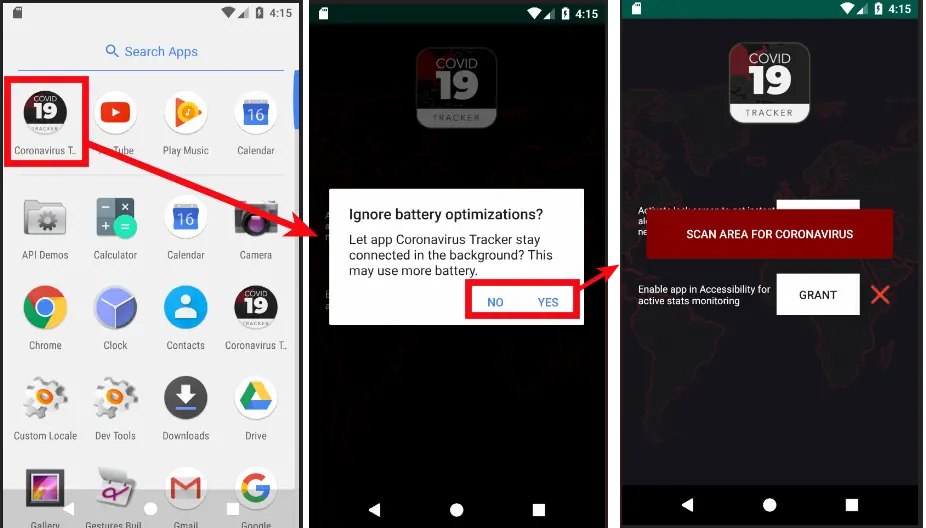 |
| Figure 2: Request to ignore battery optimization |
After the initial phase, the app requests access to the Android's Accessibility feature. Android developers can integrate accessibility features and services to improve app usability, particularly for users with disabilities. Unfortunately, attackers often exploit this functionality to keep their malware persistent.
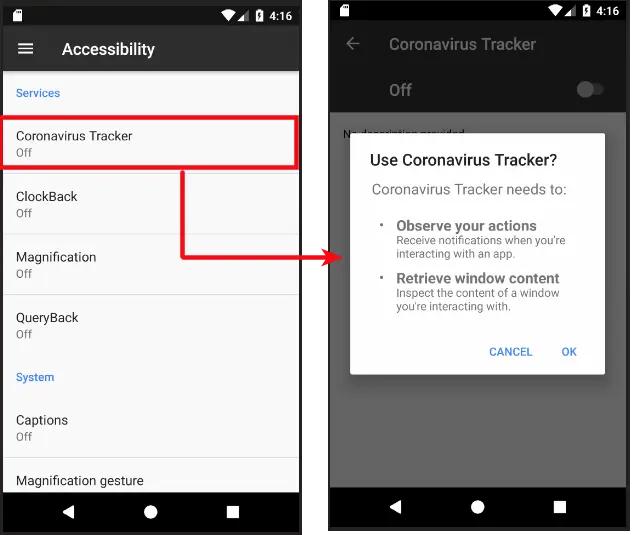 |
| Figure 3: Accessibility functionality request |
Next, the app asks for administrator privileges, which is a common red flag. The app tries to trick the victim, stating that admin rights will enable the app to notify the user when a coronavirus patient is nearby.
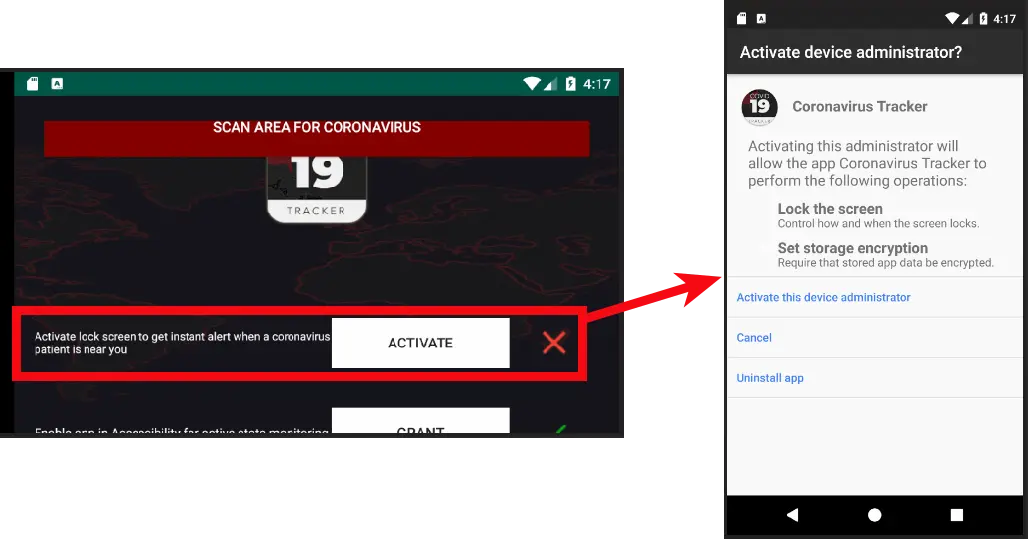 |
| Figure 4: Admin rights request |
Once the app gains admin rights, the attack is launched. As soon as the victim clicks "Scan Area For Coronavirus," the phone becomes locked, with a message on the locked screen (see figure 5). It asks for a $250 ransom in bitcoin. Failure to pay, according to the message, can lead to the leaking of the victim's private data, including photos, videos, and more.
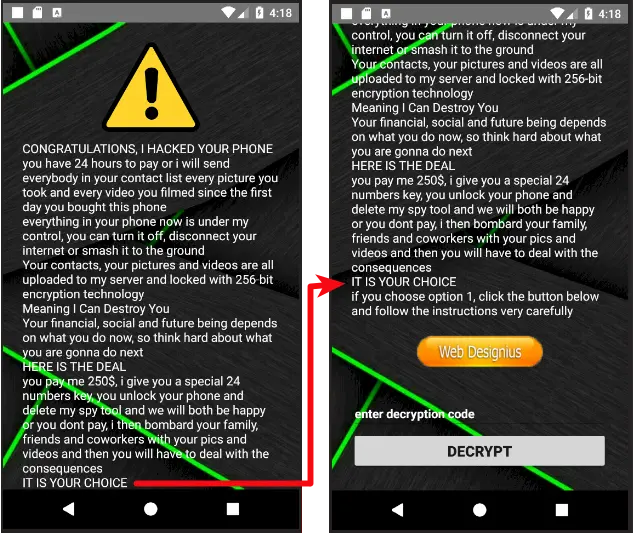 |
| Figure 5: CovidLock ransom note on a locked device |
Figure 6 shows the steps the victim must follow to pay the ransom and get a decryption key. It also shows the attacker's bitcoin address and email ID. We are keeping on eye on this and will post updates in the near future.
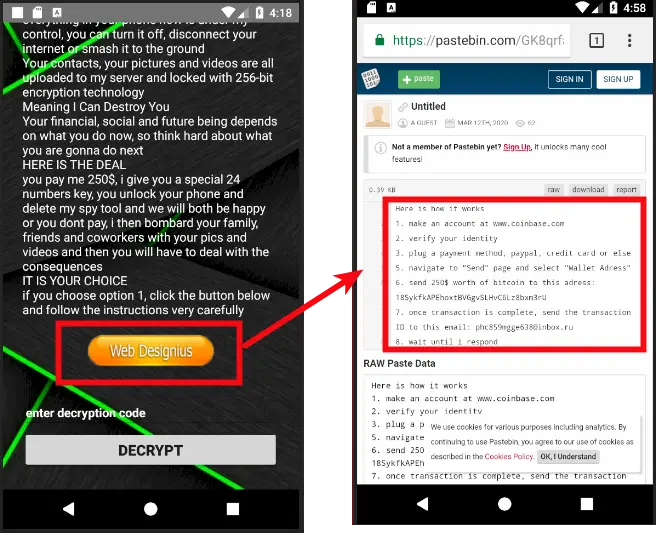 |
| Figure 6: Ransomware payment details |
We decided to look at the encryption protocol the attacker used to encrypt the files, to see if it was possible to decrypt them. To our surprise, the app turned out to be implementing very vague functionalities and, in reality, was not encrypting anything.
Looking at the AndroidManifest.xml file, we confirmed that the ransomware does not use the internet at all, and no traces of internet permissions were found during runtime. This leads us to two conclusions:
- The on-screen message claiming that the attacker has stolen personal data is completely false.
- If no direct communication encryption protocol is used, there has to be a simpler way to unlock the device.
The second conclusion led us to the unlocking functionality, where we found the hard-coded key to unlock the device. If you are the victim of this ransomware, use 4865083501 to unlock your device.
Figure 7 shows the verifyPin functionality.
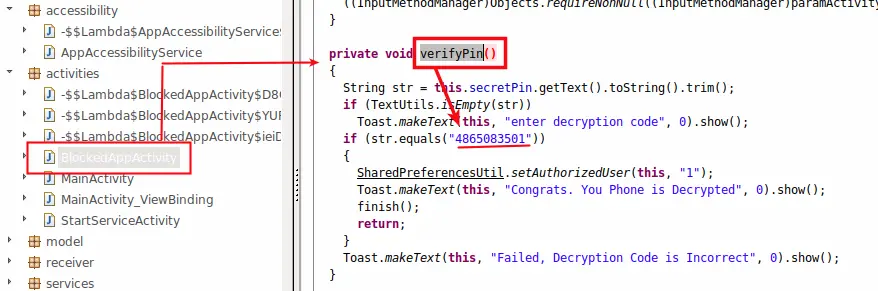 |
| Figure 7: The manual unlocking routine |
However, just unlocking the device isn't quite enough. We also noticed that the app was hiding in the entire process. Figure 8 shows the hiding functionality, which enables the app to hide its icon and delete its activity from the Recent Apps list.
 |
| Figure 8: The app attempting to hide |
It's crucial to remove the app from the app list on your Android device. To do this, simply go to Settings and open the application list. Coronavirus Tracker will be visible in the list as shown in Figure 9.
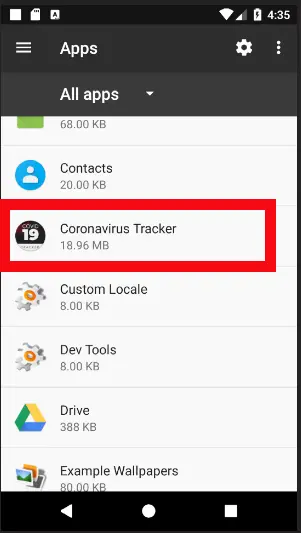 |
| Figure 9: Coronavirus Tracker in the installed apps list |
From here, you can easily uninstall the app. In some versions of Android, admin permissions will prevent you from removing the app directly. In this case, you'll need to revoke the app's permissions and then uninstall the app. This is where the Android Accessibility functionality would be used by attackers to keep the app persistent. But we did not find any such usage in this ransomware.
Conclusion
The world is in crisis amid the spread of the coronavirus, but attackers are always on the hunt to play on people's fears. In such times, it's important to take the utmost care while surfing online. Zscaler customers are safe from such fraud, and we always advise everyone to follow basic precautions:
- Only install apps from official app stores, such as the Google Play Store.
- Never click on unknown links received through ads, SMS messages, emails, etc.
- Never trust apps with claims that seem unrealistic. (Technology that can tell you when a coronavirus patient is near you doesn't yet exist.)
- Always keep the "Unknown Sources" option disabled on Android devices. This prevents apps from unknown sources from being installed on your device.