
We have previously released a number of browser security extensions to protect users against new threats and security issues, which we did not feel were addressed by anything previously available. Now I've focused my attention on a popular and useful security extension which has been missing on Internet Explorer. Internet Explorer is still the most popular browser in the enterprise, but its weak extension architecture makes it a rather difficult platform to work with. The first extension I wanted to offer to Internet Explorer users is HTTPS Everywhere from the Electronic Frontier Foundation.
HTTPS Everywhere redirects users to HTTPS URLs based on a set of rules. Switching from HTTP to HTTPS is still not as easy as it should be and many domains have not designed their websites to be accessed securely. I've explained some of the challenges in an earlier post.
The HTTPS Everywhere rules define which domain name can be accessed over HTTPS and how URLs need to be translated. For example, http://www.google.com/ should be translated into https://encrypted.google.com/. Some sections of websites may not be available over HTTPS and the rules take care of these exceptions.
HTTPS Everywhere also secures cookies according to rules, adding the secure attribute to cookies sent by the server. This ensures that any later access to the domains using HTTP (unsecure) will not leak sensitive information such as the session ID.
You can check the HTTPS Everywhere for Internet explorer page on the Zscaler website for updates.
HTTPS Everywhere
You can get a detailed explanation of the original extension on the EFF website. In summary, the extension forces a browser to use HTTPS (encrypted HTTP) whenever possible (e.g. when the website allows it).HTTPS Everywhere redirects users to HTTPS URLs based on a set of rules. Switching from HTTP to HTTPS is still not as easy as it should be and many domains have not designed their websites to be accessed securely. I've explained some of the challenges in an earlier post.
The HTTPS Everywhere rules define which domain name can be accessed over HTTPS and how URLs need to be translated. For example, http://www.google.com/ should be translated into https://encrypted.google.com/. Some sections of websites may not be available over HTTPS and the rules take care of these exceptions.
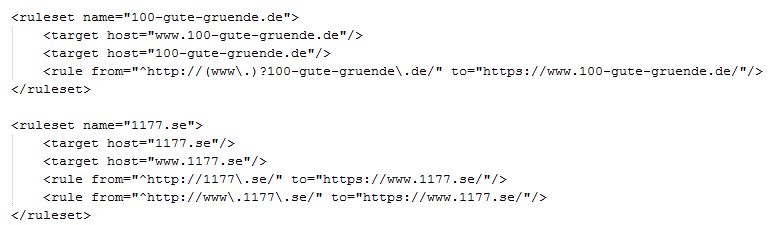 |
| Example of HTTPS Everywhere rules |
HTTPS Everywhere also secures cookies according to rules, adding the secure attribute to cookies sent by the server. This ensures that any later access to the domains using HTTP (unsecure) will not leak sensitive information such as the session ID.
HTTPS Everywhere for Internet Explorer
I'm very pleased to announce the release of HTTPS Everywhere for Internet Explorer 0.0.0.1. You can download it now at https://www.zscaler.com/research/plugins/ie/https-everywhere/https-everywhere.exe.Early release
As the version number suggests, this is a very early release. I have been using the extension for several weeks without any problems, but it should be considered an alpha release. Version 0.0.0.1 translates URLs from HTTP to HTTPS according to the EFF rules and secures cookies. It does not currently support HSTS, not does it provide support for custom rules.Requirements
The good news is that the extension works with pretty much all recent 32-bit versions of Internet Explorer:- Windows XP SP3 to Windows 8
- Internet Explorer 6 to 10
Install it
The extension comes with an installer. Simply download https-everywhere.exe and run it. Then make sure you restart Internet Explorer to enable the extension.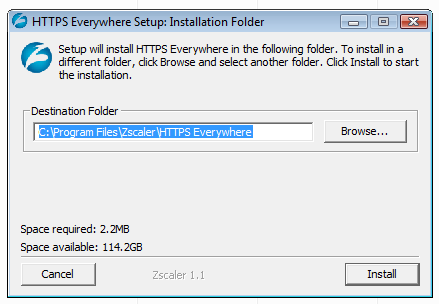 |
| HTTPS Everywhere installer |
Documentation
We have a detailed documentation available on our website. It details how the extension works and describes it's architecture. Some of the behaviors are not obvious, so I strongly suggest that you read it. The documentation will be updated as we release new versions of HTTPS Everywhere for Internet Explorer.Next
This is a very first release of HTTPS Everywhere and there will be many more to come. The first task on my todo list is to make the source code available on the EFF website. Then I'll add the features missing from the Firefox and Chrome versions, including HSTS support, custom rules, etc.You can check the HTTPS Everywhere for Internet explorer page on the Zscaler website for updates.