Zscaler 블로그
Zscaler 블로그의 최신 업데이트를 이메일로 받아보세요
DeepSeek Access Control: Enhancing Security with DeepSeek Application Blocking

DeepSeek is a new addition to the GenAI application landscape. While it offers powerful capabilities similar to other GenAI applications, its usage may pose significant risks if not properly monitored or restricted. These risks include:
- Data Leakage: Exposure of sensitive company intellectual property, such as source code.
- Compliance Risks: Unauthorized search or retrieval of regulated information, potentially violating compliance requirements.
To address these risks, organizations leveraging Zscaler can create and enforce a URL policy to block access to DeepSeek.
Steps to Block DeepSeek Using Zscaler URL Policy
1. Identify DeepSeek's URLs and Domains
- DeepSeek typically operates through specific URLs. Ensure you collect and validate the primary domains and subdomains associated with the application (e.g., www.deepseek.com , chat.deepseek.com , cdn.deepseek.com).
- Use Zscaler’s logs and analytics to monitor existing traffic patterns and verify user access attempts to DeepSeek-related URLs.
2. Create a Custom URL for the Application
Create a custom URL for Deepseek application. Please refer to this help article on how to configure custom URL
3. Create a URL Filtering Policy
- Create a URL & Cloud App Control settings,please refer to this help article on how to configure URL Policy.
4. Apply the Policy
- Save and activate the policy. This ensures immediate enforcement across all users routed through Zscaler’s Zero Trust Exchange platform
5. Test the Policy
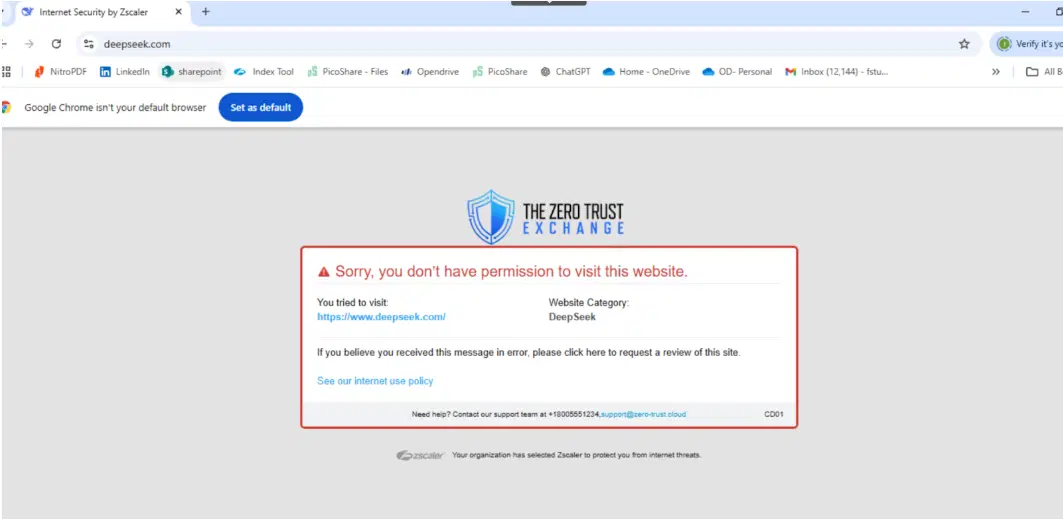
- Validate the implementation by attempting to access DeepSeek URLs from endpoints with traffic routed through the Zscaler Zero Trust Exchange. The requests should be blocked, accompanied by a notification message.
- Review Zscaler logs to confirm the policy's effectiveness.
6. Enable Alerts and Reporting
- Configure alerting to notify administrators when users attempt to access blocked DeepSeek URLs.
- Use Zscaler’s Analytic & reporting to monitor trends, such as repeated attempts to bypass the policy.
Additional Recommendations
- Educate Users: Communicate the rationale behind blocking DeepSeek to employees, emphasizing data protection and compliance.
- Monitor Exceptions: Regularly review and update policies to address exceptions or new risks as DeepSeek evolves.
- Integrate with Zscaler DLP: Enhance protection by integrating Zscaler’s policy enforcement with data loss prevention (DLP) solutions to control sensitive data interactions.
By leveraging Zscaler’s robust URL policy enforcement, organizations can mitigate the risks associated with DeepSeek while maintaining compliance and safeguarding sensitive information.

이 게시물이 도움이 되었나요?


면책 조항: 이 블로그 게시물은 정보 제공만을 목적으로 Zscaler에서 작성하였으며, 정확성, 완전성 또는 신뢰성에 대한 어떠한 보증도 없이 "있는 그대로" 제공됩니다. Zscaler는 제공된 정보를 기반으로 수행된 조치나 오류 또는 누락에 대해 어떠한 책임도 지지 않습니다. 이 블로그 게시물에 링크된 제3자 웹사이트나 리소스는 편의를 위해서만 제공되며, Zscaler는 해당 웹사이트의 콘텐츠나 관행에 대해 책임을 지지 않습니다. 모든 콘텐츠는 예고 없이 변경될 수 있습니다. 이 블로그에 접속함으로써 귀하는 본 약관에 동의하며 귀하의 필요에 따라 정보를 확인하고 사용할 전적인 책임이 귀하에게 있음을 인정합니다.