Zscaler Blog
Erhalten Sie die neuesten Zscaler Blog-Updates in Ihrem Posteingang
DeepSeek Access Control: Enhancing Security with DeepSeek Application Blocking

DeepSeek is a new addition to the GenAI application landscape. While it offers powerful capabilities similar to other GenAI applications, its usage may pose significant risks if not properly monitored or restricted. These risks include:
- Data Leakage: Exposure of sensitive company intellectual property, such as source code.
- Compliance Risks: Unauthorized search or retrieval of regulated information, potentially violating compliance requirements.
To address these risks, organizations leveraging Zscaler can create and enforce a URL policy to block access to DeepSeek.
Steps to Block DeepSeek Using Zscaler URL Policy
1. Identify DeepSeek's URLs and Domains
- DeepSeek typically operates through specific URLs. Ensure you collect and validate the primary domains and subdomains associated with the application (e.g., www.deepseek.com , chat.deepseek.com , cdn.deepseek.com).
- Use Zscaler’s logs and analytics to monitor existing traffic patterns and verify user access attempts to DeepSeek-related URLs.
2. Create a Custom URL for the Application
Create a custom URL for Deepseek application. Please refer to this help article on how to configure custom URL
3. Create a URL Filtering Policy
- Create a URL & Cloud App Control settings,please refer to this help article on how to configure URL Policy.
4. Apply the Policy
- Save and activate the policy. This ensures immediate enforcement across all users routed through Zscaler’s Zero Trust Exchange platform
5. Test the Policy
- Validate the implementation by attempting to access DeepSeek URLs from endpoints with traffic routed through the Zscaler Zero Trust Exchange. The requests should be blocked, accompanied by a notification message.
- Review Zscaler logs to confirm the policy's effectiveness.
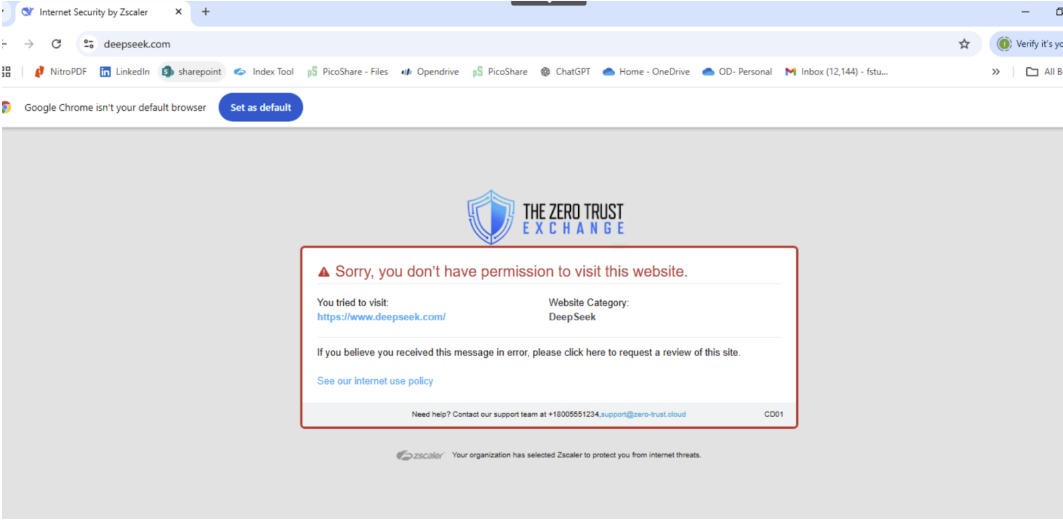
6. Enable Alerts and Reporting
- Configure alerting to notify administrators when users attempt to access blocked DeepSeek URLs.
- Use Zscaler’s Analytic & reporting to monitor trends, such as repeated attempts to bypass the policy.
Additional Recommendations
- Educate Users: Communicate the rationale behind blocking DeepSeek to employees, emphasizing data protection and compliance.
- Monitor Exceptions: Regularly review and update policies to address exceptions or new risks as DeepSeek evolves.
- Integrate with Zscaler DLP: Enhance protection by integrating Zscaler’s policy enforcement with data loss prevention (DLP) solutions to control sensitive data interactions.
By leveraging Zscaler’s robust URL policy enforcement, organizations can mitigate the risks associated with DeepSeek while maintaining compliance and safeguarding sensitive information.

War dieser Beitrag nützlich?


Haftungsausschluss: Dieser Blog-Beitrag wurde von Zscaler ausschließlich zu Informationszwecken erstellt und wird ohne jegliche Garantie für Richtigkeit, Vollständigkeit oder Zuverlässigkeit zur Verfügung gestellt. Zscaler übernimmt keine Verantwortung für etwaige Fehler oder Auslassungen oder für Handlungen, die auf der Grundlage der bereitgestellten Informationen vorgenommen werden. Alle in diesem Blog-Beitrag verlinkten Websites oder Ressourcen Dritter werden nur zu Ihrer Information zur Verfügung gestellt, und Zscaler ist nicht für deren Inhalte oder Datenschutzmaßnahmen verantwortlich. Alle Inhalte können ohne vorherige Ankündigung geändert werden. Mit dem Zugriff auf diesen Blog-Beitrag erklären Sie sich mit diesen Bedingungen einverstanden und nehmen zur Kenntnis, dass es in Ihrer Verantwortung liegt, die Informationen zu überprüfen und in einer Ihren Bedürfnissen angemessenen Weise zu nutzen.
Weitere Zscaler-Blogs erkunden

New AI Innovations That Supercharge Data Protection

Ready for Microsoft Copilot? Chances Are Your Data Isn’t.

An Integrated Solution to Distributed Data Protection
Erhalten Sie die neuesten Zscaler Blog-Updates in Ihrem Posteingang

Mit dem Absenden des Formulars stimmen Sie unserer Datenschutzrichtlinie zu.