Zscaler 部落格
訂閱 Zscaler 部落格,第一時間獲取最新資訊!
DeepSeek Access Control: Enhancing Security with DeepSeek Application Blocking

DeepSeek is a new addition to the GenAI application landscape. While it offers powerful capabilities similar to other GenAI applications, its usage may pose significant risks if not properly monitored or restricted. These risks include:
- Data Leakage: Exposure of sensitive company intellectual property, such as source code.
- Compliance Risks: Unauthorized search or retrieval of regulated information, potentially violating compliance requirements.
To address these risks, organizations leveraging Zscaler can create and enforce a URL policy to block access to DeepSeek.
Steps to Block DeepSeek Using Zscaler URL Policy
1. Identify DeepSeek's URLs and Domains
- DeepSeek typically operates through specific URLs. Ensure you collect and validate the primary domains and subdomains associated with the application (e.g., www.deepseek.com , chat.deepseek.com , cdn.deepseek.com).
- Use Zscaler’s logs and analytics to monitor existing traffic patterns and verify user access attempts to DeepSeek-related URLs.
2. Create a Custom URL for the Application
Create a custom URL for Deepseek application. Please refer to this help article on how to configure custom URL
3. Create a URL Filtering Policy
- Create a URL & Cloud App Control settings,please refer to this help article on how to configure URL Policy.
4. Apply the Policy
- Save and activate the policy. This ensures immediate enforcement across all users routed through Zscaler’s Zero Trust Exchange platform
5. Test the Policy
- Validate the implementation by attempting to access DeepSeek URLs from endpoints with traffic routed through the Zscaler Zero Trust Exchange. The requests should be blocked, accompanied by a notification message.
- Review Zscaler logs to confirm the policy's effectiveness.
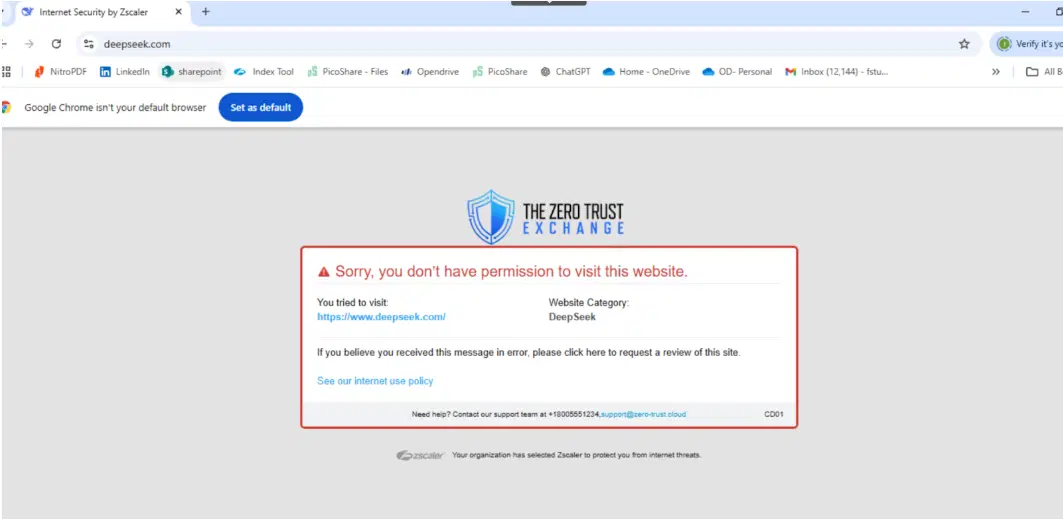
6. Enable Alerts and Reporting
- Configure alerting to notify administrators when users attempt to access blocked DeepSeek URLs.
- Use Zscaler’s Analytic & reporting to monitor trends, such as repeated attempts to bypass the policy.
Additional Recommendations
- Educate Users: Communicate the rationale behind blocking DeepSeek to employees, emphasizing data protection and compliance.
- Monitor Exceptions: Regularly review and update policies to address exceptions or new risks as DeepSeek evolves.
- Integrate with Zscaler DLP: Enhance protection by integrating Zscaler’s policy enforcement with data loss prevention (DLP) solutions to control sensitive data interactions.
By leveraging Zscaler’s robust URL policy enforcement, organizations can mitigate the risks associated with DeepSeek while maintaining compliance and safeguarding sensitive information.


免責聲明:本部落格文章由 Zscaler 製作,僅供資訊參考,並以「現狀」提供,不保證其準確性、完整性或可靠性。Zscaler 對任何錯誤或遺漏,或基於所提供的資訊而採取的任何行動不承擔任何責任。本部落格文章中連結的任何第三方網站或資源僅為方便起見而提供,Zscaler 對其內容或做法概不負責。所有內容如有變更,恕不另行通知。存取此部落格,即表示您同意這些條款,並承認您有責任自行驗證並根據您的需求適當使用資訊。