Zscalerのブログ

Zscalerの最新ブログ情報を受信

Security Research

Malware Distribution Using Fake YouTube Pages

image
THREATLABZ
July 26, 2011 - 2 分で読了
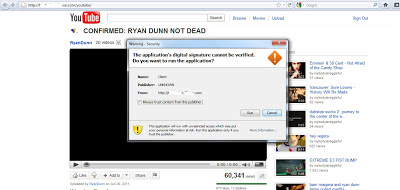
Attackers often create fake YouTube pages in an effort to lure a victim into downloading malicious binaries. During our research, we recently found an example of such a site. When a victim visits the page, a security warning will pop up saying “The application’s digital signature cannot be verified. Do you want to run the application?”. Should a victim accept the prompts, they will download and run a malicious binary on their system. Here is a screenshot of the page:

Image


The page is designed to mimic the YouTube service. If however you inspect the source code of this page, you can identify the malicious binary behind this attack. Here is what the source code looks like:
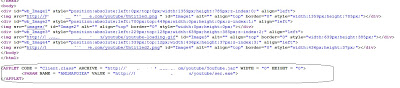
 

Image


The webpage includes a Java applet that runs a “YouTube.jar” file, which will then download “ser.exe” from the server. If you visit the homepage of above site, you will also see a separate Java applet being combined with VBScript to download and run the same malicious binary with a slightly different name “serv.exe”, which will later saved as “update.exe”. Here is screenshot of that script:
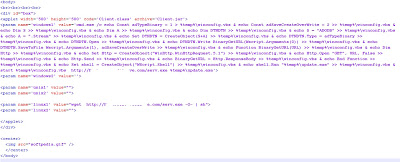
 

Image


While the malicious files are currently detected by some antivirus products, the malicious website is not blocked by Google Safe Browsing. It is never advisable to download or run any executable from an untrusted source unfortunately, this relatively simple social engineering technique clearly still works.


Umesh

form submtited
お読みいただきありがとうございました

このブログは役に立ちましたか?

免責事項:このブログは、Zscalerが情報提供のみを目的として作成したものであり、「現状のまま」提供されています。記載された内容の正確性、完全性、信頼性については一切保証されません。Zscalerは、ブログ内の情報の誤りや欠如、またはその情報に基づいて行われるいかなる行為に関して一切の責任を負いません。また、ブログ内でリンクされているサードパーティーのWebサイトおよびリソースは、利便性のみを目的として提供されており、その内容や運用についても一切の責任を負いません。すべての内容は予告なく変更される場合があります。このブログにアクセスすることで、これらの条件に同意し、情報の確認および使用は自己責任で行うことを理解したものとみなされます。

Zscalerの最新ブログ情報を受信

このフォームを送信することで、Zscalerのプライバシー ポリシーに同意したものとみなされます。