While the number of threats targeting mobile devices is increasing, web browsers for mobile devices are still lacking the security features of their Desktop counterparts. For example, Firefox 4 Mobile (also known as Fennec), does not include Google Safe Browsing to prevent users from navigating to known malicious sites.
Zscaler has released 3 Firefox add-ons to protect users, such as Search Engine Security, BlackSheep and Zscaler Safe Shopping. I have now ported Search Engine Security to the mobile version of Firefox 4, and will release Zscaler Safe Shopping for mobile devices later on.

Search Engine Security
The add-on behaves the same as the desktop version. It protects users from malicious search results in Google, Bing and Yahoo!, by modifying the Referer and User Agent headers, when the users leave these sites.
You can turn enable/disable Search Engine Security for any specific search engine. The add-on will show it's status in the search results.
The settings are the same as those used for the desktop version. You can specify which Referer header to use (none by default) and whether or not to modify the user agent (choose Yes for better protection). Because of restrictions in Firefox Mobile, the allowlist, used to prevent header changes for particular sites, is restricted to a single URL.
How to test it
Search Engine Security works transparently and most users will not notice the change of HTTP headers. The equivalent of Live HTTP Headers for Fireofx Mobile is Mobile Tools. Unfortunately, this extension shows HTTP before they are modified by Search Engine Security. To see the changed Referer and User Agent headers, look for "referer mobilefish" in Google. Click on the first search result. The page from mobilefish.com shows your User Agent string as well as Referer. You can try it with Search Engine Security truned on and off for Google to see the different values.
Don't forget to restart Firefox after you install this add-on. It does not yet take advantage of the restartless feature introduced in Firefox 4.

-- Julien
Zscaler has released 3 Firefox add-ons to protect users, such as Search Engine Security, BlackSheep and Zscaler Safe Shopping. I have now ported Search Engine Security to the mobile version of Firefox 4, and will release Zscaler Safe Shopping for mobile devices later on.
Search Engine Security
The add-on behaves the same as the desktop version. It protects users from malicious search results in Google, Bing and Yahoo!, by modifying the Referer and User Agent headers, when the users leave these sites.
You can turn enable/disable Search Engine Security for any specific search engine. The add-on will show it's status in the search results.
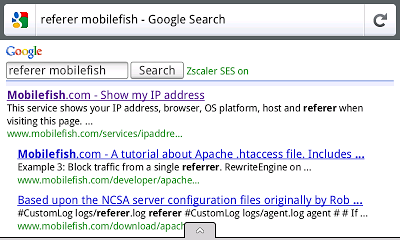 |
| Search Engine Security protection for Google |
The settings are the same as those used for the desktop version. You can specify which Referer header to use (none by default) and whether or not to modify the user agent (choose Yes for better protection). Because of restrictions in Firefox Mobile, the allowlist, used to prevent header changes for particular sites, is restricted to a single URL.
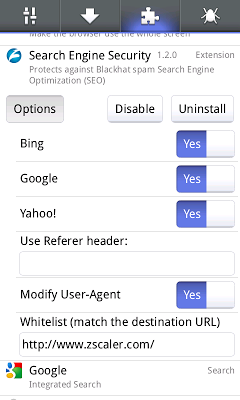 |
| Search Engine Security options for Mobile |
Search Engine Security works transparently and most users will not notice the change of HTTP headers. The equivalent of Live HTTP Headers for Fireofx Mobile is Mobile Tools. Unfortunately, this extension shows HTTP before they are modified by Search Engine Security. To see the changed Referer and User Agent headers, look for "referer mobilefish" in Google. Click on the first search result. The page from mobilefish.com shows your User Agent string as well as Referer. You can try it with Search Engine Security truned on and off for Google to see the different values.
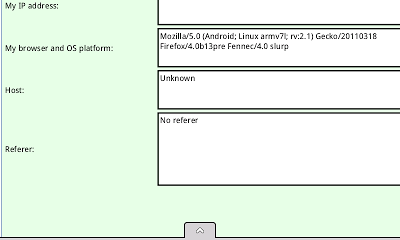 |
| User Agent and Referer headers modified by Search Engine Security |
Don't forget to restart Firefox after you install this add-on. It does not yet take advantage of the restartless feature introduced in Firefox 4.
-- Julien