While large blobs of obfuscated JavaScript at the top of the page are easy to spot, malicious JavaScript can often be hard to spot on hijacked sites. Some attackers go to great lengths to make their malicious code invisible to webmasters and security tools alike. In this post, I'll illustrate some of the places more commonly used to hide code and just how to spot them.
Source
Most malicious JavaScript is pulled from a different domain other than the hijacked page. One of the first things I look for is the list of JavaScript files pulled from external domains. For example, hxxp://kelly-monaco.org/ contained a script pulled from inforaf.vot.pl that turned out to be malicious.
A page may contain many external JavaScript sources including, frameworks (jQuery, Prototype, etc.) a CDN, statistics (Google Analytics, counters, etc.), widgets, etc.
Location
Another good clue is the location of the script tag on the page. The attackers might be lazy and put the script tag at the very top or very bottom of the page. Always look at scripts placed before the opening HTML tag, or after the ending BODY tag.
There are other places where a SCRIPT tag should not be found, for example, inside a TITLE tag.
Coding Style
When I analyze a page, I also look for different coding styles. For example, if a webmaster uses double quotes around tag attributes, I would then look for a SCRIPT tag with single quotes, or no quotes at all. Similarly, the webmaster might use the type and language attributes. Any SCRIPT tag that uses a different coding style would raise a red flag.
Well hidden
Here are some examples of very well hidden pieces of JavaScript that I've encountered. In the first example, the website is using vBulletin, an open-source forum application. All vBulletin pages contain inline JavaScript to call vBulletin_init(). The attacker inserted his JavaScript between the original JavaScript command, and the function call:
A malicious piece of code can also be inserted inside an existing legitimate JavaScript file on a hijacked site:
An even more tricky spot to identify, but one more rarely used, is the insertion of malicious JavaScript inside a CSS style using expression():
These techniques are even combined with other tricks to deliver code directed only at specific users, such as IP denylisting to block security scanners, cookies to prevent viewing the page twice, looking at the Referer tag to show the malicious code to users from specific sites, etc. The same page often has to be accessed in many different ways by security scanners to ensure that it is safe.
Source
Most malicious JavaScript is pulled from a different domain other than the hijacked page. One of the first things I look for is the list of JavaScript files pulled from external domains. For example, hxxp://kelly-monaco.org/ contained a script pulled from inforaf.vot.pl that turned out to be malicious.
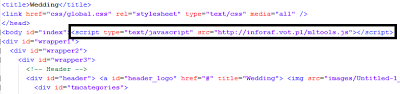 |
| Malicious external JavaScript |
Location
Another good clue is the location of the script tag on the page. The attackers might be lazy and put the script tag at the very top or very bottom of the page. Always look at scripts placed before the opening HTML tag, or after the ending BODY tag.
 |
| http://www.china-crb.cn/ |
Coding Style
When I analyze a page, I also look for different coding styles. For example, if a webmaster uses double quotes around tag attributes, I would then look for a SCRIPT tag with single quotes, or no quotes at all. Similarly, the webmaster might use the type and language attributes. Any SCRIPT tag that uses a different coding style would raise a red flag.
Well hidden
Here are some examples of very well hidden pieces of JavaScript that I've encountered. In the first example, the website is using vBulletin, an open-source forum application. All vBulletin pages contain inline JavaScript to call vBulletin_init(). The attacker inserted his JavaScript between the original JavaScript command, and the function call:
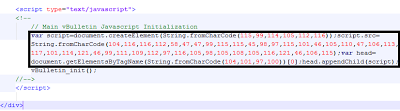 |
| http://theexerciseblog.com/ |
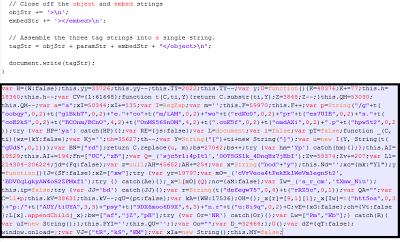 |
| Malicious code appended to AC_RunActiveContent.js |
An even more tricky spot to identify, but one more rarely used, is the insertion of malicious JavaScript inside a CSS style using expression():
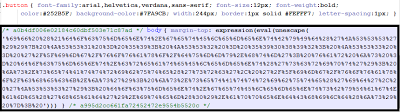 |
| Malicious JavaScript in a style-sheet |
These techniques are even combined with other tricks to deliver code directed only at specific users, such as IP denylisting to block security scanners, cookies to prevent viewing the page twice, looking at the Referer tag to show the malicious code to users from specific sites, etc. The same page often has to be accessed in many different ways by security scanners to ensure that it is safe.