Many web-based attacks try to fool the users into installing a malicious executable by faking a native application: fake AV, fake Flash updates, etc. These pages are well designed, but you can always tell it is not a native application running.
In a previous post, I described the ClickOnce deployment for Internet Explorer. ClickOnce is a a way to easily deploy applications on Windows computers. When a user clicks on a link that points to a ClikckOnce deployment, a new popup is opened. This popup is very different from any popup or window opened by Internet Explorer. If the user clicks on Install, the executable is downloaded and executed in a single step, without a way to cancel the installation at any point.
If the user minimizes the browser, the popup remains visible on the screen. The ClickOnce popup is a native application and it is therefore independent from the browser.
ClickOnce would provide a great opportunity to trick Internet Explorer users into installing software. There are three fields displayed in the popup and they can all be abused to look like the user is going to install legitimate software from a legitimate vendor:
In a previous post, I described the ClickOnce deployment for Internet Explorer. ClickOnce is a a way to easily deploy applications on Windows computers. When a user clicks on a link that points to a ClikckOnce deployment, a new popup is opened. This popup is very different from any popup or window opened by Internet Explorer. If the user clicks on Install, the executable is downloaded and executed in a single step, without a way to cancel the installation at any point.
If the user minimizes the browser, the popup remains visible on the screen. The ClickOnce popup is a native application and it is therefore independent from the browser.
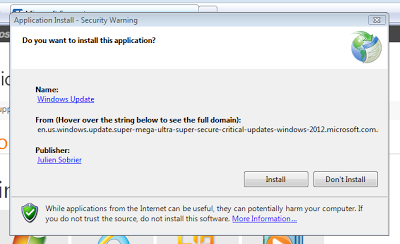 |
| ClickOnce popup |
- Name: Supposed to be the name of the software being installed. In my example, I set it to 'Windows Update'.
- From: Domain where the software will be downloaded from. The space is limited. Although the most important part of a domain is on the right side (TLD and top-domain), the right side is actually truncated. Use a very long domain, as I did in the example shown and it looks like the software is hosted on a sub-domain of microsoft.com (click on the image above to get a bigger version, and check the From domain).
- Publisher: Who created the software. The Publisher is taken from the code signing certificate that was used to sign the ClickOnce deployment. An attacker can use a legitimate certificate with a name that sounds legitimate, or use a stolen code signing certificate (like Flamer). A self-signed certificate can be used to get the Publisher name as Microsoft, for example, but a red warning would be shown on the popup. Unfortunately, the red shield warning may not adequately scare users away...