Zscaler 部落格
訂閱 Zscaler 部落格,第一時間獲取最新資訊!
We Smell a RAT: Detecting a Remote Access Trojan That Snuck Past a User

This article was originally published by Red Canary, which is now part of Zscaler.
You can have the best firewalls and perimeter defenses in place, but if your users aren’t aware of phishing techniques and malicious email attachments, it can be your undoing. Today we’re going to break down an attack that we detected for a Red Canary customer in which a malicious executable was renamed to look like an important document. While it’s not a groundbreaking phishing technique, it’s still pervasive; important documents and invoices are the two most common disguises that attackers use to distribute malware via email.
The payload of this attack was the Adwind Remote Access Trojan (RAT). Adwind is a paid malware platform that allows attackers to log keystrokes, steal passwords, capture webcam video, and more. Nasty stuff, for sure. Let’s break down what happened when the victim downloaded a so-called “important document” containing the Adwind RAT. We’ll use telemetry from the attack to illustrate its progression.
Sniffing Out a RAT: Threat Detection Timeline
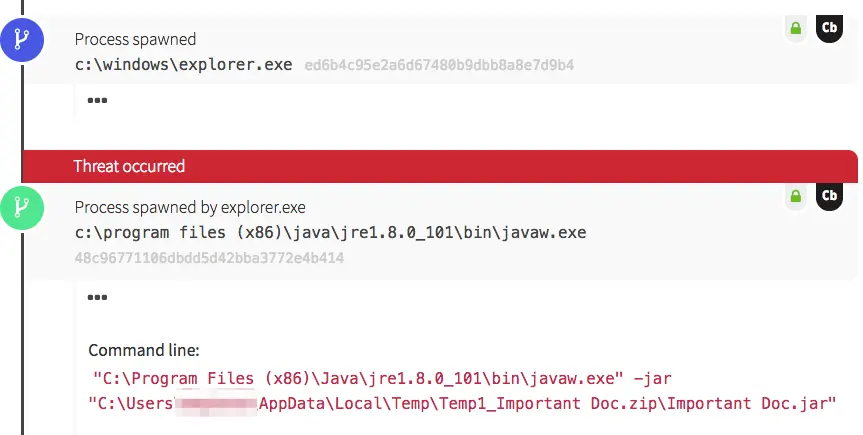
Pre-installed Java on this endpoint was used to open the “Important Doc” executable file, which was hidden in a zip archive of the same name. The file was stored within the user’s AppData directory: a common location for attackers to use for malicious files. Since AppData is owned by the user, an attacker doesn’t need to have Administrator privileges in order to write files there. In addition, many legitimate applications launch processes from AppData, so the file location alone isn’t likely to raise many red flags to defenders. Once Windows Explorer kicked off, both Java and the malicious executable were run. That’s when things started to get interesting. Within seconds, the RAT established persistence and began to install additional packages to support its surveillance capabilities.
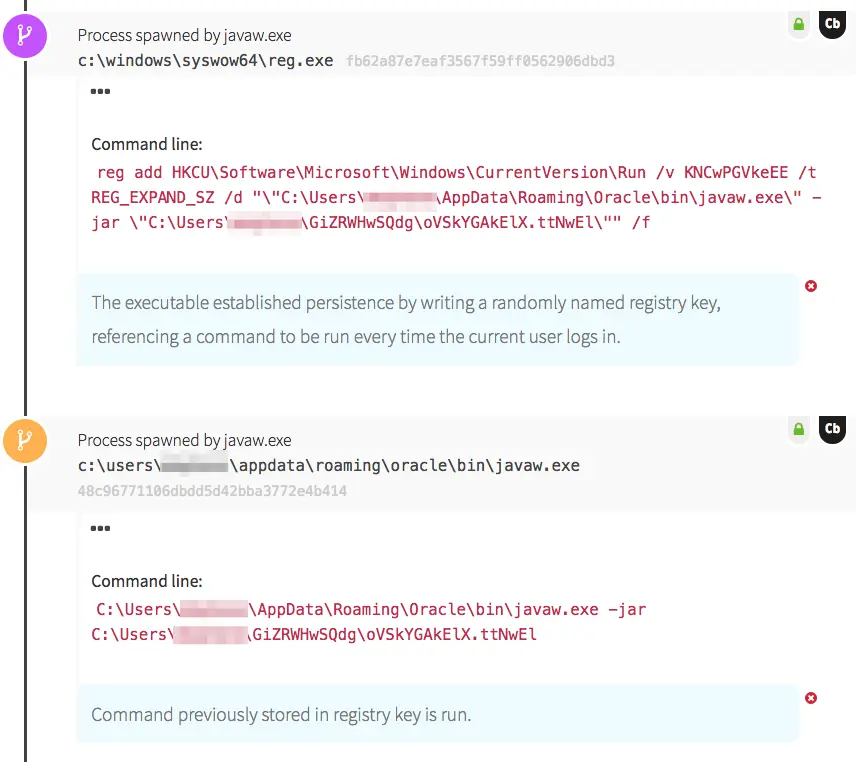
In this case, the Adwind RAT established persistence through use of a registry key. The java file wrote a randomly named registry key to HKCU\Software\Microsoft\Windows\CurrentVersion\Run, designed to ensure the malware is launched every time the user logs in. The new registry key referenced another java executable, stored under the user profile. Java then ran the executable and proceeded to write more files to disk, which is where we witnessed the RAT building capabilities to implement later.
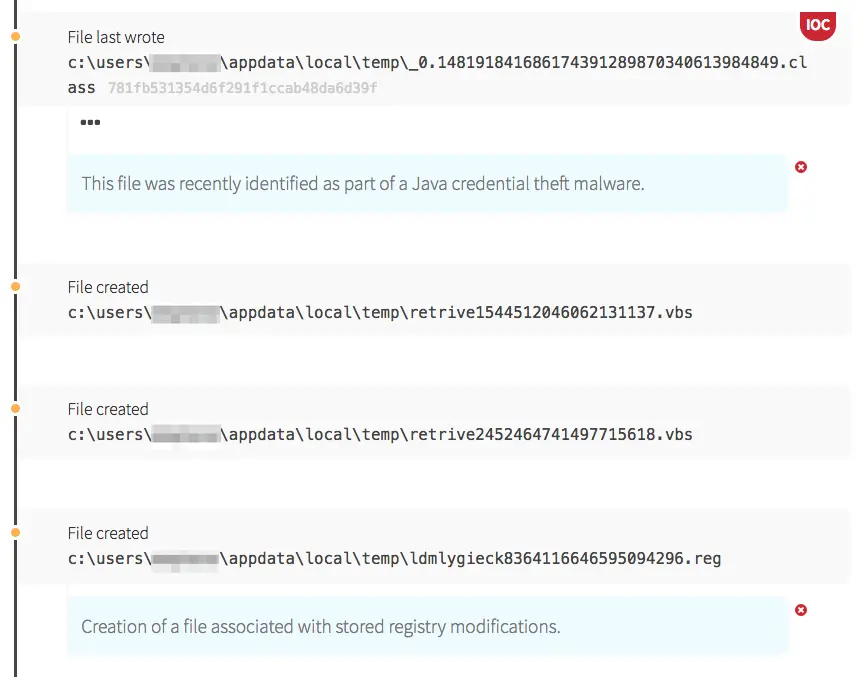
The first additional capability we saw was credential theft. The Java executable wrote a class file to disk containing the ability to steal usernames and passwords from the endpoint and send them back to the attacker. A Registration Entry file (.reg) was also written to disk; once launched, its contents will be written directly to the Windows registry.
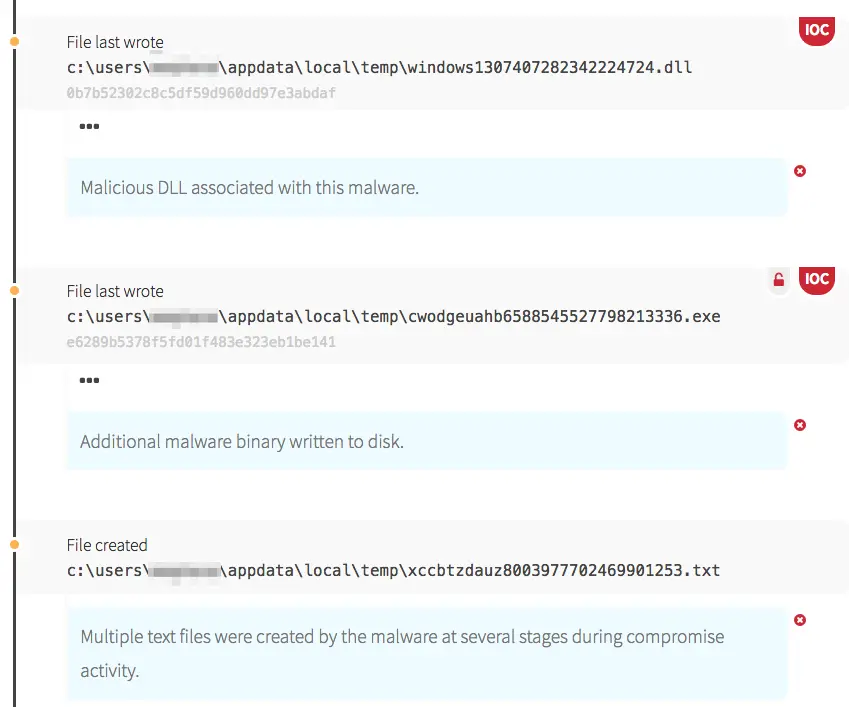
A few more malicious files and binaries were stored on the endpoint before the install phase was complete. The first DLL file above is a part of the Adwind backdoor itself. The EXE file is a password dumping tool, used to harvest credentials from the victim machine.
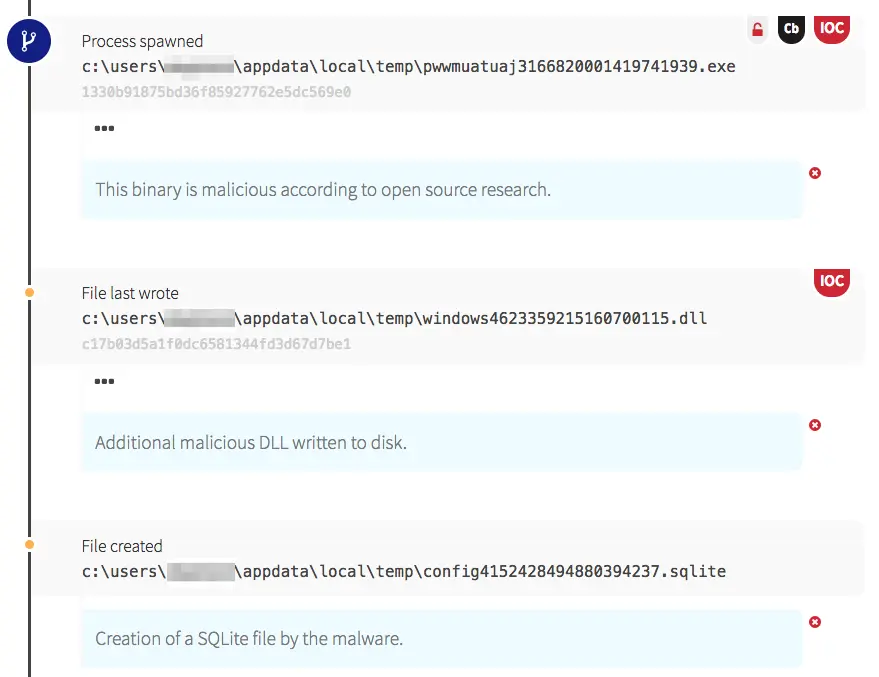
Thankfully, this RAT never made it past the installation phase. Red Canary quickly notified our customer’s security team of the infection, enabling them to remove it from that endpoint before any additional surveillance occurred or it spread across the network.
Key Takeaways
Malware platforms such as Adwind RAT make it increasingly easy for attackers to target unsuspecting users. For these adversaries, it’s a numbers game, and phishing provides a very effective way to achieve exploitation. In an ideal world, all users would be fully aware of the dangers of downloading suspicious email attachments, but no phishing mitigation is completely foolproof. Every organization faces a high likelihood of a compromise at some point, regardless of the preventive tools and educational measures they put in place. Endpoint visibility and a robust Endpoint Detection and Response (EDR) capability remain the best way to sniff out a RAT and find intruders who have successfully targeted users in your organization.
To learn about a new phishing attack we detected, read: Credential Harvesting on the Rise
Note: An earlier version of this post incorrectly referenced Internet Explorer as opposed to Windows Explorer. Thanks to our observant readers.


免責聲明:本部落格文章由 Zscaler 製作,僅供資訊參考,並以「現狀」提供,不保證其準確性、完整性或可靠性。Zscaler 對任何錯誤或遺漏,或基於所提供的資訊而採取的任何行動不承擔任何責任。本部落格文章中連結的任何第三方網站或資源僅為方便起見而提供,Zscaler 對其內容或做法概不負責。所有內容如有變更,恕不另行通知。存取此部落格,即表示您同意這些條款,並承認您有責任自行驗證並根據您的需求適當使用資訊。