Zscaler 部落格
訂閱 Zscaler 部落格,第一時間獲取最新資訊!
Uncompromised: Halting a hospital ransomware attack

Encoded PowerShell commands and Cobalt Strike beacons led us to detect and ultimately prevent a potential ransomware attack at a major hospital
This article was originally published by Red Canary, which is now part of Zscaler.
Late on a weekend night in June 2024, Red Canary detected pre-ransomware activity at a busy city hospital. Working in close conjunction with hospital IT and security staff, our team and theirs managed to prevent a potential ransomware attack in a matter of minutes.
In this blog, we tell the story of what happened and how we were able to work with security and IT staff at the hospital to rapidly respond to what otherwise might have been a critical security incident affecting patient care. We also offer detection guidance that may help other organizations prevent and respond to similar incidents.
The detection
It was Sunday night when the Red Canary security operations center (SOC) detected suspicious PowerShell activity spawning from an apparent webshell on an Exchange server at the hospital.
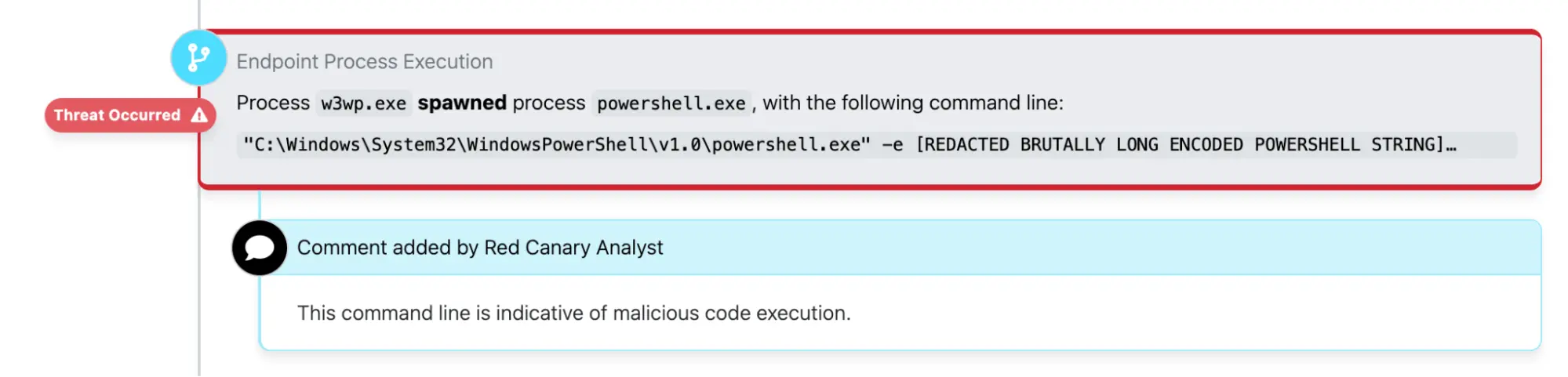
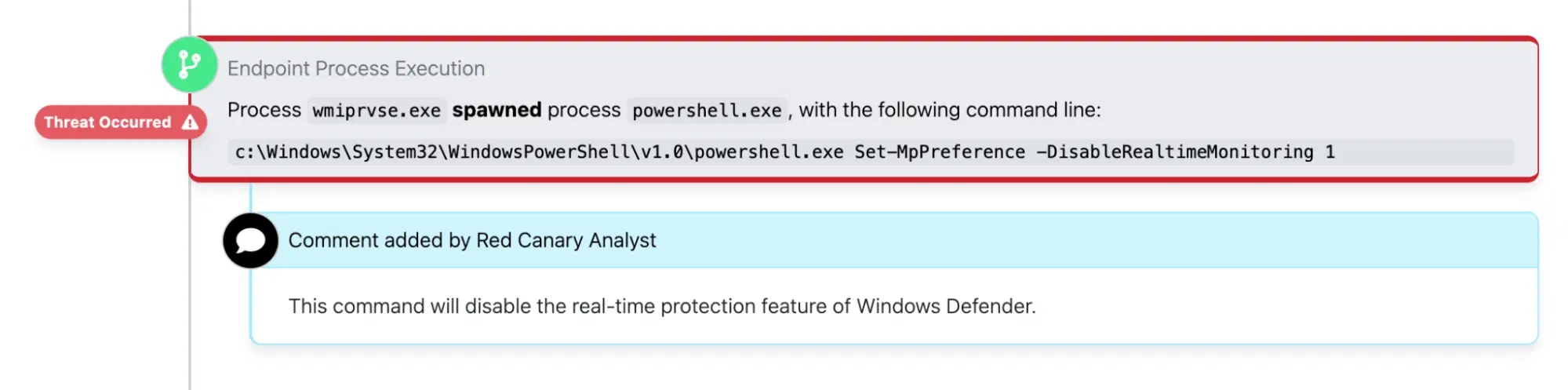
Within minutes, the adversary, who had compromised a Microsoft Azure administrative account at the organization, moved laterally to a pair of separate servers and leveraged PowerShell to disable Windows Defender’s real-time monitoring features.
They subsequently ran additional encoded PowerShell commands and eventually leveraged Cobalt Strike to install beacons on the affected servers.
It was immediately apparent that the adversary was staging the environment for a ransomware attack and attempting to exfiltrate sensitive information, potentially for the purpose of extorting the victim by threatening to leak their data in addition to encrypting it.
The response
Within 15 minutes of the webshell becoming active, Red Canary’s detection engineers had published a detection notifying the customer of what appeared to be rapidly moving Cobalt Strike activity, a common precursor to ransomware infections. PowerShell was making outbound network connections to a command and control (C2) server, the IP address of which had been previously and publicly associated with Cobalt Strike.
We worked with the hospital to isolate the affected servers and disable the compromised Azure admin account. However, isolating those servers and disabling the affected identity wasn’t enough to guarantee that the incident was resolved. The organization needed to ensure that there was no outbound network activity reaching out a C2 server to download additional payloads. However, they also needed their network to remain functional so they could continue providing patient care.
Isolating those servers and disabling the affected identity wasn’t enough to guarantee that the incident was resolved.
They took decisive action to sever their network from the external internet by disabling their firewalls. This effectively revoked the adversary’s access to the organization’s network while maintaining intranet access within that hospital that would allow them to continue their normal business operations relatively unhindered.
From there, we worked with the organization to implement conditional access policies that would prevent the adversary from leveraging compromised identities to access their cloud infrastructure and other parts of their IT environment.
Detection opportunities
The following section includes a non-comprehensive list of pseudo detection analytics that may be helpful for detecting some of the behaviors described above.
PowerShell disabling Windows Defender
The adversary leveraged the Set-MpPreference PowerShell cmdlet to disable Windows Defender security features. The following can help you detect one variation of this. Review detection guidance in the PowerShell section of the Threat Detection report for more detailed guidance.
process == powershell.exe
&&
command_line_includes (Set-MpPreference' && 'DisableRealTimeMonitoring)
The following Atomic Red Team test may be helpful for emulating and testing your ability to detect Windows Defender manipulation:
Various PowerShell encoding methods
The adversary also leveraged numerous methods for encoding malicious PowerShell commands. Again, you can find additional guidance on how to detect this in the PowerShell and Obfuscated Files or Information sections of the Threat Detection Report.
process == powershell.exe
&&
command_line_includes (-bxor || base64) || command_line_includes (.io && stream && decompress && frombase64string)
The following Atomic Red Team test may be helpful for emulating and testing your ability to detect encoded PowerShell commands:
Windows web server process spawning cmd.exe
Early in the intrusion, the adversary leveraged a webshell to execute follow-on commands. One of our most reliable detection analytics for catching webshell activity involves looking for instances of the Windows Worker Process (w3wp.exe) spawning the command processor (cmd.exe), which then leverages net commands to conduct reconnaissance.
parent_process == w3wp.exe
&&
process == cmd.exe
&&
child_process == net.exe
Conclusion
Detecting ransomware precursor activity early continues to be one of the most effective strategies for preventing ransomware infections. In this case, our broad detection coverage for ransomware precursors—along with a great deal of smart and decisive action from individuals in our SOC and staff at the hospital—averted a potentially significant incident that could have had serious, real-world consequences. We read and hear about ransomware incidents affecting hospitals all the time, and we’re proud to share a story where security controls and incident response plans conspired to prevent one.
NIPPING RANSOMWARE IN THE BUD


免責聲明:本部落格文章由 Zscaler 製作,僅供資訊參考,並以「現狀」提供,不保證其準確性、完整性或可靠性。Zscaler 對任何錯誤或遺漏,或基於所提供的資訊而採取的任何行動不承擔任何責任。本部落格文章中連結的任何第三方網站或資源僅為方便起見而提供,Zscaler 對其內容或做法概不負責。所有內容如有變更,恕不另行通知。存取此部落格,即表示您同意這些條款,並承認您有責任自行驗證並根據您的需求適當使用資訊。