
What’s the productivity tool used most by businesses? You don’t have to think much to realize it’s the web browser. Employees use web browsers to get work done on all devices, managed or unmanaged
This being the case, expectations have been heightened for what we can and should expect from web browsers. Namely, can they play a larger role in enterprise security without adding complexity or additional vendors to manage?
We’ve pondered this question at length. How can an enterprise see an instant productivity increase from newly-acquired employees working on unmanaged devices? Can browsers protect enterprise data according to an organization’s specific data protection policies? Can browser logs feed into SIEM tools for security visibility? How does VDI still fit into the picture, if at all?
Expectations and use case requirements for browsers are higher and more complicated than they’ve ever been, which is why we continue to innovate our Zscaler Browser Isolation™ product, delivering market-leading capabilities and dynamic security, wherever users work from. Let’s review the capabilities of Browser Isolation and how they help organizations stop threats, protect data, and improve productivity—without the need to deploy a VDI or separate enterprise browser.
Use case: Cyberthreat protection
Zscaler makes use of AI to make Isolation more intelligent, so we can innovate beyond a binary security approach. In years past, organizations didn’t have the luxury of granular security. They were given two choices: block or allow.. With our intelligent Browser Isolation, you can automatically detect potentially risky pages (for instance, a newly registered domain, or a policy-permitted web page that could be compromised via a malicious iFrame) and open them in isolation. This removes the need to grant too little or too much access to websites that could result in help desk tickets from employees.
Browser Isolation now fully integrates with our cloud sandbox to thread the needle between productivity and security. Additionally, this integration delivers broad protections from both web and file-based attacks. With this integration, employees gain immediate access to a flattened PDF version of the never-before-seen file in Browser Isolation while the file is detonated in the sandbox. The platform will handle all the file types you would expect, including archives and password-protected files. Once we get a verdict from the sandbox, the employee can access the original file, however if the file is deemed malicious, they’ll continue to view the PDF version.
Use case: Data security
Data is the lifeblood of enterprises and must be protected at all costs. This is why Browser Isolation has long offered a full suite of data exfiltration tools that block uploads/downloads and printing, prevent use of the clipboard (“copy/paste” can be an unsuspecting data exfil tool), watermarking to discourage screenshots, and read-only PDF document access, as mentioned above with our sandbox integration. We also have integrated protected storage to allow files to be kept temporarily for the duration of the session for productivity.
What’s more, Browser Isolation is fully integrated with our data loss prevention suite. All isolation sessions are protected by DLP, meaning sensitive data will never be permitted to leave a device.
Use case: BYOD and unmanaged devices
More and more organizations have realized they have more options than VDI for extending application access to contractors, third-party workers, or anyone working on a BYOD device.
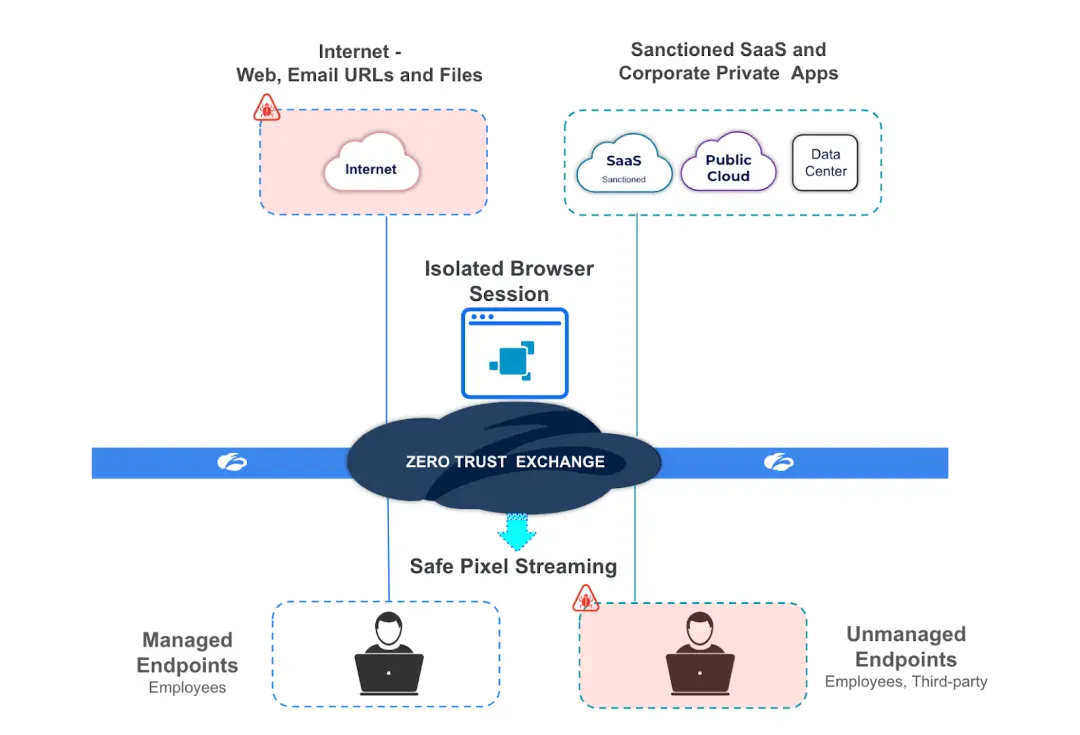
At Zscaler, we’ve given this much thought, and have integrated Browser Isolation with both our Browser Access technology and our DLP suite. The result? A managed, secure browser experience that runs on unmanaged devices.
With this approach, users on unmanaged devices can access the apps they need to do their jobs, (both SaaS or private), with full data security. Browser isolation now protects data in these scenarios with full DLP protection, isolation controls (blocking up/download, clipboard access, screencap, print), and ZIA™ threat protection. With Zscaler, there’s no need for pricey VDI for extending secure access to SaaS and private apps on unmanaged devices.
With Browser Isolation in place, employee browsers become a window to productivity and an anchor for security—without the need for any new software or vendors. For those Zscaler customers who would like to learn more, please join us for an upcoming workshop your account team can assist with.


