Zscaler 部落格
訂閱 Zscaler 部落格,第一時間獲取最新資訊!
Granular Control and Flexibility with Cloud Traffic Forwarding

Introduction
Zero Trust Cloud, our product under the Zscaler Zero Trust Networking portfolio helps securely connect workloads in the public cloud. The solution uses purpose built gateways deployed into Cloud Service Providers (CSP), such as Amazon Web Services, Google Cloud Platform and Microsoft Azure. Cloud Connectors securely forward traffic to the Zscaler Zero Trust Exchange, for both Zscaler Internet Access (ZIA) and Zscaler Private Access (ZPA). Enabling customers to secure cloud workload traffic and enable zero trust connectivity. To learn more about Zscaler ZeroTrust Networking for Cloud, see here
In this blog, we will discuss Forwarding Rules with Zscaler Zero Trust Cloud, specifically the forwarding type of Direct.
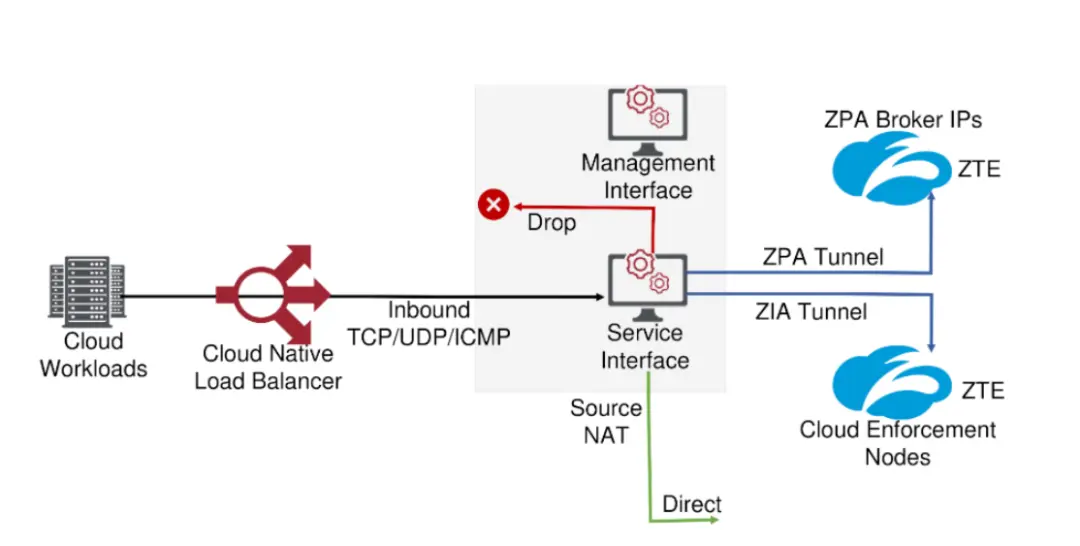
Cloud Connectors receive traffic from load balancers via the service network interface. They then determine where to send the traffic. There are currently four types of traffic forwarding rule types that you can configure to send traffic to different destinations.
- ZIA: Forwards internet-bound traffic that matches a ZIA rule to ZIA gateways over a configurable encrypted or unencrypted tunnel.
- ZPA: Forwards the private application traffic that matches a ZPA rule to ZPA over an encrypted tunnel.
- Direct: Bypasses ZIA/ZPA and forwards traffic directly to the destination server using the Zscaler service IP address.
- Drop: Discards packets matching the Drop rule.
See this article, and figure 1 below for more details on Networking Flows for Cloud Connector.
Benefits of leveraging Forwarding Rules with Zscaler Zero Trust Cloud
- Centralized Policy Management
- Ensures consistent forwarding policies are applied across all traffic, regardless of location or workload type
- Simplifies policy enforcement and management across different cloud environments.
- Ability to bypass Zscaler for certain traffic
- Provides flexibility to exclude specific traffic from Zscaler inspection, if needed.
- Granular Control and Flexibility
- Traffic forwarding based on specific criteria. Allows you to selectively forward traffic to Zscaler based on factors like application,IP address FQDN
- Enables fine-grained control over traffic forwarding policies
By effectively utilizing Zscaler Cloud Connector traffic forwarding options, organizations can achieve a higher level of security, improved network performance, and greater control over their cloud-based applications.
Customers can apply ZIA Cyberthreat protection at scale for workloads, leveraging the same platform they have been utilizing to protect their user traffic.
Example Use case for forwarding traffic Direct to the Internet
By default, there is a rule which will forward all egress traffic to Zscaler Internet Access. See Figure 2.
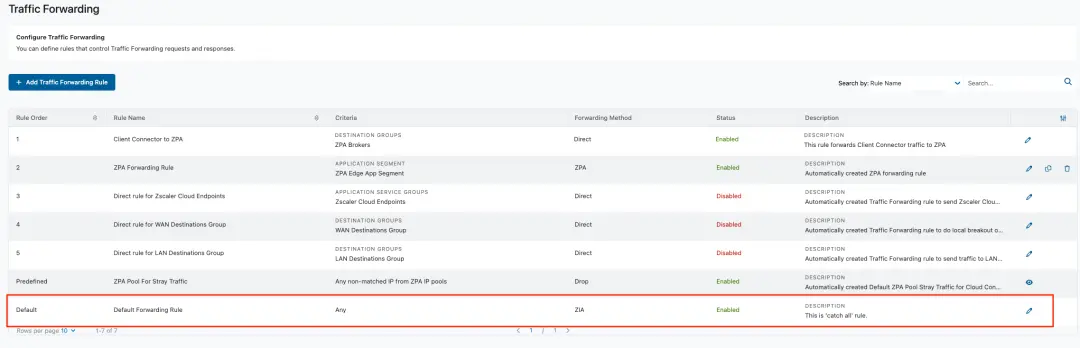
However, there may be situations where customers want to send traffic directly to the Internet, and not to Zscaler Internet Access.
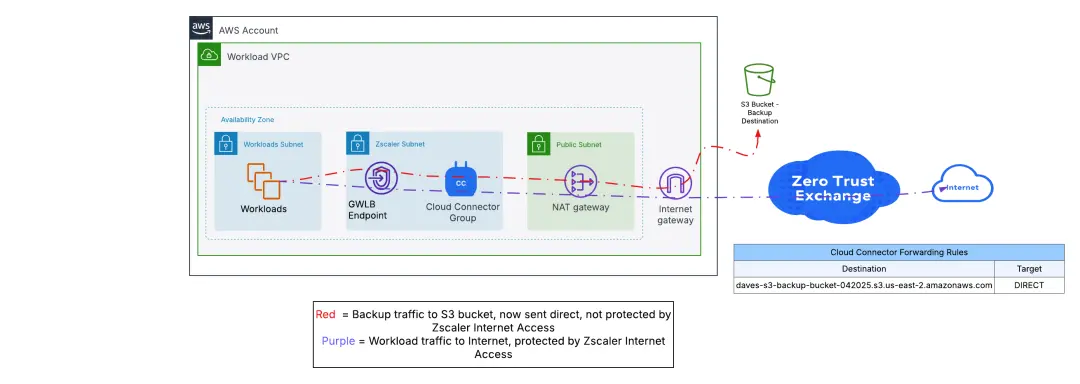
In this example, a customer is sending backup data from workloads to an AWS S3 bucket on the internet. In this case, the customer does not want to protect this traffic with ZIA but rather send traffic directly to the internet.
Figure 3 depicts all Internet egress traffic being forwarded to ZIA, including to the S3 bucket.
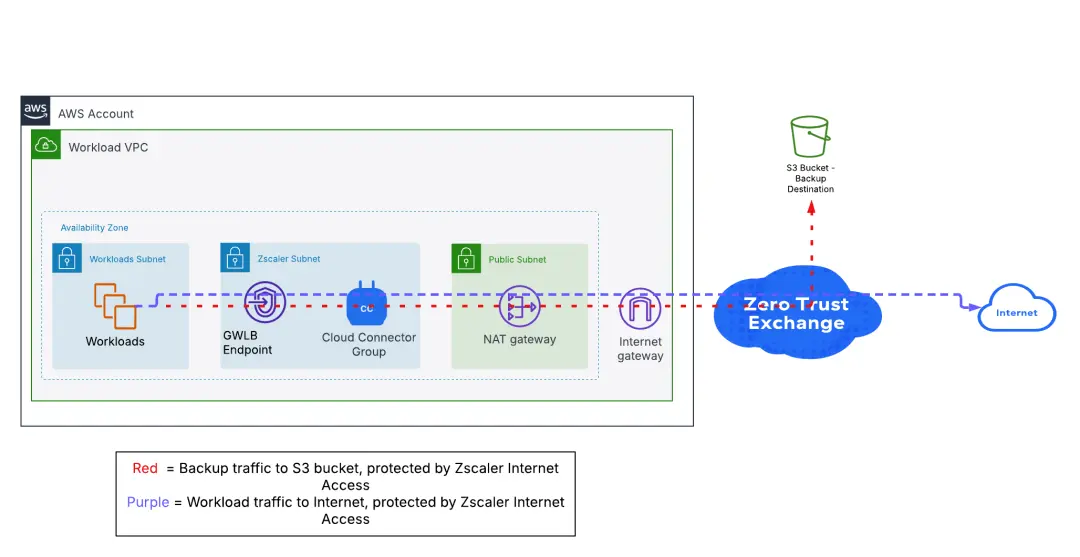
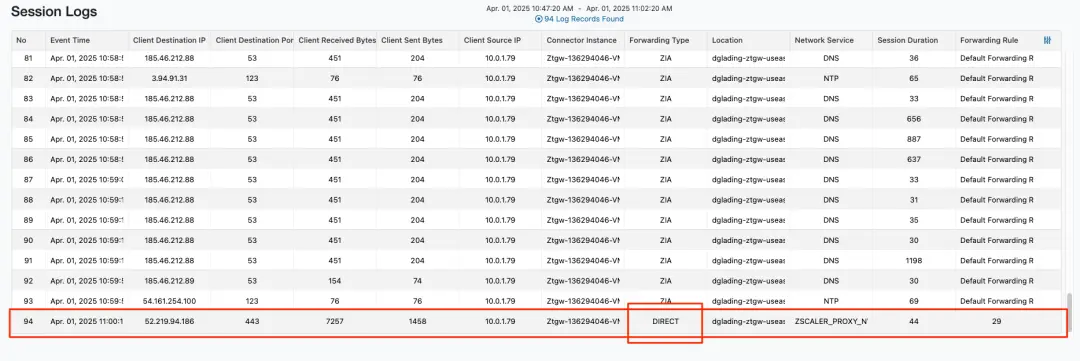
We can see traffic being sent to ZIA in the Cloud Connector Sessions Logs. See Figure 4, where the Forwarding Type is ZIA

Forwarding Rule with forwarding method of Direct
This is where forwarding rules come into play. Customers can create forwarding rules to send certain traffic direct, where traffic matching the rule will be sent out of the Cloud Connectors Service Interface and follow the VPC’s route tables out to the internet. Note that this traffic will be Source NAT’d to the Service Interface IP Address.
NOTE: Traffic that is not tunneled to ZIA or ZPA (e.g. Direct or Drop traffic) does not utilize the workload licensing bandwidth (GB/month) allocated to your entitlement.
In this example we have a S3 bucket with an FQDN of daves-s3-backup-bucket-042025.s3.us-east-2.amazonaws.com
Created a Forwarding Rule, as shown in Figure 5, where any traffic sent to the FQDN daves-s3-backup-bucket-042025.s3.us-east-2.amazonaws.com will be sent DIRECT to the Internet, and not via ZIA.
The forwarding rule can also be configured with additional granularity. Based on criteria such as;
- Location/Sublocation
- Cloud Connector Group
- Service
- Source IP Groups/Source IP
- Destination IP Groups, IP Address or Wildcard FQDN
For more details see Configuring Traffic Forwarding Rules
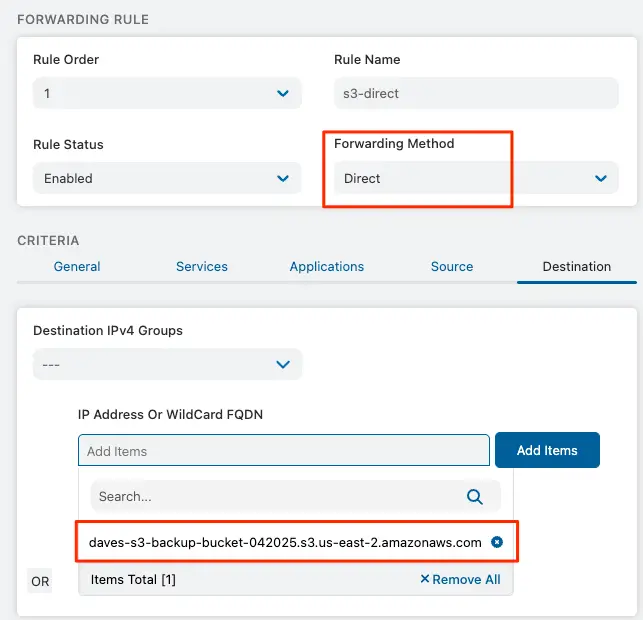
The result of this rule is depicted in Figure 6. Where traffic bound for this S3 Bucket will now be sent direct to the Internet. There is also potential for this DNS to resolve to a private IP if using private endpoints, instead of to the public internet.
Reviewing the Session Logs, can verify that traffic to this S3 Bucket is now being sent direct, as opposed to ZIA. See Figure 7
Summary & Next Steps
In summary, this blog provides an overview of Cloud Traffic Forwarding rules. A powerful, yet simple to use capability to ensure consistent forwarding policies are applied across all traffic, regardless of location or workload type.
We used the example of sending backup traffic directly to the Internet.
There are other example use cases for this feature too.
For example, Data Locality & Sovereignty. Forwarding rules can be used to ensure certain traffic is always forwarded to a specific Zscaler Location and ensure compliance. This is achieved by configuring specific ZIA Gateways and applying this to specific forwarding rules.
E.g. Send all traffic for a particular destination to a ZIA Gateway located in Frankfurt. See here for more details.
To learn more about this capability, or Zscaler’s Zero Trust Networking portfolio in general, contact your Zscaler account team, or click here to request a demo.


免責聲明:本部落格文章由 Zscaler 製作,僅供資訊參考,並以「現狀」提供,不保證其準確性、完整性或可靠性。Zscaler 對任何錯誤或遺漏,或基於所提供的資訊而採取的任何行動不承擔任何責任。本部落格文章中連結的任何第三方網站或資源僅為方便起見而提供,Zscaler 對其內容或做法概不負責。所有內容如有變更,恕不另行通知。存取此部落格,即表示您同意這些條款,並承認您有責任自行驗證並根據您的需求適當使用資訊。


