
In the ever-evolving landscape of network engineering, visibility and control over network performance are paramount. The recent release of our new Wi-Fi dashboard marks a significant advancement in how network engineers can manage and optimize Wi-Fi connectivity. As businesses increasingly rely on digital platforms for their operations, maintaining a robust digital experience is crucial for keeping end users productive. However, managing Wi-Fi connectivity presents unique challenges that can significantly impact user experience. These challenges include identifying problematic access points (APs), determining the root causes of user connectivity issues—such as weak Wi-Fi signals in specific locations or difficulties connecting to new APs—and accurately diagnosing Wi-Fi related incidents. Additionally, network engineers must navigate complexities such as adapting to new updates from operating systems that may obscure critical details like SSIDs. The Wi-Fi dashboard is designed to address these challenges, providing comprehensive tools and metrics to ensure a seamless digital experience for all users.
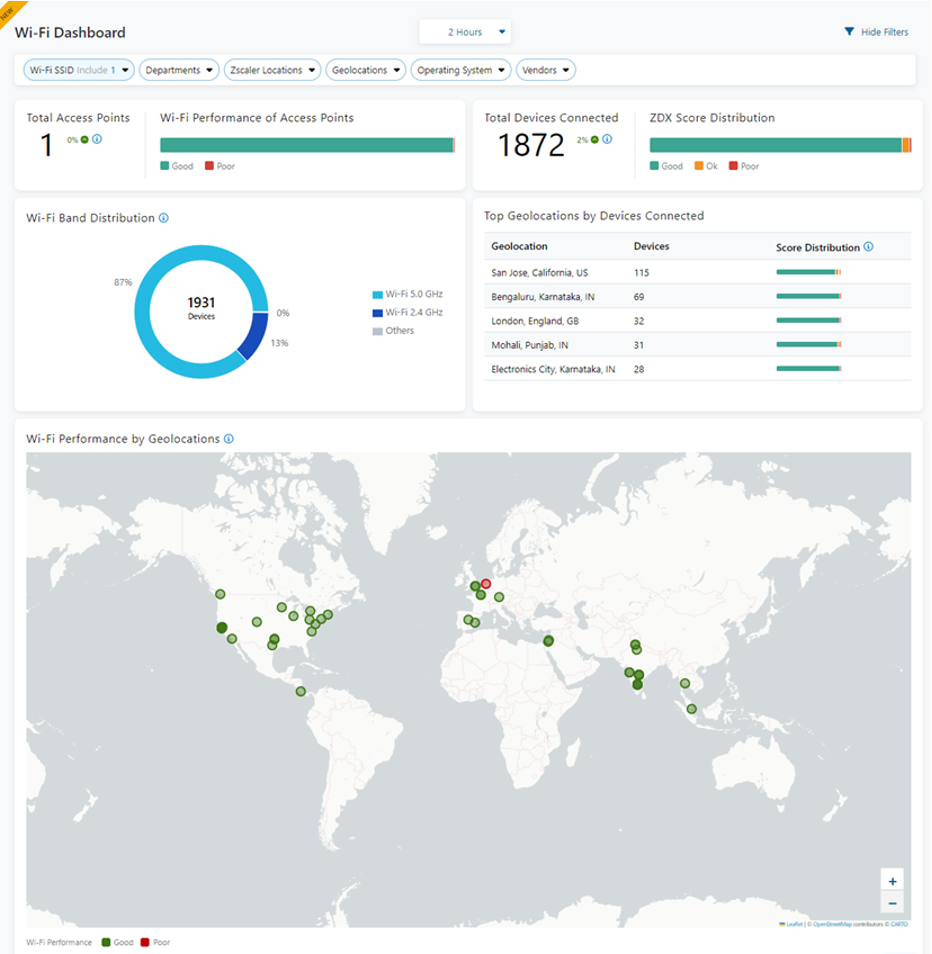
Key Features of the Wi-Fi Dashboard:
- SSID Insights: The dashboard allows users to view the number of devices connected to specific SSIDs. This feature is crucial for identifying high-traffic nodes and optimizing resource allocation.
- Access Point Details: Network engineers can drill down into specific access points (APs) to gather detailed information. This granularity helps in pinpointing issues and performing targeted troubleshooting.
- Connectivity Diagnostics: The dashboard provides essential metrics such as latency and jitter.. These metrics are vital for diagnosing common Wi-Fi problems and ensuring a stable connection.

Addressing Wi-Fi Adapter Issues: Users often encounter difficulties with Wi-Fi adapters due to various factors, including weak signals in certain office areas, improper disconnections from previous APs, and device-specific issues. The dashboard aids in identifying these problems by displaying detailed metrics such as signal strength, adapter type, and user connection details, allowing for precise troubleshooting and resolution.

Tracking Wi-Fi Issues Around the Office: The Wi-Fi dashboard feature is instrumental in tracking location-specific Wi-Fi issues. It provides a map view showing the distribution of devices across different office areas, helping to identify problematic APs and signal coverage gaps. This feature, combined with data on latency and jitter, enables network engineers to quickly address and resolve connectivity issues, ensuring optimal network performance.

Summary
The new Wi-Fi dashboard is a game-changer for network engineers looking to streamline their network management processes. With detailed insights, engineers can now anticipate issues before they become critical, ensuring optimal network performance and improved user satisfaction.
Sign up for a demo today and see how the Wi-Fi dashboard can enhance your network management and user experience.


