Zscaler 部落格
訂閱 Zscaler 部落格,第一時間獲取最新資訊!
Securing AWS Private Lambda with Zscaler Zero Trust Cloud

Modern cloud architectures increasingly rely on AWS Lambda for event-driven processing, data ingestion, and microservice integration. While Lambda functions often run within private Virtual Private Clouds (VPCs) to keep data isolated, many serverless workloads still require outbound internet access to interact with third-party APIs, SaaS applications, or external data feeds.
Without deep visibility into this outbound traffic, security teams face a critical blind spot. Attackers can leverage encrypted channels (HTTPS) to exfiltrate sensitive data or communicate with command-and-control (C2) servers. To combat these risks, organizations turn to Zscaler Zero Trust Cloud and Zscaler Internet Access (ZIA) for inline SSL/TLS Inspection.
To seamlessly extend zero trust security to public cloud environments, Zscaler provides the Zscaler Zero Trust Gateway (ZTGW). ZTGW securely brokers outbound traffic originating from cloud workloads and private subnets, funneling it safely over encrypted DTLS tunnels into ZIA for policy enforcement and threat prevention.
However, introducing SSL inspection into serverless environments presents a unique operational challenge: How do you distribute custom Root CA certificates to short-lived, ephemeral Lambda execution containers without breaking application code or requiring manual maintenance?
In this blog, we’ll explore why SSL inspection is essential for serverless workloads, how to fully automate custom certificate distribution using AWS CloudFormation and S3, how to configure granular SSL inspection policies in ZIA, and how to verify everything in action.
The Challenge: SSL Inspection vs. Ephemeral Execution
When ZIA inspects outbound HTTPS traffic, it acts as a man-in-the-middle proxy. It terminates the TLS session from the client, inspects the payload for threats or Data Loss Prevention (DLP) violations, and establishes a new TLS session to the destination server. To accomplish this, ZIA re-signs the destination’s SSL certificate using a custom Zscaler Root or Intermediate CA.
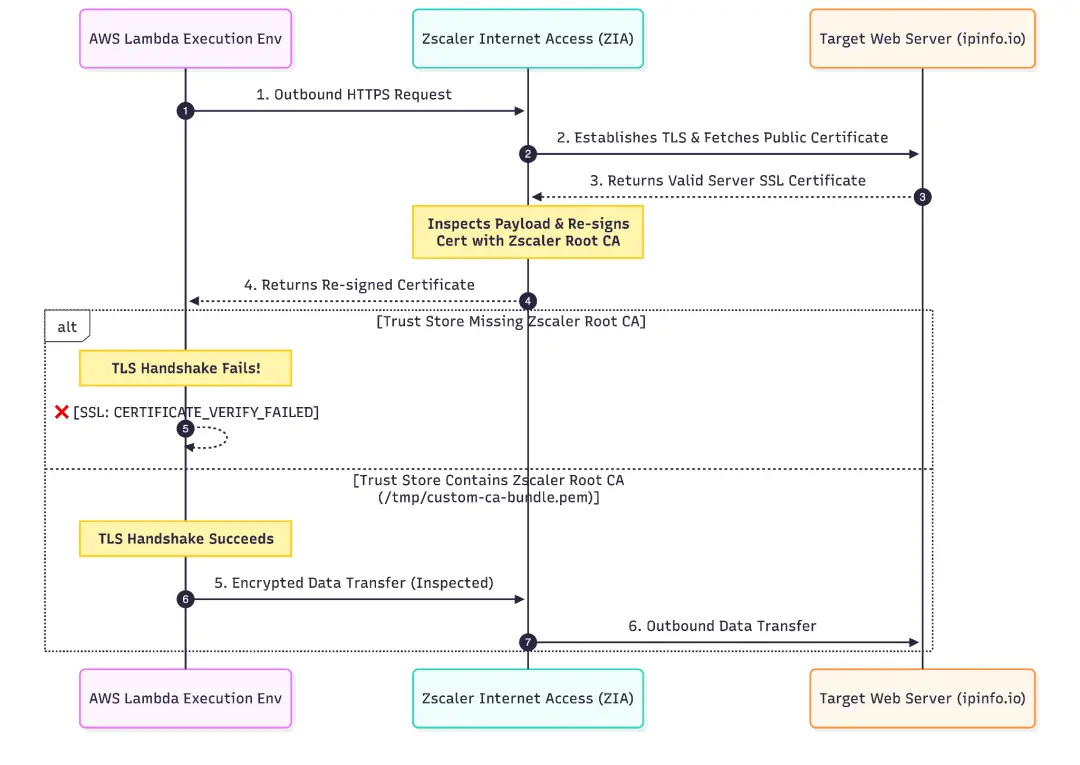
If the client runtime does not explicitly trust the Zscaler Root CA, the TLS handshake fails immediately with an error like:
| [SSL: CERTIFICATE_VERIFY_FAILED] certificate verify failed: unable to get local issuer certificate |
In traditional virtual machines (like EC2), administrators deploy custom certificates via configuration management tools (Ansible, Chef) or golden AMI images. But AWS Lambda containers are ephemeral and managed entirely by AWS. Standard Linux system trust stores cannot be modified permanently at the OS image level.
The Solution: Cold-Start Bootstrap & Auto-Discovery Pattern
To solve this challenge, we can implement an Automated Cold-Start Bootstrap Pattern.
By storing our Zscaler Root CA certificate in an isolated Amazon S3 bucket within the VPC, the Lambda function can fetch the certificate during container cold boot, dynamically merge it with native Amazon Linux root CAs into /tmp/custom-ca-bundle.pem, and bind it to the Python SSL context.
Architecture Overview

Automating Certificate Distribution Step-by-Step
Let's look at how the execution environment handles the certificate lifecycle automatically in the following steps.
1. Zero-Trust Storage in Amazon S3
The certificate resides in a dedicated S3 bucket protected with:
- Gateway VPC Endpoint: All traffic between Lambda and S3 remains on the AWS internal backbone without traversing NAT Gateways or the public internet.
- Restricted Bucket Policy: Blocks all access unless the request originates from the specific VPC Endpoint or authorized IAM roles in your AWS account.
2. Smart Certificate Auto-Discovery & Normalization
During cold start, the Lambda handler searches the S3 bucket for any certificate ending in .crt, .pem, or .cer (such as ZscalerRootCertificate-2048-SHA256-Feb2025.crt).
Certificates uploaded by security teams often vary in encoding (ASCII PEM vs. Binary DER) or contain UTF-8 Byte Order Marks (BOM headers) from Windows text editors. The bootstrap code automatically cleans and normalizes these files:
import ssl import re import boto3
def extract_pem_certificates(raw_bytes): """Parses, cleans, and converts raw bytes into valid PEM certificate blocks.""" pem_blocks = []
# Strip UTF-8 BOM headers (\xef\xbb\xbf) and decode text_content = raw_bytes.decode('utf-8-sig', errors='ignore')
# Regex search for ASCII PEM certificate blocks matches = re.findall(r'-----BEGIN CERTIFICATE-----[\s\S]*?-----END CERTIFICATE-----', text_content)
if matches: return [m.strip() + '\n' for m in matches]
# Fallback for Binary DER encoded certificates try: pem_cert = ssl.DER_cert_to_PEM_cert(raw_bytes) return [pem_cert.strip() + '\n'] except Exception as e: print(f"Failed to parse DER certificate: {e}") return [] |
3. Merging with Native System CAs
To ensure the Lambda function trusts both public internet sites and Zscaler re-signed sessions, the handler merges native Amazon Linux system CAs (/etc/pki/tls/cert.pem) with the extracted Zscaler Root CA into a single /tmp/custom-ca-bundle.pem file.
def build_trust_store(bucket_name): bundle_path = "/tmp/custom-ca-bundle.pem"
# 1. Copy standard Amazon Linux system CAs with open("/etc/pki/tls/cert.pem", "r") as sys_in, open(bundle_path, "w") as bundle_out: bundle_out.write(sys_in.read() + "\n")
# 2. Download and append Zscaler Root CA from S3 s3 = boto3.client('s3') objects = s3.list_objects_v2(Bucket=bucket_name).get('Contents', [])
for obj in objects: if obj['Key'].endswith(('.crt', '.pem', '.cer')): response = s3.get_object(Bucket=bucket_name, Key=obj['Key']) cert_bytes = response['Body'].read() pem_blocks = extract_pem_certificates(cert_bytes)
with open(bundle_path, "a") as bundle_out: for pem in pem_blocks: bundle_out.write(pem + "\n") print(f"Appended {len(pem_blocks)} certificate block(s) from {obj['Key']}")
return bundle_path |
4. Binding the Trust Store to Python Runtime
Finally, during outbound calls, the Lambda handler configures ssl.create_default_context pointing directly to /tmp/custom-ca-bundle.pem:
import urllib.request
# Create SSL context using the combined trust store ssl_context = ssl.create_default_context(cafile="/tmp/custom-ca-bundle.pem")
# Outbound HTTPS request now seamlessly trusts Zscaler re-signed certificates req = urllib.request.Request("https://ipinfo.io", headers={"User-Agent": "AWS-Lambda-URL-Checker"}) with urllib.request.urlopen(req, context=ssl_context, timeout=10) as response: body = response.read().decode('utf-8') |
Crafting SSL Inspection Policies in Zscaler Internet Access (ZIA)
With the Lambda trust store in place, we can configure ZIA to inspect outbound HTTPS traffic. ZIA offers two powerful methods for scoping SSL inspection rules to AWS serverless workloads.
Option 1: Scoping Policy via Sub-Locations (IP / Subnet Based)
If your Lambda functions are deployed into dedicated private subnets, you can scope policies based on subnet CIDRs.
1. Create a Sub-Location in ZIA:
- In the ZIA Admin Portal, navigate to Administration > Location Management.
- Locate your AWS location and click Add Sub-Location.
- Define the IP range corresponding to your private Lambda subnet (e.g., 10.0.2.0/24).
2. Build the SSL Inspection Rule:
- Navigate to Policy > SSL Inspection > Add SSL Inspection Rule.
- Under Criteria, select your newly created Sub-Location.
- Under Action, select Inspect and assign your Zscaler Intermediate CA.
Option 2: Scoping Policy via Workload Groups (Leveraging AWS Native Metadata)
For modern cloud environments where IP addresses are dynamic, ZIA supports Workload Groups. This approach maps AWS-native attributes—such as Security Groups, Account IDs, or VPC IDs—directly into ZIA policy context without maintaining static IP ranges.
Prerequisite: Ensure AWS Workload Discovery is enabled between your AWS Account and Zscaler. For setup details, see the official Zscaler Documentation on Adding an AWS Account.

1. Define a Workload Group in ZIA:
- In ZIA, go to Administration > Workload Groups > Add Workload Group.
- Name the group (e.g., AWS-Lambda-Workloads).
- Add criteria matching your AWS infrastructure:
- VPC ID: vpc-xxxxxxx
- Security Group ID: sg-0123456789abcdef0
2. Apply Workload Group to SSL Inspection:
- Under Policy > SSL Inspection, create a new rule.
- Under Criteria > Workload Groups, select AWS-Lambda-Workloads.
- Set Action to Inspect.
Benefits of Workload Group Scoping:
- Zero IP Management: Eliminates hardcoded subnet CIDRs or static NAT mappings.
- Auto-Scaling Protection: Any new Lambda function attached to the Security Group instantly inherits the correct SSL inspection policy.
Demonstrating Verification & Testing
To test the deployment, we invoke the URLStatusChecker Lambda function with a payload targeting https://ipinfo.io:
Test Event Payload
{ "url": "https://ip.zscaler.com/?json" } |
Lambda Response Payload
| { "statusCode": 200, "url": "https://ip.zscaler.com/?json", "message": "Successfully connected to https://ip.zscaler.com/?json", "trustStoreUsed": "/tmp/custom-ca-bundle.pem", "responseBody": { "srcip": "n.n.n.n", "vip": "null", "nodename": "zs3-nnn-nnn-nnn", "cloud": "zscalerthree.net", "datacenter": "Washington DC IV", "xff": "n.n.n.n", "clientip": "n.n.n.n" }, "responseHeaders": { "Date": "Wed, 16 Sep 2026 11:21:26 GMT", "Content-Type": "text/html;charset=UTF-8", "Transfer-Encoding": "chunked", "Connection": "close", "Server": "nginx", "X-Powered-By": "PHP/8.0.30", "Access-Control-Allow-Origin": "*", "Access-Control-Allow-Methods": "GET, OPTIONS, HEAD", "Strict-Transport-Security": "max-age=63072000; includeSubDomains", "X-Frame-Options": "SAMEORIGIN" } } |
Conclusion & Key Takeaways
Securing serverless egress traffic does not require sacrificing security visibility or burdening developers with complex certificate management code.
By combining AWS CloudFormation, an isolated S3 bucket, and Zscaler Internet Access (ZIA):
- Security is Automated: Lambda functions dynamically discover and inject the Zscaler Root CA during cold start without modifying base images.
- Traffic is Fully Inspected: ZIA performs deep content inspection and threat analysis on encrypted outbound HTTPS sessions.
- Policy is Identity-Centric: Workload Groups tie ZIA policies directly to AWS Security Groups and cloud metadata, creating a scalable, zero-trust serverless architecture.
Ready to Learn More?
Check out the full CloudFormation deployment template (lambda-ssl-demo.yaml) and step-by-step setup guide in our GitHub repository to implement automated SSL inspection for your serverless workloads today!
While this blog focuses on AWS Lamba, a similar approach can be leveraged for Serverless workloads in other cloud providers. E.g. Azure Functions & Cloud Run in GCP.
To learn more about Zscaler Zero Trust Gateway, click here.


免責聲明:本部落格文章由 Zscaler 製作,僅供資訊參考,並以「現狀」提供,不保證其準確性、完整性或可靠性。Zscaler 對任何錯誤或遺漏,或基於所提供的資訊而採取的任何行動不承擔任何責任。本部落格文章中連結的任何第三方網站或資源僅為方便起見而提供,Zscaler 對其內容或做法概不負責。所有內容如有變更,恕不另行通知。存取此部落格,即表示您同意這些條款,並承認您有責任自行驗證並根據您的需求適當使用資訊。