In a recent cycle of malware hunting, ThreatLabZ came across a malicious Android application specifically targeting South Korea. There have been a few attempts in the past to target South Korea, in which malicious apps were either trying to pose as bank apps or as services apps. But the malicious app we recently came across was trying to invade security mechanisms by portraying itself as a security app required for financial transactions for South Korean Banks.
The malicious app portrays itself as a version of V3 Mobile Plus. V3 Mobile Plus is a legitimate product of AhnLab, a South Korea-based company that sells antivirus software, online security, network security appliances, and more, including security software for online games and the mobile web.
According to AhnLab, V3 Mobile Plus is a mobile transaction security solution that provides real-time detection of smartphone malware. (Important: our analysis discusses the fake app and NOT the actual V3 Mobile Plus app from AhnLab, which is a legitimate app found on Google PlayStore.)
Overview
V3 Mobile Plus is an app that is required for Android devices to perform online functions within some well-known South Korean banks. It is likely that the attacker chose to develop a fake version of this app as a way to target a large pool of users.
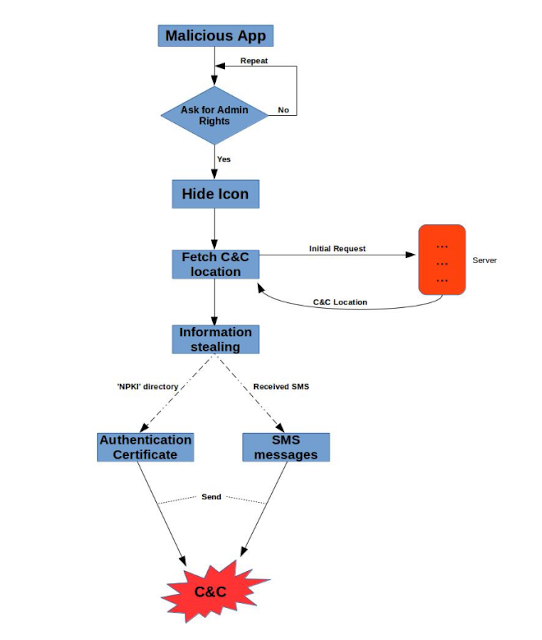
The malware poses as the “V3 Mobile Plus” application and asks for administrator rights upon launch. After claiming admin rights, it hides itself, which makes victim think the app has been removed/deleted from device. In reality, the app asynchronously runs services in the background, hidden from user view. The main purpose of the malware is to steal the victim’s SMS messages and authentication certificates used in the National PKI (Public Key Infrastructure) scheme, and send it to its C&C (Command & Control) server.
The flowchart below illustrates the process followed by this malicious app.
 |
| Flowchart |
Technical Details
Displayed App Name : V3 Mobile Plus
Url : hxxp://********.com/p*****.apk
Package Name : com.qbjkyd.rhsxa
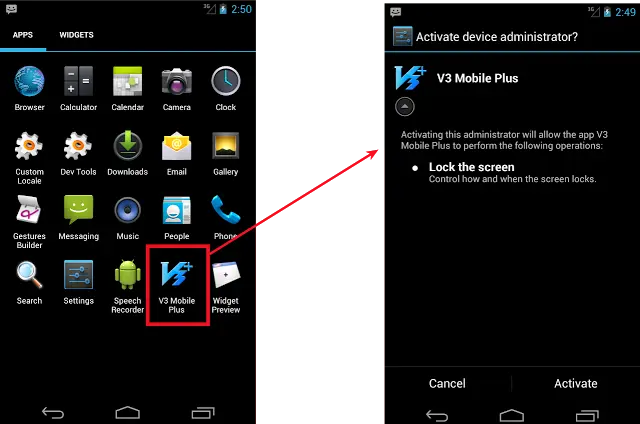
Once a victim installs the malicious app, the app asks for administrator rights, which give the app the ability to lock the victim completely out of his or her Android device.
These screenshots show the malware in action:
 |
| App Icon & Admin Rights |
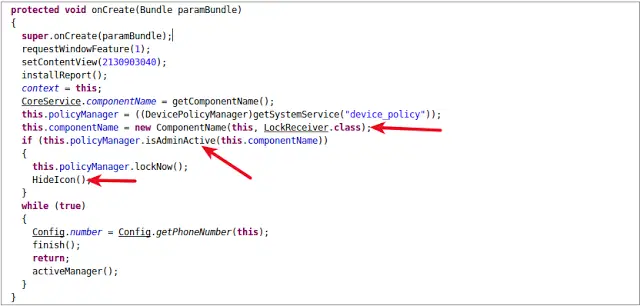
Once the administrator rights have been granted, the malware hides its icon, making the victim think that the app must have been removed or deleted. The screenshot below shows the code exhibiting this functionality:
 |
| Admin permission & Icon Hiding |
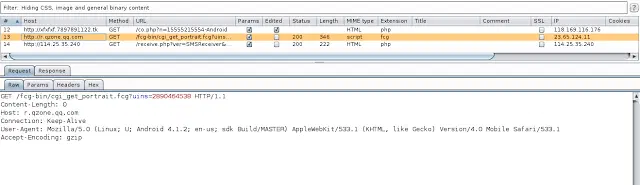
Following the function of hiding itself, a background service requests a new location, where messages and authentication certificates will be sent. Once the request is successful, the malicious app receives the C&C address, as seen below:
 |
| Request for C&C location |
Once the response is received, malicious app extracts the location and stores it locally.
 |
| C&C location extraction |
SMS Stealing.
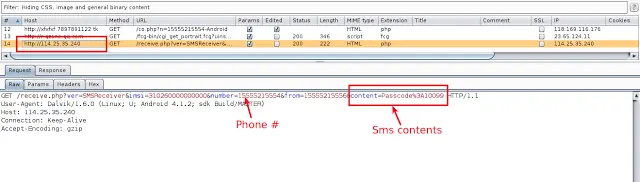
After the location is received and extracted, the malware is up and running, ready to steal the SMS message as soon as it arrives on the device. A request, along with the device's IMSI number, phone number, and contents of the SMS message are sent to C&C.
It was found that the malicious app steals the message and cancels the broadcast, which leaves the victim unaware of any new messages.
The screenshot below shows the stolen message from the victim and shows it being sent to C&C:
 |
| Stolen SMS messages |
Stealing Authentication Certificates.
Our research further revealed that S.Korean users are entitled to use NPKI (National Public Key Infrastructure) to enhance their security.
Banks generally use NPKI information during financial transactions.
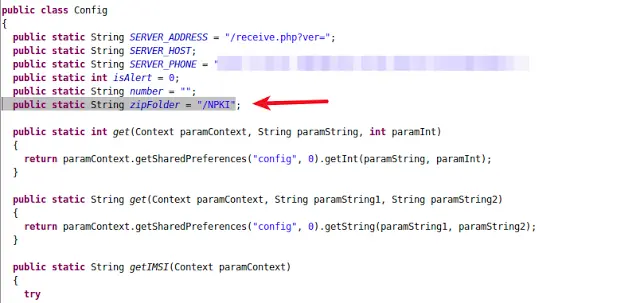 |
| Authentication certificate location |
The malware in our analysis has been designed to steal these authentication certificates stored in a victim’s device. It looks for an NPKI folder in the device and, if found, the malicious app compresses the content of the folder and sends it to C&C server. Note that the C&C location is the one sent in the first request. The following screenshot shows the functionality in action:
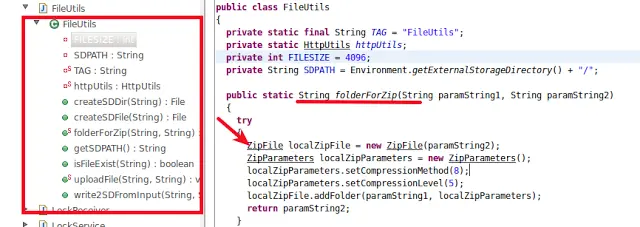 |
| Compressing NPKI information |
 |
| Uploading NPKI information |
As of now, this malicious app was trying to detect two security based apps, namely V3 Mobile Plus 2.0 and ALYac Android.
If it found these two apps installed on the device, we discovered that it wasn’t able to initiate them.
This functionality seems to be under development.
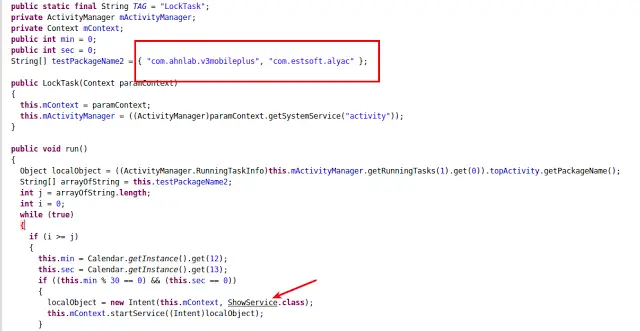 |
| Targeted Package Names |
We believe the new package names will be added and the malicious app will target these and other security apps in future. We are keeping an eye on such activities.
Zscaler customers are safe from such malicious apps, as the Zscaler cloud has implementations that provide different levels of preventive measures to tackle such attacks. As a preventive measure for other users, its always advisable to install apps from trusted Android stores like Google Playstore.
Mitigation:
The malware is designed to be persistent on a device, which means it does not allow the the victim to uninstall it.
But it can be removed by following these steps:
- Boot device into safe mode (Please note that entering "safe mode" varies depending on your device). Safe mode boots the device with default settings without running third party apps.
- Uninstalling such malwares from device requires you to first remove administrator privilege. To do the same, go to Settings --> Security --> Device Administrator and select the malicious app, then deactivate.
- Once this is done, you can go to Settings --> Apps --> Uninstall malicious app.