Zscaler 部落格
訂閱 Zscaler 部落格,第一時間獲取最新資訊!
Rise in Tech-Support Scams Abusing Windows Action Center Notifications
Introduction
The Zscaler ThreatLabz team recently observed a surge in tech-support scams, with a noteworthy focus on the utilization of Windows Action Center notifications to display misleading warning messages to users. While the majority of tech-support scams previously centered around counterfeit notifications related to Windows Defender, scammers have since expanded their tactics to include bogus web pages impersonating other security providers like McAfee and Avast.
Now, threat actors use pirated movie streaming websites and X (formerly Twitter) as conduits for directing users to fraudulent tech-support pages by using the Windows Action Center notifications to display fictitious warnings and alerts.
In this blog, we examine two tech-support campaigns and the tactics they employ to trick users into willingly accepting fraudulent notifications that go on to display multiple fake infection-related warnings.
Key Takeaways
- Delayed Gratification Over Instant Joy: We observed tech-support scammers focusing on using the Windows Action Center notifications to push notifications, instead of the traditional immediate appearance of pop-ups.
- Explicit Images as a Lure: Many tech-support scams post explicit images on social media platforms to solicit attention from potential victims.
Pirated Streaming Websites as Initial Vector
This campaign targets users visiting pirated movie streaming websites. When the user clicks Play to watch a video, they receive a pop-up asking them to allow or cancel notifications from the website in order to watch the video.
If a user chooses to allow notifications, the website’s domain is added to the “allowed” notifications in the web browser. This grants the website permission to push notifications to the user’s systems even when they are not active on the website.
In the screenshot below, we see websites that were added to the allowed list. On the right side of the screen, the Windows notifications slider displays the scam notifications pushed by the websites.
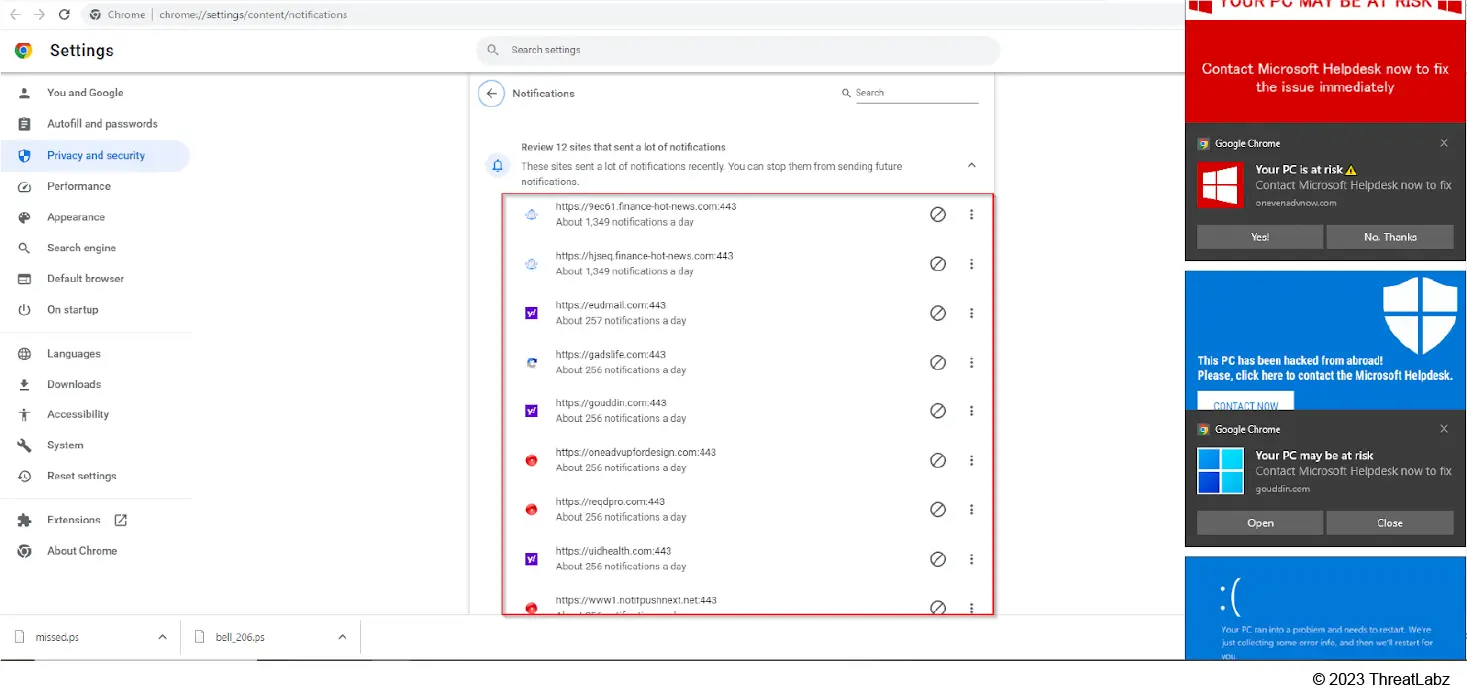
Figure 1: Ad redirector/scam serving websites added to the notification allowed list of the browser.
After a brief period of time, the user is bombarded with notifications with ad content, beginning with explicit advertisements followed by notifications saying their system is infected.
When the user clicks on a notification, a new screen appears playing alarming MP3 audio convincing them that the system is infected. The same screen asks users to call the Windows Support phone number so a technician can help them resolve the problem. Of course, these messages are fraudulent and will direct users to a scam center.
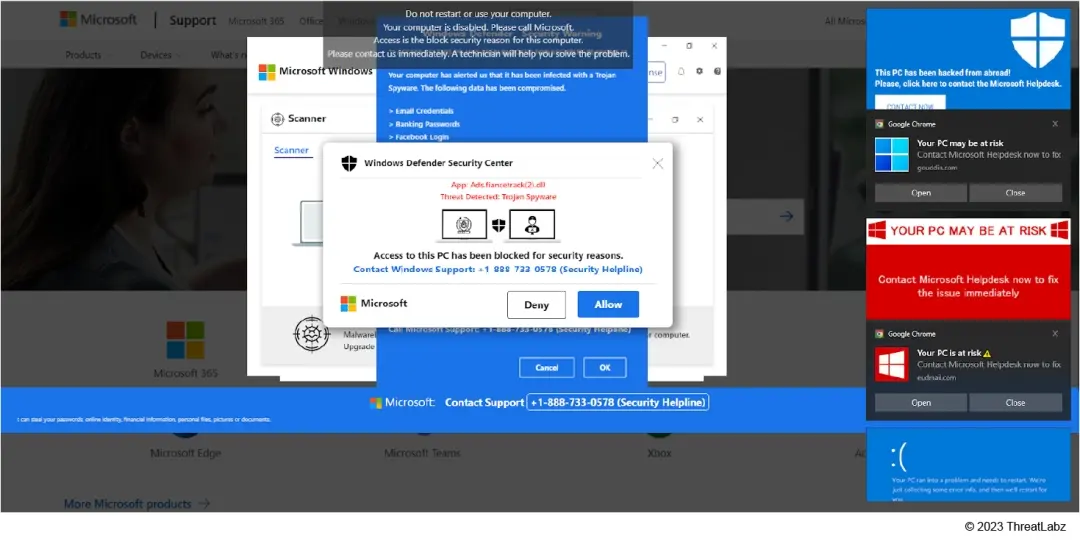 Figure 2: Tech-support scam page, which makes the page full-screen and disables keystrokes, effectively locking out users because they can’t minimize or close the page.
The user can’t close the page, minimize it, or right-click on the page because the tech-support scam page runs a JavaScript code which disables these features. This is depicted in the screenshot below.
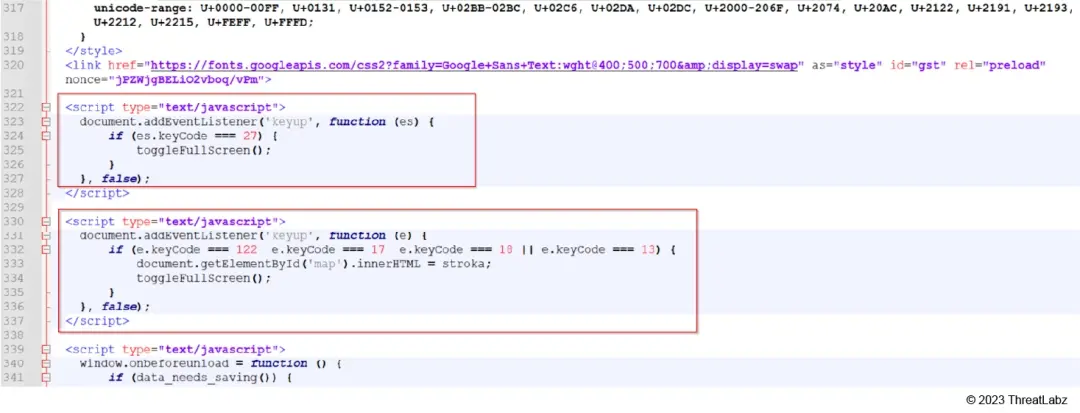 Figure 3: Screenshot of JavaScript code disabling features.
This campaign is unique because fraudulent messages do not immediately appear on the infected system when the user hits Play - which has been observed in traditional tech support scam chains.
For this campaign, the threat actors want users to subscribe to the notification. After some time, the malicious redirects show up as a notification in the Windows Action Center.
Most of the campaigns we analyzed were hosted on Amazon CloudFront or DigitalOcean. Many of the URL variants hosted on DigitalOcean begin with a marine animal name.
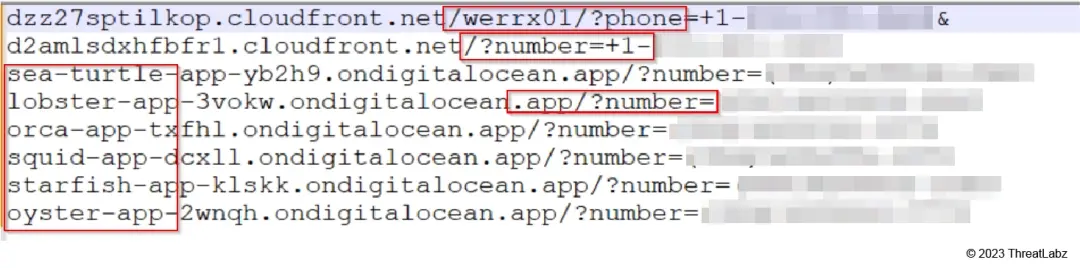 Figure 4: URL patterns observed in this campaign.
This tech-support scam campaign primarily targeted users from Australia, Canada, Japan, and the United States.
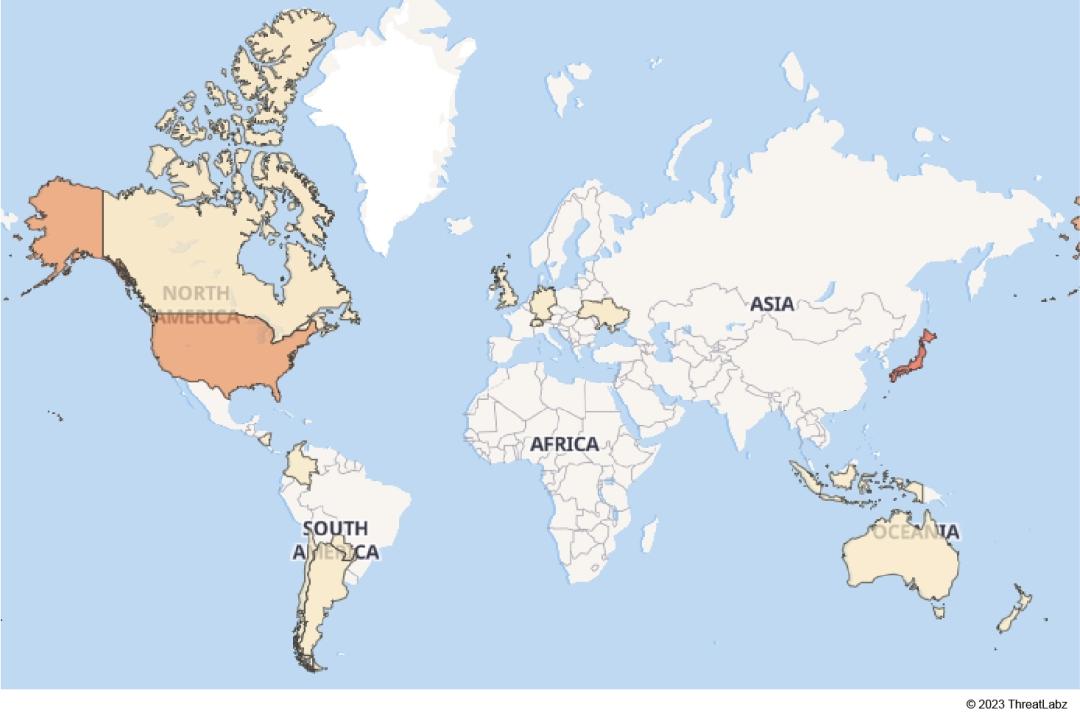 Figure 5: Geographical targets of tech-support campaign.
Signature Hits
According to our monitoring, these signature hits indicate the number of daily users accessing tech-support scam websites.
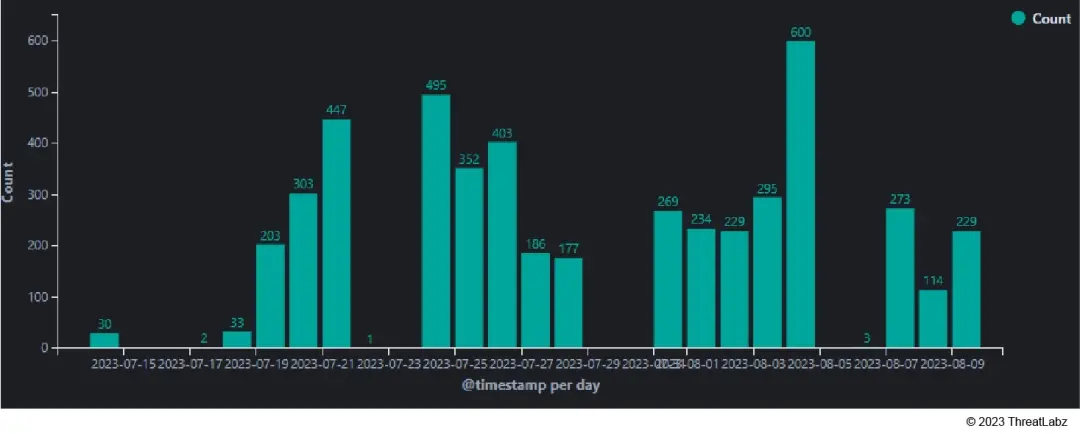 Figure 6: Hits for tech-support Campaign July-Aug 2023.
X (formerly Twitter) as Initial Vector
We also observed social media platforms like X (formerly Twitter) being used to redirect users to tech-support scam pages. This is mainly accomplished by using fake profiles to post alluring or sensational content to attract users' attention.
In the screenshot below, you can see provocative images being posted from fake accounts.
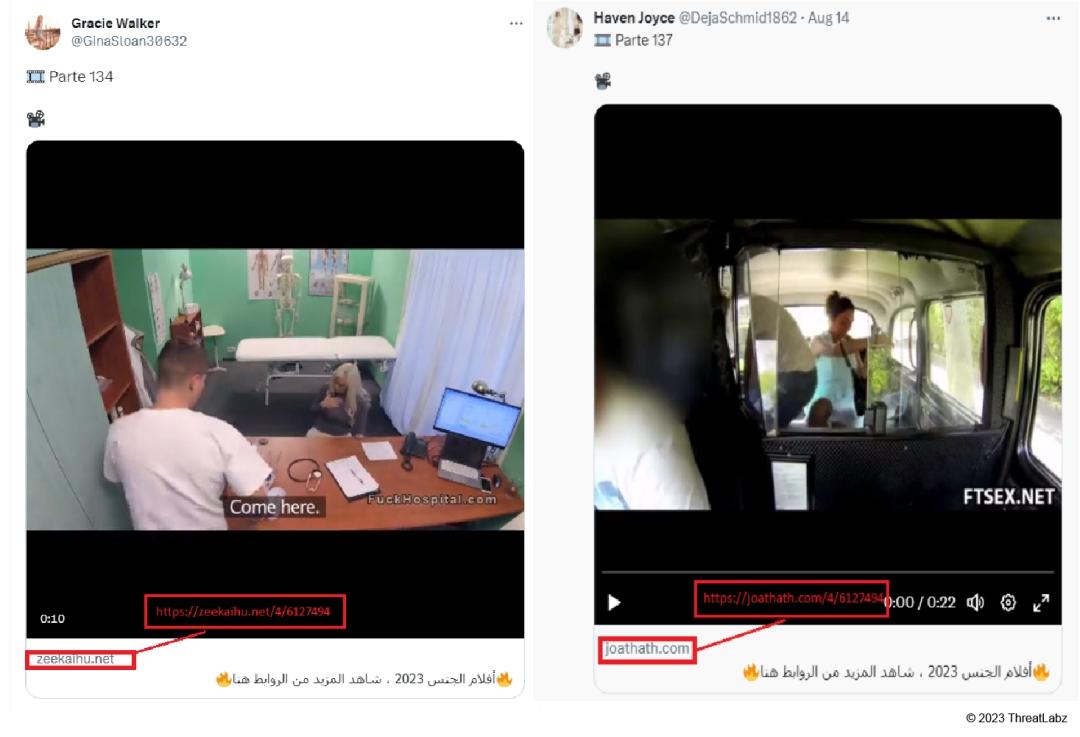 Figure 7: Fake profiles posting sensationalized images on X (formerly Twitter)
Once a user clicks on the X (formerly Twitter) posts, they are redirected to a page where users are prompted to complete a fake “robot verification” process, which usually involves solving a captcha or interacting with checkboxes. This step is meant to create an illusion of authenticity.
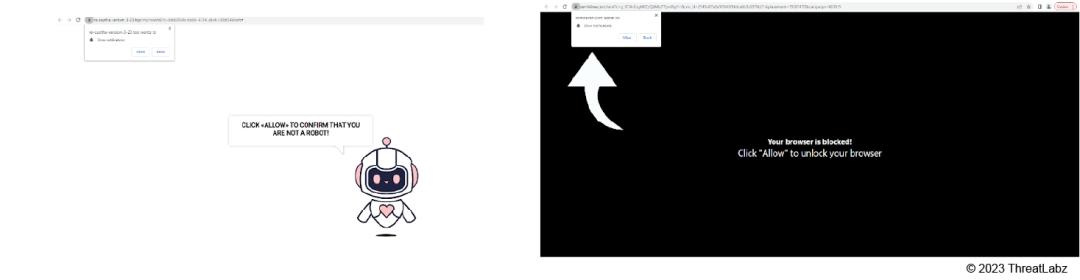 Figure 8: A page asking a user to allow notifications and prove they are not a robot
Once the user solves the captcha and clicks to allow access, the website uses the permission to display unwanted notifications and bombard the user with frequent pop-ups using the Windows Action Center. These pop-ups claim that the user's device is compromised and requires a renewal of their antivirus subscription. This is depicted in the images below.
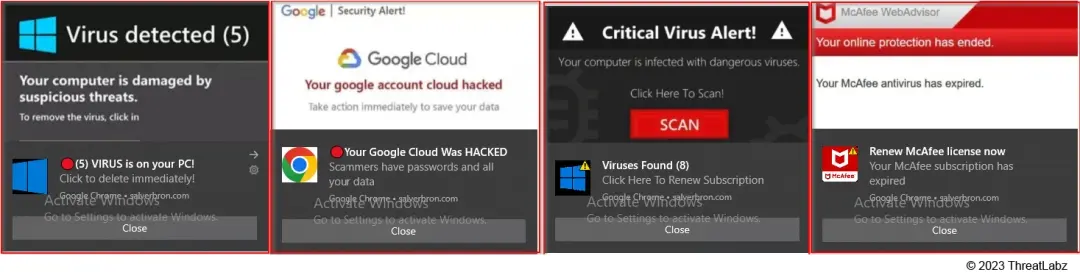 Figure 9: Unwanted pop-up windows
The objective of this campaign is usually to plant harmful or potentially malicious software. It is obvious that these pages are fake because they are not affiliated with any legitimate antivirus vendors.
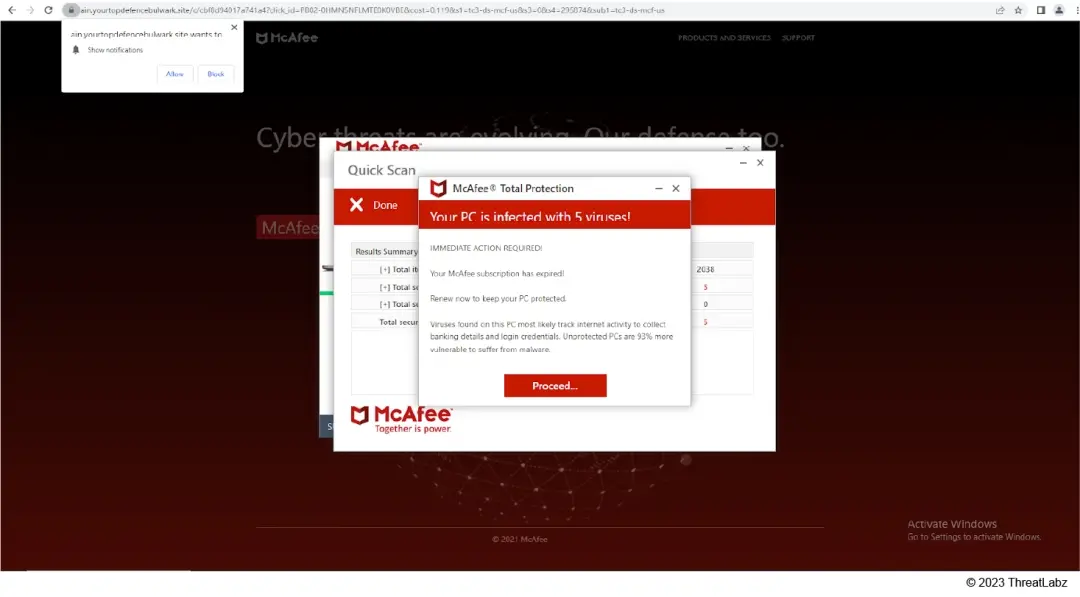 Figure 10: A fraudulent tech support webpage that generates false alerts of computer infections.
Here are a few more examples where websites “detect” vulnerabilities in a user's system and warn them about potential virus infections if renewal is neglected. This is all a strategy to make the user panic and contact tech-support.
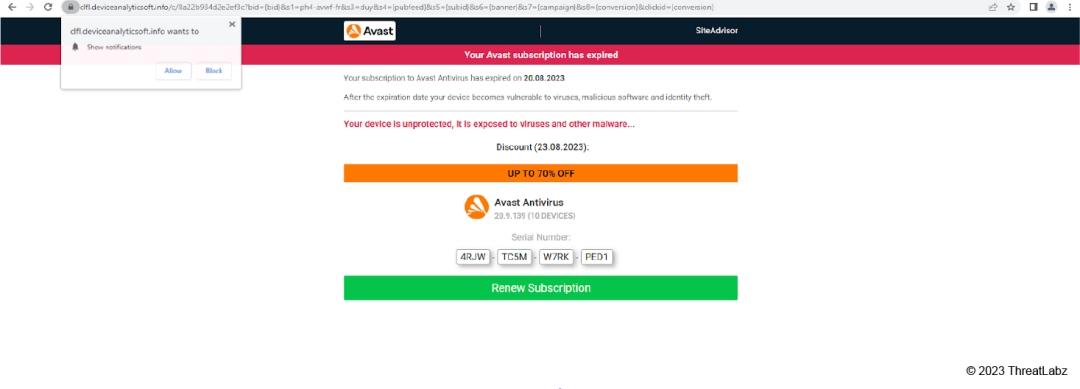 Figure 11: A deceptive Avast-themed webpage falsely indicating that the user's system is vulnerable to virus infections.
These sites may also offer discounts on renewal, which increases the likelihood of users making a purchase. This is shown in the screenshot below.
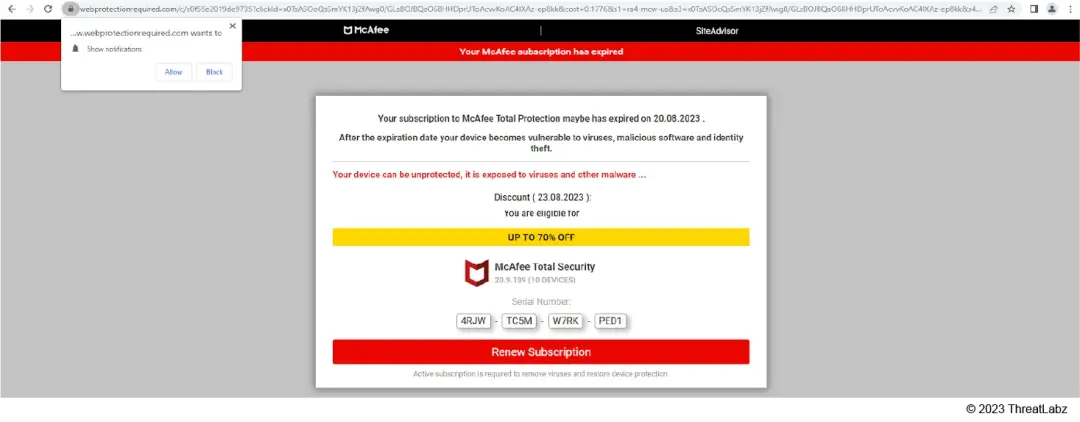 Figure 12: A deceptive McAfee-themed webpage falsely indicating that the user's system is vulnerable to virus infections and offering a discount.
Conclusion
Tech-support scams are updating their tactics as cybercriminals exploit Windows Action Center notifications to deceive users. Our research sheds light this shift in tactics, emphasizing the importance of staying informed and cautious.
In addition to staying on top of these threats, Zscaler's ThreatLabz team continuously monitors for new threats and shares its findings with the wider community.
Detection & Indicators of Compromise (IOCs)
Zscaler ThreatLabz Detection
HTML.Phish.TechSupport
Indicators of Compromise (IOCs)
- dzz27sptilkop[.]cloudfront[.]net/werrx01/?phone=+XXXXXXXXX&
- d2amlsdxhfbfr1[.]cloudfront[.]net/?number=+1-XXXXXXXXX
- sea-turtle-app-yb2h9[.]ondigitalocean[.]app/?number=XXXXXXXXX
- lobster-app-3vokw[.]ondigitalocean[.]app/?number=XXXXXXXXX
- orca-app-txfhl[.]ondigitalocean[.]app/?number=XXXXXXXXX
- squid-app-dcxll[.]ondigitalocean[.]app/?number=XXXXXXXXX
- starfish-app-klskk[.]ondigitalocean[.]app/?number=XXXXXXXXX
- oyster-app-2wnqh[.]ondigitalocean[.]app/?number=XXXXXXXXX
Domains Present in X (formerly Twitter) Posts
- keewoach[.]net
- whulsaux[.]com
- naipsouz[.]net
- potsaglu[.]net
- vasteeds[.]net
- dolatiaschan[.]com
- oulsools[.]com
- soocaips[.]com
- zatloudredr[.]com
- almstda[.]tv
- zeekaihu[.]net
- nebsefte[.]net
- whoursie[.]com
- thaudray[.]com
- greewepi[.]net
Newly Registered Streaming Sites
- worldsports1[.]live
- powerakkus[.]com
- trophional[.]com
- acc-network[.]us
- enake[.]site
- soccerloverss[.]online
- foreverstream[.]xyz
- zodic[.]xyz
- np-downloader[.]com
- squathweenic[.]com
- gemstreams[.]com
Sites Asking User to Grant Permission
- sembilme[.]com
- bonalluterser[.]com
- exusnefte[.]com
- scotennepruse[.]com
- squathweenic[.]com
- birmentuorpose[.]co[.]in
- re-captha-version-3-23[.]top
- ologeysurincon[.]com
- chaeffulace.com
Redirected Fake Security Product Pages
- yourtopdefencebulwark[.]site
- myalltimebestdefender[.]site
- sunfont[.]site
- keepsafetycenter[.]com
- worldwidedefence[.]online
- improvedwebsecurity[.]com
- webprotectionrequired[.]com
- highpotencyguard[.]com
- ultradesktopanalytic[.]com
- analysesecuritystatus[.]com
- datasecuritypc[.]com
- totaldeviceanalyticsoft[.]club
X (formerly Twitter) Accounts
- Gracie Walker @GinaSloan30632
- Amy Day @DayAmy95254
- Haven Joyce@DejaSchmid1862
- Audrey Mayer @MelissaGal14721


免責聲明:本部落格文章由 Zscaler 製作,僅供資訊參考,並以「現狀」提供,不保證其準確性、完整性或可靠性。Zscaler 對任何錯誤或遺漏,或基於所提供的資訊而採取的任何行動不承擔任何責任。本部落格文章中連結的任何第三方網站或資源僅為方便起見而提供,Zscaler 對其內容或做法概不負責。所有內容如有變更,恕不另行通知。存取此部落格,即表示您同意這些條款,並承認您有責任自行驗證並根據您的需求適當使用資訊。


