It’s the season: holiday shopping has increased and email inboxes have been inundated with promotional emails, offers from online retailers, and discount banners. And with increased online shopping activity, you can expect to see an increase in activity from the bad actors, too. Cybercriminals are taking advantage of the bustling season by launching various social engineering attacks, including phishing and drive-by download campaigns, to deliver ransomware.
Threat actors leverage keywords to create reasonable doubt in the victim's browsing experience as a lure to attack. Cybercriminals exploit users through the tried and true tactic of sending spam emails. Ransomware strains target victims by posing as an attachment or link to a receipt for an order that the user made.
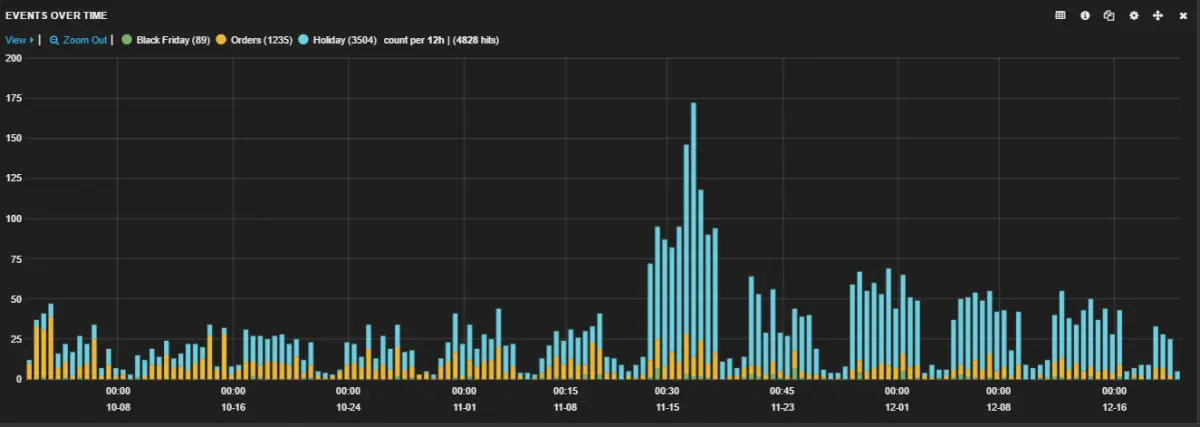
Figure 1 - Security events seen for Holiday Shopping
Online shoppers are bombarded with banners and pop-ups offering discounts and free shipping. Even for experienced users, it can be difficult to differentiate between ads from legitimate sources and those that are created by malicious users. As users have learned to be more careful — like resisting the temptation to open executable files — criminals have had to get more creative. Fake gift cards that were once delivered as executable files are now being embedded in malformed Word documents. Such documents contain a VBScript (macro), which (when opened) will download a malicious executable that can deliver ransomware and other trojans.
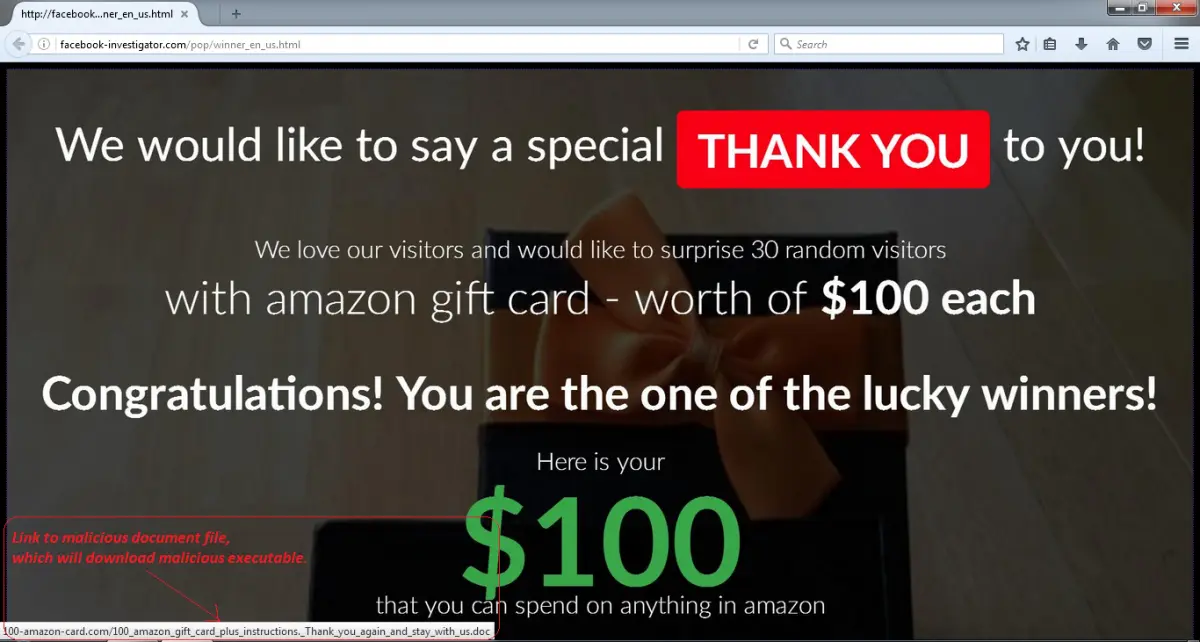
Figure 2 - Example of a phishing page offering an Amazon gift card.
Cybercriminals are also sending phishing emails with fake package tracking numbers, bogus discounts, or coupons that link to phishing sites. With so many online orders being shipped, it is difficult to differentiate between the genuine email notifications and the frauds. Recently, we have observed a huge email spam campaign with a fake Amazon notification that includes a ZIP attachment containing a malicious JavaScript file. This malicious JavaScript will download and execute Locky ransomware. (Read more about Locky here.)
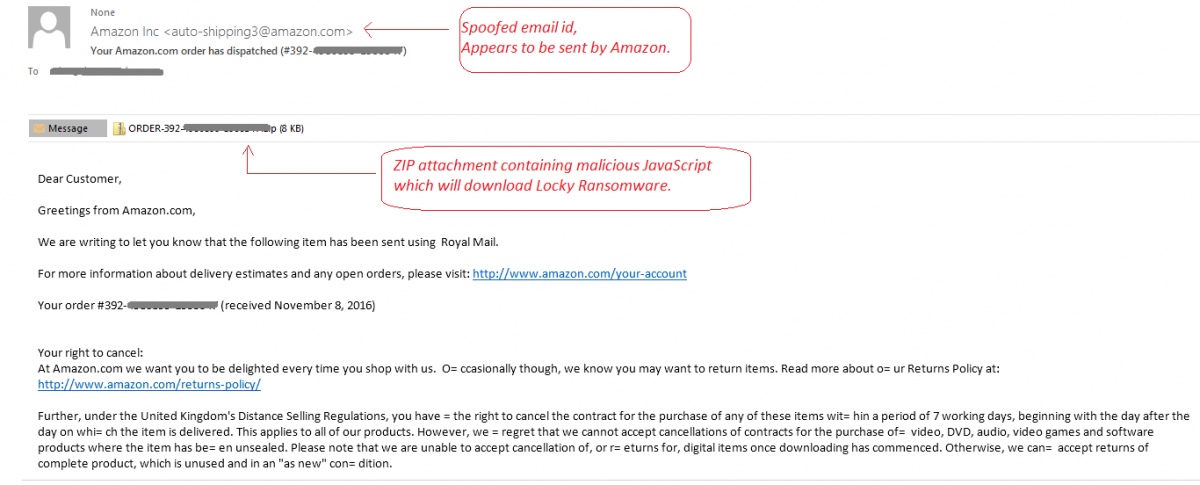
Figure 3 - Example of phishing mail with fake Amazon notification.
We urge customers to use caution with all email in light of the prevalence of phishing attacks, which are increasing in both frequency and sophistication. Guidelines provided by Amazon can help in identifying phishing emails. A detailed report with more examples of phishing attacks posing as Amazon notifications has been published by Microsoft.
The following table shows several suspicious file names that should raise your suspicions. You can see that several are executables, while the others are receipts and invoices, which are rarely sent as attached files by legitimate retailers.
| Payslip_Dec_2016_218467.doc | receipt5343.exe | INVOICE.doc |
| invoice_scott.doc | invoice8003820.doc | Copy_2016_0989_PDF.scr |
| invoice.exe | IMG-DOC0008-20161011_Pdf.exe | 002 order.exe |
The chart below shows phishing traffic trends over the last 30 days based on different URL categories, such as stores, games, seasonal, and mobile phishing.
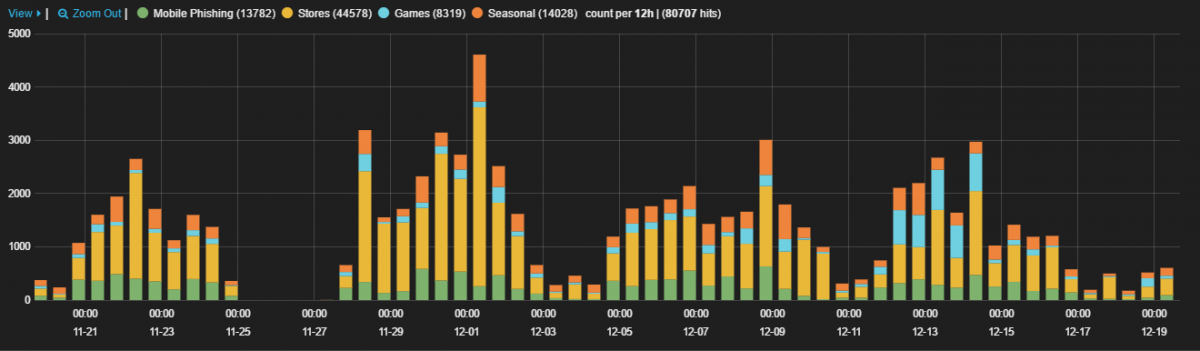
Figure 4 - Phishing trends categorized by URL categories.
We been observing higher than usual phishing traffic for store-related scams. Below are a few examples of different types of phishing attacks that have been designed to look like online stores, deals, branded products, and tech support websites.
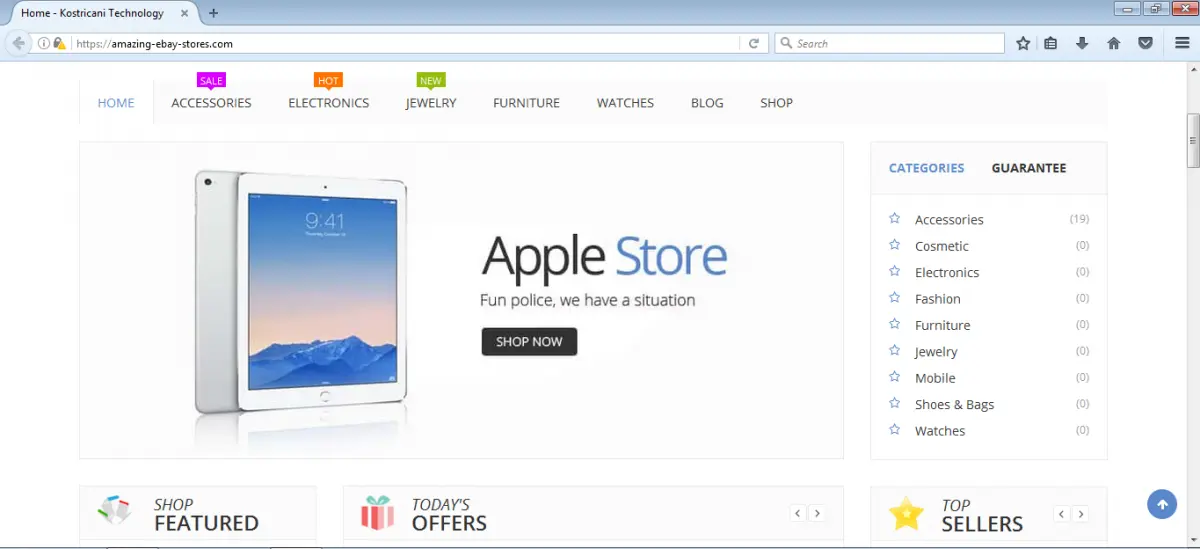
Figure 5 - Fake webstore made to resemble the Apple App Store.
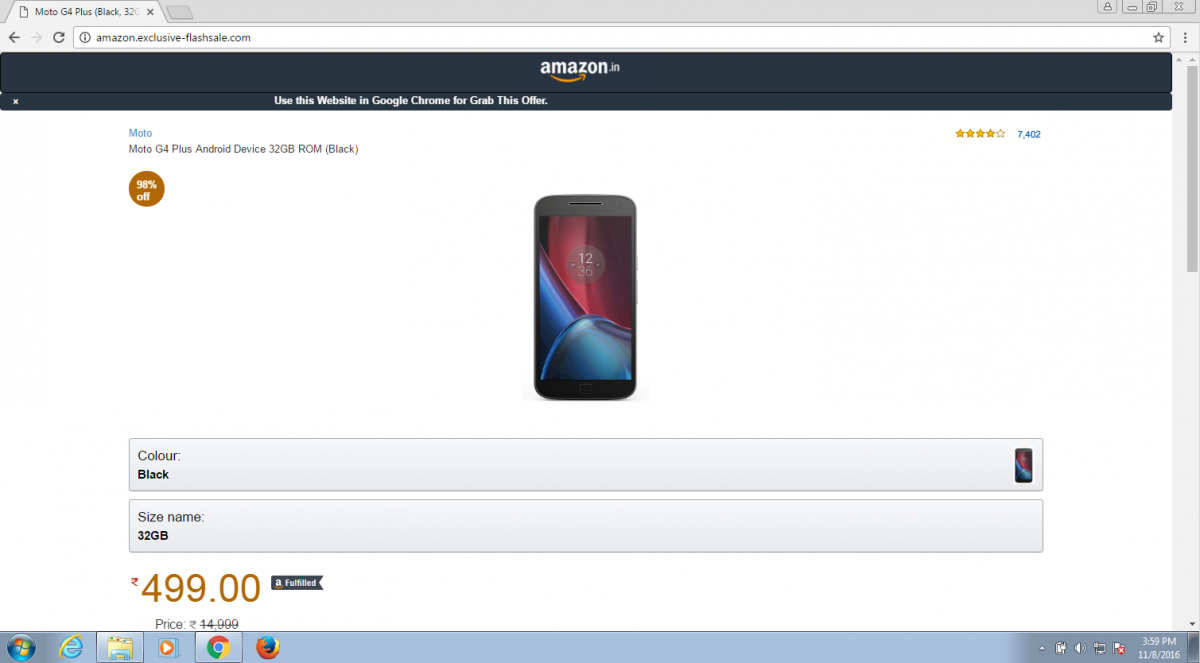
Figure 6 - Fake Amazon sales website.
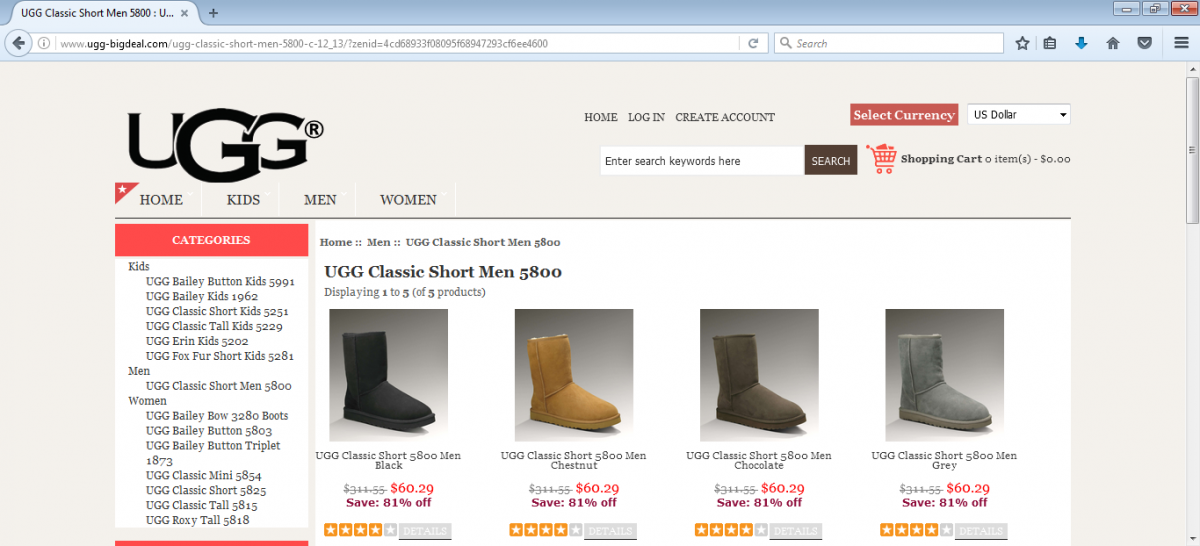
Figure 7 - Fake specialty brand discount website.
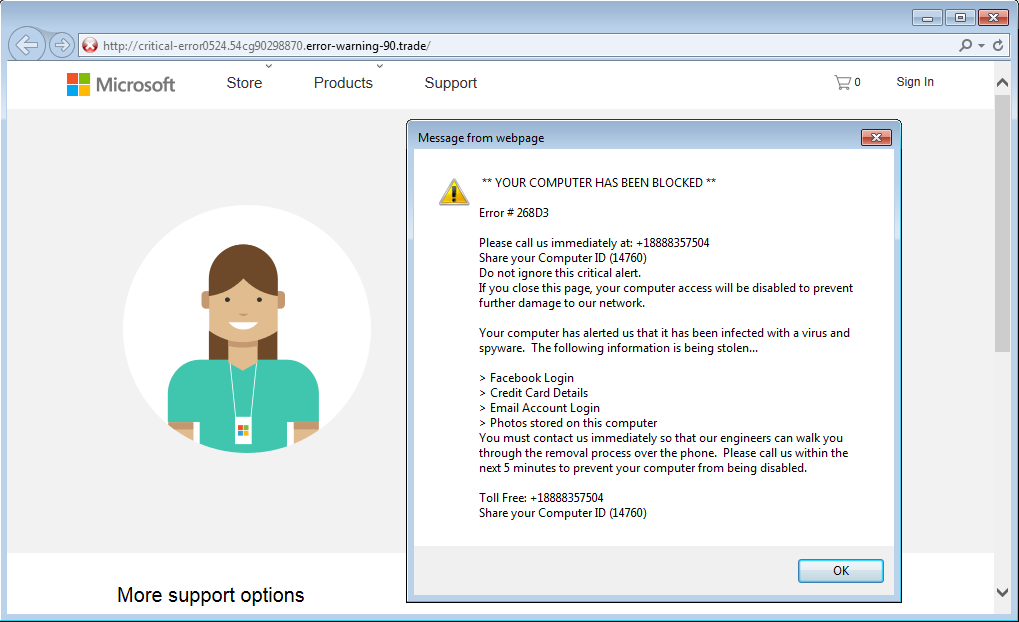
Figure 8 - Fake tech support website.
Family technical support
It's the time of year when we all get to celebrate with our families. For some of us, though, this will mean online shopping with all its potential pitfalls. And for some it will mean new devices and appliances to connect — with oblique instructions and undoubtedly some questions. Here are some tips to help keep you and yours safe and secure through the holidays and into the new year.
- Inspect the source of emails, especially those with enticing shopping deals; be wary of all attachments and don't open anything suspicious
- Steer clear of unofficial mobile application stores
- Ensure you have secure connections (HTTPS) to online retailers and banking sites
- Check the authenticity of the URL or website address before clicking on a link
- Stay away from emailed invoices; this is often a social engineering technique used by cybercriminals
- Do not use unsecured public Wi-Fi for shopping
- Use two-factor authentication whenever possible, especially on sensitive accounts such as those used for banking
- Always ensure that your operating system and web browser have the latest security patches installed
- Use browser add-ons like Adblock Plus to block popups and potential malvertisements
- Back up your documents and media files
- Review the Identity Theft Guide and FAQ from the Federal Trade Commission
- Change the default password on your newly purchased IoT devices, such as your IP cameras, router, and smart TV