Zscalerのブログ
Zscalerの最新ブログ情報を受信
Attackers Exploit Optimizely Flaw To Inject Malicious JavaScript

Introduction
On November 16, 2026, an attacker exploited a vulnerability in Optimizely's Web Experimentation account signup flow. Optimizely is a platform used to create, manage, test, and personalize digital content and websites. The flaw allowed the attacker to edit the Project JavaScript (projectJS) field. Customers use this field to add custom code that runs on pages that load the Optimizely snippet. By abusing this mechanism, the attacker injected malicious JavaScript into customer projects. The code was then delivered to visitors’ browsers through the Optimizely snippets, including snippets served from Optimizely’s content delivery network (CDN).
The attack highlights the continued risk posed by third-party script dependencies and software supply chain compromises, particularly when websites rely on trusted third-party platforms to deliver JavaScript that runs in visitors’ browsers.
Optimizely reported that it blocked the vulnerable path, deployed a fix, removed the injected code from affected projects, ended active sessions, revoked tokens, reset access for affected accounts, and notified impacted customers.
The malicious payload was designed to replace cryptocurrency wallet addresses, skim payment card details, steal cookies, capture page screenshots, and deliver iOS exploits to iPhones and iPads. Organizations using Optimizely, or similar third-party JavaScript platforms, should treat this incident as a reminder to review third-party script governance, monitoring, and browser-side security controls.
ThreatLabz Observations
ThreatLabz identified more than 450 unique domains and more than 3,000 URLs serving the malicious script. These findings suggest a broader impact across organizations and industry verticals than previously reported. The affected domains span industries including the following:
- Airlines and Travel
- Automotive
- Banking and Finance
- E-commerce
- Insurance
- News and Media
- Property and Real Estate
- Retail and Fashion
- Smart Home
- Sports
- Technology and SaaS
- Telecommunications
Recommendations
For end users who visited affected sites
- Monitor bank and credit card statements for suspicious activity.
- Review cryptocurrency transactions made on or around November 16, 2026.
- Be cautious of unexpected account activity on sites visited during the incident.
- Update iOS and iPadOS devices to the latest available security version.
- Change passwords for accounts used on potentially affected websites, especially if the same credentials are reused elsewhere.
For organizations using Optimizely
Review Optimizely project configuration
- Audit all Project JavaScript fields for unauthorized or unexpected code.
- Review recent changes, user activity, account creation events, and administrative access.
- Confirm whether any project snippets were modified during the exposure window.
- Verify that production pages load only approved versions of Optimizely snippets.
Rotate and reset access
- Reset credentials for affected Optimizely administrative users.
- Rotate API tokens, session tokens, and integration keys associated with Optimizely.
- Enforce multi-factor authentication (MFA) for all users with access to experimentation or web personalization platforms.
Deploy Content Security Policy (CSP) in enforcement mode where possible
- Restrict script execution to approved domains.
- Limit where pages can send requests and load images and frames using connect-src, img-src, frame-src, and related CSP directives.
- Use CSP reporting to identify unexpected browser-side activity.
Reduce third-party JavaScript risk
- Maintain an inventory of third-party scripts loaded across websites.
- Review whether each third-party script is still required.
- Apply least-privilege principles to third-party tags and tag management platforms.
- Monitor third-party script changes and unexpected behavior.
How It Works
Optimizely Web Experimentation allows site owners to run A/B tests, personalization logic, and other front-end experiments by loading JavaScript on customer websites. The Project JavaScript field is designed to let customers add custom JavaScript that executes on any page that loads the Optimizely snippet.
Public reporting indicates that the attacker injected malicious JavaScript into the Project JavaScript field of affected customer projects. The injected code was then delivered through legitimate Optimizely snippets. As a result, when visitors loaded a page with a modified snippet, the injected JavaScript could run in their browsers.
Scope of script activity: The observed JavaScript activity is primarily limited to the browser context of the website where the scripts are loaded. The wallet replacement, clipboard manipulation, form monitoring, card-skimming, screen capture, and network-hooking behaviors operate inside the current page, its accessible DOM, same-origin frames, page-initiated requests, and JavaScript-accessible cookies or browser APIs. By design, this JavaScript cannot directly inspect other browser tabs, unrelated websites, other sites’ cookies, local files, or global browser activity. The main exception is the iOS/iPadOS exploit-delivery branch: if one of the delivered exploit chains succeeds, the resulting impact could potentially exceed normal web-page sandbox restrictions.
Attack chain
The figure below shows how malicious JavaScript reached website visitors through Optimizely snippets.
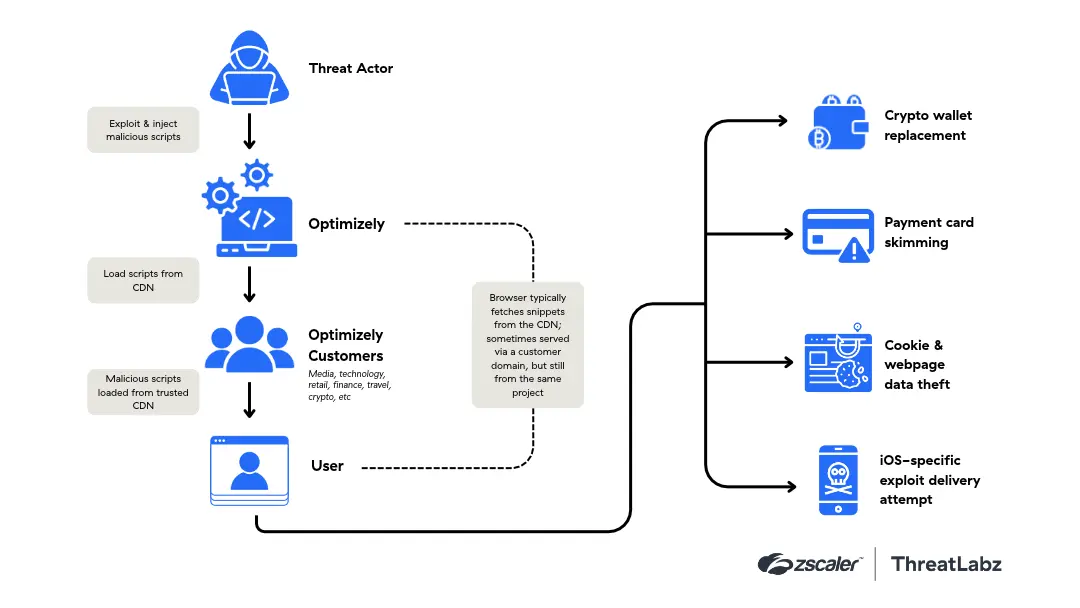
Figure 1: Attack chain showing how a threat actor injected malicious JavaScript into Optimizely customer projects.
Initial access and injection
As stated above, the attacker exploited a vulnerability in Optimizely’s Web Experimentation account signup flow. This flaw allowed unauthorized write access to the Project JavaScript field for multiple customer projects. Modified snippets were served through existing delivery paths, including Optimizely’s CDN (including cdn.optimizely.com) and, in some cases, customer domains. This made the attack more effective because many affected websites already trusted and allowed Optimizely scripts.
Malicious JavaScript payload
In most affected snippets, the injected code acted as a loader that fetched a second-stage JavaScript payload named track.js from attacker-controlled infrastructure such as 1688360[.]cc. The JavaScript payload provided the main malicious functionality, and ran in the visitor’s browser within the context of the affected website.
The following flowchart shows what track.js does after it runs in a visitor’s browser.
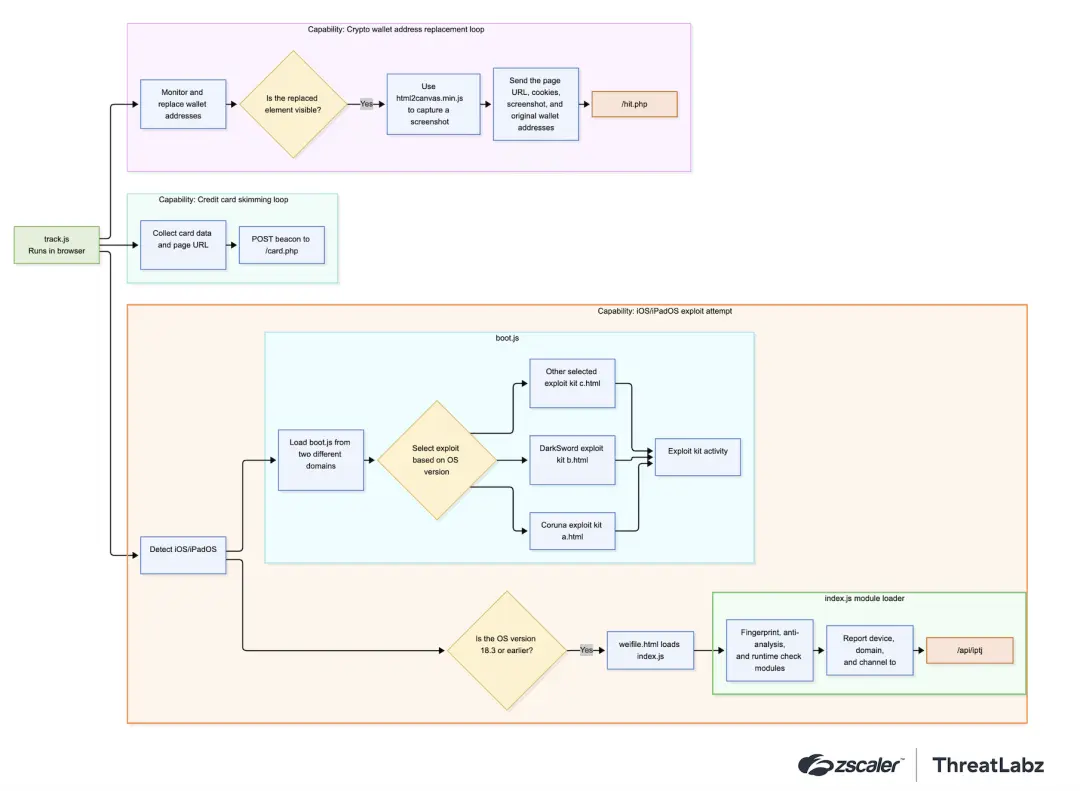
Figure 2: Clipboard hijacking, card skimming, cookie theft, screen capturing, and attempted exploit delivery on iOS and iPadOS.
Cryptocurrency address replacement
The script monitors page content, clipboard operations, and network-transmitted data for cryptocurrency wallet addresses. Targeted cryptocurrencies include Bitcoin, Ethereum, Tron, Solana, Litecoin, Toncoin, Bitcoin Cash, and Dogecoin. When the script detects a valid wallet address, the script attempts to replace it with an attacker-controlled wallet address.
Cookie theft and screen capture
Cookie theft and screen capture happens only when a valid crypto wallet address is replaced and the element is visible. In that case, the JavaScript payload script loaded the legitimate html2canvas.min.js to capture a screenshot of the page, along with the page URL, cookies, original wallet address, and other metadata. This data is sent to the attacker endpoint https://1688360[.]cc/hit.php, likely so the operator can validate successful replacement activity and capture the victim’s session context. The JavaScript payload could collect browser cookies from the affected website, with some exceptions such as if the HttpOnly flag was set.
This could cause users to unknowingly send cryptocurrency to the attacker instead of the intended recipient.
Payment card skimming
Later versions of the payload added payment card skimming functionality. The script monitors input and textarea elements, keyboard events, form submissions, and web requests for payment card numbers, expiration dates, and CVV values on the compromised website. Captured card data was to an attacker-controlled endpoint (1688360[.]cc/card.php). Note the skimmer could not read payment details entered inside secure cross-origin payment iframes, such as hosted payment fields from providers like Stripe or Adyen.
Attempted iOS exploit delivery
For visitors using iPhones or iPads, the malware reportedly attempted to load the Coruna and DarkSword exploit kits. The payload used device and browser checks to decide whether to attempt iOS-specific exploitation.
When the payload identified a visitor’s device as an iPhone or iPad, it added two script elements to the page to load external JavaScript files. Indicators of these pages are the elements data-channel-code, data-chain-url, and data-cfasync attributes.
The script injected a hidden iframe in some cases (hxxps://eil786npto9u5bq[.]icu/JIUJIU888/weifile[.]html) on devices it identified as running iOS 18.6 or earlier. The iframe is positioned off-screen with zero width and height, suggesting it is not intended to be visible to the user.
iOS exploit delivery components
track.jsis the browser-side payload. It checks for iOS or iPadOS and loads additional components when it detects either operating system.boot.jsis the main iOS loader. It uses Safari and iOS version information to select the next delivery path.weifile.htmlprovides a separate delivery path for selected iOS and iPadOS versions. It loads index.js.index.jsinitializes an obfuscated loader, decodes embedded modules, reports device and domain metadata, and may fetch additional modules (if required).
The following table summarizes the two modules embedded in index.js.
Embedded Module Identifier | Description |
|---|---|
57620206d62079baad0e57e6d9ec93120c0f5247 | Utility/runtime helper module providing encoding, binary parsing, numeric conversion, URL normalization, and typed-array/DataView helpers. |
14669ca3b1519ba2a8f40be287f646d4d7593eb0 | Browser environment profiling and anti-analysis module that checks runtime capabilities, storage behavior, WebRTC, MathML rendering, WebAssembly behavior, and automation indicators such as navigator.webdriver. |
Table 1: Functions of the two modules embedded in index.js.
Conclusion
The Optimizely incident highlights how attackers can compromise trusted third-party JavaScript supply chains to reach users across many websites at once. By abusing a legitimate experimentation feature, the attacker delivered injected JavaScript through snippets that affected websites already trusted. Note the malicious JavaScript code can run in visitors’ browsers without any obvious change to the page. The card-skimming and wallet-replacement behavior should be understood as page-context activity, not browser-wide monitoring. These scripts act within the compromised site where they are loaded. Broader impact would depend on successful exploitation by the iOS/WebKit exploit chain.
Zscaler Coverage
The Zscaler ThreatLabz team has deployed protections for the indicators of compromise associated with this campaign.
Zscaler Advanced Threat Protection
How Zscaler Can Help
The following table shows Zscaler’s recommended mitigations by attack stage.
Attack Stage | Recommended Mitigation |
|---|---|
Prevent compromise |
|
Prevent lateral threat movement |
|
Detect post-exploitation activity |
|
Prevent data loss |
|
Indicators Of Compromise (IOCs)
Domains and URLs
IOC | Type | Details |
|---|---|---|
1688360[.]cc | Domain | Main domain associated with the threat campaign. Also used for fingerprinting, reporting, and screenshot submission by track.js. Includes the following URLs:
|
eil786npto9u5bq[.]icu | Domain | Hosts another iOS boot.js script and the weifile.html iframe path. Includes the following URLs:
|
5vobauua3ojpklx[.]icu | Domain | Hosts one of the iOS boot.js scripts loaded by track.js. Includes the following URL:
|
ios-hack[.]icu | Domain | Main loader/API domain used directly by boot.js. |
q1ls1ho9x7wsxlu[.]icu | Domain | Secondary C2 base decoded by boot.js and passed into the hidden iframe as c2Base. |
Script/file names
IOC | Description |
|---|---|
track.js | Injected browser script that monitors crypto wallet activity and initiates the iOS/iPadOS path. |
boot.js | iOS loader script that decodes configuration, fingerprints Safari/iOS, and selects the delivery path. |
weifile.html | Hidden iframe stage loaded for selected iOS/iPadOS versions. |
index.js | Loader script loaded by weifile.html; decodes modules, reports metadata, and may load follow-on modules. |
html2canvas | Library loaded from 1688360[.]cc to capture screenshots when wallet replacement is visible. |
iOS exploit-kit entry paths
IOC | Description |
|---|---|
A8/a.html | Reported Coruna exploit-kit entry targeting iOS 13–17. |
B9/b.html | Reported DarkSword exploit-kit entry targeting iOS 18.x. |
D11/b.html | Reported DarkSword exploit-kit entry targeting selected iOS 15–17 / 17.2 ranges. |
D12/b.html | Reported DarkSword exploit-kit entry targeting selected iOS 18.x ranges. |
C10/c.html | Selected by boot.js for iOS 26. |
Follow-on JavaScript module pattern
IOC | Description |
|---|---|
/<40-hex>.js? | Pattern used by index.js to request follow-on JavaScript modules from the same directory as the loader. |
/<40-hex>.js? | Pattern used by index.js to request follow-on JavaScript modules from the same directory as the loader. |
sha256("cecd08aa6ff548c2" + module_id).substring(0, 40) + ".js" | Filename derivation logic used to generate the follow-on module path. |
Referenced module IDs and download paths
Referenced Module ID | Download Path |
|---|---|
477db22c8e27d5a7bd72ca8e4bc502bdca6d0aba | bef10a7c014b826e9dd645984e80baf313c1635f.js |
29b874a9a6cc9fa9d487b31144e130827bf941bb | 4a75f0551eba446b4fa35127024a84b71d9688d6.js |
9db8a84aa7caa5665f522873f49293e8eebccd5c | 3fd66b32c44150acff3dcb80f86c759574148ed5.js |
171a7da1934de9e0efb9c1645f4575f88e482873 | 17480ecc0120292fb6b8b19f2fa134385dcfd0fd.js |
91b278ddb2aec817b10c1535e0963da74f9b8eeb | f6377d5d458183d41c5fd99661c5a306b42c6255.js |
b586c88246144bc7975ad4e27ec6d62716bf34ea | 3bc0f6865c0476c0a98a76cb9924d6b3972df591.js |
e3b6ba10484875fabaed84076774a54b87752b8a | 6beef463953ff422511395b79735ec990bed65f4.js |
57cb8c6431c5efe203f5bfa5a1a83f705cb350b8 | 8c4451cf1258f9a8d6a8af27864f111fd69a0e99.js |
d11d34e4d96a4c0539e441d861c5783db8a1c6e9 | ff4f3cb4711fb364b52de5ab04a8f83140466f89.js |
ea3da0cfb0a5bdb8c440dd4a963f94cbd39d9e44 | 46ecd515ac9e99ef0603063db39303a0fd849632.js |
Attacker wallets
Wallet Address | Cryptocurrency / Network |
|---|---|
0xC4026b06D82b0F0B363eda0642D61CfbDc17884e | Ethereum |
THvs6p56XkUiMkJeSc51cAP64u2RsTYqxa | TRON |
19g9rZcPeiz8rUvyWpTRyXXhPnjsWrc3kW | Bitcoin |
UQAgM1VqSZQiJLSG5w-ovurq5CZdxLEK3_7CMmwALTA5e09p | TON |
FVtL8NMYS9PA1v3HE67XUGCtGA9JaZUvqav2fU2LrV5n | Solana |
ltc1q3wp7g6ds0ggg6fl6kncpa4sepn0q3qfacgred5 | Litecoin |
qzkaaf8n6grmpr0d9lx8xutn3r9lk722f566hhpe58 | Bitcoin Cash |
DBEGrxRF7KMSuhTS4c1MFviStU6efdMnu5 | Dogecoin |
0:2033556a49942224b486e70fa8beeaeae4265dc4b10adffec2326c002d30397b | TON |


免責事項:このブログは、Zscalerが情報提供のみを目的として作成したものであり、「現状のまま」提供されています。記載された内容の正確性、完全性、信頼性については一切保証されません。Zscalerは、ブログ内の情報の誤りや欠如、またはその情報に基づいて行われるいかなる行為に関して一切の責任を負いません。また、ブログ内でリンクされているサードパーティーのWebサイトおよびリソースは、利便性のみを目的として提供されており、その内容や運用についても一切の責任を負いません。すべての内容は予告なく変更される場合があります。このブログにアクセスすることで、これらの条件に同意し、情報の確認および使用は自己責任で行うことを理解したものとみなされます。