Find vulnerable targets
When a vulnerability is disclosed in a popular software (such as Wordpress, Joomla!, Drupal, etc.), attackers can use Google to quickly find a list of websites that run the potentially vulnerable versions of the application.
This page lists few (old) vulnerabilities and the corresponding Google search to find vulnerable targets.
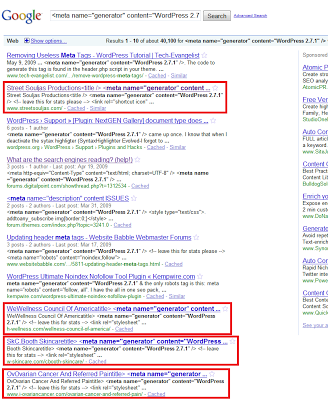
More recently, I was doing research on hacked Wordpress websites. The Wordpress version can be identified with this HTML code:
Google does not usually allow search for HTML source code, but only for text. However, when a page is not parsed correctly, HTML code gets indexed as regular searcheable content, which actually happens pretty often
Google can show you a list of Wordpress sites that run version 2.7.1:
Coupled with security feeds that include ready-to-use exploits such as SecurityFocus this technique can let attackers find vulnerable sites within minutes of a vulnerability disclosure, before website owners have time to update their website. For example, all rcent versions of MediaWiki, except the last one, are proned to a Cross Site Request Forgery vulnerability. Most othe MediaWiki websites carry an image with the alternative text "Powered by MediaWiki". Using the Google search for this text, it is easy to gather a list of potentially vulnerable targets.
Find vulnerable code
Google Code Search is a powerful tool that allows advanced searches in the source code of open software. You can even use regular expressions for the searches.
This tool can be used to find different types of vulnerabilities such as:
- software that includes vulnerable versions of a library
- dangerous code patterns
- for example, misuse of sprintf can lead to format string vulnerabilities
- lack of buffer size checks (with the C functions gets, memcpy, etc.)
Find infected pages
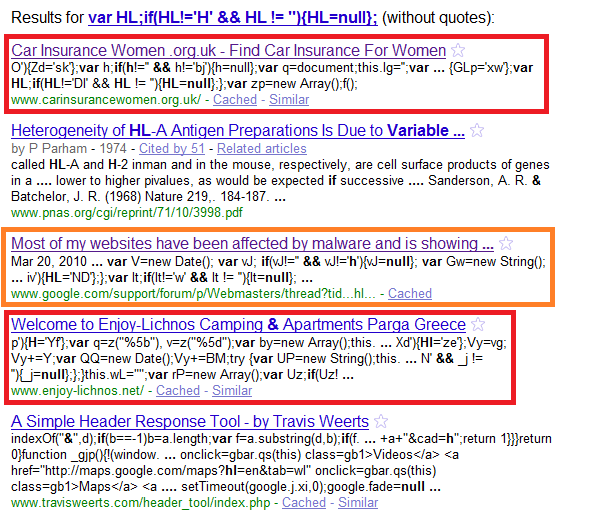
But we can also use Google to find pages infected in the same fashion, or exploits running in the wild. This allows us to gather more information about the attack, to get a list of domains that serve malicious files and to create an efficient set of signatures or heuristics to protect customers.
For example, we recently found this obfuscated JavaScript maliciously injected into the home page of an Indian college website:
This code loads another JavaScript file from BestBlenderPart.ru:

A Google search for part of the obfuscated code shows a list of infected websites, and a few posts in forums that also list infected pages. All the injected, obfuscated JavaScript is slightly different, but the end result is the same - external JavaScript is loaded on port 8080 from several domains such as easyfunguide.at, reachsaw.ru, forredtag.ru, etc. With this information, we can add the malicious files to denylists and develop good heuristics to block infected pages.