Zscaler Blog
Get the latest Zscaler blog updates in your inbox
Zscaler WebMCP Security Controls: Bringing Zero Trust to the Agentic Web
We are excited to announce WebMCP Security Controls (Web Model Context Protocol) in the Zscaler Zero Trust Browser. This solution extends the zero-trust framework, traditionally applied to human web activity, to secure the automated tool calls made by AI agents directly within the browser via the emerging WebMCP standard.
WebMCP is a proposed web standard available in Chrome Origin Trials. WebMCP lets websites expose structured, typed JavaScript functions and annotated HTML forms as callable tools for AI agents. An in-page AI agent can then list those tools and invoke them programmatically, i.e. get_cart, update_cart, search_flights, submit_payment. No clicking, no navigating, no leaving the page. It’s a useful primitive, which is why we started paying attention to it.
This post covers why we built the product, where the control point needs to sit for this new interface, how it works, and three short demos from a real customer scenario.
Where the Control Point Sits
The Zscaler Zero Trust Browser Extension runs inside the Chrome browser, on the same layer as the WebMCP APIs themselves. That placement is deliberate. It lets us evaluate every tool call before the site’s handler ever runs.
There are two points in the WebMCP lifecycle where this matters. The first is registration: when a site declares its tools, the extension enumerates them before the agent has any way to invoke them. The second is invocation: when the agent actually calls a tool, we inspect the full argument payload and evaluate its policy . If the policy says block, the site’s function is never called at all. Nothing runs, no state changes, nothing goes out. The agent is then told the call failed in a way the user can see, so there’s no silent failure.
Because The Zscaler Zero Trust Browser Extension sits at that point in the flow, the outcome doesn’t hinge on what’s in the path. There’s no downstream tool to depend on and no cooperation required from the site. The decision happens at the moment the tool call is being made, on the layer before anything else has a chance to react to it.
How WebMCP Security Controls work
WebMcp security was specifically developed for this in-page layer, using the same zero-trust principles as the rest of the Zscaler platform. The Zero Trust Browser Extension that customers are using to secure their Chrome browsers now also secures the WebMCP layer, and gives customers three additional capabilities on top of it.
1. WebMCP Capability Discovery
The moment a user (or their agent) loads a WebMCP-enabled site, the The Zero Trust Browser Extension enumerates every tool the site registers, before a single one can run. Seven attributes are captured on each tool:
- webmcp.tool.name: the identifier the site exposed
- webmcp.tool.description: the natural-language description the site declared
- webmcp.tool.arguments: the JSON payload passed at invocation time
- webmcp.tool_count: how many tools the site registered in total
- webmcp.tool.provider_origin: the origin that actually registered the tool
- webmcp.tool.is_cross_origin: whether that origin differs from the top-level site
- webmcp.tool.has_untrusted_content_hint: a signal that the tool’s output may contain untrusted content
This creates a structured inventory of the agentic surface, specific to every site and user. This is a view security teams simply haven’t had before, mostly because the layer it describes is new.
2. WebMCP Runtime Monitoring
While discovery tells you what a site can do, Runtime Monitoring tells you what it actually did. While the user is on the page, the extension captures every tool invocation with full context: the seven attributes above, plus user identity, device posture, extension version, browser, IP, geolocation, and URL. Each event lands in the Zscaler admin console as a detection, in the same event stream as the rest of the platform’s telemetry. Searchable, filterable, exportable.
That’s what makes agent activity auditable. If something anomalous happens, you know which agent made the call, on whose behalf, on which device, and what it passed as arguments. Not just that someone’s browser touched the site.
3. WebMCP Policy Enforcement
Visibility on its own doesn’t change outcomes, which is why inline policy enforcement is so critical. Policies apply in real time, match to any of the seven WebMCP attributes, and land on one of three effects:
- Allow: Call proceeds normally.
- Monitor: Call proceeds, but is logged as a detection with full context. This is a good starting posture.
- Block: Call is stopped at the point of invocation. The agent is told the call failed, and that message shows up in the agent’s own reply to the user.
Rules can match on tool identity (kill a whole capability), on argument content (kill specific payloads that carry restricted data), on provider origin (be stricter about cross-origin tool providers), or on the untrusted-content hint (treat outputs from lower-trust sources differently).

Figure 1. Registration and invocation are both intercepted inside the page. Every attribute is captured, every call is policy-evaluated inline, every decision is logged with full user and device context.
Together the three capabilities cover the questions we usually get from security teams the first time they see WebMCP: what tools are on our sites, what are agents actually doing with them, and what do we want to allow? Zero trust has always been about answering these kinds of questions. Now we get to answer it for agents on the web too.

Figure 2. The seven attributes on the left are what every policy rule can match against. The two rules on the right are the ones used in the demos below.
See it in Action
The three short demos below all run against the same site, a retailer with an in-page AI shopping assistant, and the same user. The only thing that changes between them is the policy. This is roughly the sequence we recommend to our customers– start in monitor mode, learn what’s actually happening, then add targeted blocks where you need them.
1. Monitor mode: see the surface before you change it
Most teams start here. In monitor mode, every tool registration and invocation is captured and logged without blocking a single action. While your users won't notice a thing, your security team gets two key benefits: a complete inventory of the agentic surface across every site visited, and a fully searchable audit trail of every tool call that occurs.
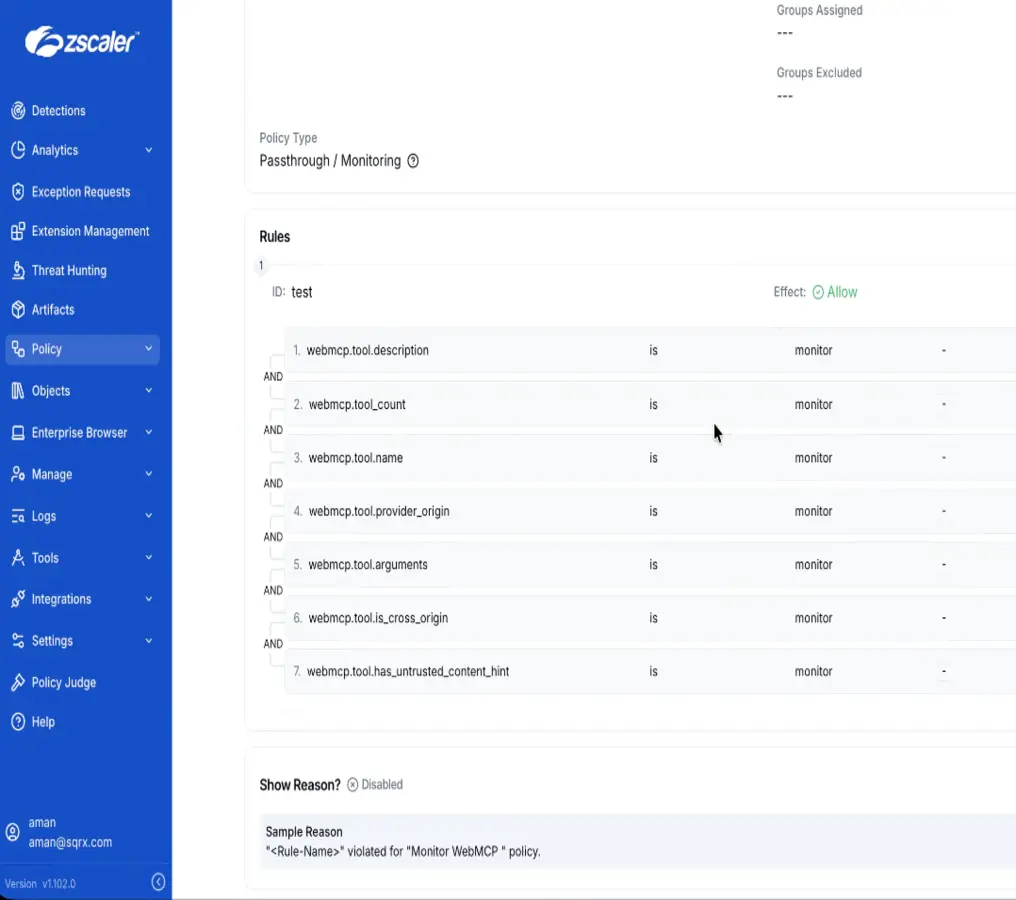
In the demo below, the assigned policy is called Monitor WebMCP and runs in passthrough mode with all seven webmcp.* attributes enabled. The user opens the retailer’s site, launches the in-page agent, and asks “what’s in their cart”. The agent calls get_cart and answers in real time. On the admin side, each interaction shows up as a new detection with severity Informational and effect Allow. Clicking into one gives you the full record, including user identity, device posture, IP, geolocation, URL, tool name, tool description, and tool count.
Demo 1: Block Monitor

The Monitor WebMCP policy in the Zscaler admin console: all seven webmcp.* attributes wired up as monitor rules, default effect Allow.

The Detections view streams every WebMCP interaction as an Informational / Allow entry, in the same stream security teams already use for user activity.

A single detection carries the full forensic record: user identity, device posture, IP, geolocation, URL, and the Webmcp Tool Name, Description, and Count the site declared.
Monitor mode is not designed to immediately block threats. Instead, it establishes an essential baseline of "ground truth" before security teams begin enforcing block rules. By first understanding exactly which tools users are invoking, on which domains, and with what arguments, organizations can make highly informed policy decisions rather than blocking traffic blindly.
2. Blocking a tool: kill the capability
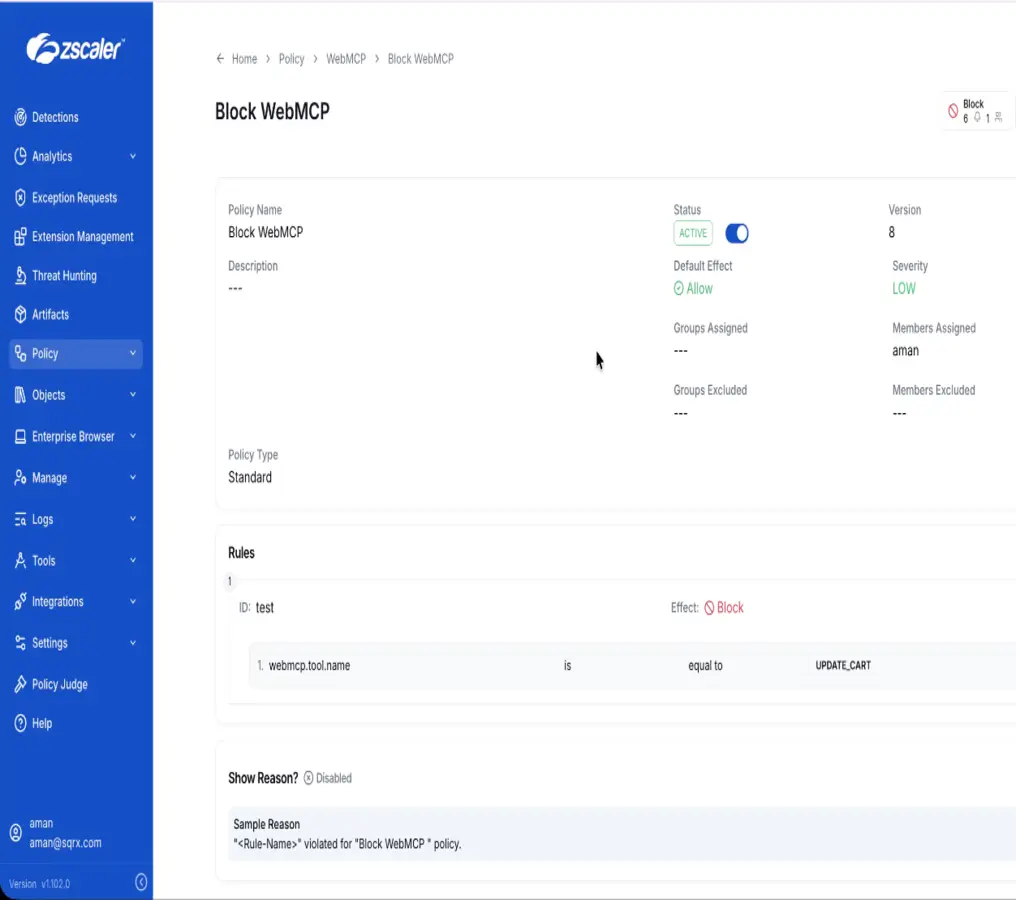
Once you know what agents are calling, the next step is deciding what you don’t want them calling. The simplest kind of block rule targets a tool by name. In this demo, the policy switches to Block WebMCP with a single condition: webmcp.tool.name is equal to update_cart. Any invocation of that tool, with any arguments, on any site the policy covers, gets stopped at the point of call.
On the user side, this is visible in real time. The user asks the agent to add an item to their cart. The agent tries to call update_cart. The extension intercepts it, matches the rule, and returns a block. The agent then tells the user directly: "The Zscaler Zero Trust Browser blocked this action for security reasons." Nothing is silent. The user knows what happened, and the SOC sees a new detection show up with severity Low, effect Block, and the exact rule reason: webmcp.tool.name is equal to UPDATE_CART.
Demo 2: Block Tool Name

The block surfaces inside the agent’s own reply, so the user gets a clear reason instead of a mysterious failure.

A new Low-severity Block WebMCP row appears at the top of the Detections list, alongside the ongoing Informational / Allow stream from Monitor mode.

The detection detail carries the exact rule that fired: Reason: webmcp.tool.name is equal to UPDATE_CART. Analysts get the "why" without leaving the console.
Blocking by tool name is the right control when a capability is just out of scope for a given user group. A marketing team’s agent does not need to invoke submit_payment. A support team’s agens does not need to invoke export_customer_pii. One rule per capability, applied to the right group.
3. Blocking on arguments: DLP for the agentic layer
Sometimes the tool itself is fine and the problem is the payload. That’s what argument-level inspection is for. Instead of matching on tool name, this rule matches on the JSON arguments the agent passes to the tool: webmcp.tool.arguments contains "book". Every update_cart call is still evaluated. Only the calls whose payload contains the restricted keyword get blocked.
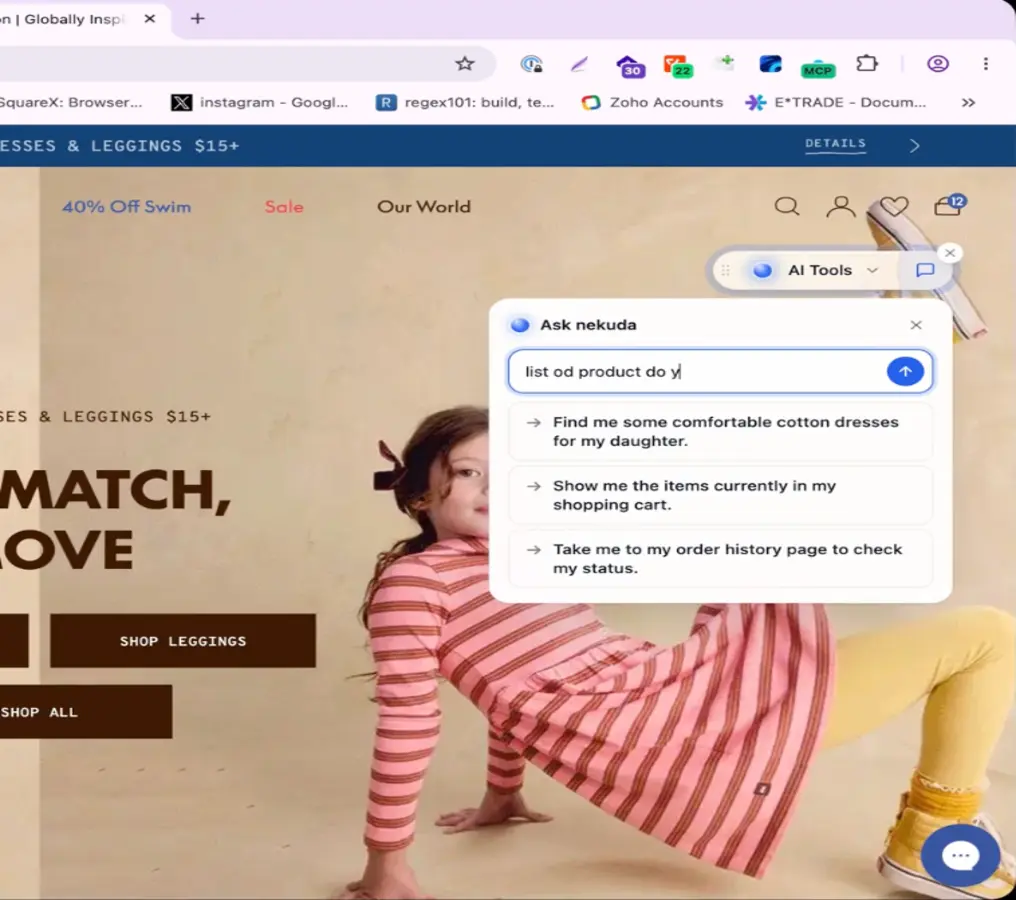
In the demo, the user asks the agent to list available products. The agent calls browse_store, which is allowed, and returns a catalog. Two items in it are relevant here: a Hammer Time Graphic Tee and a Book Cat Graphic Tee. The user asks to add the Hammer Time tee first. The argument payload contains hammer-time-graphic-tee, no match on the rule, the call goes through. Then the user asks to add the Book Cat tee. Now the payload contains book-cat-graphic-tee-apple-blossom-26f12103, which does match on book. The call gets blocked, and the agent tells the user: "The Zscaler Zero Trust Browser blocked this action for security reasons, so I am unable to add the ‘Book Cat Graphic Tee’ to your cart." Meanwhile the detection in the console has captured the entire argument payload, verbatim.
Demo 3: Block Argument

Same tool, different payload, different outcome. The user asks for the Book Cat Graphic Tee; the argument matches the deny rule; the agent surfaces the block inline.

The console captures the argument payload verbatim: {"cart":{"line_items":[{"handle":"book-cat-graphic-tee-apple-blossom-26f12103","quantity":1}]}}. That’s what makes agent activity correlatable with the actual data flow, not just the tool that was called.
Argument-level inspection is what makes WebMCP Security Controls feel like DLP for the agentic layer. Regex patterns for PII, deny-lists for customer names or project codenames, structural checks on JSON payloads: the same primitives enterprises already trust for traditional DLP, now applied to what agents are passing into websites. The full round-trip of a blocked call looks like this:

Figure 3. The full round-trip of a blocked call. The extension inspects arguments in flight, blocks the invocation, surfaces the failure back to the user through the agent’s reply, and logs the exact rule reason.
Why We Didn’t Want to Wait on This
A few things convinced us this had to ship now rather than later.
WebMCP adoption will move faster than governance. The standard is already adopted in Chrome Origin Trials . Every site running an in-page AI assistant has a fairly short path to shipping WebMCP tools. Every agent that talks to those sites has an incentive to use them. When a new web capability lands in a mainstream browser, adoption usually compresses from years to months. It’s much easier to put controls in place before that curve as opposed to waiting until after the first incident.
Agents act under user identity. A tool call inherits the user’s session, cookies, and authorization, but the intent behind it comes from a model. That’s an audit and governance problem long before it’s a security one. Which agent made this call, on whose behalf, with what payload? Those questions become answerable at the WebMCP layer, at runtime, using the attributes and context the extension already captures.
Productivity can’t be the tradeoff. Blocking in-page AI assistants outright isn’t really a viable answer. Employees are already using them and are going to use them, and the productivity gains are real. A control that lives at the WebMCP layer means users keep the benefits of agentic browsing while the enterprise still gets a say in what those agents are actually allowed to do.
We’ve seen this pattern before. Zero trust replaced castle-and-moat once perimeters started dissolving. Zero trust followed the work again as it moved to cloud and SaaS. Agentic browsing is the same story one layer deeper, and it’s a lot easier to put controls in place while the agentic surface is measured in a handful of tools per site rather than dozens.
What’s Next
WebMCP Security Controls are available today in the Zscaler Zero Trust Browser. If you want to see your own users’ agentic surface, reach out to your account team for a demo or visit the product page. Most teams are surprised by what their first monitor-mode report turns up.
This is just one of many innovations for the Zero Trust Browser for securing AI and AI Agents. Stay tuned for more and frequent innovations introduced in Zero Trust Browser , the most comprehensive and complete Zero Trust Browser Security product in the market.

Was this post useful?


Disclaimer: This blog post has been created by Zscaler for informational purposes only and is provided "as is" without any guarantees of accuracy, completeness or reliability. Zscaler assumes no responsibility for any errors or omissions or for any actions taken based on the information provided. Any third-party websites or resources linked in this blog post are provided for convenience only, and Zscaler is not responsible for their content or practices. All content is subject to change without notice. By accessing this blog, you agree to these terms and acknowledge your sole responsibility to verify and use the information as appropriate for your needs.



Get the latest Zscaler blog updates in your inbox

By submitting the form, you are agreeing to our privacy policy.