Zscaler Blog

Get the latest Zscaler blog updates in your inbox

Security Research

Be Aware Of Gmail Phishing Pages

image
THREATLABZ
August 22, 2011 - 2 min read
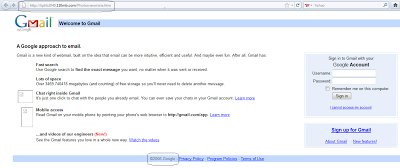
Phishing is certainly not a new attack vector but attackers are constantly using it to fool victims into entering sensitive information like authentication credentials. As I mentioned in a blog post a couple of years back, such attacks will never go away as phishing is a trivially easy attack vector that can be used to steal sensitive personal information. There are number of popular websites being targeted in phishing campaigns to steal sensitive information. Recently, we came across one website claiming to be a Gmail login page. Here is the screenshot of the website:

Image


The above page is largely identical to a legitimate Gmail login page but there are a couple of important differences to be noted. The address of the website is not “www.gmail.com” but rather points to “hxxp://kphb2040.110mb.com/Photosnewmine.htm”. Additionally, the copyright notice is out of date.


If you enter your username and password, the entered data will be sent to a malicious server and you will then be redirected to the legitimate Gmail website. The attacker has done this intentionally so that a victim will assume that the initial login wasn’t successful and they must then re-enter their login credentials.


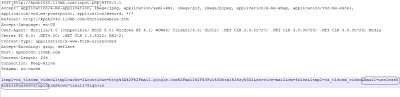
Even if you enter fake information, you will be redirected to legitimate Gmail site. For testing purposes, we have entered fake account information. The following packet capture illustrates the POST request:
 

Image


The victim’s email address and password has been sent to “input.php” and they are then redirected to the real “mail.gogle.com” website. There are plenty of such websites are present on the Internet and users should be cautious any time they are entering login credentials. Always check URL address before entering any sensitive information on a webpage. Instead of clicking on links, when possible manually enter the website address in the address bar.


Careful…


Umesh

form submtited
Thank you for reading

Was this post useful?

Disclaimer: This blog post has been created by Zscaler for informational purposes only and is provided "as is" without any guarantees of accuracy, completeness or reliability. Zscaler assumes no responsibility for any errors or omissions or for any actions taken based on the information provided. Any third-party websites or resources linked in this blog post are provided for convenience only, and Zscaler is not responsible for their content or practices. All content is subject to change without notice. By accessing this blog, you agree to these terms and acknowledge your sole responsibility to verify and use the information as appropriate for your needs.

Get the latest Zscaler blog updates in your inbox

By submitting the form, you are agreeing to our privacy policy.