Recently I blogged about how attackers are forcing users to download fake codecs to spread malicious content. I’ve also encountered across another drive by download attack vector, which uses Java applets to execute downloaded malicious content on the victim’s machine. Download and execution of malicious content happens without user interaction. Let’s take look at a screen-shot of the malicious URL “hxxp://www.nicholaspettas.com/”,
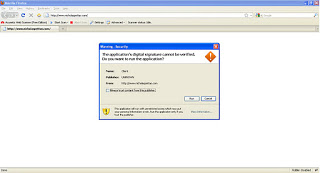
As you can see, when a user visits the website the browser requests user permission to execute the Java applet code. Here is the HTML source of the page:

When the user allows the applet code to run by clicking on “run” button, the browser downloads the “Client.jar” file from “hxxp://www.nicholaspettas.com/Client.jar”. Let’s take look at the Wireshark captures, which show the network activity performed during this process:
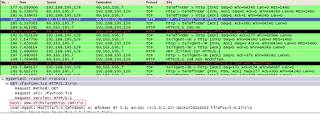
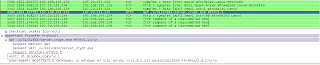
The downloaded JAR file contains “Client.class”, which is executed by the JRE. An argument to the “Client.class” file is passed with the location of the malicious .exe residing on “hxxp://dl.dropbox.com/u/31332834/server_crypt.exe”. It’s interesting to see that the malicious exe file is uploaded on www.dropbox.com. The file “server_crypt.exe” is then downloaded by the above applet code and executed on the victim’s machine.
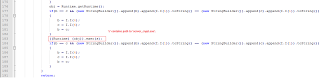
Decompiling “Client.class” reveals the Java code, which you can read to better understand how it downloads the file and executes it. Let’s have look at piece of decompiled java code, which executes the downloaded file.
Virustotal Reports:
Client.jar - 27 AV vendors on Virustotal reports it as “Trojan Downloader”.
server_crypt.exe - 16 AV vendors reports as “Trojan”
ThreatExpert Report:
server_crypt.exe – Indicated highest severity level for this threat.
Beware of drive by download attacks.
Pradeep