Zscaler Blog
Get the latest Zscaler blog updates in your inbox

Introduction
Facebook phishing pages are fake websites designed to look like the real Facebook login page. They trick users into entering their login credentials, which are then stolen by hackers. These stolen credentials can be used for identity theft, taking over accounts, or spreading spam and phishing attacks. To avoid falling victim, users should be cautious of suspicious links and enable multifactor authentication (MFA) on their accounts.
Domains
On 02/13/2011, Zscaler ThreatLabz found several domains used for Facebook phishing, all of which were registered the same day:
securedirectsite.comdirectsecuresite.comsecuredsitedirect.comhighsecuritydirect.comsecuredsitedirect.comofficialsecuredsite.com
These domains contain the same page: a simple form to enter a Facebook login and password.
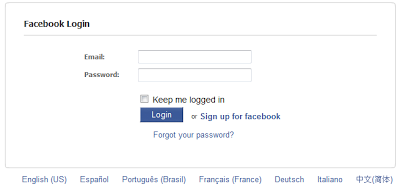
Figure 1: Facebook Phishing page.
After entering the credentials, users are redirected to http://www.facebook.com/pages/Image-hosting-service/106354426063487#!/album.php?profile=1&id=208421665712, which lands the user at their Profile Pictures page. If the user was not yet logged into Facebook, they must login "again". The phishing page does not post the credentials to Facebook on the user's behalf.
Fast-Flux DNS
All of the domains were registered by the same individual in China.
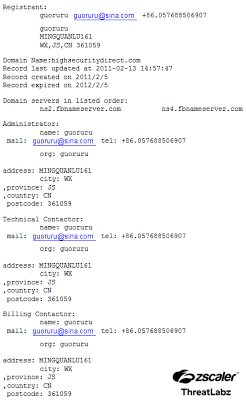
Figure 2: WHOIS information for highsecuritydirect.com.
The domains are bound to multiple IP addresses that change rapidly (aka fast-flux DNS):
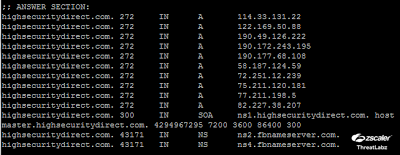
Figure 3: DNS information for highsecuritydirect.com.
They all use the DNS server fbnameserver.com, which has been used for other Facebook phishing sites in the past.
Random Redirections
On 02/14/2011, these 6 domains where redirecting users to http://www.google.com/ in the morning. In the afternoon, they redirected users to http://www.facebook.com/.
On 02/16/2011, they seem to display the phishing pages all the time. We do not know why these redirections were set up earlier.
As of 02/16/2011, these domains are not yet blocked by Google Safe Browsing.
Conclusion
In February 2011, phishing domains targeting Facebook users were discovered. These Chinese-registered domains featured login pages and employed fast-flux DNS to evade detection. Despite random redirections, they remained unblocked by Google Safe Browsing (as of 02/16/2011), posing a continued risk to users.
FAQs
A Facebook phishing page is a fake website built to mimic the real Facebook login screen. When users enter their credentials, those details are captured by the attacker rather than submitted to Facebook. Victims are typically redirected to the legitimate site after submission to avoid immediate suspicion. Stolen credentials are then used for account takeover, identity theft, or further phishing campaigns.
Fast-flux DNS is a technique where a single domain is mapped to a rotating pool of IP addresses that change rapidly. Phishing operators use it to make takedowns difficult — blocking one IP address does not disable the campaign because the domain immediately resolves to another. It also complicates threat intelligence tracking, as the infrastructure is never stable long enough for blocklists to stay current.
Check the URL carefully before entering credentials. Legitimate Facebook login pages use facebook.com — anything else, regardless of how convincing the page looks, should be treated as suspicious. Other indicators include mismatched SSL certificates, unusual domain names containing words like "secure" or "direct," and login pages reached via unsolicited links in email or messages.
Multifactor authentication adds a second verification step beyond a password. Even if an attacker successfully captures a username and password through a phishing page, they cannot access the account without the second factor, such as a one-time code or authentication app approval. MFA does not prevent credential theft, but it significantly limits the damage an attacker can do with stolen login details.

Was this post useful?


Disclaimer: This blog post has been created by Zscaler for informational purposes only and is provided "as is" without any guarantees of accuracy, completeness or reliability. Zscaler assumes no responsibility for any errors or omissions or for any actions taken based on the information provided. Any third-party websites or resources linked in this blog post are provided for convenience only, and Zscaler is not responsible for their content or practices. All content is subject to change without notice. By accessing this blog, you agree to these terms and acknowledge your sole responsibility to verify and use the information as appropriate for your needs.


Get the latest Zscaler blog updates in your inbox

By submitting the form, you are agreeing to our privacy policy.