Along with Firefox, Chrome and Safari, Zscaler Likejacking Prevention is now also available for Opera. You can download it on the official Opera add-on site.
The Opera version works the same as the Google Chrome version, with a similar popup to obtain more information about the Facebook widgets on the current page.
The red/green icon that indicates if a page is safe or suspicious, is located on the far right of the Opera browser. I believe it would have been more visible if it were part of the URL bar, as I did for Chrome and Firefox, but unfortunately, Opera does not permit such a placement.
Limitations
There is one big limitation in Opera: the extension cannot detect hidden Facebook widgets in frames or iframes. This is due to restrictions in the Opera extension framework, which don't permit frames and iframes to be linked to the top window. Scripts can be injected in frames and iframes, but it is not possible to know which tab they belong to and the background page cannot communicate with the frames and iframes inside a tab.
In practice, 90% of the hidden Facebook widgets I've seen do not use layers of frames and iframes. Zscaler Likejacking Prevention will help users to stay safe from Facebook spam for the majority of spam pages
Version 1.0.9
I'm continually improving Zscaler Likejacking Prevention on all platforms. The latest version available is 1.0.9. You can download it and the other plugins we have released, on our Tools page.
Firefox
I expect version 1.1.0 of the Firefox Zscaler Likejacking plugin to be approved on the official Mozilla add-on site within a few days.
-- Julien
 |
| Zscaler Likejacking Prevention on the Opera extensions site |
The Opera version works the same as the Google Chrome version, with a similar popup to obtain more information about the Facebook widgets on the current page.
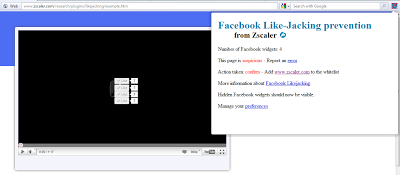 |
| Zscaler Likejacking Prevention for Opera in action |
The red/green icon that indicates if a page is safe or suspicious, is located on the far right of the Opera browser. I believe it would have been more visible if it were part of the URL bar, as I did for Chrome and Firefox, but unfortunately, Opera does not permit such a placement.
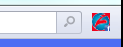 |
| Icon on the right of the screen, after the search bar |
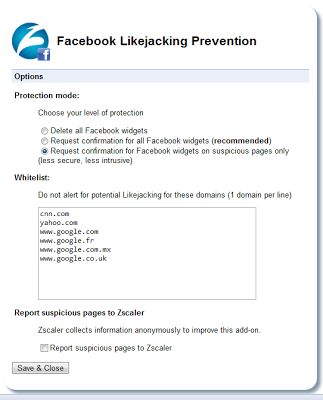 |
| Preferences page |
Limitations
There is one big limitation in Opera: the extension cannot detect hidden Facebook widgets in frames or iframes. This is due to restrictions in the Opera extension framework, which don't permit frames and iframes to be linked to the top window. Scripts can be injected in frames and iframes, but it is not possible to know which tab they belong to and the background page cannot communicate with the frames and iframes inside a tab.
In practice, 90% of the hidden Facebook widgets I've seen do not use layers of frames and iframes. Zscaler Likejacking Prevention will help users to stay safe from Facebook spam for the majority of spam pages
Version 1.0.9
I'm continually improving Zscaler Likejacking Prevention on all platforms. The latest version available is 1.0.9. You can download it and the other plugins we have released, on our Tools page.
Firefox
I expect version 1.1.0 of the Firefox Zscaler Likejacking plugin to be approved on the official Mozilla add-on site within a few days.
-- Julien